ScrapingBee vs ZenRows is the comparison most teams run first when they need a managed scraping API. Both charge per successful request using a credit system. Both bundle a free tier large enough to validate against a real target, and both publish their credit weights up front. Where they diverge is the small print: how the credit weights stack across feature flags, how concurrency and rollover behave as you climb the plan ladder, and which anti-bot stack sits between your request and the target.
The reading order below is deliberate. The pricing matrix comes first because every scenario after it is computed from those numbers. Then three concrete workloads are priced on both vendors using the same page counts: public listings on classic proxies, a JS-rendered SPA behind a login, and a hard-target hit by Cloudflare or DataDome. Only after those worked examples does the article turn to secondary levers (concurrency caps, rollover, top-ups, refunds) and to what neither vendor publishes in the way of measured success rates.
The published credit counts assume a steady-state success rate that varies by target. Confirm the real per-target success rate on both vendors before sizing a plan.
In short
ScrapingBee and ZenRows both sell one HTTP endpoint that returns HTML, JSON or a screenshot from a URL, with proxy rotation and JavaScript rendering as feature flags on the same call. ScrapingBee prices five rungs — 1, 5, 10, 25 or 75 credits per request — and gates premium proxies to its top two plans; ZenRows prices four and opens premium proxies on every plan.
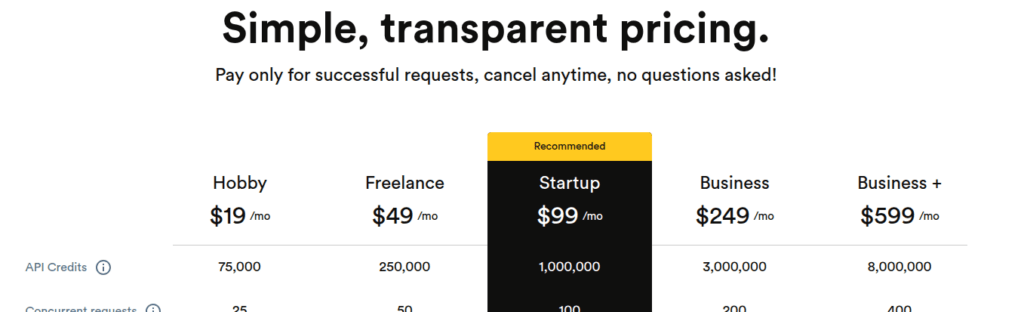
The two ladders meet at $19/month — Hobby carries 75,000 credits, Build B1 carries 45,000 — and both land near 3,000 premium-plus-JS pages a month at that price.
Pricing matrix
Both vendors in the ScrapingBee vs ZenRows comparison price the entry tier at $19/month. The credit volume you get for that dollar differs, and the credit weights you spend those credits against also differ. The matrix below is the source of every worked example later in the article.
| Field | ScrapingBee | ZenRows |
|---|---|---|
| Billing metric | API credits (1 request = 1, 5, 10, 25, or 75 credits depending on features) | Credits (1 standard page = 1 credit; JS rendering 5, Premium Proxies 10, JS + Premium 25) |
| Free tier | 1,000 credits on signup, no credit card | 5,000 credits/month, no credit card, permanent |
| Cheapest paid plan | Hobby — $19/mo, 75,000 credits | Build B1 — $19/mo, 45,000 credits |
| Minimum paid entry | $19/mo | $19/mo |
| JS rendering | Yes, on every paid plan | Yes, on every plan (5 credits per JS-rendered page) |
| Built-in premium proxies | Business ($249) and Business+ ($599) only | Available on every plan at 10 credits per page |
| “Hard-target” mode | Stealth proxies — 75 credits per request, JS required | Protected mode (JS + Premium Proxies) — 25 credits per page |
| Concurrency cap | 25 (Hobby) to 400 (Business+) | 5 (Free) to 200 (Scale S1–S3); 400–1,000+ on Enterprise |
| Concurrent overage | HTTP 429 returned | HTTP 429 returned (cap is per plan) |
| Credit rollover | None | 1-month rollover on Build and up; Free = none |
| Top-ups | Not offered | Up to 4 packs per billing period (Build and up) |
| Geotargeting | Country on all paid plans; US states on Business+ | Country-level on every paid plan |
| KYC | None | None |
| Payment methods | Credit card on self-serve; wire on Enterprise | Card, Apple Pay, Google Pay, PayPal; wire on Enterprise |
| Refunds | None published; cancel at end of cycle | Cancel anytime, refund unused portion; EU 14-day withdrawal |
| Annual billing | Not published as a discount | “Pay for 10, get 12” (≈17% off) |
Sources: scrapingbee.com/pricing and scrapingbee.com/documentation; zenrows.com/pricing and docs.zenrows.com/first-steps/pricing.
How the credit weights translate into monthly page counts
For 75,000 ScrapingBee credits against ScrapingBee’s weights:
- 75,000 classic-proxy-without-JS requests (1 credit each), or
- 15,000 classic-proxy-with-JS requests (5 credits each), or
- 7,500 premium-proxy-without-JS requests (10 credits each), or
- 3,000 premium-proxy-with-JS requests (25 credits each), or
- 1,000 stealth-proxy-with-JS requests (75 credits each), or
- any mix — including auto mode, which picks the cheapest successful configuration for you.
For 75,000 credits against ZenRows’s weights — to make the apples-to-apples comparison easier, since Hobby has 75k and Build B1 has 45k:
- 75,000 standard pages (1 credit each), or
- 15,000 JavaScript-rendered pages (5 credits each), or
- 7,500 premium-proxy pages without JS (10 credits each), or
- 3,000 fully protected pages (JS + premium, 25 credits each), or
- any mix across the four weights — all four run on the same shared balance.
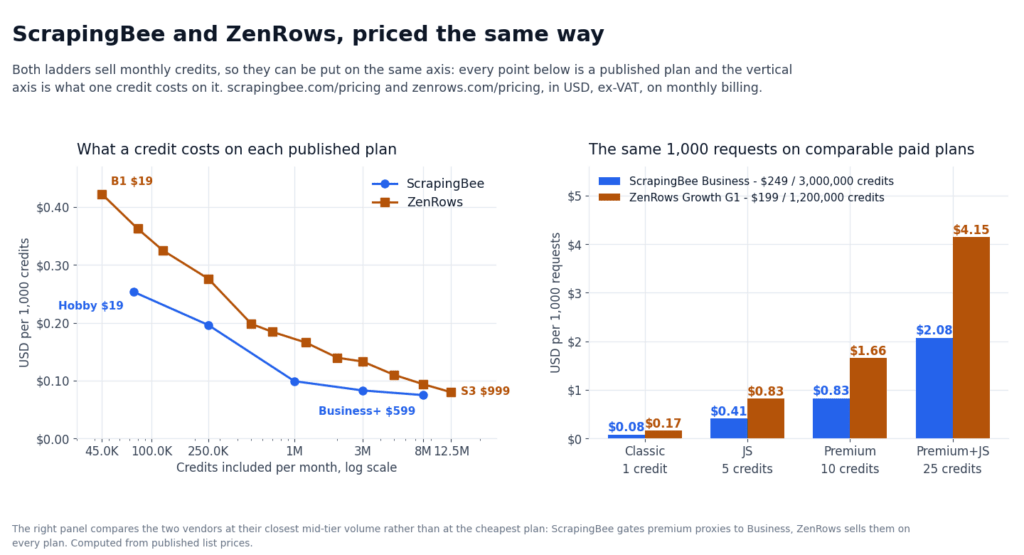
Either way the arithmetic lands in the same place — about 75,000 classic pages or about 3,000 premium-plus-JS pages a month before a credit ceiling — and the two ladders part company above it. ZenRows carries 30% fewer credits in absolute terms at the same $19 price point, but the credit weights match ScrapingBee’s premium-plus-JS tier exactly (25 credits per protected page on both vendors). The shape that diverges is the top end: ScrapingBee has a 75-credit stealth tier that ZenRows does not publish, and ZenRows opens premium proxies on the free tier that ScrapingBee gates to Business ($249).
If you are sizing a budget before you have a real target in hand, run a 10,000-page pilot against your actual site on both free tiers. The 5,000 free ZenRows credits and the 1,000 ScrapingBee trial credits are enough to measure a real success rate. They are also enough to lock down a real per-request cost — the published credit weights assume a steady-state success rate that varies by target.
Per-target success rates move, so a published credit count is a ceiling rather than a forecast. Confirm the real per-target success rate on both vendors before sizing a plan.
Scenario 1 — public listings on classic proxies
The cheapest workload both vendors handle: 200,000 pages a month off an open listing site — no JavaScript required beyond what the server returns, no login, no anti-bot challenge to speak of. Each page is a 1-credit request on either vendor.
- ScrapingBee: Startup at $99/month ships 1,000,000 credits. 200,000 classic-proxy-without-JS pages at 1 credit each costs 200,000 credits — well inside the plan ceiling, with room for ~800,000 pages of headroom. Freelance at $49/month ships 250,000 credits, so it exactly fits this workload and nothing else.
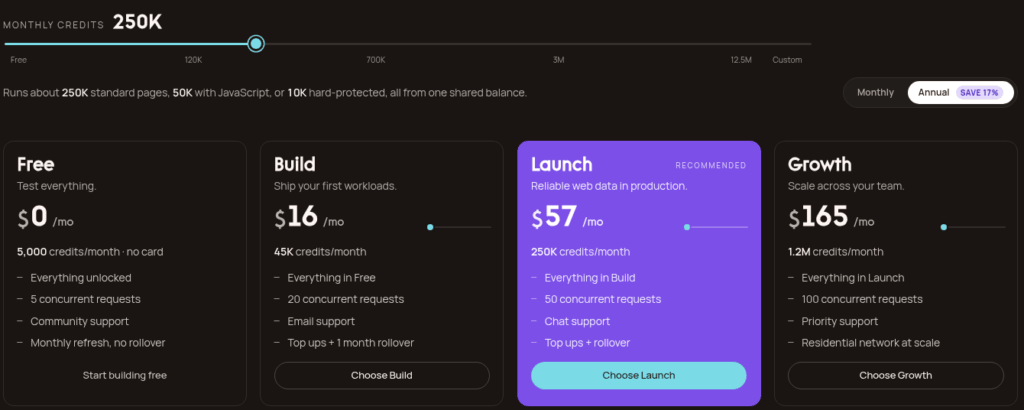
- ZenRows: Build B3 at $39/month ships 120,000 credits — short. Launch L1 at $69/month ships 250,000 credits and fits exactly. Growth G1 at $199/month ships 1,200,000 credits with significant headroom, but at this page count you do not need it.
For pure classic-proxy volume the difference is mostly the credit volume you get per dollar. In a pure ScrapingBee vs ZenRows comparison on this rung, ScrapingBee’s Freelance sells 250,000 credits for $49, ZenRows’s Launch L1 sells 250,000 for $69. The Hobby/Build B1 entry is closer — 75,000 credits for $19 against 45,000 for $19 — but on the next rung ZenRows is more expensive per credit. If your target stays at the 1-credit rung and you do not need rollover, ScrapingBee is the cheaper ladder.
The concurrency cap on this workload matters: at 200,000 pages a month, a single-threaded client is fine. If you fan out to ten threads, ScrapingBee’s Hobby caps at 25 (fine), while ZenRows’s Build B1 caps at 20 (still fine). Either vendor will handle it. The plan you actually buy is the one whose ceiling sits above your expected next month’s volume with some slack, not the cheapest rung.
Scenario 2 — JS-rendered SPA or login-gated dashboard
The middle workload both vendors actually built for: 50,000 pages a month behind a JavaScript-heavy single-page app, with a session cookie you have to refresh yourself (or use the vendor’s session feature). Each page is a 5-credit JS-rendered request on ZenRows. On ScrapingBee’s Hobby/Freelance/Startup plans, the same page is a 5-credit classic-with-JS request.
- ScrapingBee: 50,000 pages × 5 credits = 250,000 credits. Freelance at $49/month ships exactly 250,000 — perfect fit. Hobby at $19 ships 75,000 credits, which covers only 15,000 JS pages a month; you would need Freelance for this workload.
- ZenRows: 50,000 pages × 5 credits = 250,000 credits. Launch L1 at $69/month ships 250,000 — perfect fit, with rollover covering next month.
The two land at exactly the same credit math at this rung (5 credits per JS page on both vendors), so the decision is about everything around the credit count. ScrapingBee’s Freelance is $20/month cheaper, but ZenRows’s Build and up tiers roll credits over one month. If you expect your volume to be lumpy (a big scrape one week, light the next), ZenRows’s rollover matters more than the $20 difference. If your volume is flat, ScrapingBee is the cheaper fit.
One detail the matrix hides: ScrapingBee’s session-handling is via cookies you pass in the cookies parameter, and you re-render per page. ZenRows exposes a Browser Sessions product that bills by bandwidth plus 5 credits per minute of session time, on top of the per-page credit. For a session-bound SPA where you log in once and hit many pages on the same session, Browser Sessions can drop your effective credit-per-page cost below 5. This only applies on ZenRows’s Scale and up tiers, where Browser Sessions is published. On ScrapingBee you stay on the per-page 5-credit rung.
Scenario 3 — hard-target: Cloudflare, DataDome, PerimeterX
The hardest workload both vendors explicitly price for: 10,000 pages a month behind a managed anti-bot challenge that rejects plain datacenter traffic. Each page is a 25-credit premium-plus-JS request on either vendor. ScrapingBee also offers a 75-credit stealth tier behind Cloudflare-class challenges, which ZenRows does not publish as a separate rung.
- ScrapingBee: 10,000 pages × 25 credits = 250,000 credits, fits inside Freelance at $49. If your target needs the stealth tier (Cloudflare with Turnstile + PerimeterX layered on top), 10,000 pages × 75 credits = 750,000 credits. Startup at $99 ships 1,000,000 credits and covers it. Business at $249 ships 3,000,000 credits with room for ~2,250,000 more. Crucially, ScrapingBee gates Premium and Stealth proxies to Business ($249) and Business+ ($599); Hobby, Freelance, and Startup accounts cannot buy them even if they have credits left.
- ZenRows: 10,000 pages × 25 credits = 250,000 credits, fits inside Launch L1 at $69. Premium Proxies are available on every tier including the free plan — no Business-equivalent gate. If a target needs more than the protected mode can solve, ZenRows publishes an Enterprise custom contract with a Recovery Engine upgrade that is not priced on the self-serve ladder.
This is the workload where the two vendors’ product philosophies diverge most visibly in a ScrapingBee vs ZenRows comparison. ScrapingBee charges a steep premium for the top tier and gates it to higher plans: stealth at 75 credits per request, JS required, only on Business and Business+. ZenRows charges the same 25-credit protected rate on every plan and pushes the harder problems to an Enterprise contract. If your mix is 80% easy targets and 20% hard ones, ZenRows’s flat ladder lets you serve both from the same plan. If your mix is the inverse and your hard targets genuinely need a stealth stack, ScrapingBee’s per-request 75-credit option is the published answer, and ZenRows is a sales conversation.
Neither vendor publishes a per-target success rate, and we have not run a paid account on either, so the figures in this comparison are the published credit weights rather than measured results. The 5,000 free ZenRows credits and the 1,000-trial ScrapingBee credits are enough to test your specific target against each protected/stealth tier before committing.
The 5,000 free ZenRows credits and the 1,000-trial ScrapingBee credits are enough to run your hardest 100 target pages against each protected/stealth tier on the free trial before committing to a paid plan. The credit weights say one thing. The per-target success rate is what you actually pay for.
Concurrency and overage behavior in practice
ScrapingBee publishes hard concurrency caps per plan: 25, 50, 100, 200, 400 for Hobby through Business+. Hitting the cap returns HTTP 429; there is no auto-upgrade, even mid-month. If your job fans out to 30 threads against a Hobby plan, your client gets throttled and you retry — ScrapingBee does not sell a concurrency top-up. Credits do not roll over month-to-month either, so any unused balance at the end of the cycle is gone.
ZenRows publishes concurrency caps that scale by tier, not by rung: Free = 5, Build = 20, Launch = 50, Growth = 100, Scale = 200, Enterprise = 400 to 1,000+. Higher rungs within a tier buy more credits; moving up a tier buys more capability (concurrency, support level, rollover). Hitting the cap also returns HTTP 429, and there is no auto-upgrade here either — but the credit top-ups (next section) are a partial workaround for credit-side shortfalls, which ScrapingBee does not offer at all.
In practice, the concurrency cap only bites if your client library is set to fan out aggressively against the smaller plans. If you keep your client concurrency at or below the plan cap, neither vendor’s concurrency behavior is in your way. The decision is which cap you need. At the $19 rung, 25 (Hobby) versus 20 (Build B1) is essentially a tie. At the next rung ScrapingBee’s Freelance publishes 50 while ZenRows’s Launch L1 publishes 50. Both reach the same concurrency at the same general price band.
Billing hygiene: rollover, top-ups, refunds, annual discount
Three billing-side details separate the two vendors, and they do not show up in the headline price-per-credit comparison.
Credit rollover. ScrapingBee resets every cycle — any unused credits at the end of the billing period are gone. ZenRows carries one month of rollover on Build and up; the Free plan does not roll over. If your workload is month-end-heavy (a big scrape at the end of one cycle, a quiet start to the next), ZenRows’s rollover saves you from buying credits you will not use.
Top-up packs. ScrapingBee does not publish top-ups. If you run out mid-month you either upgrade the plan or wait for the cycle to roll. ZenRows publishes up to four top-up packs per billing period on Build and up; the unused portion of a top-up rolls into the next period. For a workload that occasionally overshoots its plan, ZenRows’s top-ups are the difference between “wait until next month” and “finish the scrape this week.”
Annual discount. ScrapingBee does not publish an annual discount on its self-serve plans. ZenRows publishes “pay for 10, get 12” — about 17% off — and the full year’s allowance is granted up front. For a stable monthly volume, ZenRows’s annual price undercuts its own monthly price meaningfully; for ScrapingBee you pay the published monthly price either way.
Refunds. ScrapingBee publishes no refund policy beyond “cancel at end of cycle.” ZenRows publishes “cancel anytime, refund unused portion,” plus the EU 14-day withdrawal right. If you are running on a tight procurement window — an annual budget that may get pulled mid-year — ZenRows’s refund policy is the safer contract.
What neither vendor publishes
Three numbers decide the real cost of either API in this ScrapingBee vs ZenRows comparison, and neither vendor publishes them, so neither comparison can resolve them from official sources alone.
Per-target success rate. ScrapingBee publishes credit weights but not “of the requests you send at premium-plus-JS, X% return the HTML you wanted.” ZenRows publishes the same — credit weights, not success rates. The Recovery Engine is described in ZenRows’ docs as “the routing layer that picks the right stack per target,” which is a mechanism, not a number. We have not run a paid account on either vendor, so we cannot estimate.
Real anti-bot bypass rate on hard targets. The same gap applies to stealth-tier ScrapingBee and protected-mode ZenRows. Cloudflare, DataDome, and PerimeterX update their detection regularly; a vendor’s published success rate from last quarter may not match this quarter’s. The honest answer is to test your specific target against both vendors’ protected/stealth tiers on a free trial and measure yourself.
Per-host rate ceilings. Both vendors publish per-plan concurrency caps; neither publishes per-target rate ceilings on the public pricing or docs pages. In practice, an aggressive scrape against a single host may hit a vendor-side throttle that is independent of your plan cap. We have not measured these; the 5,000 free ZenRows credits or the 1,000-trial ScrapingBee credits are enough to find out before you commit.
Frequently asked questions (FAQ)
Is there a free tier on both sides?
Yes. ScrapingBee gives 1,000 credits once, at signup, with no card. ZenRows gives 5,000 credits every month on a permanent free plan with 5 concurrent requests and a 10 MB response cap — five times the allowance for a pilot against a real target.
What does $19 a month buy on each?
ScrapingBee Hobby: 75,000 credits, 25 concurrent requests, JS rendering included, classic proxy pool only. ZenRows Build B1: 45,000 credits, 20 concurrent requests, JS rendering included, plus premium-proxy access and one month of credit rollover.
Which one is cheaper for the same workload?
Identical at the two ends that matter: 75,000 credits is 75,000 classic pages or about 3,000 premium-plus-JS pages on either vendor’s weights. The divergence is stealth-class traffic — ScrapingBee charges 75 credits per stealth request and gates it to Business ($249) and Business+ ($599), while ZenRows’ protected mode costs 25 credits per page on every plan.
Can I use premium proxies on the cheap plans?
On ZenRows, yes: premium proxies are available on every tier including the free plan, at 10 credits per page. On ScrapingBee, premium (10 or 25 credits) and stealth (75 credits) proxies are gated to Business and Business+ regardless of how many credits your plan holds.
Do unused credits roll over?
ScrapingBee: no, credits reset every cycle. ZenRows: one month of rollover on Build and up, plus top-up packs (up to four per billing period) while the free plan does not roll over.
Can either vendor prove a success rate?
Neither publishes a per-target success rate and we have not run a paid account on either, so the figures in this comparison are the published credit weights rather than measured results.
Can I compare this against alternatives?
Yes — see our ScrapingBee review for a single-vendor deep dive. See the best web scraping API roundup for context across seven APIs by workload. See the best residential proxies roundup if your bottleneck is proxy bandwidth rather than API credits.
What about JS rendering and headless browser work?
For pure JS rendering, Browserless is a managed Chromium you drive directly. For a session-bound SPA where you bring Playwright, see Playwright web scraping in Python for the local-browser pattern that often beats an API credit budget at low volume.
Bottom line: picking ScrapingBee vs ZenRows
ScrapingBee vs ZenRows, in this comparison, comes down to a few small-print differences rather than the headline numbers, which are nearly identical. ScrapingBee and ZenRows are both managed scraping APIs built for the “send a URL, get HTML back” pattern. The credit weights at the 1-, 5-, 10- and 25-credit rungs are identical on both vendors. The $19 entry price is identical. Both free tiers are large enough to test your real target before paying. The decision lives in the small print.
Pick ScrapingBee when your workload fits classic or premium proxies, when you want auto-mode’s “cheapest successful config” as a default, or when your hard targets genuinely need a 75-credit stealth tier (Business and Business+ only). The credit ladder is the cheapest per credit at every rung above entry; the ceiling on premium-plus-JS protection is the steepest published option in the category.
Pick ZenRows when you scrape a mix of protection levels and want premium-proxy access at every plan tier including the free one. The credit weights are predictable as you climb. The top-up packs and 1-month rollover handle month-end shortfalls without a plan upgrade. The annual billing at “pay for 10, get 12” undercuts the monthly price. The published Enterprise stack (SOC 2, ISO 27001, DPA, SLA, dedicated account manager) is the differentiator ScrapingBee keeps behind custom contracts.
For the full single-vendor deep dive on ScrapingBee, see our ScrapingBee review. For context across the broader category, our best web scraping API roundup ranks seven APIs by workload, and our best residential proxies roundup covers the bandwidth side if credits are not your bottleneck. If the diagnosis is “I am getting blocked, not paying too much,” the symptoms-to-cause playbook walks through the five failure patterns before any of these vendors get billed.
How we tested this: every credit weight, plan price, concurrency cap and billing rule comes from scrapingbee.com/pricing, scrapingbee.com/documentation, zenrows.com/pricing and docs.zenrows.com/first-steps/pricing, and is quoted in USD as displayed. We have not run a paid ScrapingBee or ZenRows account, so figures that depend on real-world success rates, geo accuracy or anti-bot bypass rates are flagged where they appear in the text instead of being estimated.
Our scoring criteria and the rule that bars us from linking vendors who prohibit trademark bidding are documented on the methodology page.
Disclosure: this article contains affiliate links. If you buy through them we may earn a commission at no extra cost to you. Commission never changes our scoring or the order of our rankings. ::