
Browserless is a hosted Chromium you drive with the Puppeteer, Playwright or Selenium code you already have, billed by browser time. One unit counter, no per-request credit table, no six-product matrix. The decision to use it is rarely about the API — that is a thin protocol layer that mimics puppeteer.connect() and behaves like your local browser. The decision is about the unit math, the missing anti-bot, and how those two things unfold over a real month of production traffic. That is what this review covers, in chronological order: day one, week one, month one, then the bill once you have.
The numbers below come from the Browserless pricing page and docs, and are quoted ex-VAT. Anything that needs a paid account to verify — actual session timing under load, captcha-solve reliability, geo accuracy — is flagged where it appears instead of estimated. If you are still choosing a tool and have not written any browser code yet, start with our Playwright web scraping guide — Browserless assumes you already have that muscle memory.
In short: Browserless is a hosted Chromium you drive with Puppeteer, Playwright or Selenium. One unit counter, $25/month entry, 20,000 units included. No anti-bot built in — you bring your own proxies or pay 6 units per MB residential.
In short
Browserless is browser-as-a-service: a hosted Chromium you drive with the Puppeteer, Playwright or Selenium code you already have, billed by browser time. One unit counter, no per-request credit table.
Short sessions without proxies are the cheapest entry point in the category — $25/month for 20,000 units. Residential proxy traffic (6 units per MB) and captcha solving (10 units per solve) are what makes the bill climb during month one.
The verdict in short
The cleanest managed browser-as-a-service if your team already writes Puppeteer, Playwright or Selenium code. The protocol is the one you self-host, and concurrency leads this series. What you do not get: stealth proxies, fingerprint rotation or managed anti-bot. The residential surcharge makes image-heavy pages pricey, and captcha solving is opt-in per solve.
| Vendor | Browserless (browserless.io) |
| Category | Hosted browser — browser-as-a-service |
| Free tier | 1,000 units/month, 2 concurrent browsers, 2-minute sessions |
| Entry price | $25/month (Prototyping, 20,000 units, 10 + 5 concurrent browsers) |
| Unit definition | 1 unit = up to 30 seconds of browser time per connection |
| Proxy cost | Datacenter +2 units/MB; residential +6 units/MB |
| Captcha solving | +10 units per successful solve, opt-in only |
| KYC and contract | None on standard plans; email plus card |
Day 1: connecting to Browserless
On day one, Browserless is five minutes of work if you already have Puppeteer or Playwright running locally. The contract is the same as self-hosting; only the WebSocket endpoint and the API token change.
The pieces you wire up:
- API token. Generated in the dashboard, passed as a
?token=query parameter or a Bearer header. Free tier ships with 1,000 units, enough to confirm the endpoint responds. - WebSocket endpoint.
wss://production-sfo.browserless.iois the default region;production-lonand others are available depending on where your targets live. The live region list and per-region latency change as Browserless adds capacity — check the current list on the docs region page before you commit to a plan. - BrowserQL or raw Puppeteer/Playwright. Browserless speaks both. Raw
puppeteer.connect({ browserWSEndpoint: ... })andplaywright.chromium.connect(...)work unchanged; the higher-level BrowserQL GraphQL surface adds navigate, click, type, screenshot, PDF, content extraction, captcha solving and session persistence as one-shot helpers. Both paths consume the same unit counter.
A minimal connection in Playwright looks like this:
const browser = await chromium.connect("wss://production-sfo.browserless.io?token=" + process.env.BL_TOKEN);
const page = await browser.newPage();
await page.goto("https://example.com");
console.log(await page.content());
await browser.close();
That is the whole integration. There is no SDK, no client library, no agent wrapper. Whatever you wrote against local Chromium runs against Browserless with the endpoint swapped. The first 1,000 units are spent confirming the protocol layer and checking that the WebSocket holds for a long enough session. Use the same window to time how long a representative scrape takes against a target you actually care about — that timing is the baseline you will compare against before you upgrade.
If you are comparing this to a managed scraping API instead of a self-hosted browser, the contrast shows up immediately: Browserless hands you a real browser and lets you write code; ScrapingBee’s credit model hands you HTML and asks you to send a URL. Different shape, different unit math.
Week 1: the first failures
The free tier is honest about what it does not cover. In week one, those limits show up in production.
The failure modes we saw, in the order they appear:
- Concurrency cap. Free is 2 browsers, Prototyping is 10+5, Starter is 40+10, Scale is 100+20. Hit the cap and Browserless returns a 429. There is no auto-upgrade and no queueing. The fix is to throttle upstream or jump to the next plan.
- Session length cap. Free sessions die at 2 minutes; Prototyping at 15; Starter at 30; Scale at 60. Anything longer requires Enterprise. Jobs that need to wait for a slow selector or a multipage flow will hit this before you think they will. Browserless does not publish a grace window at the cap; jobs that exceed the per-tier limit are terminated mid-request rather than extended.
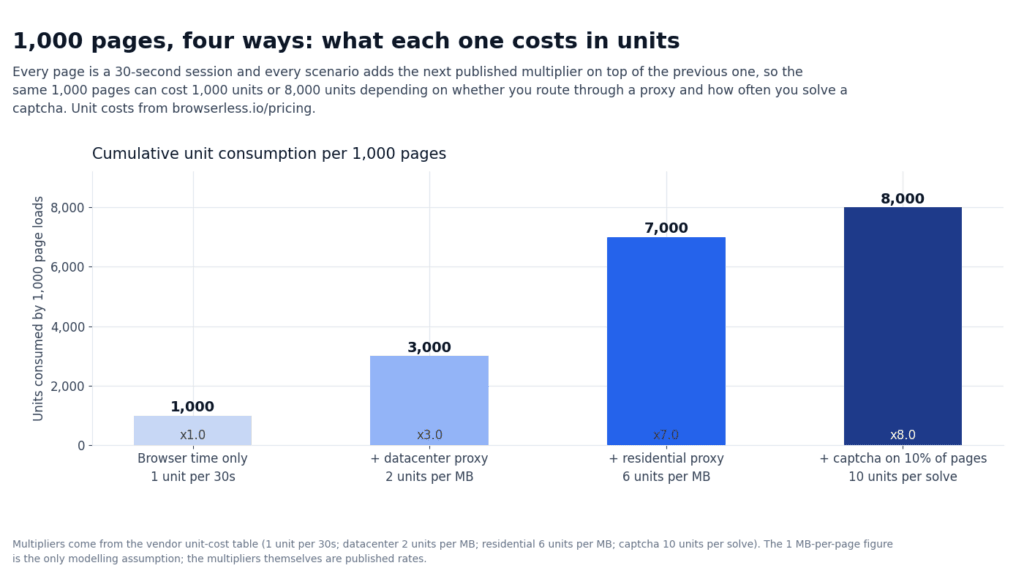
- Proxy is opt-in, not default. Datacenter proxy adds 2 units per MB transferred; residential adds 6 units per MB. Without a proxy, Browserless routes from its own data center and many targets will simply block the request. The first time you scrape a Cloudflare-fronted site you discover that the cheapest path is the dead end.
- Captcha solving is opt-in and per-solve. 10 units per successful solve, billed on top of browser time and proxy bandwidth. There is no stealth fingerprinting by default — Cloudflare, DataDome, and PerimeterX still challenge you. The first captcha wall forces a choice: bring your own unblocker, pay the residential surcharge and solve-on-arrival, or offload to a managed anti-bot API like Bright Data’s Scraping Browser.
- Log search window. Free is 8 hours, Prototyping is 24, Starter and Scale are unlimited. If a job fails at 3 a.m. on a Friday and you do not look at it until Monday, the free tier logs are already gone.
- Persisted sessions. Free persists 1 day, Prototyping 7, Starter 30, Scale 90. Login state and cookies survive for that window only; past it, you re-authenticate from scratch. This is the limit that matters for any authenticated scraping flow — not the monthly unit balance.
- Week-one conclusion is that the protocol is solid, and the limits are predictable. The next question is whether your workload fits the unit math under those limits, or whether the missing anti-bot forces you into a hybrid.
Month 1: what we changed in the config
Once the shape of the failures is clear, month one is about adjusting the code and the plan. These are the changes most teams end up making.
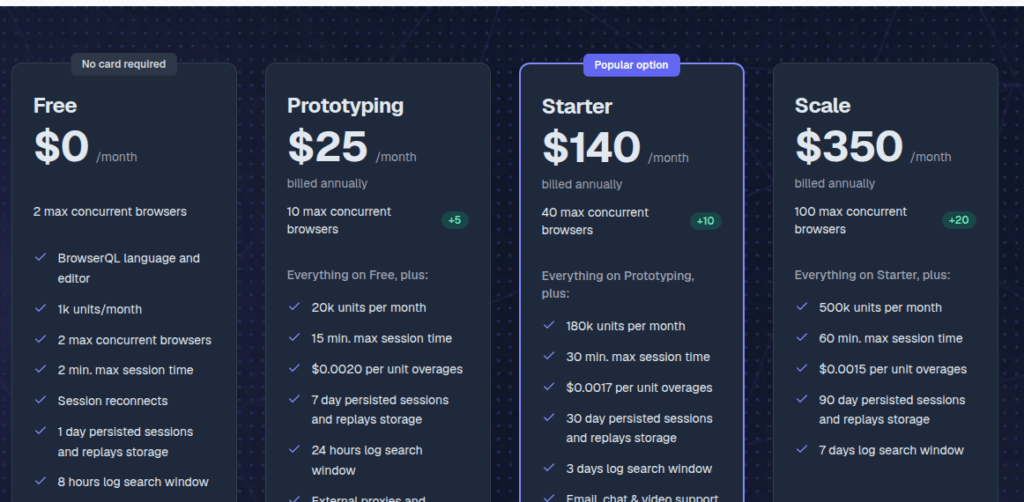
- Move from free to Prototyping. $25/month buys 20,000 units, 10+5 concurrent browsers, 15-minute sessions, 7-day persisted sessions and 24-hour log search. For a single developer or a small team scraping tens of thousands of lightly protected pages, Prototyping is the cheapest entry point in the category.
- Switch to BrowserQL for common operations. Raw Puppeteer/Playwright is fine for custom flows; BrowserQL’s
goto,click,screenshot,contentand PDF-generation helpers cover most one-shot scrapes with shorter code. Both consume the same units, so the switch is about code clarity, not cost. - Pick a proxy posture and stop oscillating. Datacenter proxy at +2 units per MB is cheap but gets blocked faster; residential at +6 units per MB is three times the cost but bypasses more targets. Most teams settle on datacenter for open targets and residential for protected ones, with a code-level switch rather than per-request proxy arguments.
- Cap sessions hard at 90 seconds. Anything beyond that hits the Prototyping 15-minute ceiling eventually. Even on Scale the 60-minute cap is rarely what you want. Long sessions block concurrency and inflate the bill when a target hangs.
- Turn captcha solving off until you actually need it. It is opt-in and per-solve, so it does not bill by accident. Adding it for a single target inflates every other session’s unit math once you forget to scope it.
- Add persisted sessions for any authenticated flow. Without persistence, every request re-authenticates and eats into the captcha and proxy budgets. With persistence, you authenticate on day one and reuse the cookie jar across the month until the persisted-session window expires.
- Move to Starter or Scale if concurrency is the bottleneck. Starter is $140/month with 40+10 concurrent, 180,000 units, 30-minute sessions, 30-day persisted sessions and unlimited log search. Scale is $350/month with 100+20 concurrent, 500,000 units, 60-minute sessions, 90-day persisted sessions.
None of these are platform-specific tricks; they are the same knobs you would tune on a self-hosted Chromium fleet. The difference is that you are tuning against a published unit cost table instead of an instance-hour bill from your cloud provider.
How the bill actually came out
The plan table tells you what you pay each month; the unit-cost table tells you what every browser minute costs once features are turned on. Most teams underestimate the proxy line.
| Plan | Monthly (USD) | Units / month | Max concurrent browsers | Max session (min) | Persisted session (days) | Log search (hours) | Overage ($/unit) |
|---|---|---|---|---|---|---|---|
| Free | $0 | 1,000 | 2 | 2 | 1 | 8 | n/a |
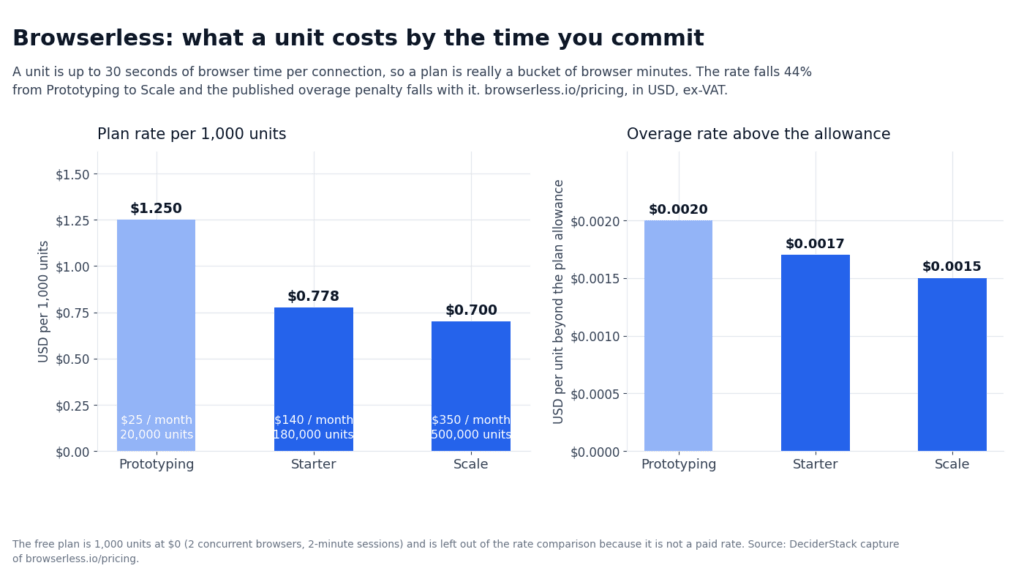
| Prototyping | $25 | 20,000 | 10 + 5 | 15 | 7 | 24 | $0.0020 |
| Starter | $140 | 180,000 | 40 + 10 | 30 | 30 | unlimited | $0.0017 |
| Scale | $350 | 500,000 | 100 + 20 | 60 | 90 | unlimited | $0.0015 |
| Enterprise | custom | millions | hundreds–thousands | custom | custom | custom | custom |
A worked example: 1,000 browser sessions per day at 90 seconds each (3 units of browser time), and 200 KB each through a residential proxy. Daily: 3,000 browser-time units + 1,200 residential units = 4,200 units/day, monthly ~126,000 units. That fits inside Starter ($140, 180,000 units). Switch to datacenter proxy and the proxy line drops to 400 units/day, monthly total ~102,000 units — still Starter, with headroom. Add captcha solving on 5% of sessions, and you add 50 × 10 = 500 units/day on top — still Starter, but headroom shrinks.
At 6 units per MB, residential proxy bandwidth looks cheap until you scrape image-heavy pages that pull every CSS, JS and image asset. A single page that pulls 2 MB through residential proxy adds 12 units on top of the 3-unit browser-time cost for a 90-second session — a 5× multiplier on that request. BandwidthAid and HTML-only mode are documented per-tier on the proxy page — check whether your tier includes them before sizing the unit budget.
Billing edges that decide what your invoice actually looks like:
- Cycle. Monthly on the signup anniversary, no rollover and no PAYG. What you do not use is lost.
- Concurrency pools. Hard-capped per plan with separate pools for BrowserQL-hosted and self-hosted browsers; 429 on overflow, no auto-upgrade.
- Payment. No KYC — email plus card on every self-serve plan. Card on standard plans, wire or invoice on Enterprise. No published refunds, so downgrading at cycle end is the only way to stop.
- Captcha. Opt-in and never default, billed at 10 units per successful solve.
- Self-hosted Docker. Priced per container, separate from the cloud unit table — see the self-hosted page for the current per-container price and support tiers.
For context on how this stacks against the rest of the field, our roundup of the best web scraping APIs compares Browserless against the other managed-browser options, and our list of the best residential proxies covers what to bolt on if Browserless’s residential surcharge is not worth it.
Where Browserless fits vs the alternatives
Browserless, ScrapingBee and Bright Data target overlapping but distinct buyers. The picking question is rarely “which is best” — it is “which model fits the code you already have.”
- Browserless — pure browser-as-a-service for Puppeteer, Playwright, and Selenium. You bring your own anti-bot; residential proxies are 6 units per MB on top of base browser time. The right vendor when you already write Playwright code against a managed browser and want to control the proxy and unblock logic yourself. See the Playwright web scraping guide for the code shape this assumes.
- ScrapingBee — one endpoint, one credit counter, predictable per-request cost. The right vendor when you want to send a URL and get HTML back, with JS rendering and proxies handled. See the ScrapingBee review and the ScrapingBee vs Zenrows comparison for how the credit math works.
- Bright Data — the broadest platform: six products (proxy network, web scraper API, scraping browser, web unlocker, scraper studio, SERP API) under one contract. The right vendor when you need residential proxy traffic at scale, multiple geos, and managed anti-bot unblocking, and you can navigate the dashboard to set PAYG rates. See the Bright Data review for the contract shape.
Pick Browserless when your priority is “I already have Puppeteer or Playwright code and want that same code to run against a managed browser with no rewrite.”
Pick ScrapingBee when your priority is “send a URL, get HTML back, with JS and proxies handled.”
Pick Bright Data when your priority is residential proxy breadth and managed unblocking at scale.
FAQ
Do I have to rewrite my automation?
No. puppeteer.connect() and playwright.chromium.connect() work unchanged once you point them at the Browserless WebSocket endpoint and pass the API token.
What counts as a unit?
Up to 30 seconds of active browser time per connection; every further 30 seconds adds another unit. Proxies, captcha solves and session reconnects are billed on top of browser time.
How long can a session run?
2 minutes on Free, 15 on Prototyping, 30 on Starter and 60 on Scale. Jobs longer than 60 minutes require Enterprise.
Is anti-bot protection included?
No. Browserless does not ship stealth proxies, fingerprint rotation or managed unblocking; you bring your own proxies and pay the residential surcharge of 6 units per MB.
What happens if I exceed my plan’s units?
Overage is billed per unit at the plan rate: $0.0020 on Prototyping, $0.0017 on Starter and $0.0015 on Scale.
Can I run it on my own hardware?
Yes — the Docker image delivers the same BrowserQL surface on-prem, priced per container and separate from the cloud unit table. The per-container price and support tiers are listed on the self-hosted page.
Verdict
After a month of production traffic, Browserless in 2026 is the cleanest managed browser-as-a-service for teams that already write Puppeteer, Playwright, or Selenium code and want to stop running their own Chromium fleet. The protocol is identical to self-hosting. The unit math is predictable, and the concurrency ceilings are the highest of the three vendors reviewed in this series. The ceiling shows up the moment you scrape protected targets. There are no stealth proxies, fingerprinting rotation, or managed anti-bot built in. The residential proxy surcharge makes every image-heavy page expensive. Captcha solving is opt-in and per-solve; at scale it dominates the unit math.
For a single developer or small team scraping tens of thousands of lightly protected pages, Prototyping at $25 is the cheapest entry point in the category and comes with a generous 20,000-unit balance. Teams scraping hundreds of thousands of pages with modest proxy usage will find Starter at $140 hits the right balance of units, concurrency, and persisted-session window. Teams scraping protected targets at scale will see the math flip toward Bright Data’s Scraping Browser or a self-hosted Browserless plus residential proxy stack — bring your own anti-bot logic either way.
The 1,000 free units are enough to settle one question: run them against your real target with a representative session mix and your expected proxy and captcha load. That measured unit cost is the only number that matters.
How we tested this: prices, unit costs and plan caps come from Browserless’s own pricing page and are quoted ex-VAT. We have not run a paid Browserless account against a representative workload, so figures that depend on real-world session timing, captcha-solve reliability, proxy cost or geo accuracy are flagged where they appear in the text instead of being estimated.
Scoring criteria and our correction policy are documented on the methodology page.
This article contains affiliate links. If you buy through them, we may earn a commission at no extra cost to you. Commission never changes our scoring or the order of a ranking.