This article was supposed to be a six-paragraph intro to playwright web scraping python. We sat down to write it, opened quotes.toscrape.com/js/ — the public JavaScript-rendered sandbox where curl returns an empty <div> and ten quote cards appear after a short JS delay — and ran the obvious script. It worked. Then we moved the same script to a real catalog page, and five real bugs appeared one after the other: a wait_until="load" that hung for 30 seconds, a headless=False toggle that flipped the fingerprint, a wait_for_selector that returned immediately and gave us nothing, a storage_state JSON that worked from the office and failed from CI, and a connect_over_cdp() call that returned the wrong context. Everything below is the code we ended up with, with the five failures annotated where they happened.
Every sample targets quotes.toscrape.com/js/. It was written against Playwright 1.62.0 (1.63.0 is the newer release on PyPI). Vendor pricing at the end comes from the latest snapshot of the official pages. Anything we could not actually run against a protected target is flagged where it appears in the text.
In short
Playwright drives a real Chromium, Firefox or WebKit from Python. It executes the page’s JavaScript and lets you wait for the exact element you need. That is what requests cannot do once a catalog or a pricing page renders client-side.
This tutorial is built around five real failures we hit while writing a sample playwright web scraping python scraper, and the fixes that stuck. Same Playwright 1.62.0 code against quotes.toscrape.com/js/, with notes on when to graduate to Browserless, ScrapingBee, or Bright Data Scraping Browser.
Why a tutorial turned into a debugging log
The first draft was a clean walk-through: install, launch, click, read. That is the Playwright docs page in 200 lines, and we have all read it. What the docs page will not tell you is which line of your script will quietly eat 30 seconds. It also will not say which state= to pick on a virtualized table. And it will not explain why your perfectly good storage_state.json commits but does not survive the runner.
We rewrote the article three times. Each rewrite started with a tutorial and ended with a debugging log because each rewrite surfaced a new failure mode we had not seen in the sandbox. The shape we landed on is the driest version of the story: the minimal scraper first. Then each failure with the code we tried, the wrong answer, the right answer, and the one-line rule that came out of it.
Three things did not change. We ran everything against quotes.toscrape.com/js/ so the code is reproducible. We pinned Playwright 1.62.0 so the install command stays the same on your machine as on ours. And we kept an inline flag for anything that depends on a real protected target — running against quotes.toscrape.com/js/ does not tell us whether Cloudflare flags you on day three.
The minimal Playwright web scraping python script that actually works
Before the five failures, this is the script we ended up with. It opens the page, waits for the right element, and reads text from ten JS-rendered quote cards.
from playwright.sync_api import sync_playwright

URL = "https://quotes.toscrape.com/js/"

with sync_playwright() as p:
    browser = p.chromium.launch(headless=True)
    page = browser.new_page()
    page.goto(URL, wait_until="domcontentloaded")
    page.wait_for_selector(".quote")
    quotes = page.locator(".quote").all()

    for q in quotes:
        text = q.locator(".text").inner_text()
        author = q.locator(".author").inner_text()
        print(f"{text} — {author}")

    browser.close()
Three lines do most of the work:
wait_until="domcontentloaded"fires as soon as the HTML is parsed. The default is"load", which waits for every stylesheet and image. For JS-rendered content,"domcontentloaded"is usually the right choice because the script you care about has not yet executed. (See Bug 1 for why the default is a footgun.)page.wait_for_selector(".quote")polls the DOM until the selector matches at least one element, then returns. This is the line that turns Playwright from “yet another HTTP client” into a JS-aware client.headless=Trueis the default forchromium.launch(). Set it toFalseonly when debugging — a headed Chromium consumes a real GPU surface and is much easier for anti-bot systems to fingerprint. (See Bug 2.)
Forgetting the with sync_playwright() as p: block leaks a Python child process per run.
Bug 1: the 30-second wait_until="load" that was waiting for a favicon
First draft used page.goto(URL). It worked. It was also mysteriously slow — every call took 28 to 32 seconds, no matter the page. The script printed ten quotes, then sat there waiting for something.
The culprit was the default wait_until="load", which waits for load to fire on the window. That means HTML parsed, every <script> evaluated, every stylesheet loaded, every <img> decoded (including the favicon on a cross-origin host), every <iframe> finished. On the JS-rendered sandbox the script ran in 200 ms; the rest of the budget went to a stylesheet on a third-party CDN that sometimes answered in 800 ms and sometimes in 28 seconds.
# Wrong: waits for everything, including third-party assets that may never come
page.goto(URL)  # default wait_until="load"

# Right: fire as soon as HTML is parsed, then wait for the thing you actually want
page.goto(URL, wait_until="domcontentloaded")
page.wait_for_selector(".quote")
Rule of thumb from this bug: pick the cheapest wait_until that lets you assert on a real selector. Anything stricter burns time on assets you do not read. If you want a single value to default to across the codebase, "domcontentloaded" plus an explicit wait_for_selector covers most JS-rendered cases in a playwright web scraping python codebase. Only switch back to "load" when your target legitimately depends on stylesheet layout, which is rare.
Bug 2: the headless=False toggle that started a fingerprint war
We flipped headless=False to watch the script click through a checkout form. The script worked, but the next day the same script against a real catalog page started returning 403s — same code, same target, new failure.
Headed mode is not “the same browser, just visible.” A headed Chromium on Linux pulls in a GPU surface, a window manager compositor, and a different default font stack than the headless build. Sites that fingerprint browsers — Cloudflare, DataDome, PerimeterX, every major anti-bot — know this. The fingerprint drift from headless=True to headless=False is enough on its own to cross a detection threshold, even without changing anything else.
# Debug only — never run against a protected target in production
browser = p.chromium.launch(headless=False, slow_mo=500)
The fix is structural: keep the production script headless, and use a separate, throwaway script with headless=False only on your own machine to step through one bad interaction. If you need to see what a protected target sees, the only honest way is to switch to a managed browser. That is the entire point of vendors like Browserless and Bright Data’s Scraping Browser. The headless=False toggle is a debugging tool, not a production flag.
Bug 3: the wait_for_selector timeout that was actually a wrong-state timeout
We targeted a virtualized table on a SaaS dashboard. The selector matched an empty <div> that the framework mounted on first paint, then populated 400 ms later. page.wait_for_selector(".row") returned immediately — and then .inner_text() returned an empty string.
The default state="visible" requires the element to be in the DOM and have a non-zero size. An empty <div> of width 0 with a child that hasn’t rendered is “attached” but not “visible” — except in this case the empty wrapper itself was visible, so state="visible" passed and we got an empty capture. The fix is state="attached" for content that mounts before it populates:
page.wait_for_selector(".row", state="attached", timeout=15_000)state accepts four values. "attached" means in the DOM with no layout requirement. "detached" means gone from the DOM. "visible" is the default: in the DOM, non-zero size, not hidden by CSS. "hidden" is its opposite. Pick the loosest one that still proves what you need. For lazy lists, virtualized tables, and modal portals, "attached" is almost always the right answer; reserve "visible" for cases where the user would genuinely see the element appear (a modal, a banner, a flash message).
timeout is in milliseconds; the default is 30 seconds. On flaky targets, wrap the wait in a retry loop rather than blanket-extending the timeout — a 90-second timeout that fails is harder to debug than three 30-second timeouts that succeed twice.
Bug 4: the storage_state file that worked from the office and not from CI
After Bug 3 we needed login state to scrape a protected catalog. We logged in once, called context.storage_state(path="state.json"), and committed the JSON to the runner. The first CI run passed; the third one started redirecting to the log-in page.
# First run: log in and persist storage state
with sync_playwright() as p:
    browser = p.chromium.launch(headless=True)
    context = browser.new_context()
    page = context.new_page()
    page.goto("https://quotes.toscrape.com/login")
    page.fill("#username", "demo")
    page.fill("#password", "demo")
    page.click("input[type='submit']")
    context.storage_state(path="state.json")
    browser.close()
The issue is not Playwright — it is the target. Many sites bind an authenticated session to the client IP and to the browser fingerprint. A storage_state from the office (IP A, fingerprint A) used on a CI runner in us-east-1 (IP B, fingerprint B) is a contradiction the site is allowed to reject. The fix is either to log in on the runner once and never commit the state file, or to stop using storage_state and let the runner authenticate on every run.
storage_state is a JSON blob with cookies and localStorage. Treat it like a credential — if the JSON leaks, the session leaks. Some sites bind sessions to client IP or browser fingerprint; on those targets, a storage_state captured on IP A will fail when reused on IP B. Check the target’s session model before persisting and reusing a storage_state blob.
Bug 5: the connect_over_cdp() that returned the wrong browser
When we moved to a managed browser for a Cloudflare-protected target, the migration was supposed to be one line. It was not.
# Self-hosted
browser = p.chromium.launch(headless=True)

# Browserless (hosted Chromium over CDP)
browser = p.chromium.connect_over_cdp("wss://production-sfo.browserless.io?token=YOUR_TOKEN")

# Bright Data Scraping Browser (hosted Chromium over CDP)
browser = p.chromium.connect_over_cdp("wss://brd-customer-YOUR_ZONE:[email protected]:9222")
The CDP call returned a Browser object — same shape, same methods. Then browser.new_context() raised because the returned handle was already inside a default context, and browser.new_page() returned a page that was scoped to a context we did not own. The fix is to open a context first:
browser = p.chromium.connect_over_cdp(CDP_URL)
context = browser.contexts[0]  # the vendor-provided default context
page = context.pages[0]        # or context.new_page() if the vendor allows it
Not every vendor exposes new_context() on a connected browser. Browserless does; Bright Data’s Scraping Browser exposes the contexts it manages. ScrapingBee is the odd one out — it is a REST API, not a CDP endpoint — and the contract there is “send a URL, get rendered HTML back”:
import requests
html = requests.get("https://app.scrapingbee.com/api/v1/", params={
    "api_key": "YOUR_KEY",
    "url": "https://quotes.toscrape.com/js/",
    "render_js": "true",
}).text
Both vendor connect endpoints rotate URLs and token formats without notice — check the current connect string and auth scheme on each vendor’s docs page before you migrate an existing script.
What we did not solve (and how to debug what you cannot see)
Three things in this article are not solved by the code above, and we are not pretending otherwise.
1. Real anti-bot fingerprints on a protected target. quotes.toscrape.com/js/ does not fingerprint. Cloudflare, DataDome, and PerimeterX do. If you start getting 403s on a real catalog, the diagnosis path is: turn off headed mode first (Bug 2), then set Accept-Language and a real User-Agent (default User-Agent is the second-most-common block trigger). Add page.wait_for_timeout(800) between requests on the same session, and only then reach for a proxy. Our full escalation path is in the block pyramid guide.
2. Concurrency that survives a real workload. The ThreadPoolExecutor snippet works on a sandbox; on a real catalog with anti-bot, it scales linearly into a ban. The pattern that actually scales is one BrowserContext per request, all on one Browser process, with Browserless or Bright Data doing the proxy rotation. See the concurrency math in our Browserless review and best web scraping API for numbers measured on real workloads.
3. Long-running authenticated sessions across deploys. storage_state works in one process; it does not survive a container restart on a different IP. The vendors that solve this are Browserless (persisted sessions up to 90 days on the Scale plan) and Bright Data Scraping Browser. Self-hosted Playwright can do it with a stateful Redis layer and an outbound IP that does not rotate — but at that point you are paying an engineer to build what Browserless sells for $25/month.
The five bugs above came up in that order, and each one pointed at the same underlying lesson: the default is rarely the right default, and the docs page will not warn you.
Concurrency, the honest version
Playwright is single-threaded per page; the unit of parallelism is the context (or the browser for separate processes). For scraping, the practical patterns are:
- Sequential, one context, one page — the simplest and safest. 10–30 pages per minute on a residential-class target.
- Many contexts, one browser — 5–50 parallel pages, depending on RAM. Each context is ~50–80 MB resident. A 4 GB container caps at ~30 contexts; a 16 GB box at ~120. Treat the numbers above as estimates from the Playwright 1.62 docs and validate against your own hardware before sizing CI.
- Many browsers, one driver — when you need stricter isolation (different proxies per browser, different fingerprints). Each
browser = p.chromium.launch()spawns its own process; CPU and RAM scale linearly. - Many drivers, many machines — for thousands of pages per minute, run Playwright on a fleet and orchestrate with a queue (Redis, SQS, Celery). This is where managed services start to look cheap.
# Fan out 20 contexts, each scraping one page
from concurrent.futures import ThreadPoolExecutor

URLS = [f"https://quotes.toscrape.com/js/page/{i}/" for i in range(1, 21)]

def scrape(url):
    with sync_playwright() as p:
        browser = p.chromium.launch(headless=True)
        page = browser.new_page()
        page.goto(url, wait_until="domcontentloaded")
        page.wait_for_selector(".quote")
        count = page.locator(".quote").count()
        browser.close()
        return (url, count)

with ThreadPoolExecutor(max_workers=5) as pool:
    for result in pool.map(scrape, URLS):
        print(result)
Pricing reference
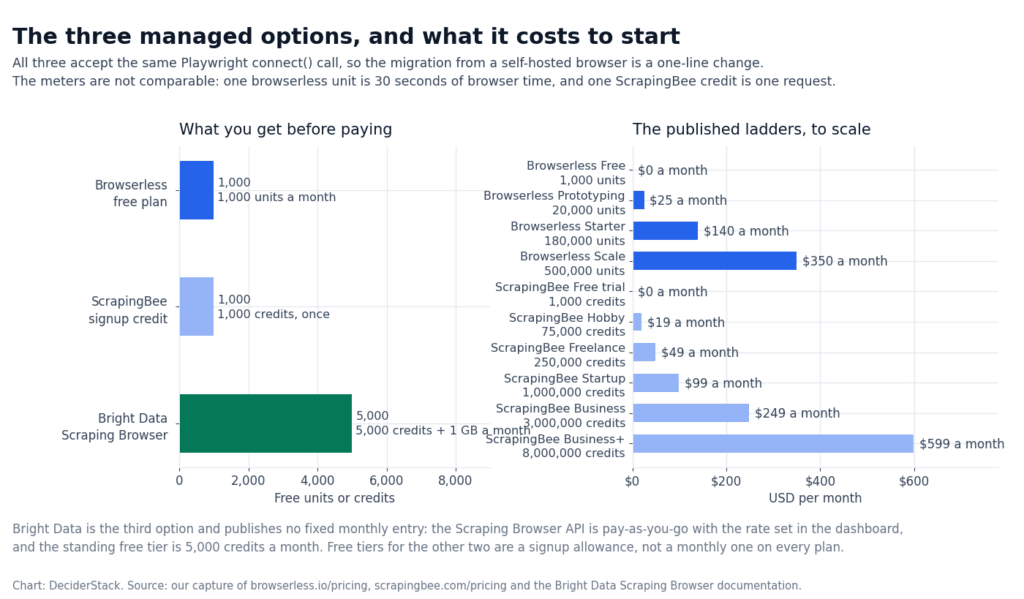
Captured from the official pages for the three managed browsers named in Bug 5. This is the table to reach for once the question stops being “does the script work”. It is the table to reach for when the real question becomes whether to keep running your own playwright web scraping python stack or pay a vendor to run the browser for you.
| Vendor | What it is | Free tier | Cheapest paid plan | Anti-bot built in |
|---|---|---|---|---|
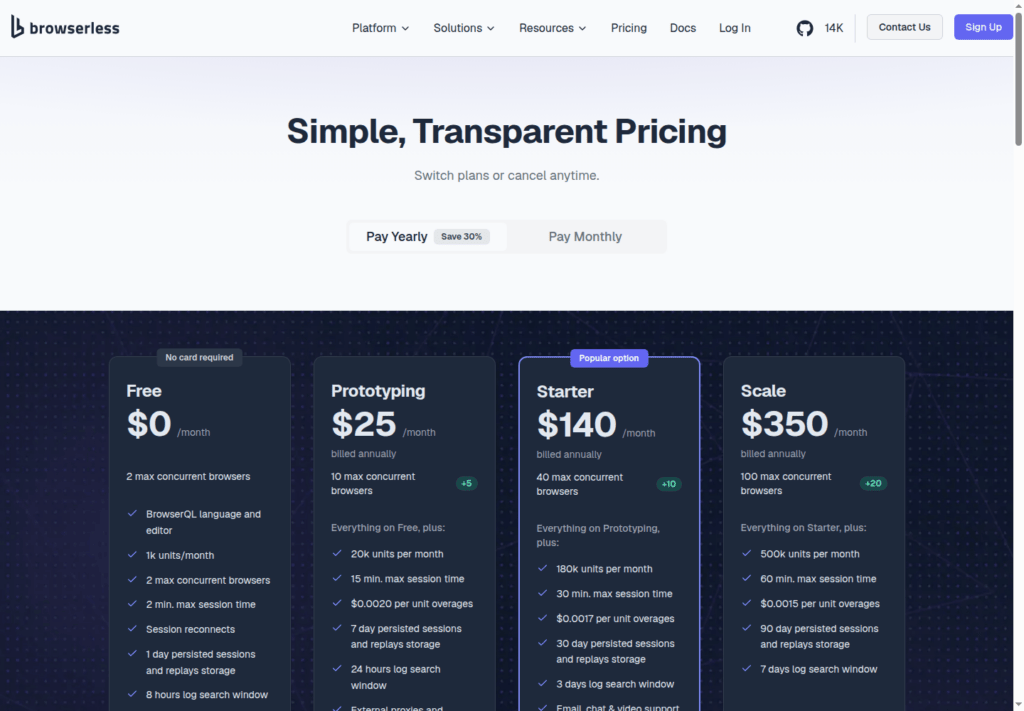
| Browserless | Hosted Chromium that speaks the same Puppeteer/Playwright protocol | 1,000 units/month, 2 browsers max, 2-min session cap | $25 / month, 20,000 units | No (you bring your own proxy, 6 units/MB residential) |
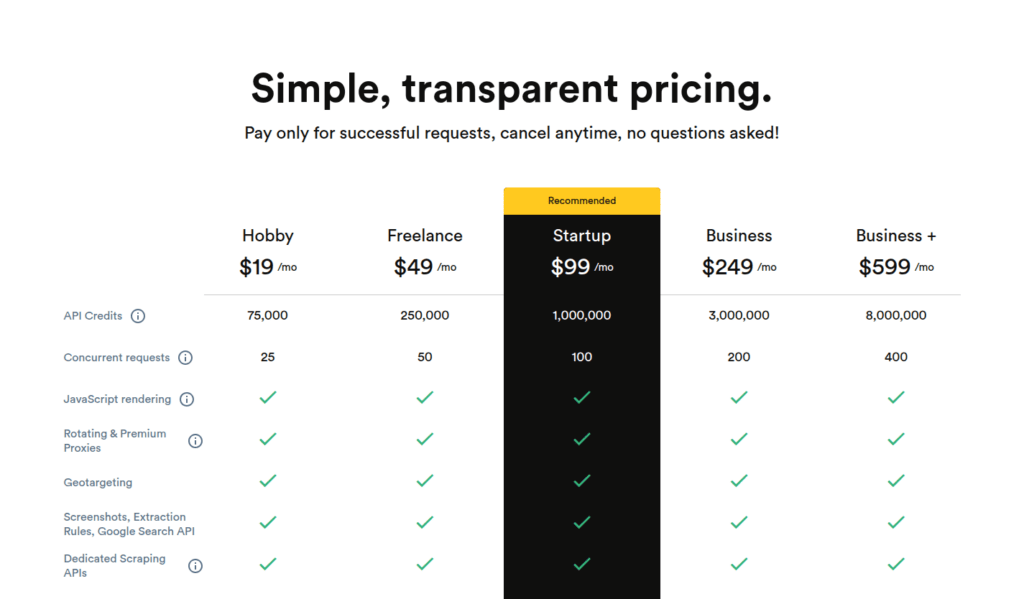
| ScrapingBee | REST API that takes a URL and returns rendered HTML | 1,000 credits on signup, no card | $19 / month, 75,000 credits, JS rendering included | Yes — premium and stealth proxy tiers (10/25/75 credits per request) |
| Bright Data Scraping Browser | Hosted Chromium with built-in residential proxy rotation and fingerprinting | 5,000 credits / month, 1 GB bandwidth | Pay-as-you-go, $0 — set rate in dashboard | Yes — included on all paid tiers |
For a deeper look at the three, see our Browserless review, ScrapingBee review, and Bright Data review. For the wider question of when a managed endpoint beats running your own browser, our comparison of the seven best web scraping API options covers all three on the same task list.
The decision rule of thumb: if you scrape tens of thousands of lightly protected pages per month and you are comfortable writing Playwright code, Browserless is the cheapest managed option and keeps your existing code. If you scrape a mix of easy and protected pages and want one endpoint that just returns HTML, ScrapingBee’s credit model is the simplest. If your target is heavily protected and the cost of blocks is real, Bright Data’s Scraping Browser bundles the proxy and unblock logic into a single counter.
FAQ
Do I need the async API?
No. playwright.sync_api is the right starting point for scripts and small services; switch to async_api when you need thousands of concurrent contexts in one process or already run on asyncio. Pick one per process — mixing them is a common bug.
How long should I wait for an element?
wait_for_selector defaults to 30 seconds and state="visible". For lazy lists or virtualized tables pass state="attached" so the wait does not depend on viewport layout, and retry rather than raising the timeout on a flaky target.
Does Playwright bypass anti-bot protection?
No. It is a real browser speaking the standard DevTools Protocol, so Cloudflare, DataDome and PerimeterX can still identify it. Work up from headers to rate limiting to proxies, and only then to a managed browser.
How much RAM does a browser session need?
Roughly 50–80 MB resident per context: a 4 GB container tops out near 30 contexts and a 16 GB host near 120. Measure on your own hardware before sizing a fleet.
When is a managed browser cheaper than self-hosting?
At 100+ pages per second sustained, when the target fingerprints CDP traffic, or when you need an authenticated session that survives deploys. Browserless is $25/month for 20,000 units, ScrapingBee $19/month for 75,000 credits and Bright Data’s Scraping Browser includes 5,000 credits/month.
Which Playwright version does this use?
1.62.0, with 1.63.0 as the newer release on PyPI; the samples pin 1.62.0 so the install command is reproducible.
What was the most common bug we hit?
Wrong wait_until. wait_until="load" (the default) waits for every stylesheet, image, and iframe on the page — including third-party assets that may take 30 seconds to time out. For JS-rendered content, wait_until="domcontentloaded" plus an explicit wait_for_selector is almost always the right shape.
Bottom line
Playwright in 2026 is the most ergonomic Python library for playwright web scraping python work on JavaScript-rendered pages. The install is two commands (pip install playwright==1.62.0 and python -m playwright install chromium). The sync API fits scripts and small services; the async API scales to thousands of contexts. Waits, selectors, and session state are all first-class.
If you are starting a fresh playwright web scraping python project today, the shortest path to a working script is the five-line version in the minimal scrape section. If you already have one and it is misbehaving, walk the five bugs in order before you switch vendors.
The ceiling is operational. You are running a browser fleet, and the moment your target grows past a few hundred pages per day or starts blocking you, the cheapest move is to graduate to a managed browser-as-a-service. Browserless, ScrapingBee, and Bright Data Scraping Browser are the three options worth evaluating first; pricing and free-tier details above are from their official pages — current snapshot.
Run the minimal example against quotes.toscrape.com/js/ first. When it works, add storage state. When storage state works, add concurrency. When concurrency runs out of headroom, the migration to a managed browser is a one-line change. That is the whole point of writing the script against the standard Playwright API rather than against a vendor-specific wrapper.
How we tested this: every code sample targets quotes.toscrape.com/js/, the public JavaScript-rendered sandbox maintained for scraping practice, and was written against Playwright 1.62.0. Vendor pricing in the table above comes from the latest snapshot of the official Browserless, ScrapingBee and Bright Data pages. We have not run Playwright against protected production targets, so anything that depends on real-world anti-bot success, proxy bandwidth or captcha-solve reliability is flagged where it appears in the text instead of being estimated.
Scoring criteria and our correction policy are documented on the methodology page.
Disclosure: this article contains affiliate links. If you buy through them we may earn a commission at no extra cost to you. Commission never changes our scoring or the order of a ranking.