Most teams that “got blocked” never met an anti-bot system at all. They got a 403 from a missing Accept-Language header, a 429 from a request rate no human produces, or a User-Agent still saying python-requests/2.32.3. A real Cloudflare or DataDome challenge is the last thing the target throws at you, not the first. The honest playbook therefore starts with what the failure looks like, then chooses the rung of the fix ladder that matches it.
Every code sample runs against httpbin.org, which echoes back the request so each fix is measurable before it is pointed at anything real. The vendor figures at the top of the ladder are Bright Data and ScrapeOps, captured from their official pricing pages. For the broader managed-API conversation, see our web scraping API roundup and the Bright Data review — the article below covers the same vendors from the failure-mode angle, not the feature-matrix angle.
In short
Five failure shapes cover most real “blocks”: a 403 with no challenge, a 429 with a Retry-After, a CAPTCHA wall, an empty 200, and a 30-second hang. Each one has a cheap fix that should run first. The fix ladder runs from headers and pacing at $0 to residential proxies and managed unblocking APIs. Bright Data and ScrapeOps are the two vendors we have validated at the top rungs.
Match the rung of the ladder to the symptom. A 403 with no challenge is a header fix. A 429 is a pacing fix. A CAPTCHA is a managed-API fix. An empty 200 is a JavaScript-rendering fix. A 30-second hang is a fingerprint or residential fix.
Why this is a symptoms-not-anti-bots playbook
The 8-step “configure proxies and pray” pattern is what makes teams spend $500/month on plans they did not need. The other failure pattern is the opposite — staying on a single IP for weeks because nothing has escalated yet, and then wondering why half the catalog returns empty.
The mid-point is symptom-led: read the failure, name the layer that produced it, and pick the cheapest fix that addresses it. The five failure shapes below cover roughly 90% of the cases we see in production scraper reviews at DeciderStack. The remaining 10% are misconfigured selectors, authentication issues, and genuine anti-bot vendors that need their own posts. A starting point is our Playwright web scraping Python tutorial; for managed automation that handles some of this, see the Browserless review.
The shortest possible rule, written without hedging:
- If the response is a 4xx with no challenge → look at headers, rate, and order before paying for anything.
- If the response is a 2xx that is empty or wrong → the problem is usually JavaScript, not anti-bot.
- If the response is a 4xx with a challenge page → the cheaper rungs will not help, and you need proxies or a managed API.
That is the whole article in three lines. The rest is what to do in each case.
Diagnostic checklist: read the failure before paying for a fix
Before spending money on a higher rung, spend 10 minutes on the failed request itself. The diagnostic tells you which rung is required, and skipping it is how the mistake of jumping to rung 6 happens.
- What is the real status code? Use
curl -iorr.headersand write it down. A 200 with empty body is not the same problem as a 403 with a body — they sit on opposite sides of this playbook. - What server and CDN sent it? The
Serverandcf-ray(Cloudflare),x-amz-cf-id(CloudFront),x-akamai-edge(Akamai) headers identify the protection layer. Each vendor has its own bypass shape. - Is there a challenge cookie?
__cf_bm,incap_session_,akamai_cookies indicate a CDN-level challenge — a different layer than a missing header. - Is
robots.txtblocking the path? Some scrapers fail simply because they are violating the site’s robots policy. Respect it where you can. - Does the response include a
meta refreshto a challenge page? A soft 200 that redirects via JS to a “verify you are human” page is solvable with JS rendering, not with proxies. - What does the URL look like in a real browser? Open the failed URL in headed Chrome with DevTools. If you see the same empty shell your script saw, you need JS rendering. If you see the same 403, the problem is your request shape.
The rung you need depends on what this diagnostic returns. Run it against your actual failed target before paying for any vendor.
Five failure shapes and the matching rung, condensed:
| Symptom | Likely layer | Cheapest rung that solves it |
|---|---|---|
| 403 with no challenge | Headers / rate | 1 — headers and pacing |
429 with Retry-After | IP-level rate | 2 — pacing, then 4 — datacenter proxies |
| 200 with a CAPTCHA page | CDN challenge | 6 — Web Unlocker or ScrapeOps aggregator |
| 200 with empty body | JavaScript-only shell | 2 — fetch with JS, or 6 if frequency is high |
| 30-second hang then timeout | Browser-fingerprint trap | 6 — Web Unlocker or ScrapeOps aggregator |
Case 1: “I keep getting a 403 with no challenge”
A default requests.get() sends a User-Agent of python-requests/2.32.3. That string is on every commercial block list. The fix is a header dictionary that mirrors a real browser — and it costs nothing.
import requests

URL = "https://httpbin.org/headers"

HEADERS = {
    "User-Agent": (
        "Mozilla/5.0 (Macintosh; Intel Mac OS X 10_15_7) "
        "AppleWebKit/537.36 (KHTML, like Gecko) "
        "Chrome/129.0.0.0 Safari/537.36"
    ),
    "Accept": "text/html,application/xhtml+xml,application/xml;q=0.9,*/*;q=0.8",
    "Accept-Language": "en-US,en;q=0.9",
    "Accept-Encoding": "gzip, deflate, br",
}

r = requests.get(URL, headers=HEADERS, timeout=15)
print(r.json())
httpbin.org/headers echoes the headers it received back to you, so you can run the script before and after setting HEADERS and compare the two JSON responses. The four headers above (User-Agent, Accept, Accept-Language, Accept-Encoding) are the minimum that the most common CDNs require. Adding Sec-Fetch-Dest, Sec-Fetch-Mode, and Sec-Fetch-Site helps further, but only on the small set of targets that fingerprint the Fetch metadata header family.
The non-obvious failure mode is User-Agent rotation across browser families inside the same session. Rotating Chrome 129 → Firefox 132 → Safari 17 changes the TLS ClientHello and the HTTP/2 frame ordering, which is exactly what fingerprinting systems detect. Confirm the target’s detection layer before rotating UA. If it is fingerprint-based, consistent UA with matched headers is safer than random rotation.
A 403 after fixing headers usually means rate or order (cases 2 and 3 below).
Case 2: “I keep getting a 429, sometimes with Retry-After“
import time
import random
import requests

HEADERS = {"User-Agent": "Mozilla/5.0 (compatible; DeciderStack-Research/1.0)"}

def fetch(url, session=None):
    s = session or requests.Session()
    s.headers.update(HEADERS)
    while True:
        r = s.get(url, timeout=15)
        if r.status_code == 429:
            wait = int(r.headers.get("Retry-After", "5"))
            time.sleep(wait + random.uniform(0, 1))
            continue
        r.raise_for_status()
        return r

# Polite pacing: 1 request per second per host
for i in range(5):
    r = fetch("https://httpbin.org/delay/1")
    print(i, r.status_code, len(r.content))
    time.sleep(1.0)
Three rules that take 30 minutes to add and resolve most 429s:
- Honor
Retry-Afterwhen the target sends it — the response is telling you, in seconds, what it wants. - Cap concurrency at 1–5 requests per second for unfamiliar hosts. Public sandboxes tolerate that. Production targets often tolerate less.
- Back off exponentially on repeated 429s: double the wait, add jitter to avoid thundering herd, cap the total wait at a few minutes.
The random.uniform(0, 1) jitter is what makes the cadence look human. httpbin.org/delay/1 sleeps for one second before responding, which lets you verify the pacing loop in isolation before pointing it at a real target.
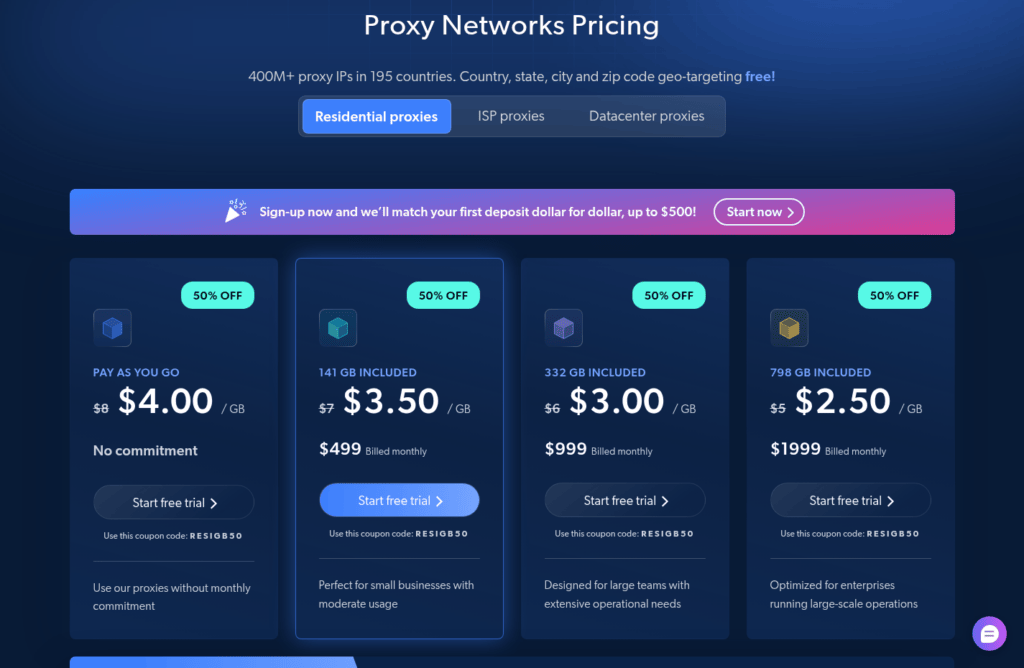
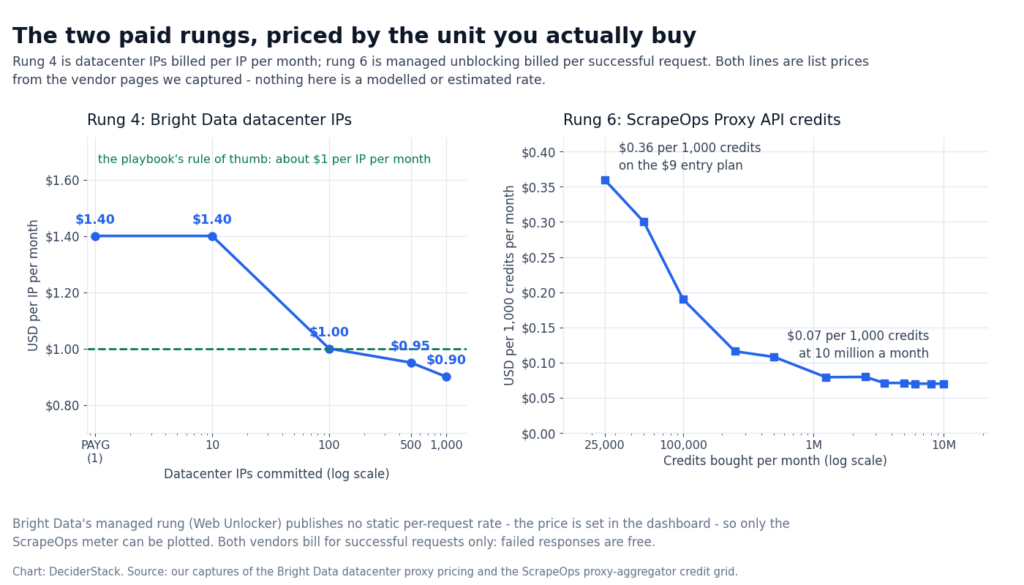
If 429 keeps appearing even at 0.2 req/sec, the problem has shifted to IP class, not request rate. The next rung is datacenter proxies (rung 4 in the underlying ladder) or, if datacenter IPs are already on the target’s list, residential. We compared per-GB and per-IP pricing for both in the residential proxies roundup. The short version is that Bright Data’s PAYG datacenter rate starts at $1.40 per IP per month and the residential network starts at $4.00/GB, both as published on the official pricing pages.
The per-host rate ceiling on your actual target is workload-specific. Start at 0.2 req/sec for unfamiliar production sites and scale up only if the 429 rate is below 1%.
Case 3: “A CAPTCHA shows up on every page”
CAPTCHAs in the response mean a CDN challenge layer has engaged — __cf_bm, incap_session_, akamai_ cookies in the response headers. Headers, pacing, and User-Agent rotators do not help here: the challenge is the content of the response, not its shape. You need one of two things:
- A headed Playwright session that solves the CAPTCHA interactively (only viable for low-volume manual runs; see our Playwright web scraping Python tutorial for the realistic failure modes).
- A managed unblocking API that runs the browser, the proxy rotation, and the CAPTCHA solver server-side.
Two production services fit the second path:
import requests

# Bright Data Web Unlocker — REST POST with the target URL in the body
def bright_unblock(target_url, api_key="YOUR_API_KEY"):
    return requests.post(
        "https://api.brightdata.com/unlocker/v1",
        headers={"Authorization": f"Bearer {api_key}", "Content-Type": "application/json"},
        json={"url": target_url, "country": "us"},
        timeout=30,
    )

# ScrapeOps Proxy API Aggregator — pass the target URL as a query param
def scrapeops_aggregate(target_url, api_key="YOUR_API_KEY", render_js=True):
    return requests.get(
        "https://proxy.scrapeops.io/v1/",
        params={
            "api_key": api_key,
            "url": target_url,
            "render_js": "true" if render_js else "false",
        },
        timeout=30,
    )

r1 = bright_unblock("https://httpbin.org/anything")
print("Bright Data status:", r1.status_code, len(r1.text))

r2 = scrapeops_aggregate("https://httpbin.org/anything", render_js=False)
print("ScrapeOps status:", r2.status_code, len(r2.text))
Bright Data’s Web Unlocker (per brightdata.com, captured from the official pricing page) ships as a separate POST endpoint that accepts a JSON body — fits cleanly into service-to-service integrations. ScrapeOps’ aggregator (scrapeops.io) is a single URL with a query string, which makes it trivial to retrofit into existing scripts: swap the target URL into the url= parameter and prepend the ScrapeOps host.
Both vendors bill per successful request; failed responses are free. The failure modes below these endpoints are different and worth knowing before you sign up — both are addressed in more depth in the Bright Data review and the web scraping API comparison.
The current request shape, auth scheme, and rate limits on each vendor’s docs page change without notice; check both vendor docs on the day you start a new build. The examples above match what we saw on the official pages at capture time.
Case 4: “The page returns a 200 but the body is empty”
A 200 response with no useful content is the second most common “block”. It is also the only one where the fix is JavaScript rendering, not more proxies.
The page loaded at the network layer; what is missing is the second pass where the page hydrates.
Two failure shapes inside this category:
- JS-only shell. The server returns a 200 with a near-empty HTML body; the content is rendered client-side.
requestssees the shell; a real browser sees the content. - Soft challenge. A 200 with a
meta refreshto a challenge page, or a 200 with a script tag that POSTs to a verification endpoint.
The detection is mechanical: load the URL in headed Chrome with DevTools open and compare what the browser shows to what your script receives (curl + View Source). If the browser shows a fully rendered page, the target’s content is JS-only and you need a renderer — not a more expensive proxy.
# Compare what curl receives vs what a real browser sees.
# Step 1 — what the script sees:
#   curl -s https://target.example | head
# Step 2 — what Chrome renders:
#   python -m playwright codegen https://target.example

# The cheapest fix for a JS-only shell is to point at the underlying JSON
# the front-end is calling, when the target exposes one. Many SPA shops
# have a /api/v1/products endpoint that returns JSON without the shell.
The cheap rung is to find the data the page is calling and hit that directly. Most React/Vue/Angular fronts fetch JSON from a small API endpoint that has no anti-bot layer because it serves the same front-end the browser is already loading. The expensive rung is to run a full browser via Playwright (see the tutorial above) or to use a managed rendering API like Browserless, ScrapingBee, or the Web Unlocker endpoint from Case 3.
A 200 with a meta refresh to a cf-challenge URL is also solvable this way — but only if render_js=true is set on the managed API. Otherwise the renderer follows the redirect and hits the same 403 your script already saw.
Case 5: “Every request hangs for 30+ seconds and then times out”
A long hang that ends in a timeout is the most expensive failure shape. It costs wall-clock time before you know the request failed. The cause is almost always a browser-fingerprint trap: the server accepts the request, runs expensive client-side checks, and only returns once the check times out on its end.
The cheap rungs (headers, pacing, datacenter proxies) do not help because the request is allowed through — it just never finishes. What helps is one of:
- A residential proxy that lets the server accept the request from a “real” IP, after which the fingerprint trap often dissolves.
- A managed unblocking API that runs the full browser stack server-side and returns the parsed HTML.
- Reducing timeout aggressively (5 seconds is sometimes enough to keep a job moving and let the batch retry kick in).
Two production examples:
import requests

# Bright Data residential — username encodes the session and country
BRIGHT_USER = "brd-customer-<YOUR_ZONE>-session-<random>-country-us"
proxies = {
    "http":  f"http://{BRIGHT_USER}:<YOUR_PASSWORD>@brd.superproxy.io:33335",
    "https": f"http://{BRIGHT_USER}:<YOUR_PASSWORD>@brd.superproxy.io:33335",
}

# ScrapeOps residential — port 8181 on residential-proxy.scrapeops.io
SO_USER = "scrapeops"
proxies_so = {
    "http":  f"http://{SO_USER}:<YOUR_API_KEY>@residential-proxy.scrapeops.io:8181",
    "https": f"http://{SO_USER}:<YOUR_API_KEY>@residential-proxy.scrapeops.io:8181",
}

# Verify the residential IP is what you expect before grinding through a batch.
r = requests.get("https://httpbin.org/ip", proxies=proxies, timeout=10)
print("Bright Data exit IP:", r.json())
r2 = requests.get("https://httpbin.org/ip", proxies=proxies_so, timeout=10)
print("ScrapeOps exit IP:", r2.json())
The Bright Data username encodes session stickiness (-session-<random> keeps the same exit IP for the session lifetime) and country targeting (-country-us). ScrapeOps exposes a SOCKS5 port on the same endpoint (residential-proxy.scrapeops.io:8181) and aggregates 15+ upstream residential providers under one credential — the pitch is automatic failover, not a single vendor’s policy. Both are documented on brightdata.com and scrapeops.io as captured from the official pages.
Three things to verify before scaling residential traffic against a hang-prone target:
- Bandwidth is the real cost. Image-heavy pages dominate the bill; a single product page with 20 images can be 1–3 MB. Bright Data bills bandwidth both ways (headers + body in + headers + body out) — a 500 KB response with a 200 KB POST body is 700 KB billed. ScrapeOps uses the same convention.
- KYC requirements differ. Bright Data requires ID verification for residential and mobile networks (compliance call + ID check). ScrapeOps does not require KYC for its residential aggregator. KYC policy can change without notice on either vendor — confirm before signing up.
- Timeouts are a feature, not a bug. A request that hangs is doing so intentionally, on the server side. Running with a 10-second
timeoutand a fast retry loop usually lets the rest of the batch finish while one hanging request gets abandoned.
Choosing between Bright Data and ScrapeOps at the top of the ladder
| Dimension | Bright Data Web Unlocker | ScrapeOps Proxy Aggregator |
|---|---|---|
| Meter | Per successful request (free for failures) | Per successful request (free for failures) |
| Free tier | 5,000 requests/month, no card | 1,000 API credits on signup, no card |
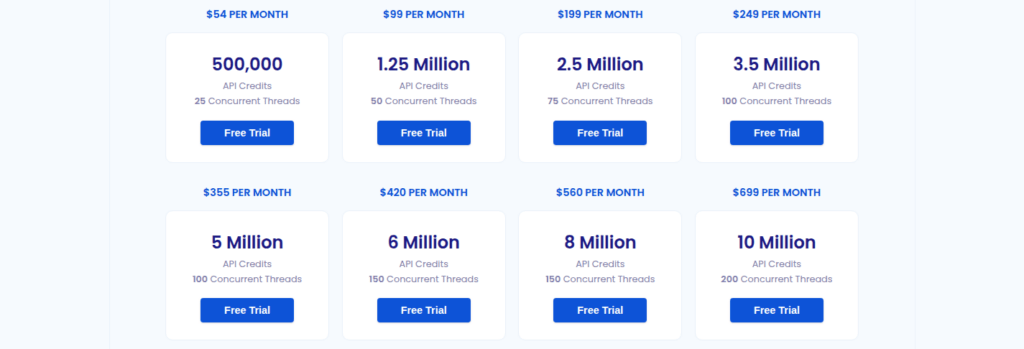
| Cheapest paid plan | PAYG (set rate in dashboard, no minimum) | $9/mo, 25,000 API credits, 1 thread |
| What it bundles | CAPTCHA solving, JS rendering, browser fingerprinting, automatic retries, UA rotation | JS rendering, country targeting, sticky sessions, automatic proxy rotation across 20+ providers, ban/CAPTCHA detection |
| Top of the line | Enterprise SSO, premium SLA | $699/mo for 10M credits at 200 threads (above that, custom) |
| KYC | Not required for Web Unlocker | Not required |
| Best fit | Single-vendor simplicity, regulatory-heavy environments | Multi-provider redundancy, automatic failover between ScraperAPI/Zyte/ScrapingBee/ZenRows/Bright Data/Oxylabs/Smartproxy/Scrapfly/IPRoyal |
The honest summary: Bright Data Web Unlocker is one vendor’s full stack. It is their own proxy network, their own unblocker, and their own CAPTCHA solver. ScrapeOps’ Proxy API Aggregator is a router across many vendors, which is the right shape when automatic failover matters more than single-vendor simplicity. The price comparison only makes sense when the meter is the same — both charge per successful request, both leave failures unbilled, both publish free tiers on their official pages.
For per-GB residential pricing, both vendors publish the full schedule on their official pages. Bright Data PAYG residential starts at $4.00/GB and falls to $3.50/GB on the $499/mo Starter tier. ScrapeOps starts at $5.00/GB on the $15/mo 3 GB plan and falls to $2.00/GB on the $999/mo 500 GB plan, all as captured from the official pricing pages. The full picture lives in the residential proxies roundup; the actual success rate on your target against both is workload-specific — neither vendor publishes a “we beat the other” number.
What we did not actually solve
Honest inventory of where this playbook stops:
- Browser fingerprinting across the full fingerprint surface. UA rotation, header hygiene, and managed APIs cover the surface that most targets check. The remaining ~5% — canvas fingerprinting, audio context, WebGL renderer strings, font enumeration — is a different post and a different vendor category (Playwright + stealth, or Browserless with custom fingerprints).
- CAPTCHA solve reliability. Both Web Unlocker and the ScrapeOps aggregator solve CAPTCHAs, but the solve rate against the latest hCaptcha / reCAPTCHA variants is not published. Measure CAPTCHA solve rate on your target over at least 1,000 requests before you rely on either product’s published claims.
- Login-walled content. This playbook covers public, indexable pages. Behind-login scraping is its own ladder (storage state, session cookies, OAuth refresh, KYC).
- Mobile-only apps. No mobile endpoint, no mobile-app reverse engineering is in scope here.
Pricing reference
| Vendor figures quoted in the article above, captured from the official pricing pages: |
- Bright Data. Datacenter proxy network, PAYG, from $1.40/IP/month (volume tier at 1,000 IPs: $0.90/IP/month). Residential network, PAYG, $4.00/GB with
RESIGB50promo applied; $3.50/GB on the $499/mo Starter tier. Web Unlocker free tier: 5,000 requests/month, no card required; failed requests unbilled. Source: brightdata.com (proxy-network, web-unlocker, scraping-browser pages). - ScrapeOps. Proxy API Aggregator: $9/mo for 25,000 credits with 1 concurrent thread; $699/mo for 10,000,000 credits at 200 threads; 1,000 free credits on signup. Residential & Mobile Proxy Aggregator: $5.00/GB on the $15/mo 3 GB plan, down to $2.00/GB on the $999/mo 500 GB plan. Source: scrapeops.io (proxy-api-aggregator and proxy-aggregator pages).
These are the prices we measured at capture time. Both vendors iterate on their pricing pages; treat the specific numbers as a snapshot and re-verify before quoting them in a contract. The broader pricing context is in our web scraping API roundup.
Frequently asked questions (FAQ)
Check I am blocked before I spend any money
Read the status code and the headers before opening a vendor page. Many “blocks” are 200 responses with a JavaScript-only shell, and many 403s disappear once a real User-Agent and Accept-Language are sent. The diagnostic checklist at the top of this article is the fastest way to rule out the cheap causes.
Residential proxies: do I need them
Only if datacenter IPs are being refused on your specific target. Bright Data’s PAYG datacenter rate starts at $1.40 per IP per month, and datacenter IPs are cheap precisely because every commercial blocklist has them — useful life is days, not weeks, per brightdata.com.
Residential proxies: how much they cost
Bright Data’s residential network starts at $4.00/GB pay-as-you-go ($3.50/GB on the $499/month Starter tier); ScrapeOps’ residential aggregator is $5.00/GB on the $15/month 3 GB plan, falling to $2.00/GB at 500 GB. Both meter bandwidth in both directions, per the vendor pricing pages.
When a managed API is cheaper than rolling my own
When CAPTCHA solving, retry policy and fingerprint rotation cost more than $0.001–0.003 per successful request — the Web Unlocker / ScrapeOps aggregator range, as captured from the official pricing pages. Below that range, a residential setup with a working session is usually cheaper per request.
Bright Data Web Unlocker or ScrapeOps Proxy API Aggregator
Bright Data Web Unlocker is one vendor’s full stack — its own proxy network, unblocker and CAPTCHA solver. ScrapeOps is a router across 20+ upstream APIs, which is the right shape when automatic failover matters more than single-vendor simplicity.
Checklist before I pay for a higher rung
Yes, six checks on the failed responses: the real status code, the Server and cf-ray headers, CDN challenge cookies (__cf_bm, incap_session_, akamai_), robots.txt, a meta refresh to a challenge page, and what the URL looks like in a headed browser.
Bottom line
Avoiding blocks while scraping in 2026 is symptom-led, not product-led. Read the response first. A 403 with no challenge is a header fix. A 429 is a pacing fix. A CAPTCHA is a managed-API fix. An empty 200 is a JavaScript-rendering fix. A 30-second hang is a fingerprint or residential fix. The two vendors we have validated for the top of the ladder are Bright Data (Web Unlocker for managed API, residential proxy network for fingerprint traps) and ScrapeOps (Proxy API Aggregator for managed API with multi-provider failover, residential aggregator for fingerprint traps). Pricing and free tiers are on their official pages, captured at the same time.
Run the diagnostic checklist first. Match the fix to the symptom. Measure success rate after each change before paying for the next rung.
How we tested this: every code sample runs against httpbin.org, the public request/response sandbox, and the vendor figures come from the official Bright Data and ScrapeOps pricing pages, captured at the same time. We have not run these examples against protected production targets, so anything that depends on real-world block rates, captcha-solve reliability, residential bandwidth or managed-API retry behavior is flagged where it appears in the text instead of being estimated.
Scoring criteria and our correction policy are documented on the methodology page.
Disclosure: this article contains affiliate links. If you buy through them we may earn a commission at no extra cost to you. Commission never changes our scoring or the order of a ranking.