A requests.get(url) that falls over a Cloudflare challenge is the reason the web scraping api category exists. In short: seven vendors below promise the same surface — send a URL, get HTML or JSON back — and bill it in five different units. Pick one without comparing them by workload and you either overpay for a feature you never use or under-buy a plan that cannot handle your concurrency.
This article compares the seven send-URL, get-HTML vendors by task, not by vendor. The four tasks are the ones that actually break a comparison if you ignore them: a 100-page prototype, a 100,000-page production month, a JS-heavy single-page app, and a Cloudflare-class anti-bot target. The recommendation flips between tasks because the meters — credits, units of browser time, compute units, rows, or gigabytes — favor different vendors on different jobs.
Every figure below is a published price or credit weight. Anything that needs a live paid account to verify is flagged where it appears in the text rather than estimated.
In short
Seven vendors in the send-URL, get-HTML category, billed in five units: credits (ScrapingBee, ZenRows, Browse AI), units of browser time (Browserless), compute units plus proxies and storage (Apify), per-successful-request or per-GB bandwidth (ScrapeOps), and per-record / per-request / per-GB meters on four separate Bright Data APIs.
For a 100-page prototype, every vendor except Apify ships a permanent free tier without a credit card — ZenRows at 5,000 credits/month is the most generous. For 100,000 pages, per-success-billed vendors (ZenRows, ScrapeOps) win on protected targets and per-attempt-billed vendors (ScrapingBee, Bright Data) win when retries are cheap. For JS-heavy sites, only Browserless and Bright Data’s Scraping Browser ship a full Chromium you can drive. For hard anti-bot (Cloudflare, DataDome, PerimeterX), Bright Data’s Web Unlocker, ScrapingBee Stealth (75 cr/req), ZenRows Protected (25 cr/page), Apify Unblocker ($1–1.50 per 1,000) and the ScrapeOps aggregator each take a different approach.
When a web scraping API is the right tool (and when to skip it)
The seven products on this list all do the same thing in the abstract: you POST a URL to their endpoint, they fetch the page, they return HTML, JSON, a screenshot, or all three. The reason seven vendors can sell what is essentially the same curl call at seven different prices is that what happens between your request and the response is the actual product. Proxy rotation, JS execution, fingerprint management, CAPTCHA solving, retry policy — that is what you are paying for.
If you only need to scrape static HTML from a site that does not defend itself with any anti-bot layer, a web scraping api is overkill. requests plus a polite header set will outrun every vendor here on cost and latency. The web scraping api category earns its keep the moment any of these become true.
- the target returns an empty document until JavaScript runs (single-page apps, infinite scroll, client-side rendered tables);
- the target fingerprints your TLS handshake, header order, or canvas before it will answer (Cloudflare, DataDome, PerimeterX);
- you need to scale beyond a few requests per second without spinning up your own proxy fleet;
- the target’s behavior changes between regions, devices, or user-agent strings, and you need a managed way to vary all three.
Once you cross any of those lines, the question stops being “do I need a scraping api?” and becomes “which scraping api, billed in which unit, against which target?”. The four task sections below walk through that decision for the four most common workload shapes.
A second thing to understand up front: the seven vendors price the same outcome in five different units, and the units are not convertible. Credits at ScrapingBee and ZenRows look similar. ScrapingBee’s classic request costs 1 credit and ZenRows’ classic request also costs 1 credit. ScrapingBee’s premium-with-JS costs 25 credits and ZenRows’ protected-with-JS also costs 25 credits, but the underlying meaning of “premium” and “protected” is not the same. Apify bills compute units plus proxy bandwidth plus storage. Browserless bills 30-second units of real browser time. ScrapeOps bills per successful request on one product and per GB on the sibling product. None of those convert into each other without knowing your actual workload. That is why every section below ties the recommendation back to the task you are running.
Task 1: scraping 100 pages for a prototype
This is the workload where every vendor publishes a permanent free tier, and where the right choice is the one whose free tier survives contact with your real target. Every vendor above except Apify offers a recurring free allowance without a credit card. Apify gives you $5 of prepaid usage, enough to validate an Actor but not enough to run for a month.
The real question on a 100-page prototype is: does the free tier actually return your data, or does the vendor silently cap it on protected targets? That question has only one answer per target, and it costs nothing to find out. Run the same 100 URLs against two or three free tiers and pick the one that returns the cleanest response.
The numbers below describe what each free tier publishes. They do not describe what each free tier can do on your specific target. The rule for picking is: run the same 100 URLs against two or three free tiers and pick the one that returns the cleanest response. That costs nothing and is the only answer that works per target.
Bright Data gives you 5,000 records/month on Web Scraper API, 5,000 requests/month on Web Unlocker API, 5,000 requests/month on SERP API, 1 GB + 5,000 credits on Scraping Browser API, and 5,000 page loads/month on Scraper Studio. All without a credit card and all runnable from the same account. KYC is required only for the Residential and Mobile proxy networks, not for the APIs.
The catch: Bright Data publishes the free tiers but not the per-unit rates. Those are set via dashboard sliders after you sign in. So you cannot quote the bill on a 100-page prototype without logging in. For a deeper look at how Bright Data prices the four APIs together, see our Bright Data review.
ScrapeBee ships 1,000 credits once on signup, not per month. A classic proxy request costs 1 credit, classic with JS costs 5, premium without JS costs 10, premium with JS costs 25, and stealth with JS (anti-bot bypass) costs 75. On a 100-page prototype with JS rendering enabled you spend ~500 credits, leaving 500 to test with premium/stealth on a few harder URLs. Credits do not roll over. For our full web scraping api review, see the ScrapingBee review.
Browserless ships 1,000 units/month on a permanent free tier. One unit equals 30 seconds of browser time, so a 100-page prototype at 10 seconds per page costs ~33 units — about 3% of the free allowance. The ceiling is concurrency: only 2 concurrent browsers on Free, with a 2-minute max session. That survives a 100-page prototype but not a 100,000-page production crawl.
ZenRows ships 5,000 credits/month on a permanent free tier with no credit card — the most generous recurring allowance on this list that has no card requirement. Failed and retried requests are free; HTTP 404 and 410 count as successful. On a 100-page prototype with JS rendering enabled (5 credits/page) you spend 500 credits, leaving 4,500 to validate on harder targets or to test protected mode at 25 credits/page. For pricing details, see our ScrapingBee vs ZenRows comparison.
Apify ships $5/month of prepaid usage, 5 concurrent runs, 16 GB max Actor RAM. $5 covers ~25 CU-hours at the Starter PAYG rate ($0.20/CU), enough to validate a custom Actor but not enough to run a recurring scrape. Prepaid usage expires at end of cycle. Pricing is sourced from apify.com/pricing.
Browse AI ships 50 credits/month on a permanent free tier — enough for ~5 monitor runs on a small robot or 50 detail-page extractions. The free tier is the smallest of the seven, but the recorder interface means a non-developer can ship a 100-page scraper without writing code. Pricing is sourced from browse.ai/pricing.
ScrapeOps ships 1,000 API credits/month on the Proxy API Aggregator plus 100 MB of residential bandwidth on the Residential & Mobile Aggregator, both without a credit card. Proxy API bills only successful requests, so a 100-page prototype where 80 URLs succeed costs 80 API credits, not 100. Residential bandwidth bills regardless of success. Both include JS rendering, sticky sessions, and automatic proxy rotation. For a web scraping api in the send-URL-get-HTML category, this is the cheapest entry tier on the list.
The practical rule on a 100-page prototype: pick the free tier with the highest allowance on your actual target, then pick the second-highest as a fallback. ZenRows at 5,000 credits/month is the default first choice. ScrapeOps’ Proxy API at $9/mo is the cheapest fallback if ZenRows misses on a specific target.
The actual return on a protected target is workload-specific. Confirm the published free-tier success rate on your top three targets before sizing a paid plan.
Task 2: scraping 100,000 pages in a production month
The shape of the answer changes at this scale. Recurring free tiers are no longer enough; you are picking a paid tier with a credit or unit budget that maps to your workload. Three things matter: the meter, the concurrency ceiling, and whether credits roll over.
Per-success vs per-attempt. ScrapingBee (with transparent_status_code), ZenRows and ScrapeOps bill only on success. Bright Data’s Web Unlocker still consumes bandwidth on a failed request. Browserless bills browser time even on an empty page. Apify bills compute units plus proxy traffic regardless. Browse AI bills credits on extracted rows and screenshots.
At 100,000 pages/month with a 20% failure rate on protected targets, the gap between per-success and per-attempt is the gap between 80,000 credits billed and 100,000. On a 25-credit-per-page protected meter, that is 500,000 credits of margin.
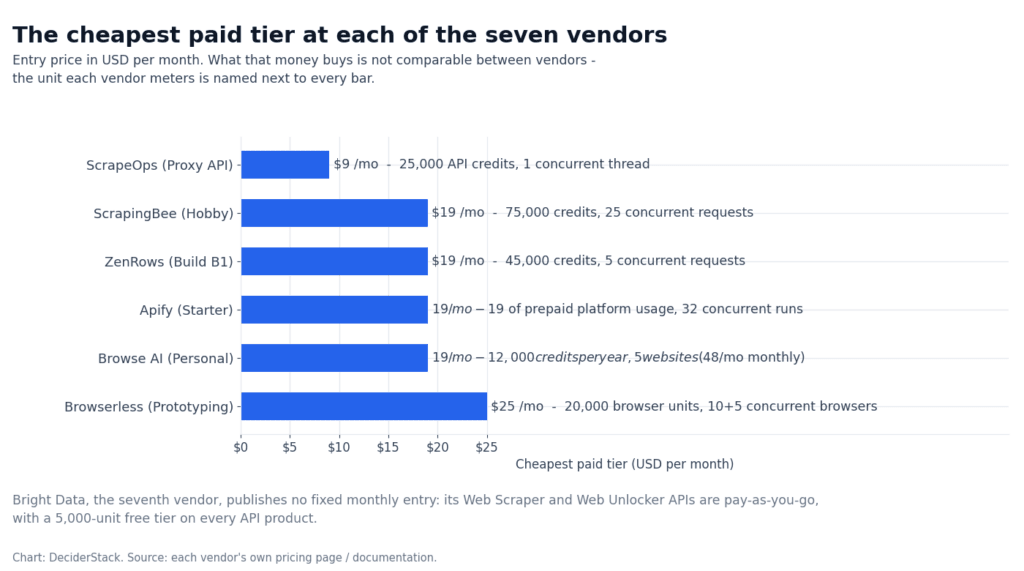
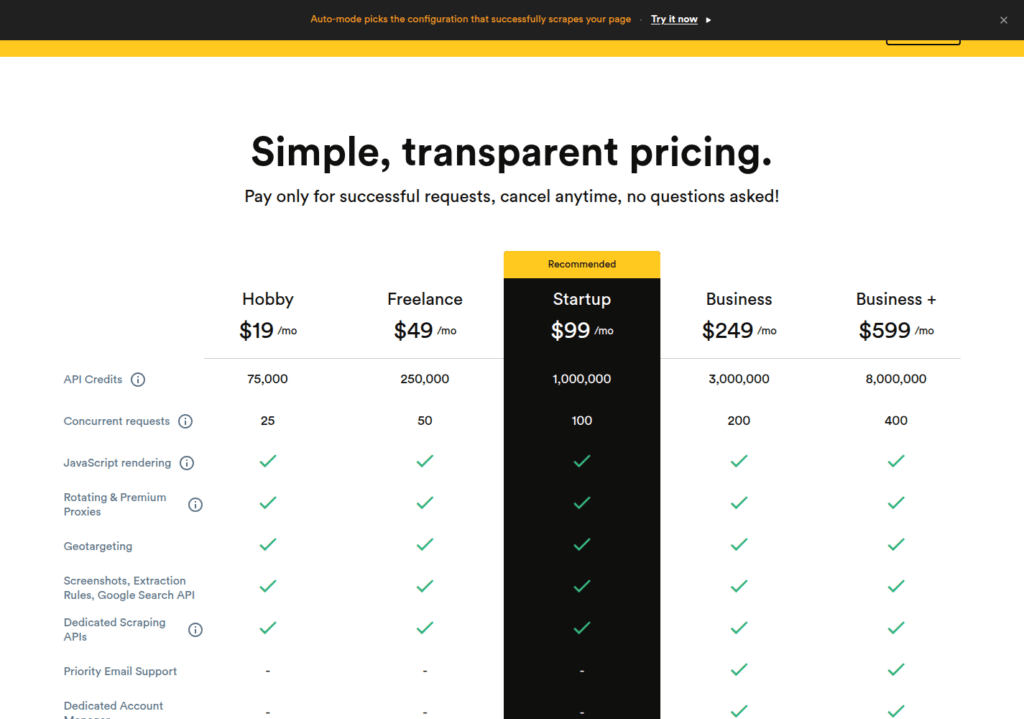
Concurrency ceiling. ScrapingBee jumps from 25 concurrent on Hobby ($19/mo) to 100 on Startup ($99/mo) to 400 on Business+ ($599/mo). ZenRows runs 5 on Free, 20 on Build B1 ($19/mo), 50 on Launch L1 ($69/mo), 100 on Growth G1 ($199/mo) and 200 on Scale S1 ($549/mo). Apify runs 5 on Free, 32 on Starter ($19/mo + PAYG), 128 on Scale ($199/mo + PAYG), 256 on Business ($999/mo + PAYG). Browserless runs 10+5 on Prototyping ($25/mo), 40+10 on Starter ($140/mo), 100+20 on Scale ($350/mo). ScrapeOps Proxy API runs 1 at $9/mo, 25 at $54/mo, 100 at $249/mo, 200 at $699/mo. Bright Data publishes “unlimited” on all paid APIs.
| Vendor | Lowest paid tier | Concurrency on that tier | Concurrency on mid-tier | Concurrency on top published tier |
|---|---|---|---|---|
| ScrapingBee | Hobby $19/mo | 25 | 100 (Startup $99/mo) | 400 (Business+ $599/mo) |
| ZenRows | Build B1 $19/mo | 20 | 50 (Launch L1 $69/mo) | 200 (Scale S1 $549/mo) |
| Apify | Starter $19/mo + PAYG | 32 | 128 (Scale $199/mo + PAYG) | 256 (Business $999/mo + PAYG) |
| Browserless | Prototyping $25/mo | 10 + 5 proxy | 40 + 10 (Starter $140/mo) | 100 + 20 (Scale $350/mo) |
| ScrapeOps Proxy API | $9/mo | 1 | 25 ($54/mo) | 200 ($699/mo) |
| Bright Data | PAYG | “unlimited” | “unlimited” | “unlimited” |
| Browse AI | Personal $19/mo annual | soft cap | soft cap | soft cap |
Roll-over. Only ZenRows rolls paid credits over — 1 month on paid plans, no roll-over on Free. ScrapingBee, Browserless, Apify, Browse AI and ScrapeOps reset every cycle. Bright Data is PAYG by default and does not have a cycle.
Three real configurations for 100,000 pages.
- Cheapest stable. ScrapeOps Proxy API at $99/mo gives you 1.25M credits/month and 50 concurrent. At ~12.5 credits per successful request on default settings, that is ~100,000 requests. The catch: ScrapeOps bills per successful request, so you eat the cost of provider switching only when one provider succeeds.
- Most predictable. ZenRows Build B3 at $39/mo gives you 120,000 credits and the standard credit weights (1/5/10/25). For 100,000 pages at JS-rendering weight (5 credits), you spend 500,000 credits — too small for the workload. The realistic fit is Launch L1 at $69/mo (250,000 credits) or Growth G1 at $199/mo (1,200,000 credits). Failed and retried requests are free, so the actual bill is driven by what succeeds on the first try.
- Highest concurrency. ScrapingBee Startup at $99/mo gives 1,000,000 credits and 100 concurrent. Premium proxies (10 credits) and premium with JS (25 credits) are gated to Business ($249/mo) and Business+ ($599/mo). You stay on classic proxies unless you commit to $249/mo. See our ScrapingBee review for the full credit ladder.
Apify at 100,000 pages means you are paying for compute units, not credits. At $0.20/CU on Starter ($19/mo + PAYG), a custom Actor running 24/7 at 1 GB RAM consumes ~720 CU/month, or $144 in compute. Plus residential bandwidth ($7–8/GB), plus dataset storage. The bill grows linearly with runtime, not with pages.
Browse AI at 100,000 pages means 12,000 credits (rows), since 1 credit = 10 rows. The Professional annual tier at $69/mo gives 60,000 credits/year — 5,000/month. At 10,000 detail pages per month you consume 1,000 credits (one extraction = 1 credit per row). A 100,000-page month consumes 10,000 credits. That is a one-month overrun on Professional annual — the plan needs to step up.
The credit math above assumes a fixed per-request cost, which only holds if your targets do not shift between protected and unprotected mode. Confirm the published per-tier success rate on your top three protected targets before locking in a contract.
Task 3: scraping JS-heavy single-page apps and infinite scroll
A JS-heavy target returns a JavaScript bundle and an empty document on the first request. Four of the seven vendors ship a real browser you can drive: Browserless, Bright Data Scraping Browser, and Apify’s Playwright Actor. The other three wrap a headless browser behind their credit meter: ScrapingBee with JS, ZenRows with JS, and ScrapeOps with rendering.
Full Chromium you can drive. Browserless is the only vendor that ships managed Chromium as the primary product, not as a feature flag. You connect via Puppeteer, Playwright, Selenium, or BrowserQL, and you control every aspect of the session.
One unit equals 30 seconds of browser time. Residential proxy is +6 units per MB. Datacenter proxy is +2 units per MB. Captcha solving is +10 units per solve. Anti-bot is not built in — every protected target requires you to bring your own residential proxy (their pool at 6 units/MB is the on-ramp) or stack a third-party anti-bot layer.
The Free plan is too tight for production: 2 concurrent browsers and 2-minute sessions do not survive a real crawl. For the unit-cost math on a real Puppeteer/Playwright workload, see our Browserless review.
Bright Data’s Scraping Browser API is the second full-Chromium option. Free 1 GB + 5,000 credits/month; PAYG; Scale 71 GB at slider-set rate. Compatible with Puppeteer, Playwright and Selenium, with built-in proxies and unlocking. Bandwidth bills even on failures. For an open-source browser-automation path on the same problem, see our Playwright web scraping in Python guide.
Apify’s Playwright Actor runs a headless Chromium inside Apify’s infrastructure, billed at $0.20/CU on Starter plus residential $7–8/GB. The advantage is that you can write your own Actor in Node.js or Python and let Apify manage the browser. The disadvantage is that runtime bills linearly — a 24/7 crawl at 2 GB RAM is ~1,440 CU/month, or $288 on Starter.
Rendered HTML behind a credit meter. ScrapingBee’s JS-rendering mode costs 5 credits/request on classic proxies, 25 credits/request on premium proxies. Failed requests (per transparent_status_code) are not billed. The auto mode picks the cheapest working configuration per request, capped by max_cost=N. Default auto resolves to classic + JS on most targets; premium + JS only when classic + JS fails.
ZenRows’ JS-rendering mode costs 5 credits/page on standard proxies, 25 credits/page on the Protected primitive (premium proxies + anti-bot + captcha solving). Browser Sessions cost 25,000 credits/GB plus 5 credits/minute of session time — for sites that need a persistent browser across multiple pages. Batch API runs async queues with retries and webhooks for sites where one request triggers a stateful flow.
ScrapeOps’ rendering flag is built into both products. Both include JS rendering, snippet execution, sticky sessions, and automatic proxy rotation; the Proxy API bills per successful request, the Residential product bills per GB regardless of success.
Browse AI records the click path inside its own Chromium recorder, so JS rendering is built in by default. The trade-off is that you cannot drive an arbitrary browser — the recorder builds the robot from the click path you recorded. Premium sites (those needing residential proxies + captcha solving) cost a minimum of 2–10 credits per run.
The published weights assume a single page render. Sites that require multiple clicks, scrolls, or waits before the data appears can burn 5–10× the published credit estimate. Confirm the actual JS-rendering credit cost on your SPA before sizing a budget.
Task 4: scraping Cloudflare, DataDome, PerimeterX and other hard anti-bot
This is the workload where vendor choice matters most. Six of the seven ship some form of anti-bot bypass; only Browserless does not, and stacks third-party layers instead. Three questions drive the decision: is anti-bot built into the credit weight or is it a separate product line? Does the vendor rotate IP and fingerprint, or just IP? How does the bill scale with retries?
Bright Data Web Unlocker is the deepest single-product option. It bills per successful request. CAPTCHA solving, JS rendering, browser fingerprinting, automatic retries, user-agent rotation, and a 99.99% uptime SLA all ship with it. Free 5,000 requests/month; PAYG; Scale 383K requests/month at slider-set rate. Web Unlocker is the right choice if you have a single hard target at scale and want one bill line. The trade-off: bandwidth still bills on a failed request, so a retry-heavy target can outrun the per-request budget. For a full breakdown of how Bright Data’s anti-bot stack works against the residential network, see our Bright Data review.
ScrapingBee Stealth ships anti-bot bypass as a 75-credit-per-request weight on top of the JS-rendering base. Premium proxies (DataDome/Cloudflare-class targets without stealth) cost 10 credits without JS or 25 credits with JS. Stealth is gated to the proxy pool you are routed through — there is no separate “Stealth” product, only the credit weight. Premium proxies are gated to Business ($249/mo) and Business+ ($599/mo). Below that ceiling you stay on classic proxies and anti-bot hits harder. See our ScrapingBee review for the full credit ladder.
ZenRows Protected primitive bundles premium proxies, anti-bot, and captcha solving at 25 credits/page. The credit weight is the same on Free, Build, Launch, Growth and Scale — there is no Business-equivalent gate. The 5,000-credit/month free tier can validate Protected mode on 200 pages/month before you commit. Only successful calls are billed, so what you actually pay tracks the first-try success rate.
Apify Unblocker bills on its own line at $1–1.50 per 1,000 successful requests, on top of compute units and proxy bandwidth. You can also stack residential proxies ($7–8/GB) plus your own retry logic. The Apify Store ships 8,000+ pre-built Actors. Several of them already solve common anti-bot flows on Instagram, Google Maps, Amazon, and LinkedIn.
ScrapeOps Proxy API Aggregator routes across 20+ providers including ScraperAPI, Zyte, ScrapingBee, ZenRows, Bright Data, Oxylabs, Decodo (formerly Smartproxy), Scrapfly and IPRoyal. The aggregator picks the provider most likely to succeed per request, bills only on success, and rotates IP and fingerprint automatically. $9/mo gets you 25,000 successful requests at 1 concurrent; $99/mo gets 1.25M at 50 concurrent. The Residential & Mobile Aggregator ($15/mo for 3 GB) is the cheaper option for sustained bandwidth-heavy targets.
Browse AI ships anti-bot (rotating residential + captcha solving) as a built-in feature, not a credit weight. Premium sites cost 2–10 credits per run minimum, and the multiplier varies by domain. The recorder interface means a non-developer can ship an anti-bot scraper without writing code, but the credit math has no correlation with what you are actually scraping.
Browserless does not ship anti-bot. Every protected target requires you to bring your own residential proxy (their pool at 6 units/MB is the on-ramp at $0.002/unit on Prototyping, $0.0015/unit on Scale) or stack a third-party anti-bot layer. The realistic Browserless + anti-bot pattern is Browserless Scale + Bright Data Web Unlocker as the proxy source. Both are metered independently.
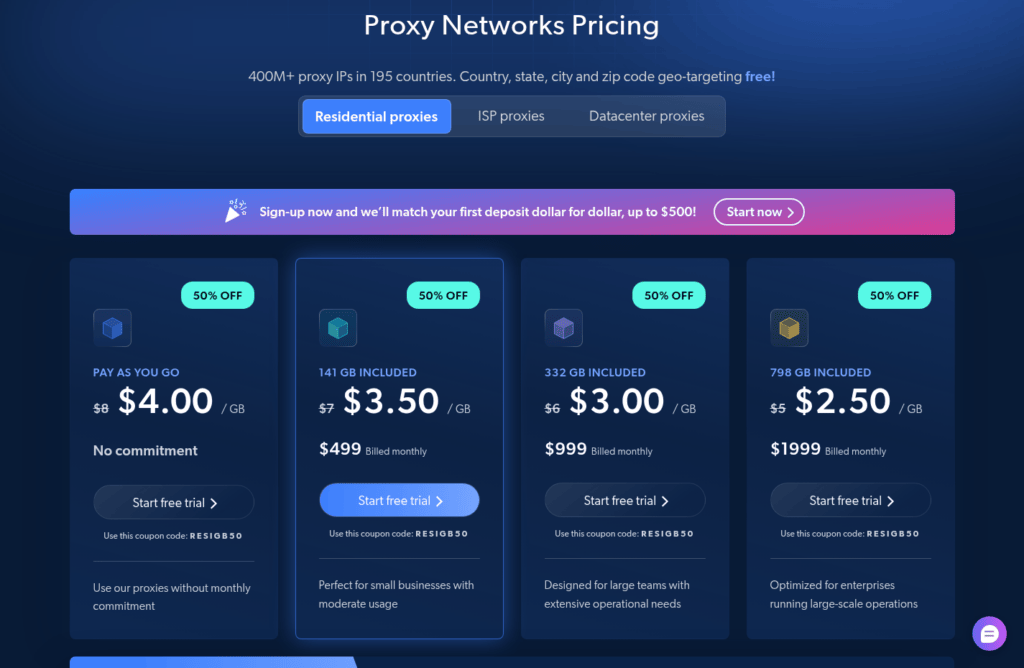
For a deeper look at how the residential-proxy side of this stack works (pool sizes, $4/GB PAYG, the difference between PAYG and committed plans), see our best residential proxies comparison.
For the IP-rotation and fingerprint side that sits underneath the anti-bot layer, see how to avoid getting blocked while scraping.
Every vendor above documents a bypass rate, but the actual return on a specific target (Cloudflare v5, DataDome v3, PerimeterX v4) is workload-specific and changes without notice. Confirm the published anti-bot success rate on your top three Cloudflare-class targets before locking in a plan.
FAQ
Which vendor has the best free tier?
Bright Data publishes 5,000 units a month on each of its APIs and ZenRows publishes 5,000 credits a month on a permanent plan, both without a credit card. ScrapingBee’s 1,000 credits are one-time rather than monthly, and Browserless’ 1,000 units a month come with a 2-concurrent-browser ceiling.
What is the cheapest paid plan in this list?
ScrapeOps’ aggregator at $9/month for 25,000 successful requests is the lowest entry price. ScrapingBee and ZenRows both start at $19/month (75,000 and 45,000 credits), and Browserless starts at $25/month for 20,000 units of browser time.
Which vendors bill for failed requests?
ScrapingBee (only successful HTTP 200/404/410/413 with transparent_status_code), ZenRows (failed and retried requests are free) and ScrapeOps (only successful requests are billed) do not charge for failures. Bright Data’s Web Unlocker still consumes bandwidth, Browserless bills browser time even on an empty page, and Apify bills compute units plus proxy traffic regardless of what came back.
Do I have to pick one web scraping API for everything?
No. The common production shape is one API for the bulk of traffic plus a fallback for Cloudflare-class targets. Because credits, compute units, browser units, rows and gigabytes are not comparable, the workload sections above pair the seven by use case rather than ranking them.
Is every vendor in this list linked as an affiliate?
No. Apify, Browse AI and ZenRows prohibit paid advertising on their trademarks, so they are named without affiliate or partner links. Bright Data, ScrapingBee, Browserless and ScrapeOps are the four that can carry an editorial link. The policy is on the affiliate disclosure page.
Bottom line: which web scraping API for which task
- Already writing Puppeteer / Playwright, want a managed Chromium fleet. Start with Browserless Free (1,000 units/month). Jump to Prototyping ($25/mo) if 2 concurrent browsers are too tight. Layer Bright Data Web Unlocker on top for anti-bot.
- Single URL, want HTML back with predictable per-request cost. ScrapingBee free trial (1,000 credits) or ZenRows Free (5,000 credits/month permanent). Move to Hobby / Build B1 at $19/mo once you validate the credit math on your web scraping api workload.
- Custom scraper or want to use someone else’s. Apify Free ($5/mo), validate the Actor, then $19/mo Starter once the runtime is stable.
- No code. Browse AI Free (50 credits) and record your first robot.
- Want to mix providers without managing each contract. ScrapeOps Proxy API ($9/mo, 25,000 successful requests).
- Heavy residential proxy + automated unblocking as the dominant cost. Bright Data Web Unlocker Free (5,000 requests) before committing to a Scale plan. Pair with our best residential proxies guide if your bandwidth bill is bigger than your request bill.
When two of these are equally true — the common case is “URL-in / HTML-out, but my targets are Cloudflare-class” — decide by meter. Per-success billing (ZenRows, ScrapeOps) wins at high success rate. Per-attempt (ScrapingBee, Bright Data) wins when every protected target must succeed and you tolerate paying for retries.
What we did not measure
Every figure that depends on a real workload — per-target success rates, anti-bot bypass rates, premium-site credit burn, Actor runtime variance — is flagged where it appears in the text rather than guessed. The numbers above describe pricing pages, not benchmark results. Treat the credit / unit / CU weights as inputs to your own model. Run a small pilot against your top three targets before locking in a plan.
Sources
- Bright Data: brightdata.com/pricing/web-scraper, brightdata.com/pricing/scraping-browser, brightdata.com/pricing/web-unlocker, brightdata.com/pricing/serp, brightdata.com/pricing/web-scraper/studio, brightdata.com/pricing/proxy-network.
- ScrapingBee: scrapingbee.com/pricing, scrapingbee.com/documentation.
- Browserless: browserless.io/pricing.
- ZenRows: zenrows.com/pricing, docs.zenrows.com/first-steps/pricing.
- Apify: apify.com/pricing, docs.apify.com/platform/account/billing, docs.apify.com/platform/actors/running/usage-and-resources.
- Browse AI: browse.ai/pricing, help.browse.ai/article/137-premium-sites.
- ScrapeOps: scrapeops.io/proxy-api-aggregator/, scrapeops.io/proxy-aggregator/.
How we tested this: every figure here is a price or a credit weight the vendor itself published, quoted in USD as displayed. Because credits, compute units, browser units, rows and gigabytes are not comparable, this article compares published terms rather than benchmark results: anything that depends on a real workload, such as per-target success rates, anti-bot bypass rates and Actor runtime variance, is flagged where it appears in the text instead of being estimated.
Ranking here means fit to a workload, not a score out of ten: the scoring criteria and the rule that bars us from linking vendors who prohibit trademark bidding are on the methodology page.
Disclosure: this article contains affiliate links. If you buy through them we may earn a commission at no extra cost to you. Commission never changes our scoring or the order of our rankings.