Apify vs Browse AI is the comparison teams run when they need to collect web data without writing a scraper from scratch. Both sit on the shortlist. Both charge $19 a month for the cheapest paid plan. Both advertise “no code needed.” The reason the choice is hard is that the two products don’t compete on the same axis. One is a programmable platform with a meter for memory and time. The other is a no-code recorder with a meter for extracted rows. The same job ends up on a completely different line of each bill.
The reading order below is deliberate. The article opens with a concrete workload — pulling ~1,000 product detail pages from a Premium e-commerce target every day. It then walks through how the job is set up and priced on each platform separately. Only after both implementations are priced does the article compare what the two bills actually look like, what they leave out, and what fails first when the workload changes.
Neither Apify nor Browse AI is linked as an affiliate here. Both prohibit paid advertising on their trademarks, so they can only appear as plain-text mentions. For the broader context on how managed scraping APIs price the same workload, and where residential proxies fit in, see our ScrapingBee vs ZenRows breakdown. See the best web scraping APIs roundup, the Bright Data review, and the best residential proxies guide.
The numbers below assume a steady-state success rate that varies by domain. Confirm the real per-page success rate on your own target before sizing a plan.
In short
Apify is a programmable platform: 8,000+ pre-built Actors in a marketplace, a hosted runtime for your own code, and a bill assembled from compute units (1 CU = 1 GB RAM × 1 hour), proxy traffic and storage. Browse AI is a no-code recorder whose meter is rows — 1 credit per 10 rows extracted, or per screenshot.
The same daily crawl of ~1,000 Premium-site pages lands at roughly $240–$260/month on Apify Scale and over 1,080,000 credits a year on Browse AI Premium, past the published 600,000-credit annual cap.
The Apify vs Browse AI case: pulling 1,000 product pages a day from a Premium e-commerce target
A common production workload in the Apify vs Browse AI comparison is the same on both sides: refresh a catalog of roughly 1,000 product detail pages from a Premium e-commerce target every day. Each page returns 10 structured rows — title, price, stock flag, seller, ratings, image URLs, and four category fields. The target uses rotating residential IP detection. It serves a captcha to repeated connections from a single IP. The scraper needs both residential proxies and captcha solving out of the box.
The shape of the workload matters because it pushes both products onto their more expensive meters. The target is Premium under both vendors’ definitions. Browse AI flags it as Premium and applies a minimum-credit multiplier per run. Apify’s residential proxies at $7–$8 per GB and the Unblocker service at $1–$1.50 per 1,000 requests stack on top of compute units for any Actor that scrapes it. The case is small enough to be a paying real workload, large enough to expose the meter, and not large enough to need Enterprise contracts.
The rest of the article walks through how that case is set up on each platform, what it actually costs, and what fails first when the workload grows past the published limits.
How the case is set up on Apify
Apify ships the workload as an Actor — a Docker container running Node.js or Python. For a Premium e-commerce target the practical setup is either an off-the-shelf Actor from the Apify Store (pay-per-event or pay-per-usage, ~8,000 listed at the time of writing) or a small custom Actor written against the target’s public pages. The Actor uses Apify Proxy residential for IP rotation and the Apify Unblocker service for captcha handling. Both are billed as separate line items.
The settings page exposes five knobs that drive the bill. Memory size sets the GB figure that multiplies every runtime hour into CUs. Timeout caps the wall-clock cost of a single page. Concurrency sets how many pages run at once. At 1,000 pages a day on a 30-second-per-page target that’s ~8.3 hours of wall-clock time sequentially. At 32 concurrent runs (Starter) and 128 concurrent runs (Scale) it compresses to under an hour. Storage sizing decides how much dataset / key-value / request-queue GB-hours the run consumes. Proxy choice decides whether residential or datacenter traffic is metered against the $7–$8 per GB residential rate or the included datacenter IPs.
The cost of a run is a function of those five knobs. The Actor runs 1,000 pages a day at 30 seconds each with 1 GB of RAM, residential proxies and the Unblocker enabled. At 32 concurrent runs (Starter) the wall-clock time is ~13 minutes, or 8.3 CU per day at 1 GB × 0.22 hours. At 128 concurrent runs (Scale) it compresses to under 4 minutes, or 2.7 CU per day. The residential traffic is roughly 10 GB per month at ~250 KB per page. The Unblocker requests depend on how often the captcha is served. Storage and dataset reads are small at this scale — sub-$1 per month.
The bill at each tier: $19 of prepaid platform usage on Starter at $0.20/CU plus $8/GB residential covers a few days of this workload before PAYG overage kicks in. The actual break-even tier is Scale ($199/mo prepaid, $0.16/CU, $7.50/GB residential, 128 concurrent) — the prepaid $199 plus an estimated $40–$60 of usage on top of prepaid (residential traffic dominates), for roughly $240–$260 per month. Below Scale the per-unit rate and the concurrency ceiling make the workload impractical; above Scale the workload fits on Scale with headroom.
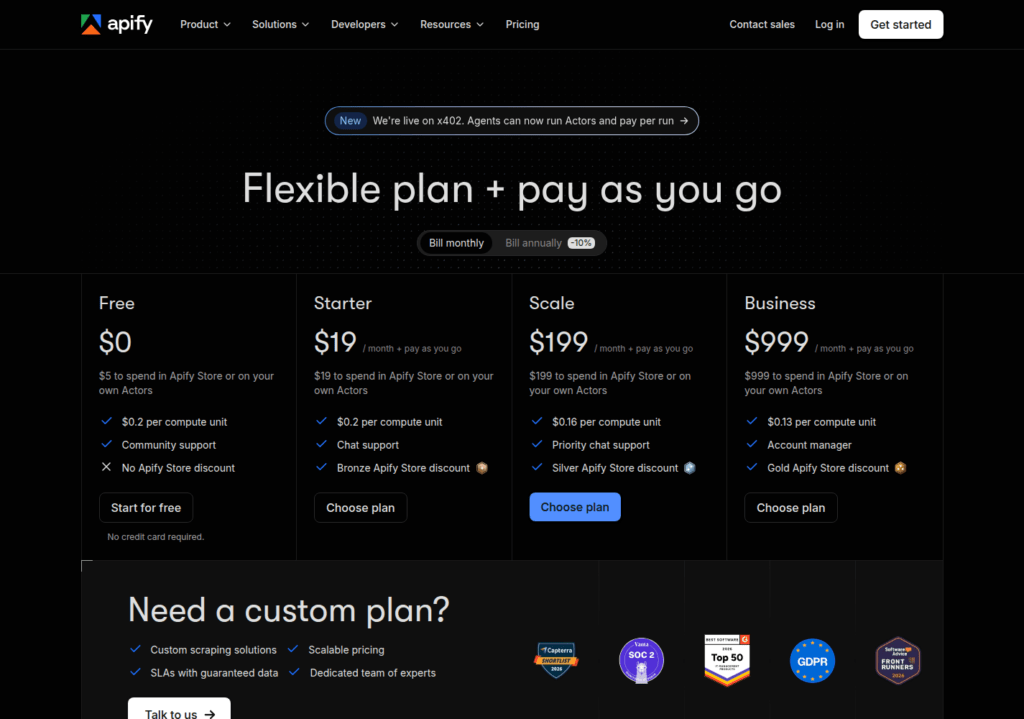
For the full Apify plan ladder and CU definition, see apify.com/pricing and docs.apify.com/platform/account/billing. For the compute-unit math (1 CU = 1 GB RAM × 1 hour), see docs.apify.com/platform/actors/running/usage-and-resources.
The prepaid usage does not roll over. A workload that exceeds $19 in a single month pays PAYG overage on top — confirm the day-one pilot fits inside the $19 Starter prepaid allowance before you start.
How the case is set up on Browse AI
Browse AI ships the same workload as a recorded robot. The user opens the recorder in Browse AI’s browser, clicks through to a product page, points at the data to extract, and saves the result as a robot. The robot reproduces the steps against any product URL on the same site and returns the structured rows, or runs on a schedule as a monitor.
The settings page exposes four knobs. Number of pages sets how many detail pages the robot opens in a single run. Capture rate sets how often the robot runs — daily, hourly, or on a trigger. Capture mode selects between extracting structured rows and taking screenshots; the row count and the screenshot count both consume credits. Premium-site handling is not a knob — Browse AI detects Premium targets automatically and applies a per-run minimum of 2–10 credits regardless of how many rows the run returns.
The cost of a run is a function of those four knobs plus the Premium-site multiplier. For 1,000 pages a day at 10 rows per page, the row credit is 1,000 credits per day — 30,000 credits per month at the 10-rows-per-credit rate. The Premium-site minimum adds 2 credits per run × 1,000 runs × 30 days = 60,000 credits per month on top. Total: 90,000 credits per month, or 1,080,000 credits per year.
The bill at each tier: Personal annual ($19/mo, 12,000 credits/year) is out at month two. Professional annual ($69/mo, 60,000 credits/year) is out at month eight. Premium annual ($500/mo, 600,000+ credits/year) is short by roughly 480,000 credits for this workload — there is no published tier above Premium, so the case as stated needs a sales contract.
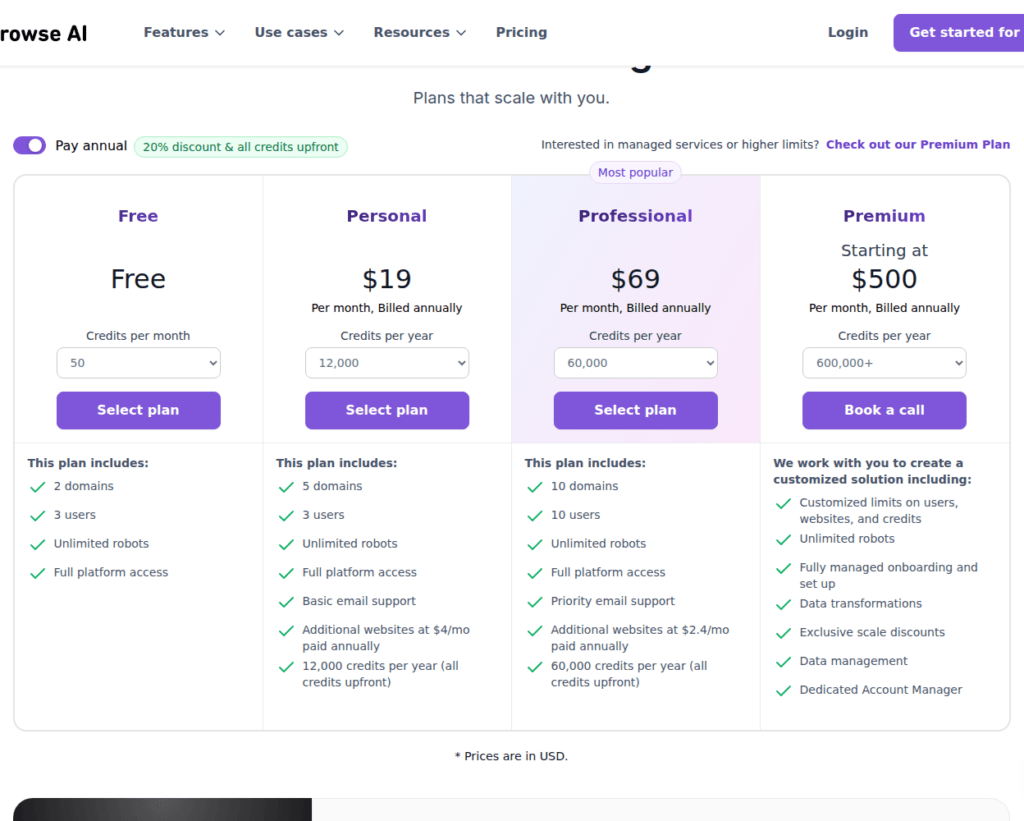
For the full Browse AI plan ladder and credit definitions, see browse.ai/pricing. For the Premium-site per-run credit range (2–10 credits), see help.browse.ai/article/137-premium-sites.
The 2–10 credit range varies by domain. A target that consistently triggers the high end of the range breaks Personal and Professional budgets faster than the published numbers suggest — confirm Browse AI’s per-run Premium-site minimum on your actual target before sizing a plan.
What the bill looks like on Apify
The Apify side of the Apify vs Browse AI comparison is a bill assembled from four metered products: compute units (memory × time), residential proxy traffic, Unblocker requests, and storage / dataset operations. The prepaid platform-usage allowance on each plan pays down those line items first. Once it is spent, pay-as-you-go overage kicks in. Overage is invoiced immediately once it reaches $20 on Starter and $200 on higher plans; below those thresholds it rolls into the next subscription invoice.
For the 1,000-page-daily Premium case at Scale tier ($199 prepaid, $0.16/CU, $7.50/GB residential, $1.25 per 1,000 Unblocker requests):
| Line item | Per day | Per month (30 days) |
|---|---|---|
| Compute (Actor at 1 GB × 0.22 h, 8.3 CU/day) at $0.16/CU | $1.33 | $40 |
| Residential proxy traffic (~10 GB/mo) at $7.50/GB | — | $75 |
| Unblocker (~30,000 requests/mo at 1,000/day) at $1.25/1k | — | $37.50 |
| Storage + dataset ops | — | < $1 |
| Platform usage subtotal | ≈ $153 | |
| Scale prepaid allowance | -$199 | |
| Estimated monthly bill | ≈ $240–$260 (prepaid + light usage) |
A 2× growth in pages (2,000/day) keeps the same bill structure but doubles the residential and Unblocker lines, lifting the platform usage to ~$300/month on top of the $199 prepaid. A 5× growth (5,000/day) requires the Business tier ($999/mo prepaid, $0.13/CU, $7/GB residential, $1.00/1k Unblocker, 256 concurrent) to fit the concurrency ceiling; the per-CU and per-GB savings partly offset the bigger prepaid allowance.
What the bill looks like on Browse AI
The Browse AI side of the comparison is a single number: credits consumed, plus the Premium-site minimum per run. Credits reset at the start of each billing cycle and do not roll over. The one exception is a plan upgrade, where the unused balance of the previous plan is added on top of the new plan. There is no pay-as-you-go overage path. Once the credits are spent, the robot stops until the cycle renews.
For the 1,000-page-daily Premium case:
| Tier | Plan credits/year | Case usage/year | Outcome |
|---|---|---|---|
| Personal annual | 12,000 | 1,080,000 | out at month two |
| Professional annual | 60,000 | 1,080,000 | out at month eight |
| Premium annual | 600,000+ | 1,080,000 | short by ~480,000; needs sales contract |
A 2× growth in pages pushes annual usage past 2 million credits — well above any published tier. A 10× reduction (100 pages/day instead of 1,000) puts the case at ~108,000 credits/year, which fits Professional annual with headroom but still exceeds Personal annual. Browse AI’s published plan ladder does not have a tier that matches the 1,000-pages-daily Premium case cleanly; the product is shaped for row-bound workloads at a smaller scale.
Where the two bills diverge
Reading the two side-by-side, the Apify vs Browse AI comparison shows three structural differences that don’t show up in the headline price.
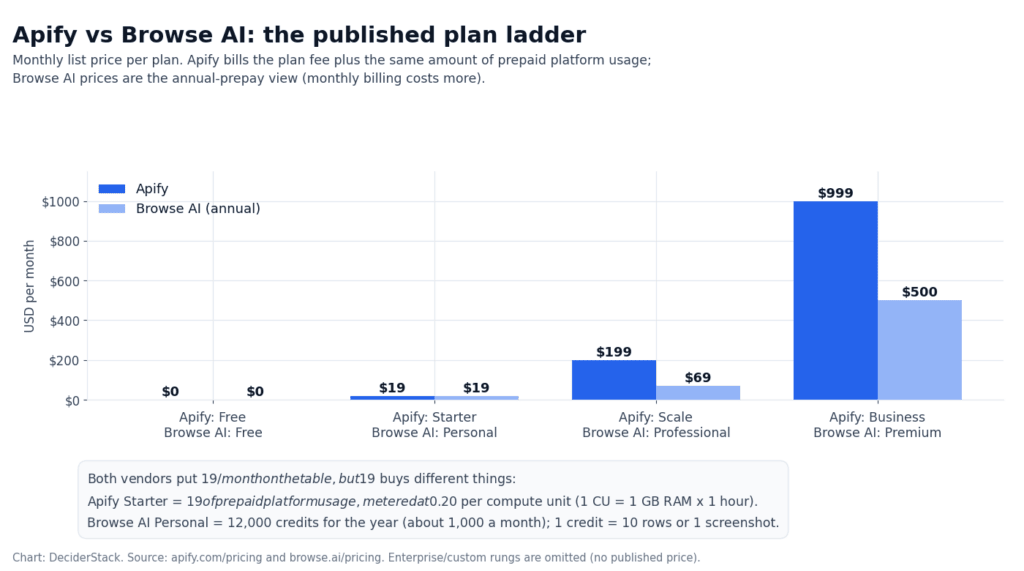
Meter shape. Apify bills for memory × time + bandwidth. Browse AI bills for extracted rows. A workload that returns a lot of rows from few pages is cheap on Browse AI and expensive on Apify. A workload that returns few rows from many pages with heavy JS rendering is the opposite. The Premium-site multiplier on Browse AI compounds this. The per-run minimum is the same regardless of row count, so a sparse-but-protected workload pays a fixed premium for every run.
Headroom under the cap. Apify’s PAYG overage path means a workload that briefly exceeds the prepaid allowance keeps running and the overage is invoiced at the next threshold ($20 on Starter, $200 on higher plans). Browse AI has no overage path — the robot stops when the credits run out, and the only way to keep it running is to upgrade the plan or wait for the cycle to renew. For a daily monitor that drops the catalog, the Apify failure mode is a noisy invoice; the Browse AI failure mode is a stale data feed.
Concurrency ceiling. Apify publishes explicit concurrency caps: 5 (Free), 32 (Starter), 128 (Scale), 256 (Business). Browse AI does not publish a hard concurrency cap; the platform load and the credit budget are the effective constraints. For a workload with a wall-clock budget (a daily refresh must finish before business hours) the Apify cap is a feature — predictable runtime, predictable concurrency cost. The Browse AI cap, where it exists, is implicit.
Both free tiers are enough to validate the platform against a real workload — confirm both products work against your actual target before committing to either. Apify’s $5 prepaid usage covers a few hundred page requests. Browse AI’s 50 free credits cover 5 runs at the 10-row rate.
Maintenance and billing hygiene on each side
Apify. Prepaid usage never rolls over — every monthly cycle the $5 (Free) or $19 (Starter) allowance resets; once it is spent, services are blocked on Free or PAYG overage kicks in on paid plans. Overage is invoiced immediately at $20 on Starter and $200 on higher plans. Annual billing saves 10%. Discounts: 30% off Starter and Scale for students, 30% off Scale for startups, custom discounts for nonprofits and universities. Apify publishes an agentic payment path (x402 / MPP crypto rails at agi.apify.com) that lets an agent pay per run without a registered account using a temporary token with a spend cap. Payment methods are managed inside Apify Console; Enterprise contracts move to invoiced wire.
Browse AI. Credits reset every cycle and never roll over except on plan upgrade (unused balance of the previous plan is added on top of the new plan). Annual prepay saves 20% — Personal drops from $48/mo monthly to $19/mo annual; Professional drops from $87/mo to $69/mo. Additional discounts for nonprofits, educational institutions and startups are available through sales. Refunds are covered by a 60-day satisfaction guarantee per the Refund Policy. Currency is USD only; payment is credit card only via Stripe — no wire transfer on standard plans. The annual credit pack is granted up front, so a buyer who prepays for Personal in January gets 12,000 credits that month.
In practice, Apify’s bill grows in PAYG increments once you exceed the prepaid allowance, Browse AI’s bill resets to a fixed credit allowance on the renewal date. The risk on Apify is a runaway Actor burning CUs overnight; the risk on Browse AI is running out of credits mid-month with no overage path.
What neither vendor publishes
Both Apify and Browse AI leave gaps that pricing pages and help docs do not fill, and that matter for the case above.
Apify. The per-Actor success rate on a Premium target is not published; Store Actors are rated by users, but the rating is for the Actor generally, not for any specific target. The Unblocker cost per 1,000 requests assumes a captcha is served and solved on a fraction of requests; the actual rate depends on the target. Third-party Actors in the Store may charge on top of platform usage, and the published CU rate does not include their event fees — that is per-Actor. Pay-per-event Actors are billed separately from the platform usage allowance and can run into the hundreds of dollars per month for a busy robot.
Browse AI. The Premium-site multiplier range (2–10 credits per run) is published, but the per-domain mapping is not — there is no public list of which sites are Premium at which multiplier. The effective per-row credit cost on a Premium target is therefore unknown until the robot is run against that target. The free tier’s 50 credits/month is enough to test the recorder against one Premium target, but not enough to characterize the credit burn across the full domain.
In both cases the cost you measure on your own workload is the only number the pricing pages cannot give you. Run the free tier or a small paid pilot against your real target before committing.
Frequently asked questions (FAQ)
Which is cheaper for a daily 1,000-page Premium crawl?
The worked example in this article lands at roughly $240–$260/month on Apify Scale and over 1,080,000 credits a year on Browse AI Premium, past the published 600,000-credit annual cap. Below the Premium tier, Browse AI’s published plans cannot fit the workload at all.
Can Apify’s prepaid usage roll over?
No. The $5 (Free) or $19 (Starter) allowance resets every cycle and expires unused. Once it is spent, pay-as-you-go overage starts and is invoiced when the unbilled usage crosses $20 on Starter and $200 on higher plans.
What does a protected site cost on each?
Apify meters it: residential proxies at $7–$8 per GB and the Unblocker service at $1–$1.50 per 1,000 requests. Browse AI folds it into the credit price — targets that need rotating residential IPs and captcha solving are flagged Premium and cost a minimum of 2–10 credits per run regardless of how many rows you extract.
Can I run my own code?
On Apify, yes — an Actor is a Docker container running Node.js, Python or any other Docker-friendly language, deployable on Apify’s infrastructure and schedulable there. Browse AI publishes no custom code path and no hosted runtime; the recorder is the runtime.
Do credits roll over?
Neither vendor rolls credits over by default. Browse AI’s one exception is a plan upgrade, where the unused balance of the previous plan is added on top of the new plan. Apify’s prepaid usage expires at the end of every cycle.
Is there a discount for annual billing?
Apify publishes 10% off on annual billing, plus 30% off Starter and Scale for students and 30% off Scale for startups. Browse AI publishes 20% off on annual prepay — Personal at $19/month instead of $48/month, Professional at $69 instead of $87.
What if the workload is row-bound and small?
A row-bound job — a small set of pages, monitored on a schedule, returning structured rows or change-detection alerts — fits Browse AI’s credit model well. A daily monitor on 10 detail pages with 10 rows each costs ~3 credits/day (row credits) plus the Premium-site minimum if applicable. That is well within the 50-credit free tier for a pilot and within Personal annual for production.
Bottom line
For the 1,000-pages-daily Premium-e-commerce case in this Apify vs Browse AI comparison, Apify is the practical fit. Scale tier at $199 prepaid plus $40–$60 of platform usage covers the workload with concurrency headroom, pay-as-you-go overage for spikes, and explicit caps that make the run-to-run cost predictable. Browse AI’s credit meter hits its published cap within eight months on Professional annual and exceeds the Premium annual allowance by ~480,000 credits. The workload would require a sales contract above the published tier ladder.
The shape that diverges is the workload, not the vendor. A row-bound job — a small set of pages monitored for change on a schedule — fits Browse AI’s recorder and credit model. The Premium-site multiplier applies but the absolute counts stay within the published tiers. A memory-and-time-bound crawl with pagination, custom headers, retries and the need to compose proxies and captcha solving yourself fits Apify’s platform model. The bill is harder to forecast but it scales linearly with the actual runtime and bandwidth. In an Apify vs Browse AI decision the team shape decides the answer. A technical team that wants full control over proxies and concurrency picks Apify. A non-technical team with a small row-bound monitor picks Browse AI.
Both vendors publish a free tier that is enough to confirm the platform or recorder works against the real target. Spend the free credits before signing anything.
How we tested this: plan prices, CU rates, credit multipliers, proxy rates and free-tier limits come from apify.com/pricing, docs.apify.com/platform/account/billing, browse.ai/pricing and help.browse.ai/article/137-premium-sites, and are quoted in USD as displayed. We have not run a paid Apify or Browse AI account, so figures that depend on real-world Actor success rates, monitored-job reliability, anti-bot bypass rates or premium-site credit burn are flagged where they appear in the text instead of being estimated.
Our scoring criteria and the rule that bars us from linking vendors who prohibit trademark bidding are documented on the methodology page.
Disclosure: this article contains affiliate links. If you buy through them we may earn a commission at no extra cost to you. Commission never changes our scoring or the order of our rankings.