Most of the questions about ScrapingBee come down to one number: how many credits a single request actually costs once you turn on JS rendering, premium proxies, or stealth. The pricing page lists five plan tiers; what most teams miss is that the cost per request swings from 1 credit to 75 credits depending on which features are on, and three of those features are gated to specific plans regardless of how many credits you have left on the account. This ScrapingBee review walks through that math, plan by plan, and shows where it stops making sense against Bright Data or running your own browser with Browserless.
Everything below is from the official ScrapingBee pricing and documentation pages, captured in September 2026, ex-VAT. Figures that need a paid account to verify — real-world success rates, geo accuracy, anti-bot bypass rate — are flagged where they appear rather than estimated. We also have a side-by-side in ScrapingBee vs ZenRows if you are choosing between those two specifically.
In short
ScrapingBee is a single credit-based scraping API. One endpoint, a credit counter, a per-request cost that ranges from 1 credit (classic, no JS) to 75 credits (stealth + JS).
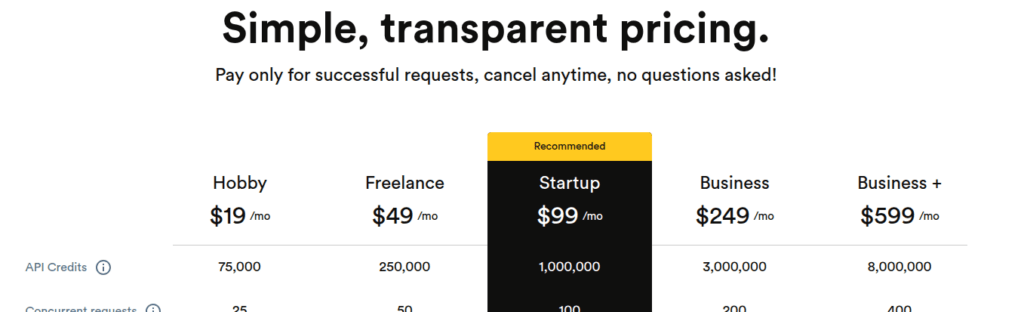
The cheapest paid plan is Hobby at $19/month for 75,000 credits; premium and stealth proxies only unlock on Business ($249/month) and Business+ ($599/month). Concurrency is hard-capped per plan — ScrapingBee returns 429 on overflow rather than auto-upgrading.
The verdict in short
One endpoint, one credit ladder, no onboarding calls. For a developer or a small team that can match its workload to a plan, the monthly bill comes down to the plan price.
| Vendor | ScrapingBee (scrapingbee.com) |
| Category | Credit-based managed scraping API |
| Free trial | 1,000 credits on signup, no credit card |
| Entry price | $19/month (Hobby, 75,000 credits, 25 concurrent requests) |
| Credit costs | 1 / 5 / 10 / 25 / 75 per successful request (classic → stealth + JS) |
| Premium and stealth proxies | Gated to Business ($249/month) and Business+ ($599/month) |
| Concurrency | Hard-capped per plan (25/50/100/200/400); 429 on overflow |
| Prices checked | Against the vendor pages. |
How many credits does a request actually use
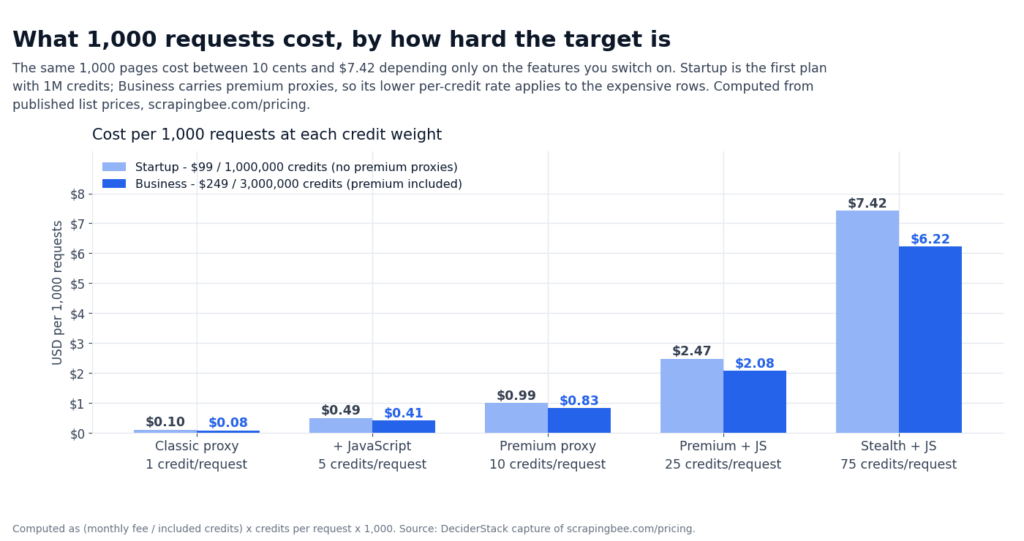
The plan table says $19/month for 75,000 credits. That tells you what you pay the vendor; it does not tell you what each request costs once features are turned on. ScrapingBee’s credit-cost table is what decides whether you stay inside the plan or blow past it on day three.
| Configuration | Credits per successful request |
|---|---|
| Classic proxy, no JS | 1 |
| Classic proxy, with JS rendering | 5 |
| Premium proxy, no JS | 10 |
| Premium proxy, with JS rendering | 25 |
| Stealth proxy, with JS rendering | 75 |
| AI extraction / scraping helpers | +5 on top of the base cost |
| Auto mode | Cheapest successful config (1/5/10/25/75); 0 if all fail |
Auto mode is the default for new accounts. ScrapingBee tries the cheapest configuration, escalates only if needed, and bills the cheapest that worked. Cap the spend on any single request with max_cost=N so a stealth-required target cannot silently burn 75 credits on every retry. Once you know which configurations succeed against your real targets, lock them explicitly — auto mode hides the per-request cost, which makes monthly forecasting harder.
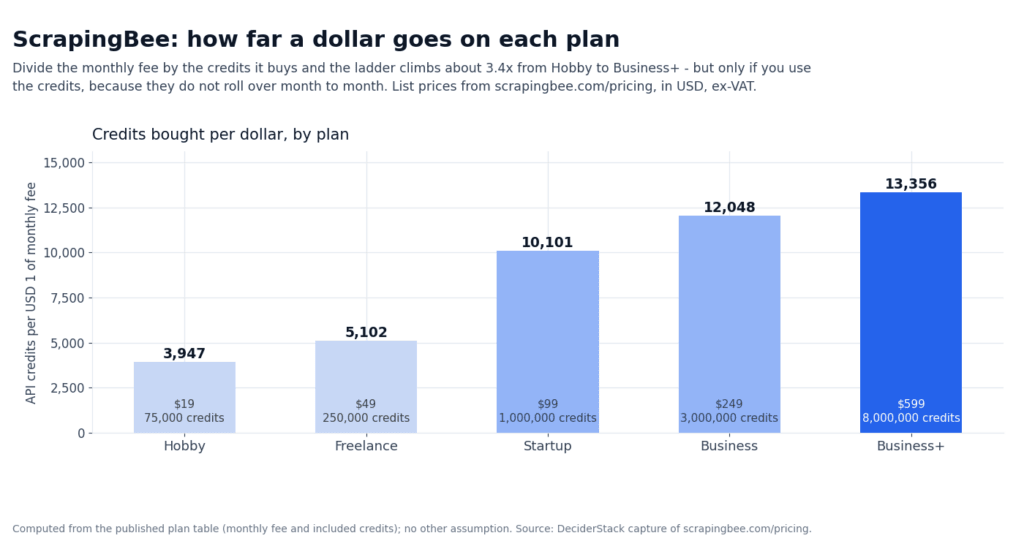
A worked example makes the gradient sharper, and it is the easiest way to spot whether your plan is the right one:
- 100,000 simple requests per month on classic, no JS: 100,000 credits. Fits Hobby ($19, 75,000 credits) only if you push it; Freelance ($49, 250K credits) covers it with headroom.
- 100,000 requests with JS rendering on classic: 500,000 credits. Needs Startup ($99, 1,000,000 credits).
- 100,000 requests on premium proxy with JS: 2,500,000 credits. Needs Business ($249, 3,000,000 credits).
- 100,000 requests on stealth proxy with JS: 7,500,000 credits. Does not fit any standard plan — you call sales.
The last row is the one that surprises most teams. Stealth is positioned as the catch-all anti-bot mode, but at 75 credits per request it is six times more expensive than premium-with-JS and 75 times more expensive than classic-without-JS. The only sane pattern is to default to classic or premium, then escalate specific targets to stealth.
What happens when you blow past the limit
ScrapingBee does not auto-upgrade you. There is no overage fee, no usage-based top-up, no “we’ll just keep going and bill you at the end.” You hit the cap and the API stops working for you until the cycle rolls over.
The specific edges:
- Concurrency is hard-capped per plan. Hobby/Freelance/Startup/Business/Business+ ship with 25/50/100/200/400 concurrent requests. Hit the cap and you get a 429 — the call is not queued, it is rejected. There is no auto-upgrade mid-month. ScrapingBee does not publish a fair-use burst policy above the documented cap; 429s on overage are strict under the published plan terms.
- Monthly credits do not roll over. Anything you do not use in the billing cycle is lost. PAYG is not offered; you buy a plan.
- Successful delivery is broadly defined. By default, codes 200, 404, 410 and 413 are billable. With
transparent_status_code=true, every sub-500 code is billable. 5xx responses and ScrapingBee-side failures are not billed. - No public SLA. Response-time targets show up on the status page informally; there is no contractual uptime number on the standard plans. Enterprise contracts are the only place an SLA exists.
- No KYC. Signup is email + card on every self-serve plan. There is no compliance call, no ID check, no invoice requirement to start scraping.
The second-to-last bullet matters if your target returns a lot of soft-404 or 410 “gone” states — every one of those is a billable credit. If you scrape a directory of removed products, the published credit costs understate what your workload actually spends.
Is the ScrapingBee premium proxy worth the plan jump
Premium proxies sit at 10 credits per request without JS, 25 with JS — roughly five times the classic cost — and they are gated to Business ($249/month) and Business+ ($599/month). Hobby, Freelance and Startup plans cannot buy premium or stealth proxies regardless of how many credits are on the account. So the question is not “should I switch to premium on my current plan.” It is: does your workload justify the $249/month floor in the first place?
Premium is worth the jump when:
- Your target returns a meaningful share of 403s or empty responses on classic datacenter IPs, and switching to residential reputation alone fixes it. The success-rate delta on representative protected targets is workload-specific — confirm it on your top three before budgeting the premium-proxy upgrade.
- You scrape targets in multiple countries and the country-level targeting on Business+ is a real product requirement rather than a nice-to-have.
- You want one of the dedicated vertical APIs (Amazon, Google Search, Fast Search, YouTube, ChatGPT, Walmart) — those are Business and Business+ only, and they return parsed JSON instead of HTML you have to parse yourself.
Premium is not worth the jump when:
- Your targets are open or lightly protected. Classic proxy at 1–5 credits per request is the right tool, and the price per request stays low.
- Your volume is under 250,000 credits per month. Startup at $99 covers 1,000,000 credits on classic; for a workload that fits Freelance, there is no premium path.
- You actually need stealth (75 credits/request). Premium will not help against Cloudflare or DataDome; only stealth does, and you can only escalate to stealth once you have already paid for Business.
The trap is the second bullet. Teams on Hobby who want premium reputation pay $249/month for the plan, then still pay 25 credits per premium-JS request. That math only works if the higher success rate means fewer retries overall, and that is exactly the figure we cannot publish without a paid account.
When your own browser is cheaper
ScrapingBee is at its best when you want one HTTP endpoint that returns HTML, with JS rendering and proxy rotation handled for you in the same call. The moment your workload needs full programmatic control over the browser — clicking, custom waits, intercepting network requests, recording sessions — you start paying for capabilities you do not use, and a self-hosted Puppeteer or Playwright stack starts looking cheap.
The break-even points we see most often:
- You need a browser you can drive. ScrapingBee returns HTML after a headless Chromium render; it does not expose the browser. If you want
page.click(),page.waitForSelector, or Playwright trace recording, Browserless is the managed version of that — same managed infrastructure, but you bring the browser code. Residential proxies are 6 units per MB on top of base browser time there. - You scrape one vertical heavily. ScrapingBee’s dedicated APIs (Amazon, Google, YouTube, Walmart, ChatGPT) ship on Business+. If 80% of your traffic is one of those, the maintained parser is worth the tier jump. If you scrape ten verticals at low volume each, you pay the Business+ floor for parsers you use once a month.
- You want to negotiate. ScrapingBee has no published Enterprise tier. The custom pricing exists — you call sales — but the self-serve plans are the only contract most teams will ever see. Bright Data publishes PAYG rates on every product except Residential, and you can set spend caps in the dashboard. That flexibility matters once your bill gets large enough that monthly plans feel rigid.
A self-hosted stack is cheaper than ScrapingBee when you can keep utilization high. A single Playwright instance running ten contexts at 70% CPU costs a few dollars a month on a modest VPS. It is not cheaper once you start needing residential proxy breadth, fingerprint rotation, or CAPTCHA solving — that is exactly what ScrapingBee’s premium and stealth tiers are selling, and building it in-house is a part-time job.
The honest summary: if your priority is “send a URL, get HTML back,” ScrapingBee wins. If your priority is driving Playwright against a hosted browser with your own proxy logic, Browserless wins. If your priority is residential proxy breadth at scale with managed anti-bot unblocking, Bright Data wins. We cover the three side-by-side in our comparison of the best web scraping APIs.
FAQ
How much does one ScrapingBee request actually cost?
1 credit on classic proxy without JS, 5 credits with JS rendering, 10 on premium proxies, 25 on premium proxies with JS, and 75 on stealth proxies with JS. AI extraction helpers add 5 credits per call on top of the base.
Is there a free trial?
Yes — 1,000 credits on signup, no credit card. Enough to confirm the API works against your target; not enough to benchmark steady-state success rates.
Which response codes are billable?
200, 404, 410 and 413 are billable by default; with transparent_status_code=true every sub-500 code is. 5xx and ScrapingBee-side failures are not billed.
Can I use premium or stealth proxies on Hobby, Freelance or Startup?
No. Both are gated to Business ($249/month) and Business+ ($599/month) regardless of how many credits are left on the account.
Do unused credits roll over?
No. Credits are monthly and expire at the end of the billing cycle. PAYG is not offered.
What does ScrapingBee’s auto mode do?
It tries the cheapest configuration that succeeds and bills that; if every option fails the call is free. max_cost=N caps the spend on a single call.
What happens when I hit the concurrency cap?
You get a 429 — the request is rejected, not queued. ScrapingBee does not auto-upgrade mid-month; you either wait for the cycle to roll over or upgrade the plan.
Does ScrapingBee require KYC?
No. Signup is email + card on every self-serve plan; there is no compliance call or ID check. Enterprise contracts may add invoicing, but no plan in the standard lineup runs KYC.
Verdict
ScrapingBee in 2026 is the cleanest managed scraping API for a developer or a small team that wants one endpoint, predictable per-request cost, and no onboarding friction. The free trial is generous, the API surface is small, and the credit model is easy to reason about — once you have matched your workload to a plan, the monthly bill is the plan price.
The ceiling shows up the moment you need premium proxies at scale, US-state geo, or stealth anti-bot bypass on more than a fraction of your traffic. Premium and stealth are gated to Business and Business+ regardless of how many credits you have, and stealth’s 75-credit cost is steep enough that you have to use it surgically rather than as a default mode. Concurrency is a hard ceiling — 429s on overflow, no auto-upgrade.
For a single developer or a small team scraping tens of thousands of pages a month off open or lightly protected targets, Hobby at $19/month is the cheapest entry point in this whole category. For teams scraping millions of pages a month off protected targets, the math flips toward Bright Data’s Web Unlocker API or a self-hosted Browserless + residential proxy stack. The 1,000 free credits are enough to settle the question: run them against your real target with max_cost=10 set. Review tables size the order of magnitude, but only your own traffic tells you whether a target needs premium or stealth.
How we tested this: prices, credit costs and plan limits come from ScrapingBee’s own pricing page and documentation, captured in September 2026, and are quoted ex-VAT. We have not run a paid ScrapingBee account against a representative workload, so figures that depend on real-world success rates, geo accuracy or anti-bot bypass rates are flagged where they appear in the text instead of being estimated.
Scoring criteria and our correction policy are documented on the methodology page.
Affiliate disclosure: this article contains affiliate links. If you buy through them we may earn a commission at no extra cost to you. Commission never changes our scoring or the order of a ranking.