The “ScrapingBee vs Scrapy” question is not really a head-to-head. ScrapingBee sells one HTTP endpoint that returns HTML, JSON or a screenshot for a URL, billed per credit. Scrapy is a Python framework you install, configure, and run on your own infrastructure, billed only as the server time and proxies you point it at. The two compete for the same line item in a data team’s stack — the part that fetches pages — but they answer it from opposite directions. Picking between them means deciding whether you want to send a request and forget, or own the whole crawl pipeline. This article walks through both, with prices, code shapes, and the operational bill on each side, captured in late September.
In short
ScrapingBee is a managed scraping API: you POST a URL, you get HTML back, and the vendor runs the headless browser, the rotating proxies, and the anti-bot work for you. Scrapy is an open-source Python framework: you write a Spider class, run scrapy crawl (or call CrawlerProcess from a script), and you operate the headless browser, the proxy pool, and the retry/back-off policy yourself.
For a 10,000-page workload with mixed JS rendering, the arithmetic lands at roughly the same dollar value on a Hobby plan — but the engineering bill is very different. ScrapingBee is cheaper when you count engineering time, Scrapy is cheaper when you count subscription dollars and you already have a Python team.
The verdict in short
ScrapingBee and Scrapy are not competing products — they sit on opposite sides of the build-vs-buy line. ScrapingBee is the answer when you want an endpoint and a credit bill. Scrapy is the answer when you want a framework and an engineering team.
ScrapingBee vs Scrapy at a glance
| ScrapingBee | Scrapy | |
|---|---|---|
| Type | Managed scraping API (SaaS) | Open-source Python framework |
| Install | Sign up, get an API key | pip install scrapy, requires Python 3.10+ |
| Primary interface | HTTP endpoint: GET /?url=...&render_js=true&api_key=... | Spider class: subclass scrapy.Spider, define parse() |
| Pricing model | Credit-based — 1, 5, 10, 25 or 75 credits per request depending on features | Free (BSD-3-Clause); you pay for servers, proxies and any commercial middleware |
| Free tier | 1,000 one-time credits at signup, no card | The framework itself (you still need a host and proxies) |
| Cheapest paid plan | Hobby — $19/mo, 75,000 credits | n/a |
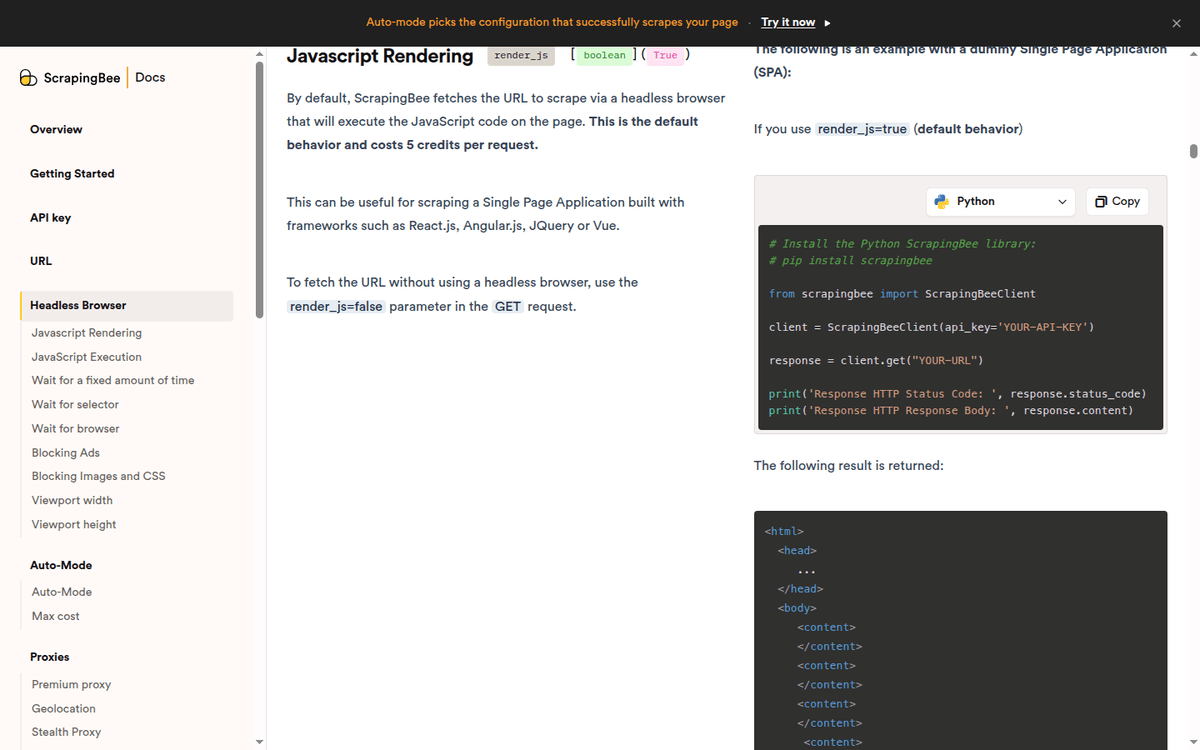
| JS rendering | Built-in (render_js=true, +5 credits) | Built-in via Twisted/asyncio download handlers; browser rendering requires scrapy-playwright or scrapy-selenium |
| Rotating proxies | Built-in (classic pool on Hobby/Freelance/Startup; premium on Business $249+) | Built-in proxy middleware; rotation via third-party packages (scrapy-rotating-proxies) or a gateway proxy URL |
| Anti-bot bypass | Premium proxies (10/25 credits) + stealth tier (75 credits, Business+) — gated to $249+ plans | No built-in bypass; requires scrapy-zyte-api, Bright Data plugin, or your own stack |
| Concurrency | Plan cap, HTTP 429 on overflow (25 → 400 across plans) | CONCURRENT_REQUESTS (default 16), CONCURRENT_REQUESTS_PER_DOMAIN (default 1, with a documented fallback of 8 — the value Scrapy falls back to when no per-domain setting is configured) — fully configurable |
| Persistence | Stateless — each request is independent | Persistent scheduler with resume/cancel via JOBDIR; SQLite-backed queues in 2.19 |
| Code line count to scrape a single page | ~3 lines (HTTP GET with API key) | ~10–30 lines (Spider subclass + Item + parse callback) |
| Language | Any HTTP client (Python, Node, curl) | Python only |
| Steeper learning curve | Low (HTTP) | Medium-high (Twisted reactor, asyncio, settings.py, item pipelines) |
| Maintenance | Vendor maintains endpoints, browsers, proxy pool | You maintain Scrapy itself (currently 2.19.0), Python version, plugins, proxies |
| Maintained by | ScrapingBee (vendor) | Zyte (formerly Scrapinghub) and 800+ contributors, BSD-3-Clause |
| Latest stable release (capture) | API stable through latest capture | 2.19.0, with experimental aiohttp handler and a Scrapy MCP server |
| GitHub stars (capture) | n/a (closed-source) | 64.5k stars, 12k forks |
Sources: scrapingbee.com/pricing and scrapingbee.com/documentation; docs.scrapy.org/en/latest/news.html and github.com/scrapy/scrapy.
What each thing actually is
ScrapingBee is a managed HTTP API. You make a GET request to its endpoint, pass the target URL plus a handful of feature flags, and it returns the rendered HTML, a JSON document or a screenshot. The vendor runs the headless browser fleet, the rotating proxy pool, and the anti-bot middleware on its side. Your integration is “send URL, get HTML” — and your bill is per credit.
Scrapy is a framework. You install it (pip install scrapy), generate a project (scrapy startproject myproject), write a Spider class, and run scrapy crawl. The framework gives you a Twisted-based (or, since 2.19, asyncio-based) reactor, a downloader, a scheduler, an item pipeline, and a middleware stack — but every piece is yours to operate. Browser rendering is a third-party download handler (scrapy-playwright), proxy rotation is a third-party middleware (scrapy-rotating-proxies), and anti-bot bypass is another plugin (scrapy-zyte-api). You assemble the stack yourself.
The asymmetry explains everything that follows. ScrapingBee charges per credit because it absorbs the engineering cost into a flat-rate API. Scrapy is free because you absorb the engineering cost into your own team.
The 2026 state of both projects
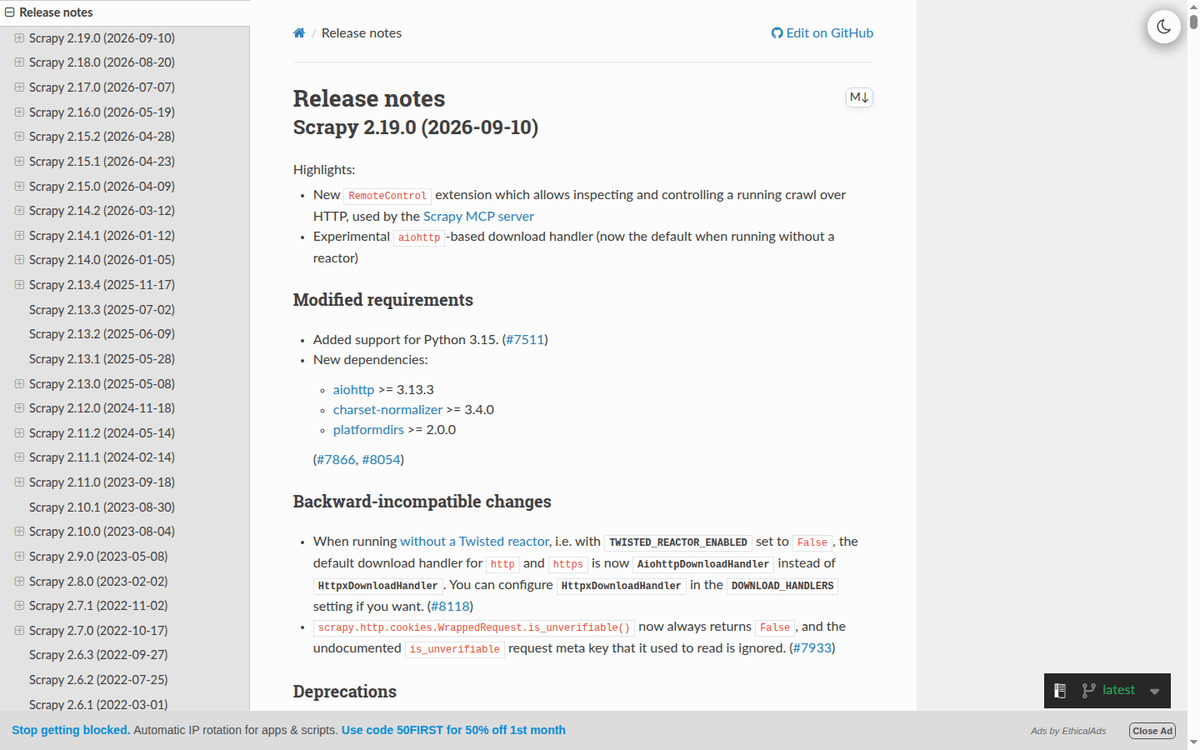
Both are alive and shipping. Scrapy 2.19.0 landed in September (per docs.scrapy.org/en/latest/news.html), with two notable changes: a new RemoteControl extension that exposes a running crawl over HTTP. The same primitive powers the new official Scrapy MCP server — and an experimental aiohttp-based download handler that becomes the default when you run Scrapy without the Twisted reactor (TWISTED_REACTOR_ENABLED=False). The release also adds SQLite-backed scheduler queues (so an unclean shutdown cannot corrupt the on-disk queue) and a DOWNLOAD_DELAY_JITTER setting to replace the older ±50% toggle. A separate advisory shipped in Scrapy 2.14.2 (in March) — cwxj-rr6w-m6w7 — closed a path where Referrer-Policy header values were executed as Python callables, and tightened POST-301 redirect handling. The repository shows 64.5k stars and 12.0k forks, BSD-3-Clause licensed, maintained by Zyte and roughly 800 contributors.
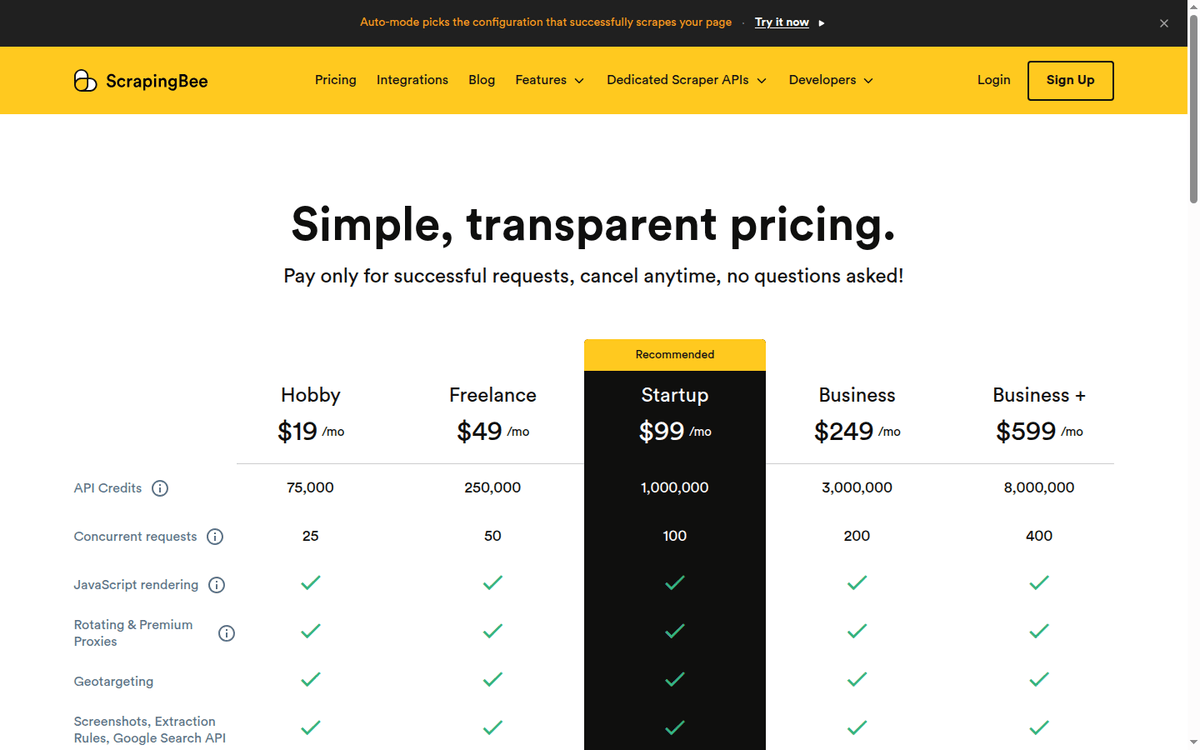
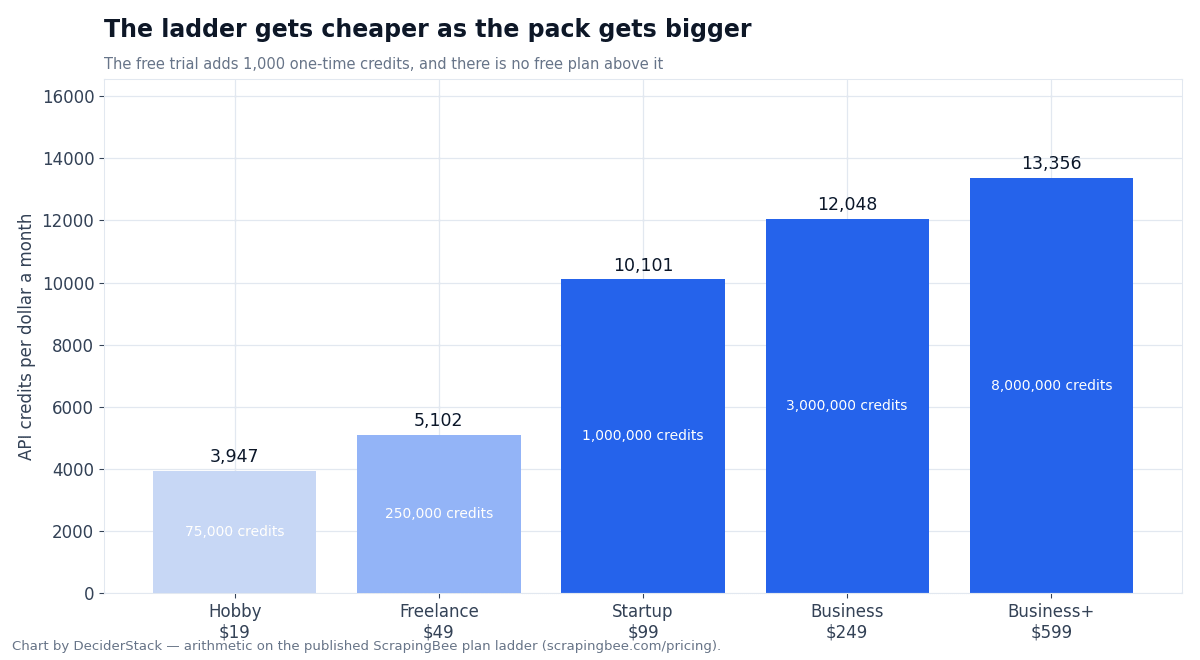
ScrapingBee does not publish a public changelog the way Scrapy does. What changes between captures is the credit weights, the plan ladder, and the feature flags (auto mode, transparent status codes, geotargeting, dedicated vertical APIs). On the latest capture, the credit weights were 1 / 5 / 10 / 25 / 75 and the plan ladder ran from a free trial (1,000 credits) through Business+ at $599/month (8 million credits, 400 concurrent, multi-region geotargeting, dedicated vertical-API add-ons for specific target categories). The exact country-level granularity of the geotargeting flag and the list of vertical add-ons should be re-checked against the live pricing page before procurement.
Per-target success rates, JS-render latency, and the cost difference between auto mode and explicit feature flags need a paid-account benchmark. Pick the platform that returns a published credit weight or proxy rate that maps to your workload, then run a paid pilot against your actual targets before sizing the contract.
Code paths: same task, two worlds
A worked example makes the structural difference visible. Suppose you need to fetch the rendered HTML for a list of 50 product URLs, follow the next-page link if present, and extract title and price. The same task looks like this on each side.
ScrapingBee, three lines per page
import requests

API_KEY = "YOUR_API_KEY"
url = "https://example.com/product/123"

resp = requests.get(
    "https://app.scrapingbee.com/api/v1/",
    params={
        "api_key": API_KEY,
        "url": url,
        "render_js": "true",   # +5 credits
        # "premium_proxy": "true",  # +25 credits, requires Business plan
        # "stealth_proxy": "true",  # 75 credits, requires Business+
    },
    timeout=30,
)
html = resp.text
That is the entire integration. The vendor handles proxy rotation, headless browser, anti-bot retries, and concurrency (capped at your plan’s concurrent_requests limit). When you hit the cap, you get HTTP 429 and back off.
Scrapy, a 25-line Spider
import scrapy

class ProductSpider(scrapy.Spider):
    name = "products"

    def start_requests(self):
        urls = ["https://example.com/product/123", ...]  # 50 entries
        for u in urls:
            yield scrapy.Request(
                u,
                meta={"playwright": True},                # JS rendering via scrapy-playwright
                headers={"User-Agent": "Mozilla/5.0 ..."}  # you set the UA yourself
            )

    def parse(self, response):
        yield {
            "title": response.css("h1::text").get(),
            "price": response.css(".price::text").get(),
        }
That is the minimum. To actually run it you need scrapy-playwright installed and configured in settings.py (one DOWNLOAD_HANDLERS line and the TWISTED_REACTOR_ENABLED=False flag), plus a proxy list and either scrapy-rotating-proxies or a gateway proxy URL in Request.meta["proxy"]. Without those, the spider fetches raw HTML — no JS render, no proxy, no anti-bot bypass.
For the Playwright-shaped path end-to-end — install, settings, item pipeline — see our Playwright Web Scraping Python walkthrough.
The line counts understate the difference. The ScrapingBee call is done; the Scrapy call is the entry point to a stack you assemble. The maintenance cost of the Scrapy stack is yours, not the vendor’s.
Running costs: free, credits, and the engineering bill
The published price of Scrapy is zero. The published price of ScrapingBee Hobby is $19/month for 75,000 credits. The arithmetic only lines up if you also count engineering hours and proxy costs. Our Best Web Scraping APIs roundup runs the same analysis across seven managed vendors and frames ScrapingBee’s place in that ladder.
A realistic ScrapingBee bill for the worked workload, with JS rendering on all 50 pages: 50 requests × 5 credits = 250 credits — fits inside the free trial (1,000 credits). For an ongoing weekly crawl of 1,000 pages, 5,000 credits/week, well inside Hobby’s 75,000/month.
A realistic Scrapy bill: a $20–$60/month VPS, plus a residential proxy pool ($50–$300/month for the volume a 1,000-page/week workload implies). Engineering time — integrating scrapy-playwright, writing the Spider, setting up retry/back-off, monitoring failures — is the line item that does not appear on any price page.
Where the math actually goes sideways is when one of three things changes:
1. Target is bot-protected. ScrapingBee’s premium proxies (10/25 credits) or stealth tier (75 credits) are gated to the $249 and $599 plans. A Scrapy spider behind the same target needs a third-party anti-bot plugin, same dollar value but billed separately. 2. Scale goes to millions. ScrapingBee’s plan ladder caps at Business+ ($599/month, 8M credits). Above that, an Enterprise contract. A Scrapy cluster of three to five workers can hit the same volume on commodity cloud spend, at the cost of more engineering. 3. The team doesn’t know Python. ScrapingBee is HTTP from any language. Scrapy is Python only.
There is no single right answer; there is a workload-shaped right answer.
Proxies, JS rendering, and anti-bot bypass
This is the line where the ScrapingBee vs Scrapy difference shows up most. ScrapingBee packages the anti-bot stack behind a credit meter; Scrapy hands you the framework and expects you to wire your own.
ScrapingBee runs four proxy tiers that map to credit weights. The classic pool mixes datacenter and residential IPs and is the cheapest (1 credit per request, no JS; 5 credits with JS). The premium pool uses higher-quality residential IPs (10 credits, no JS; 25 credits with JS). The stealth pool adds anti-bot bypass for Cloudflare, PerimeterX, DataDome and equivalents (75 credits, JS required). Premium and stealth are gated to Business ($249) and Business+ ($599); Hobby, Freelance, and Startup accounts cannot buy them even with credits left. Auto mode is the default for new accounts — the API picks the cheapest working configuration per request and bills accordingly, with a max_cost=N ceiling.
Scrapy ships with HttpProxyMiddleware built in. To rotate proxies you install scrapy-rotating-proxies or point Request.meta["proxy"] at a single rotating gateway URL (Bright Data, Smartproxy, Oxylabs, etc.). Neither approach comes with the vendor’s anti-bot bypass — you bring that yourself. scrapy-zyte-api is the official plugin for Zyte‘s managed API (browser rendering + anti-bot + extraction, billed separately). Bright Data and other proxy vendors ship Scrapy-shaped middleware that adds sticky sessions and per-domain rotation. The rotation patterns that show up in production deployments are walked through in our Rotating Proxies Python guide, and the underlying catalog is in Best Residential Proxies.
JS rendering on Scrapy goes through one of two third-party download handlers:
scrapy-playwright— uses Playwright as the download handler. Modern, supports Chromium / Firefox / WebKit, handles browser contexts and waits natively. RequiresTWISTED_REACTOR_ENABLED=Falseto coexist with Scrapy’s Twisted reactor.scrapy-selenium— uses Selenium WebDriver. Older, more legacy code paths; still maintained but a slower default than Playwright in 2026.
Neither ships by default. A vanilla Scrapy install fetches raw HTML over HTTP — and that is the entire feature set unless you wire a browser in.
Concurrency, scheduling, and operational shape
ScrapingBee vs Scrapy concurrency is where the operational divide shows up. ScrapingBee publishes hard concurrency caps per plan (25 / 50 / 100 / 200 / 400 from Hobby through Business+). Hitting the cap returns HTTP 429; there is no auto-upgrade, even mid-month. There is no scheduler on the API side — your code makes the requests, on your schedule. The credit balance resets every month and credits do not roll over.
Scrapy runs inside an event loop (Twisted by default, or asyncio when TWISTED_REACTOR_ENABLED=False) and ships concurrency knobs you can tune: CONCURRENT_REQUESTS (default 16), CONCURRENT_REQUESTS_PER_DOMAIN (default 1, with a documented fallback of 8 — the value Scrapy falls back to when no per-domain override is set; AUTOTHROTTLE auto-adjusts delay based on 200/429 ratios from the target), CONCURRENT_REQUESTS_PER_IP DOWNLOAD_DELAY with the new DOWNLOAD_DELAY_JITTER.
For long-running crawls, Scrapy 2.19 ships SQLite-backed scheduler queues (PickleFifoSQLiteQueue and friends) that write each request within its own transaction. An unclean shutdown no longer corrupts the queue. With JOBDIR set, you can pause a crawl and resume it; with the new RemoteControl extension, you can inspect and control a running crawl over HTTP. None of this exists in the ScrapingBee API because there is nothing to inspect — each request is a stateless call.
For production, Scrapy is typically deployed via Scrapyd (a daemon that schedules spiders and exposes them over a JSON API) or one of the cloud-managed runners.
Maintenance, extensions, and the plugin tax
ScrapingBee vs Scrapy maintenance is also a divide: ScrapingBee is a closed box. The vendor maintains the API, the proxy pool, the browser images, the TLS fingerprints, and the upstream vendor relationships. Your maintenance is “update your API key if it rotates, watch for new credit weights on the pricing page.”
Scrapy is a 64.5k-star open-source project maintained by Zyte and roughly 800 contributors. Your maintenance is everything else: upgrade Scrapy itself when a release ships (2.19.0 was the September release. Cadence is roughly quarterly); track the security advisory feed (Scrapy 2.14.2 fixed an RCE-shaped issue earlier in the year). Keep scrapy-playwright (or scrapy-selenium) in sync with your Scrapy version; and keep your proxy middleware aligned with whatever gateway URL and auth scheme your vendor publishes today.
The plugin tax is real but not unique to Scrapy. Any non-trivial scraper has it. ScrapingBee hides it inside the credit cost.
Putting the decision into a sentence
If your data team can write Python and you already run infrastructure, Scrapy is the cheaper answer on subscription dollars and the more expensive answer on engineering time. If your team cannot operate infrastructure and you would rather bill the work as a SaaS line item, ScrapingBee is the cheaper answer on engineering time and the more expensive answer on subscription dollars. The published plan ladder puts ScrapingBee’s Hobby tier at 75,000 credits (≈15,000 classic-with-JS pages), Startup at $99 for 1,000,000 credits (≈200,000 classic-with-JS pages), and Business at $249 for 3,000,000 credits (≈600,000 classic-with-JS pages). Scrapy self-hosting is a $20–$60/month VPS plus residential bandwidth. The published price ladder makes ScrapingBee cheaper per page at very low volumes (Hobby beats a VPS if you cannot absorb the engineering) and Scrapy cheaper at very high volumes (self-host + residential bandwidth outpaces Business at scale); the precise crossover sits in the 100,000–300,000 pages/month band depending on your anti-bot posture and proxy tier.
When Scrapy is the right pick
- You have (or can hire) Python engineers and want full control over the crawl pipeline.
- Your workload is multi-step: crawl, follow links, deduplicate, normalize, export — not just “fetch this list of URLs.”
- Your targets are not heavily bot-protected, or you already operate a proxy/anti-bot stack.
- You need to run crawls on your own infrastructure (on-prem, VPC, air-gapped) for compliance reasons.
- You want to own the data path end-to-end, including retries, persistence, and resume-after-crash.
- Your budget is measured in headcount, not API spend.
When ScrapingBee is the right pick
- You need “send URL, get HTML” without standing up a new service.
- Your team works in multiple languages and you want an HTTP endpoint, not a Python framework.
- Your targets are bot-protected and you would rather pay per credit than operate a bypass stack.
- Your crawl volume is moderate (under ~500,000 pages per month) and you want predictable spend.
- Premium and stealth proxies on ScrapingBee are gated to Business ($249) and Business+ ($599), so the bypass budget floor is $249/month, not $19. A workload that needs stealth-only plans ScrapingBee.
- You need vertical-specific parsers maintained by the vendor.
Three real workloads, three bills
Same workload from earlier — 50 product pages with JS rendering — sized three ways. The numbers give a ScrapingBee vs Scrapy cost comparison for the same workload at three volumes.
| Workload | ScrapingBee bill | Scrapy bill (rough) |
|---|---|---|
| One-shot pilot, 50 pages, classic+JS | 250 credits — fits inside the free trial (1,000 credits) | $0 in Scrapy; ~$5–$20 in VPS time and free-tier proxy bandwidth |
| Weekly crawl, 1,000 pages, classic+JS | 5,000 credits/week — well inside Hobby at $19/month | ~$50–$150/month (1 small VPS + residential proxy with a small allocation) |
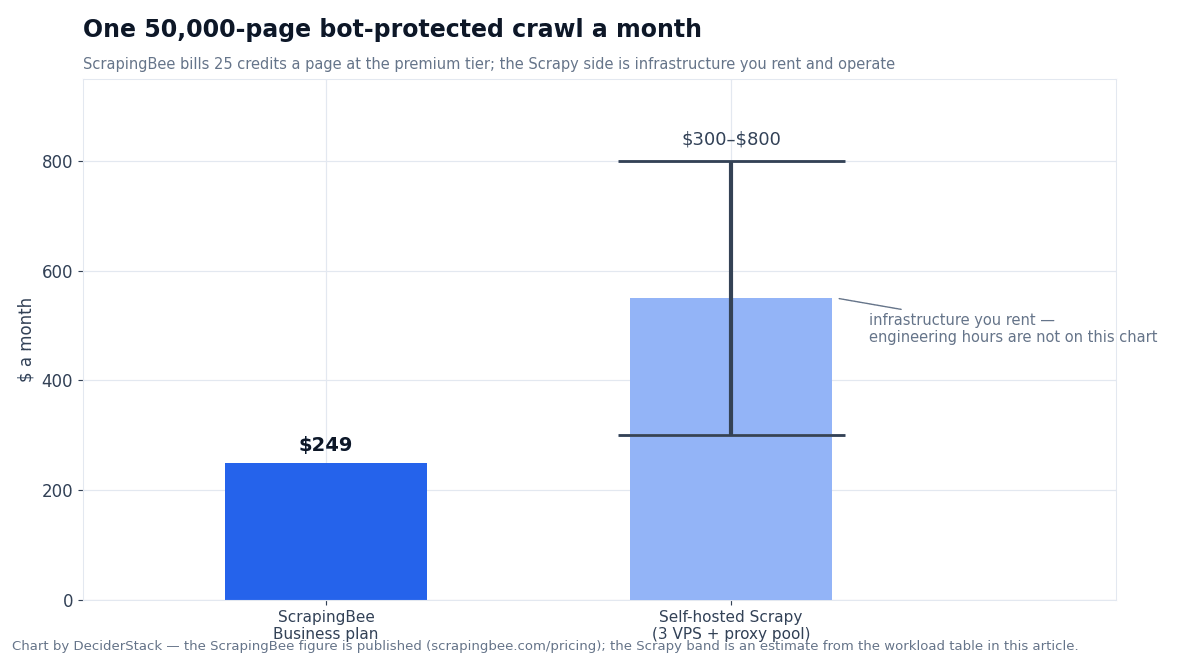
| Monthly crawl, 50,000 pages, premium+JS (bot-protected target) | 50,000 × 25 = 1,250,000 credits/month — fits Business at $249 | ~$300–$800/month (3 medium VPS + residential proxy pool sized for the volume), plus engineering hours to wire scrapy-zyte-api or equivalent |
The numbers shift with bot-protection difficulty, geo-targeting, and how often the target changes shape. The ScrapingBee number is published; the Scrapy number has to be estimated from your stack.
Per-target success rates for premium-vs-stealth and the residential proxy cost per GB need a real-account measurement on your workload before you commit to a stack. The published credit weights are the inputs to that pilot; the per-success rate is what the pilot measures.
Key parameters at a glance
| ScrapingBee | Scrapy | |
|---|---|---|
| Type | Managed scraping API | Open-source Python framework |
| License | Proprietary SaaS | BSD-3-Clause |
| Install | Sign up, get API key | pip install scrapy (Python 3.10+) |
| Pricing | Credit-based, $19–$599/month self-serve | Free; you pay for infrastructure and proxies |
| Free tier | 1,000 one-time credits | The framework (still need host + proxies) |
| JS rendering | Built-in (5 credits / request) | Via scrapy-playwright or scrapy-selenium (third-party) |
| Rotating proxies | Built-in (1 / 10 credits classic / premium) | Built-in middleware; rotation via third-party packages |
| Anti-bot bypass | Premium + stealth tiers (25 / 75 credits, gated to Business+) | No built-in; scrapy-zyte-api or vendor plugin |
| Concurrency control | Plan cap; HTTP 429 on overflow | CONCURRENT_REQUESTS (default 16), CONCURRENT_REQUESTS_PER_DOMAIN (default 1, fallback 8), AUTOTHROTTLE |
| Persistence / scheduling | None (stateless API) | SQLite-backed queue (2.19+), JOBDIR resume, RemoteControl HTTP inspection |
| Multi-language | Any HTTP client | Python only |
| Code shape | requests.get(endpoint, params={...}) | class MySpider(scrapy.Spider): ... |
| Latest stable (capture) | API stable as of latest capture | 2.19.0 |
| Latest feature highlight | Auto mode with max_cost cap | RemoteControl extension + Scrapy MCP server, aiohttp download handler |
| GitHub stars | n/a | 64.5k |
| Forks | n/a | 12.0k |
| Maintained by | ScrapingBee | Zyte (formerly Scrapinghub) and 800+ contributors |
FAQ
Is ScrapingBee built on top of Scrapy?
No. ScrapingBee runs its own headless browser fleet and proxy pool; it is not built on Scrapy internally. Zyte (the company that maintains Scrapy) sells its own managed API separately — Zyte API — which is tightly integrated with Scrapy via scrapy-zyte-api.
Can a Scrapy spider use ScrapingBee as a backend?
Yes. You can point Request.meta["proxy"] at ScrapingBee’s endpoint with the URL and render_js flag appended to the proxy URL, or write a small custom downloader middleware. This is a real pattern for teams that want Scrapy’s pipeline but ScrapingBee’s proxy pool.
What does ScrapingBee cost per 10,000 pages?
On Hobby at $19/month, 75,000 credits covers 10,000 classic-with-JS pages (5 credits each) or 2,500 premium-with-JS pages (25 credits each, but premium is gated to Business). On Business at $249/month, 3 million credits covers 100,000 classic-with-JS, 100,000 premium-without-JS, or 30,000 premium-with-JS.
What does Scrapy cost?
Scrapy is free (BSD-3-Clause). Real costs are infrastructure (a $20–$60/month VPS for small workloads, multi-instance for larger) and proxies (residential pools $50–$300+/month). Engineering time to integrate scrapy-playwright, the proxy middleware, and the anti-bot plugin is the variable cost that does not appear on a price page.
Which one handles JavaScript rendering better?
ScrapingBee handles it as a service: one flag (render_js=true), +5 credits, vendor manages the browser fleet. Scrapy requires scrapy-playwright (or scrapy-selenium) plus configuration and a running browser. Output quality is comparable for most targets; the difference is operational.
Which one is better for a small one-time scrape?
ScrapingBee. The 1,000-credit free trial is enough for a 200-page classic-with-JS pilot, and the integration is three lines. Scrapy requires Python install, project setup, middleware, and a browser — overhead you do not want for a one-shot.
Which one is better for a long-running production crawl?
Scrapy, if you have the Python talent. The persistent scheduler, resume-after-crash, item pipeline, autothrottle, and export-to-S3 hooks are all reasons production crawls are written in Scrapy. ScrapingBee is a stateless API; long-running logic lives in your code on top of it.
Can I use ScrapingBee if my team doesn’t know Python?
Yes. It is a plain HTTP endpoint. Any language with an HTTP client (Node, Go, Java, Ruby, curl) can call it. Scrapy is Python only.
Does Scrapy have anti-bot bypass built in?
No. Scrapy ships proxy middleware and header-rotation middleware for the basic transport-level concerns, but no CAPTCHA solving, no TLS fingerprint rotation, no Cloudflare bypass. You bring scrapy-zyte-api, a vendor plugin (Bright Data, Smartproxy, Oxylabs), or a third-party service.
What is the new Scrapy MCP server?
A Model Context Protocol server shipped by the Scrapy project in the 2.19 release, powered by the new RemoteControl extension. It lets a coding agent (Claude, Codex) inspect and control a running Scrapy crawl over HTTP — querying stats, pausing, changing settings. Captured from the 2.19.0 release notes.
Verdict
ScrapingBee and Scrapy are not competing products — they sit on opposite sides of the build-vs-buy line. ScrapingBee is the answer when you want an endpoint and a credit bill. Scrapy is the answer when you want a framework and an engineering team.
If your workload is “fetch these URLs, get HTML back” and you do not want to operate a service, ScrapingBee is the right pick. The credit model is straightforward (1 / 5 / 10 / 25 / 75 per request), the integrations are three lines of HTTP, and the anti-bot bypass is in the box. At Business and Business+ pricing. The 1,000-credit free trial is enough for a real pilot.
If your workload is “crawl, follow links, normalize, dedupe, persist, resume after crashes, export to S3,” Scrapy is the right pick. The framework is BSD-3-Clause, the project is alive (2.19.0, 64.5k stars, 800-strong contributor community), and the operational levers are deeper than any managed API exposes. The cost is engineering time to wire the JS rendering, the proxy rotation, and the anti-bot bypass.
A few workloads genuinely benefit from using both — Scrapy for the crawl pipeline and persistence, ScrapingBee (or Zyte API) as the download middleware. Worth knowing about, even if you only use it on the 5% of requests that need premium proxies.
The two free tiers together are enough to answer the only question the pricing pages leave open what does your actual target do when you hit it? The 1,000 ScrapingBee credits and a fresh pip install scrapy will both fit on a laptop. For a deeper dive on ScrapingBee alone, see our ScrapingBee Review and our head-to-head with another managed API in ScrapingBee vs ZenRows.
How we tested this: every credit weight, plan price, and feature flag for ScrapingBee comes from scrapingbee.com/pricing and scrapingbee.com/documentation.
Every release-note line and architectural detail for Scrapy comes from docs.scrapy.org/en/latest/news.html and github.com/scrapy/scrapy.
GitHub star and fork counts are from the GitHub repository page.
We did not run a paid ScrapingBee account or a production Scrapy 2.19 deployment against the workloads described.
Figures that depend on real-world success rates, geo accuracy, or proxy-pool sizing are flagged where they appear in the text rather than being estimated.
Our scoring criteria and the rule that bars us from linking vendors who prohibit trademark bidding are documented on the methodology page.
Disclosure: this article contains affiliate links. If you buy through them we may earn a commission at no extra cost to you. Commission never changes our scoring or the order of a ranking.