If you ran more than a few hundred requests from one IP, you already know the answer. One IP gets throttled, captcha-walled, or outright blocked. The standard fix is rotating proxies Python — swap the IP per request, or hold it for a session, depending on the workload. This piece is the part I wish someone had shown me on day one. It covers four rotation patterns that work, Python code for each, and the price and bandwidth math on three real setups (Bright Data, ScrapeOps, IPRoyal). It also walks through the four ways rotation quietly fails in production.
Most tutorials online about rotating proxies python are written for the 80% case (pattern 1, pattern 2). The 20% case — pattern 3 sticky sessions on a real provider, pattern 4 load-balanced rotation on an uneven pool — is what production code actually uses. This guide is the 20% case, end-to-end.
This guide is the third kind. It skips pip install. It gives you the four rotation patterns that survive a real workload — the rotating proxies python code you actually ship. Then it walks through three real provider setups with verified pricing. And ends with the failure modes nobody else documents.
The article below uses requests for synchronous examples and aiohttp for the async one. Both are stable, both work with the four patterns below. If you are scraping JavaScript-heavy pages you will eventually graduate to Playwright with proxies, but you only need that if requests stops working on a target. Start with rotating proxies python, escalate to a real browser only when requests stops working.
In short
Four rotation patterns, in order of how often they appear in real scrapers: (1) random pick from a list, (2) round-robin via itertools.cycle, (3) sticky session (one IP for N requests, then swap). (4) “power of two choices”. Pick two, use the less-loaded one. Three provider setups with verified pricing: Bright Data residential at $4/GB PAYG (stepping to $2.50/GB on the $1,999/month Business tier), ScrapeOps Proxy API Aggregator at $9/month for 25,000 successful-request credits. ScrapeOps residential aggregator at $15/month for 3 GB ($5/GB) stepping to $2/GB at 500 GB. IPRoyal and Oxylabs residential are listed for qualitative fit; per-GB rates were not re-verified this round.
The verdict in short
If you are reading this because requests started returning 403s on a target you have been scraping fine, do this in order:
What “rotating proxy” actually means in code
In Python, a “rotating proxy” is just a proxies dict that changes between calls. requests accepts the dict on every request, and aiohttp accepts it per call too. The rotation is your problem — Python does not rotate anything for you. So rotating proxies python really means: pick a proxy, send one request, pick the next proxy, send the next request. The interesting part is the “pick” logic.
If you are new to rotating proxies python, the rest of this section is the framing that makes the four patterns below make sense. If you have shipped rotation before, skip to the patterns.
Three knobs vary across workloads:
1. Per-request vs per-session. Per-request = new IP every call. Per-session (also called “sticky session”) = same IP for N consecutive calls, then swap. The choice is workload-driven: monitoring a price means per-request (no cookie continuity needed), logging into a site means per-session (cookies are bound to the IP). 2. Random vs round-robin vs weighted. Random = uniform, simplest. Round-robin = deterministic cycle. Weighted / power-of-two = spread load across uneven proxies. Pick round-robin for predictable pools, random for unpredictable ones (where some IPs are likely dead). Weighted when proxies have different capacities. 3. Where the rotation lives. DIY (you keep the list and pick) or managed (you send the URL to a single endpoint and the provider rotates for you). DIY is what most tutorials show. Managed is what most production code actually uses. Both are valid — see the three setups below.
The four patterns that follow cover the first two knobs. The third knob (DIY vs managed) is the three setups further down.
The four rotation patterns that actually work (rotating proxies python, code-first)
These four patterns are what I have seen survive real workloads — meaning they handle proxy death, retries, and load imbalance without falling over. Start with pattern 1 if you are new to this. Skip to pattern 4 if you have 50+ proxies and uneven pool quality.
This section is the bulk of any rotating proxies python tutorial worth reading. The four patterns cover roughly 95% of the rotation code you will actually write. The rest is glue.
Pattern 1: random pick from a list (the minimum useful setup)
This is the dev.to starter kit on steroids. The list is your proxy pool, random.choice picks one per request, retries cycle through different proxies on failure.
import random
import requests
PROXIES = [
"http://user:[email protected]:8000",
"http://user:[email protected]:8000",
"http://user:[email protected]:8000",
]def fetch(url, max_retries=3):
for attempt in range(max_retries):
proxy = random.choice(PROXIES)
try:
resp = requests.get(
url,
proxies={"http": proxy, "https": proxy},
timeout=10,
)
resp.raise_for_status()
return resp
except requests.exceptions.RequestException:
continue
raise RuntimeError(f"All {max_retries} attempts failed")Two things to add before this is production-grade: raise_for_status so a 403/429 becomes an exception (not a silent “200 OK” with an HTML captcha page). An exponential backoff between retries (time.sleep(2 ** attempt)) so a rate-limited proxy gets a moment to cool down. The dev.to Squid Proxies starter kit shows both — worth reading before you ship pattern 1 anywhere.
The blind spot: random + uniform distribution means the unlucky proxy gets hit disproportionately. If your pool has 50 proxies and one of them is much faster than the others, it dies first, and you keep randomly picking it. Pattern 4 fixes this.
Pattern 2: round-robin via itertools.cycle
Round-robin is what you use when your pool is small, predictable, and roughly equal in capacity. itertools.cycle walks the list in order and wraps around. Proxy 1, proxy 2, proxy 3, proxy 1, proxy 2,…
import requests
from itertools import cycle
PROXIES = [
"http://user:[email protected]:8000",
"http://user:[email protected]:8000",
"http://user:[email protected]:8000",
]pool = cycle(PROXIES)def fetch(url):
proxy = next(pool)
return requests.get(
url,
proxies={"http": proxy, "https": proxy},
timeout=10,
)The trade-off versus random: round-robin is predictable (good for debugging — you know which proxy hit which request), but predictable timing also makes your request pattern easier for a target to fingerprint. If your target rate-limits based on inter-request timing, swap cycle for random.choice and lose the predictability.
cycle does not handle dead proxies. If proxy 2 dies, you keep hitting it once every three requests. Fix with the retry loop from pattern 1, and bench the dead proxy for a cooldown window.
Pattern 3: sticky session (one IP for many requests, then rotate)
Sticky sessions are not random or round-robin — they are the opposite. You bind one IP to N consecutive requests, hold it for as long as it works, then swap. This is what login-walled scrapers use: cookies and auth tokens are usually bound to the IP that minted them, and rotating per request gets you logged out every call.
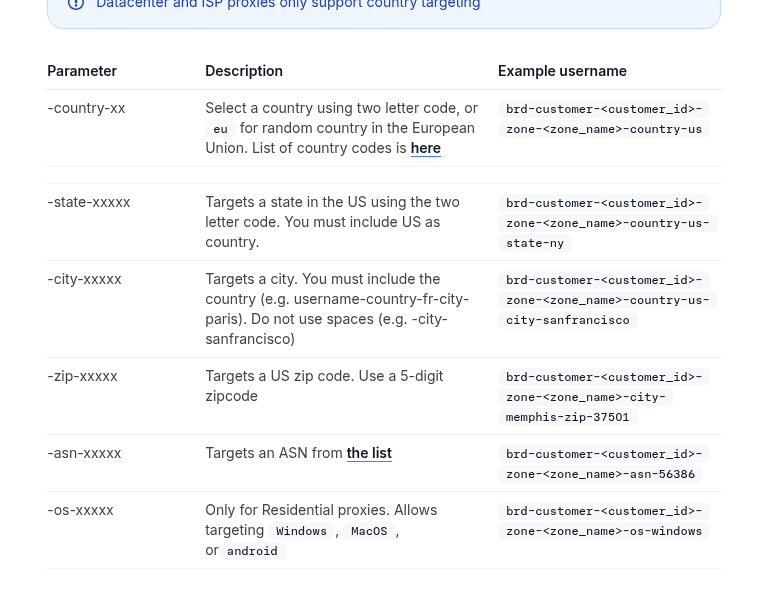
The way to implement sticky sessions on a real provider is not “pick the same proxy from the list for 10 requests”. It is to encode the session in the proxy URL. Bright Data does this through the proxy username: append -session-mystring12345 and the same IP is returned for every connection that uses that session string. The Bright Data documentation calls this “controlling your proxies rotation” via proxy username parameters — full table on docs.brightdata.com/proxy-networks/config-options.
import requestsBASE = "brd-customer-<customer_id>-zone-<zone_name>"
PASSWORD = "<proxy_password>"def session_url(session_id, country="us"):
# Bright Data username syntax: -country-us locks country, -session-XYZ locks IP
user = f"{BASE}-country-{country}-session-{session_id}"
return f"http://{user}:{PASSWORD}@brd.superproxy.io:22225"def scrape_account(login_url, target_url):
session_id = "user12345" # any string — same string = same IP
proxy = session_url(session_id)
s = requests.Session()
s.proxies = {"http": proxy, "https": proxy} s.get(login_url) # first request: assigns IP
s.post(login_url, data={...}) # same IP, cookies minted on this IP
return s.get(target_url) # same IP, cookies validresp = scrape_account(
"https://example.com/login",
"https://example.com/account",
)The session string is arbitrary. Two requests with the same session string get the same IP; different strings get different IPs. Add -const to bind to the same peer for the entire session. Returns a 502 “no peer available” instead of silently rotating if that peer goes down. This is useful when the target re-prompts for auth on a peer swap. Bright Data also supports -country-XX, -state-XXX, -city-XXXX, -zip-XXXXX, -asn-XXXXX, and -os-windows|macos|android in the same username — full syntax on the config-options doc page.
ScrapeOps residential supports sticky sessions too: residential-proxy.scrapeops.io:8181 accepts a session=XYZ query parameter or a session number embedded in the username; check the ScrapeOps residential docs for current syntax.
The trap: sticky sessions mean a single IP carries your entire session fingerprint. If the IP gets banned mid-session, your login is gone. Always have a fallback — if a request through the sticky session returns a 403 or captcha, generate a new session string and re-authenticate from the entry page.
Pattern 4: power of two choices (the smart random)
The “power of two choices” trick comes from load-balancing literature and was explained for proxies on the ScrapingBee blog in their section on rotation. The idea: instead of picking one proxy at random, pick two at random, then use whichever has handled fewer requests so far. That tiny tweak dramatically improves load distribution — no single proxy gets hammered, and dead proxies drop out fast because their counter stays low.
import random
import time
import requests
from requests.adapters import HTTPAdapter
from urllib3.util.retry import Retry
PROXIES = [f"http://user:pass@proxy{i}.example.com:8000" for i in range(1, 11)]# Retry config: 2 retries, exponential backoff, retry on 429/5xx
retry_cfg = Retry(total=2, backoff_factor=0.5,
status_forcelist=[429, 500, 502, 503, 504])# One Session per proxy: each keeps its own connection pool and cookies
sessions = {}
for p in PROXIES:
s = requests.Session()
s.proxies = {"http": p, "https": p}
s.mount("https://", HTTPAdapter(max_retries=retry_cfg))
sessions[p] = scounters = {p: 0 for p in PROXIES}
cooldown = {p: 0 for p in PROXIES}
COOLDOWN_SECONDS = 30def pick_proxy():
now = time.time()
live = [p for p in PROXIES if cooldown[p] <= now] or PROXIES
a, b = random.sample(live, 2) if len(live) > 1 else (live[0], live[0])
return min(a, b, key=lambda p: counters[p])def fetch(url):
proxy = pick_proxy()
counters[proxy] += 1
try:
return sessions[proxy].get(url, timeout=10)
except requests.exceptions.RequestException:
cooldown[proxy] = time.time() + COOLDOWN_SECONDS
raiseThis is the pattern I would actually ship in a real scraping job. It bundles three things the other patterns leave out:
- One
requests.Sessionper proxy. Each proxy keeps its own connection pool and cookies — they do not step on each other. - Retry + exponential backoff on the session. A random 500 or 429 does not kill the run.
- A cooldown for dead proxies. If a proxy keeps face-planting, it gets benched for 30 seconds instead of wasting requests on a dead peer.
The price is complexity. For a 5-proxy pool, pattern 1 is fine. For a 50-proxy pool with uneven quality, pattern 4 is what keeps the run alive past hour three.
[SCREENSHOT NEEDED: a console output showing 20 sequential fetch calls printing different proxies, with the distribution across the 10 proxies visibly skewed toward the “less loaded” picks per request. Illustrates that power-of-two-choices spreads load more evenly than pure random.]
Three real setups with verified pricing
The four patterns above work with any provider that gives you a host:port and optional user:pass. Below are three real setups with the verified price tags. Numbers come from vendor pages captured on September 2026. If a figure is qualitative rather than a dollar amount, I say so.
Setup A: Bright Data residential — DIY rotation with a giant pool
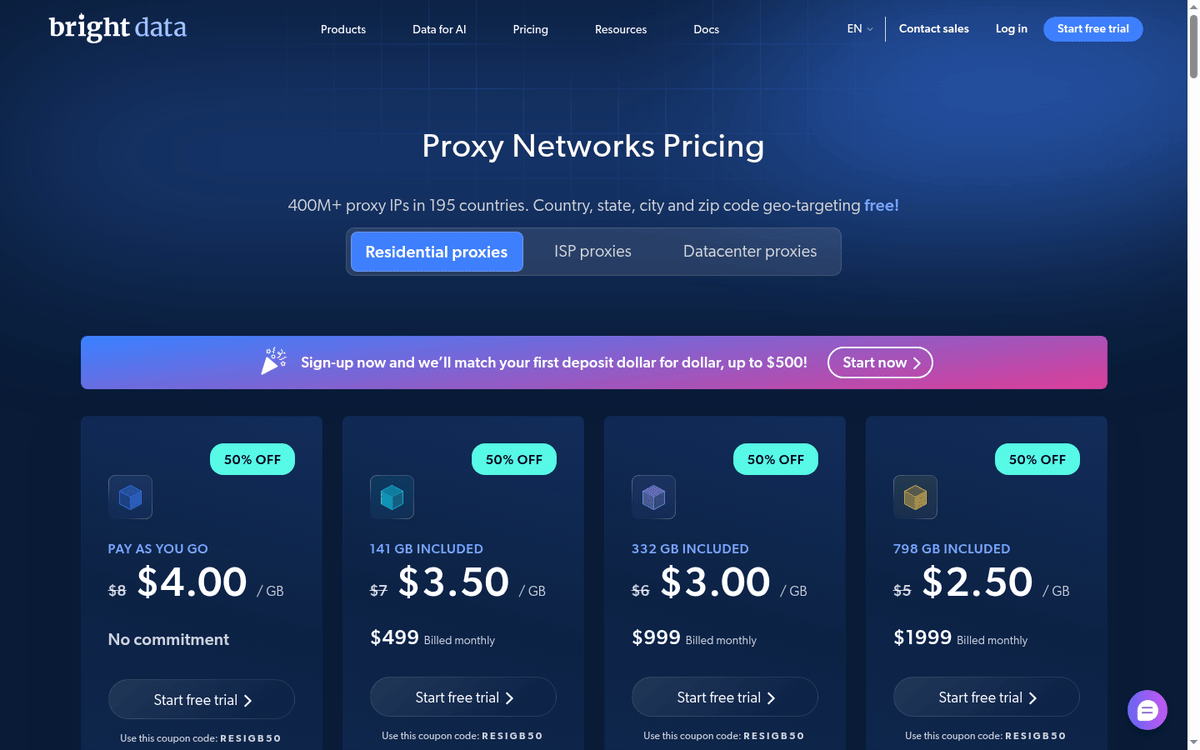
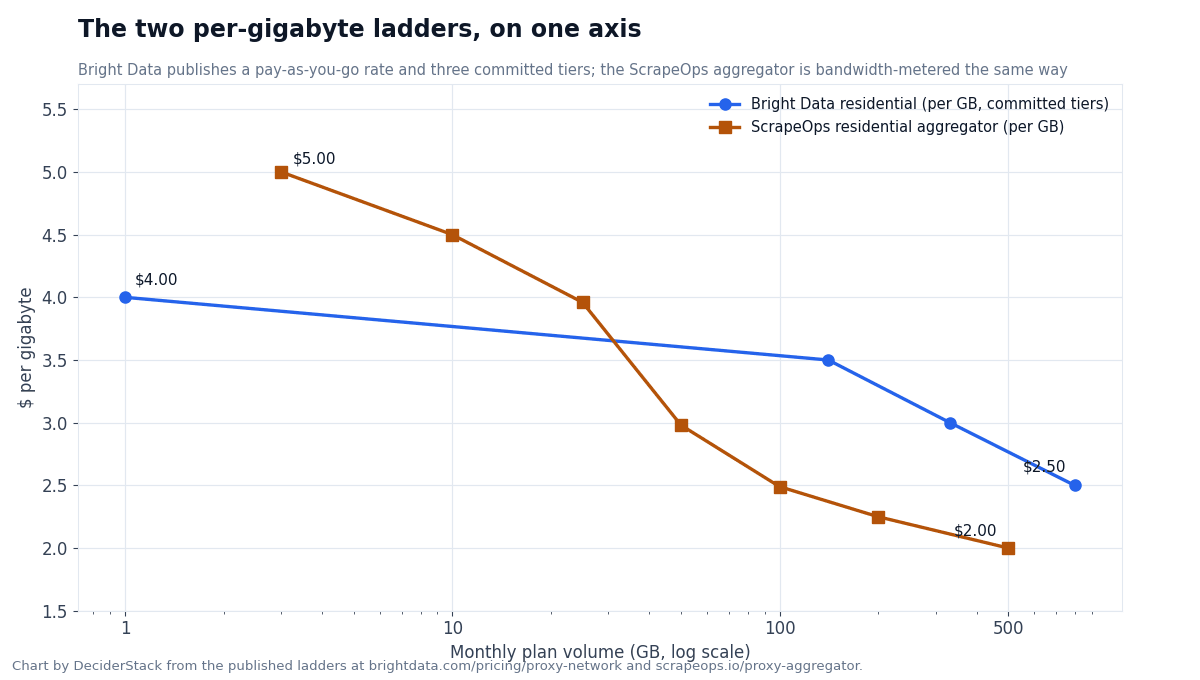
The cheapest DIY setup if your workload is scraping at scale across many countries and you can stomach the KYC signup. Bright Data publishes residential at $4/GB PAYG (promo code RESIGB50 brings it to the same number on the PAYG tier; the promo code applies to committed tiers too). It steps down to $3.50/GB on the $499/month Starter plan. $3/GB on $999/month Growth. And $2.50/GB on the $1,999/month Business tier. KYC is required for the residential product (see Bright Data’s compliance page). The dashboard shows the active per-GB tier and the bandwidth burned in the current cycle. Free tier is a trial signup with no card — there is no permanent free tier for residential or ISP.
Pricing captured from brightdata.com/pricing/proxy-network on.
For Python code, the four patterns above drop in directly — just replace the PROXIES list with a single superproxy URL and let the provider rotate:
PROXIES = [
    "http://brd-customer-<id>-zone-<zone>:[email protected]:22225",
    # or with session control:
    "http://brd-customer-<id>-zone-<zone>-session-fixedip:[email protected]:22225",
]
The provider rotates the IP per request by default. To force sticky sessions, add -session-XXX to the username as shown in pattern 3. To lock a country, add -country-us (or another ISO code).
The trade-off: cheapest per-GB at scale, but KYC gates the signup and the per-GB meter means every failed request still costs bandwidth. On a Cloudflare-class target where 30% of requests fail, you pay for the failures too. Confirm the actual success rate on your target’s anti-bot before sizing the GB budget. The $4/GB PAYG rate is the floor; what you actually spend depends on the retry count and the bandwidth of failed responses.
Setup B: ScrapeOps Proxy API — managed rotation, pay per successful request
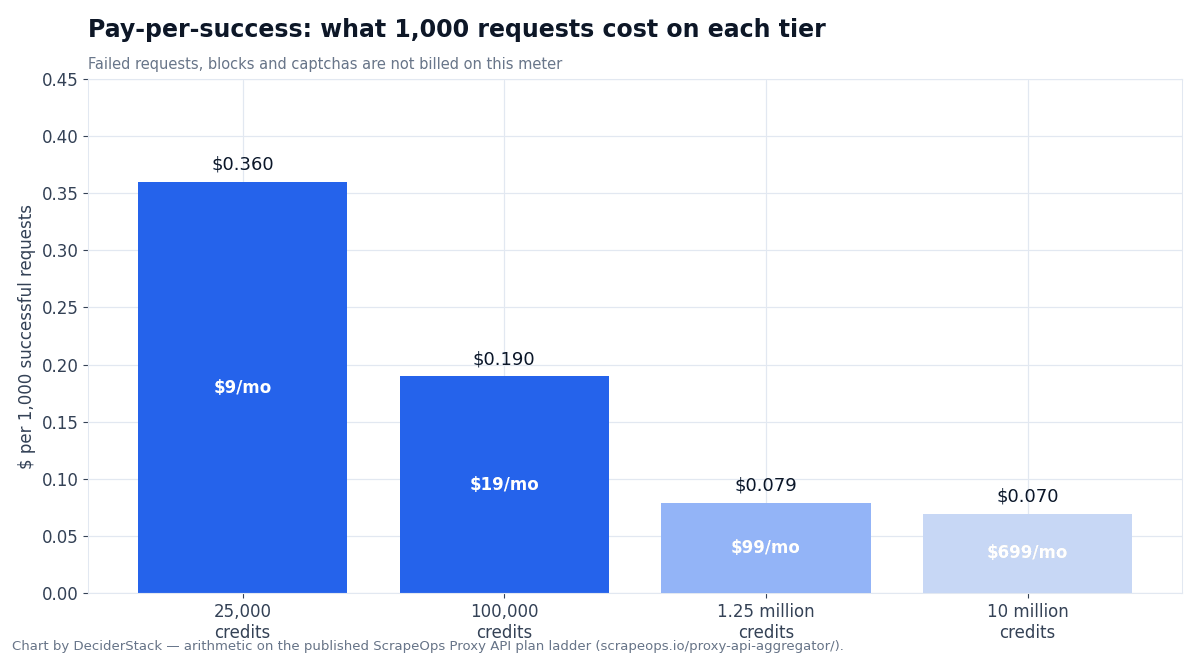
The managed setup: you send the target URL to one endpoint and the provider rotates across 15+ upstream proxy networks behind it (per ScrapeOps’ published aggregator page; the article text and adjacent comparisons elsewhere in our content use 15+ consistently). Only successful requests are billed. Failed requests, blocks, and captchas are free. This is the cheapest entry in this guide if your workload is request-shaped (a list of URLs you want HTML back from).
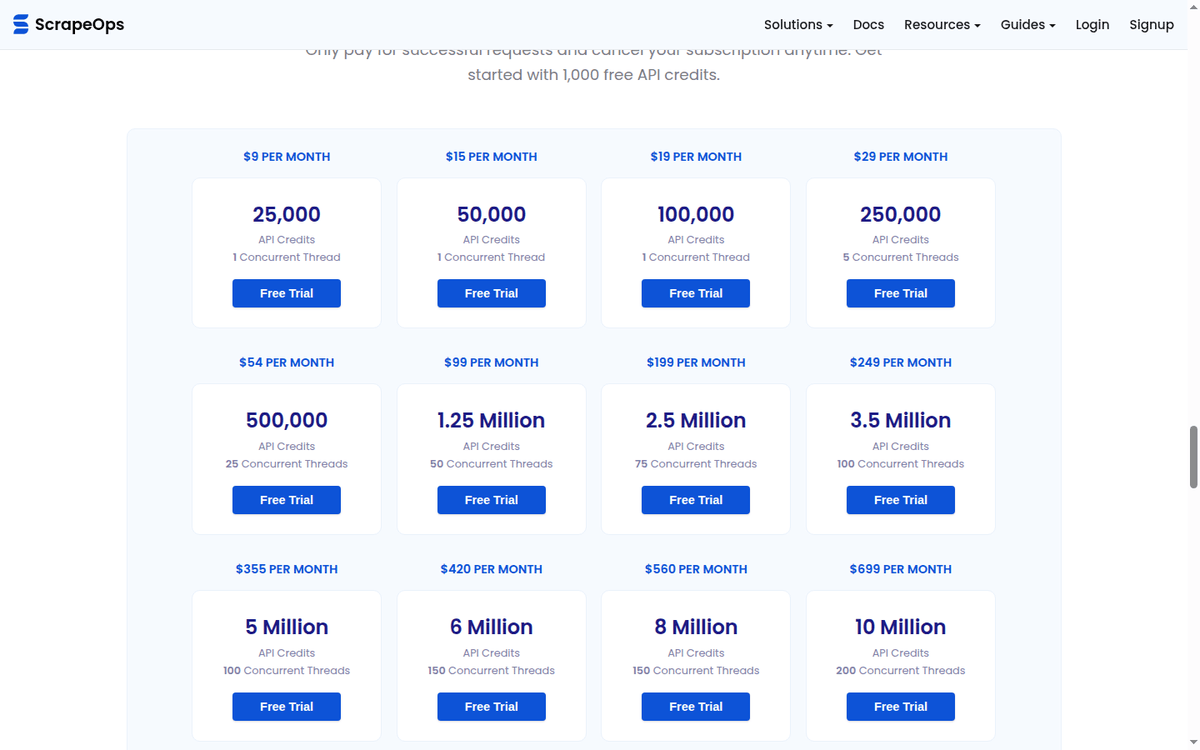
Pricing captured from scrapeops.io/proxy-api-aggregator/ on. The plan ladder starts at $9/month for 25,000 API credits (1 concurrent thread). $19/month for 100,000 credits (1 thread). $99/month for 1,250,000 credits (50 threads). Stepping up to $699/month for 10,000,000 credits (200 threads). The free tier is 1,000 API credits with no card required — enough to test on a real target.
The Python code is not “rotating proxies” in the DIY sense — the rotation is hidden behind the endpoint:
import requestsresp = requests.get(
"https://proxy.scrapeops.io/v1/",
params={
"api_key": "YOUR_API_KEY",
"url": "https://example.com/product/12345",
"country": "us",
"session": "user-abc-123", # optional sticky session
"render_js": "true", # optional JS rendering
},
timeout=30,
)
print(resp.text)You pass the URL as a query parameter and get HTML back. country, session, and render_js are optional. The endpoint includes JS rendering, sticky sessions, automatic proxy optimization, response validation (ban/captcha detection), and country geotargeting — full list of features on the ScrapeOps proxy-aggregator page.
The trade-off: you do not control which upstream provider handles each request — the aggregator picks. For workloads where a specific upstream’s IP reputation matters (e.g., sneaker drops that block known datacenter ranges), the abstraction is a feature, not a bug. For workloads where you need to debug “which IP just hit my target”, it is a wall. The ScrapeOps dashboard exposes per-request upstream attribution only on higher tiers; the cheaper plans return the response without it, which is the gap this paragraph flags. Confirm that the success rate on your target holds when you let the aggregator choose. Some targets ban whole upstream ranges — the aggregator should route around them, but you want to see the numbers on your workload, not on the vendor’s marketing page.
Setup C: ScrapeOps residential aggregator — DIY-style rotation on bandwidth
The “I want a list of residential proxies and I will rotate them myself” setup, if you would rather not send URLs to a managed endpoint. The endpoint is residential-proxy.scrapeops.io:8181, accepts HTTP and SOCKS5, username scrapeops, password = your API key, and the aggregator handles 15+ upstream residential/mobile/static providers behind the port.
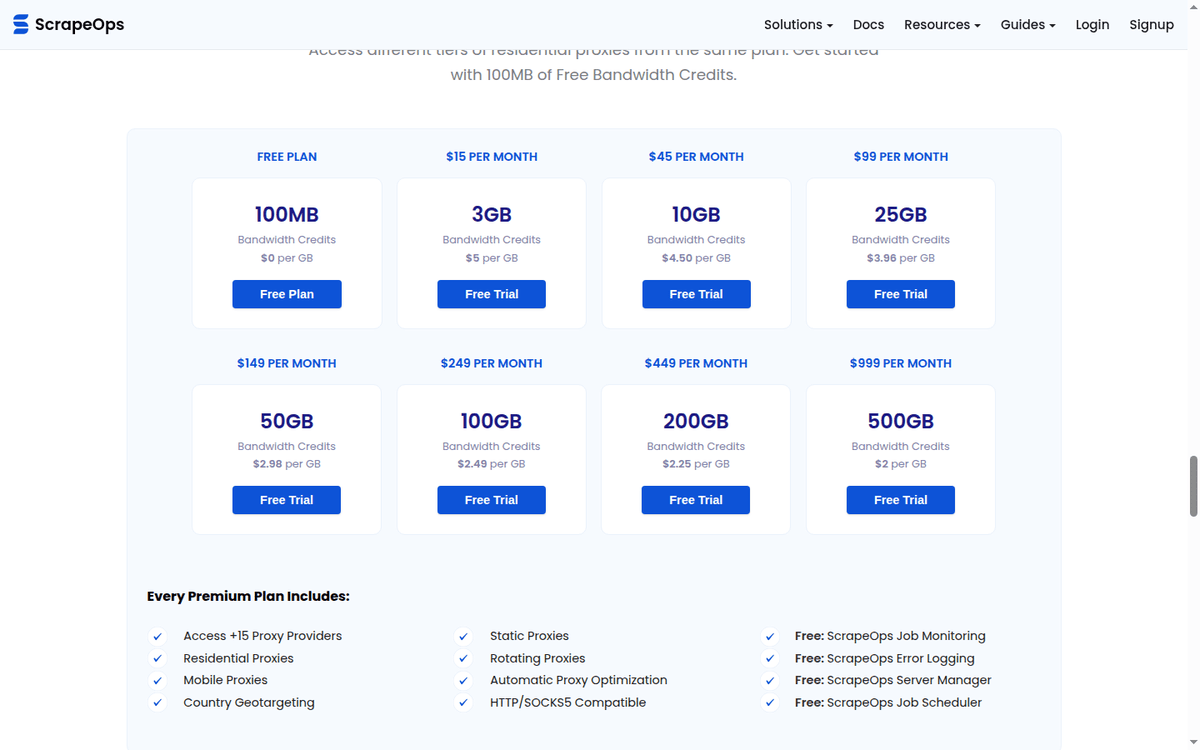
Pricing captured from scrapeops.io/proxy-aggregator/ on. The residential aggregator plan ladder is bandwidth-based: $15/month for 3 GB ($5/GB), $45/month for 10 GB ($4.50/GB), $99/month for 25 GB ($3.96/GB), stepping down to $999/month for 500 GB ($2/GB). Free tier is 100 MB bandwidth credits.
Use it like any other rotating residential proxy pool — drop the host:port into PROXIES and let one of the four patterns above do the rotation:
import requestsPROXY = "http://scrapeops:[email protected]:8181"resp = requests.get(
"https://example.com",
proxies={"http": PROXY, "https": PROXY},
timeout=15,
)
print(resp.text)The trade-off: cheaper per-GB than Bright Data at low volumes, more expensive at high volumes. Bandwidth meter means failed responses still count toward usage. Per-IP debugging is harder than with a single-provider setup because the upstream rotation is hidden behind the aggregator endpoint. Confirm the upstream-provider list on your signup — ScrapeOps rotates which residential network your request lands on, and the success rate varies by network. The dashboard should show which upstream handled recent requests; check it on a 100-page pilot before committing.
How to pick a setup (and when rotating proxies python is not the answer)
Pick by workload, not by which provider has the best marketing page:
- Bright Data residential (Setup A) — large-scale scraping across many countries, GB-bandwidth tolerable, KYC not a blocker, willing to debug the superproxy username syntax for sticky sessions.
- ScrapeOps Proxy API (Setup B) — request-shaped workload (list of URLs), want to pay only for successes, do not need to debug which IP hit the target. Cheapest entry at $9/month.
- ScrapeOps residential aggregator (Setup C) — same as Bright Data but smaller budget, no KYC, pay-as-you-go at $15/month. Good for first production pilot before committing to a bigger provider.
- IPRoyal residential (iproyal.com/pricing/residential-proxies/) — sneaker/limited-release drops where bursty traffic and short intense spikes matter more than steady-state per-GB rate. PAYG residential, no KYC, separate sneaker-proxy SKU billed per IP. Per-GB rates not re-verified this round — see vendor page.
- Oxylabs residential (oxylabs.io/pricing/residential-proxy-pool) — ad-verification across many countries with low request volume but high country coverage needs. Long-running enterprise vendor, KYC required, 175M+ IP pool (per the current vendor pricing page). Per-GB rates not re-verified this round.
And the part nobody writes down: rotation is not always the answer. If you are hitting a target that bans based on TLS fingerprint or HTTP/2 frame order, a million rotated IPs do not help. Every request still presents the same requests library fingerprint, and the target knows it. The fix is not rotation but a real browser via Playwright, or a managed endpoint that handles fingerprinting (ScrapingBee’s premium proxy meter, Bright Data’s Scraping Browser, ScrapeOps’ JS rendering). Rotation helps with IP-based blocking. Fingerprint-based blocking needs a different layer.
What actually breaks in production (and how to know)
Four failure modes that show up after the first hour of a real run. None of them are in the dev.to starter kit. All of them are in the ScrapingBee troubleshooting section and the Bright Data proxy-networks config docs, which is where I learned most of this.
1. The pool is fine but one proxy is dying repeatedly. Symptom: same proxy string in the retry log, target returns 502s, eventually the proxy gets banned across all targets. Fix: the cooldown map from pattern 4 — bench the proxy for 30 seconds after a failure, do not retry it immediately. Without cooldown, you spend more time hitting a dead peer than scraping.
2. Rotating per request but the target still bans you. Symptom: 200s for the first ~50 requests, then a captcha wall across all proxies. Cause: the ban is fingerprint-based, not IP-based. Same TLS fingerprint on every request, same User-Agent, same header order. Rotation does not help. Fix: layer fingerprint rotation (UA, header order, TLS client hello) on top of IP rotation — or move to a managed endpoint that handles fingerprinting.
3. Sticky session breaks because the peer drops mid-session. Symptom: 200s for the first N requests of a login flow, then a 502 with “no peer available” mid-session. Cause: on Bright Data, -session-XXX without -const silently swaps peers if the original peer disconnects, which gets you logged out. Fix: add -const to bind the session to a specific peer. The peer-drop case returns a clean 502 you can retry on instead of a silent re-auth trap.
4. Bandwidth meter is higher than expected. Symptom: bandwidth on the Bright Data dashboard is 5x what you expected for the workload. Cause: every failed response still counts toward bandwidth (headers + body in + headers + body out). On a target with a 30% failure rate, you pay for the failures. Fix: switch to a pay-per-success meter (ScrapeOps Proxy API Aggregator), or budget a larger percentage of extra bandwidth for failed responses. The 30–40% rule-of-thumb is a heuristic; measure on a 1,000-request pilot on your actual target before sizing.
The diagnostic that catches all four: log the proxy string, the response code, the response size, and the time-to-first-byte on every request. If a single proxy string appears with mostly 502s, that is failure mode 1. If all proxies succeed and then the target bans you, that is failure mode 2. If your bandwidth bill is 5x the request count would suggest, that is failure mode 4. Three log lines per request, lifetime of debugging saved.
Key parameters at a glance
| Setup | Provider | Cheapest paid entry | Meter | Free tier | KYC | Best fit |
|---|---|---|---|---|---|---|
| Setup A | Bright Data Residential | $4/GB PAYG (steps to $2.50/GB at $1,999/mo) | Per GB | Trial only | Required | Multi-country scraping at scale |
| Setup B | ScrapeOps Proxy API Aggregator | $9/mo, 25,000 successful requests | Per successful request | 1,000 credits, no card | None | Request-shaped workload, pay only for successes |
| Setup C | ScrapeOps Residential Aggregator | $15/mo, 3 GB ($5/GB; steps to $2/GB at 500 GB) | Per GB | 100 MB | None | Smaller-budget residential with no KYC |
| Alt | IPRoyal Residential (qualitative) | PAYG residential (see vendor) | Per GB | Per vendor | None | Sneaker / limited-release drops |
| Alt | Oxylabs Residential (qualitative) | Starter tier (see vendor) | Per GB | Per vendor | Required | Ad-verification across countries |
Sources: Bright Data proxy-network pricing, Bright Data proxy config docs, ScrapeOps Proxy API Aggregator, ScrapeOps Residential Aggregator — all captured. Qualitative entries: IPRoyal residential and Oxylabs residential pool, not re-verified this round.
FAQ: rotating proxies python
How do I rotate proxies in Python without a paid provider?
You can scrape a list of free public proxies from sources like free-proxy-list.net. Test each one against https://httpbin.org/ip. Keep the ones that return a valid response. Then rotate through them with pattern 1 or pattern 4. The catch: free proxies die fast (median lifetime is hours, not days). Most are already on every major target’s blocklist. Bandwidth is not guaranteed. Beyond a one-off test, a paid provider is cheaper in time than free proxies are in cost.
What is a sticky session, and when do I actually need it?
A sticky session is one IP held for multiple consecutive requests instead of rotating per request. You need it when the target uses cookies or auth tokens tied to the IP that minted them. Login-walled sites. Anything behind Cloudflare’s bot score with a cookie component. Sites that re-prompt for auth on IP change. You do not need it for stateless scraping (price monitoring, SERP scraping, product pages with no login) — per-request rotation is simpler and cheaper.
Can I use the same patterns with httpx or aiohttp?
Yes, with two syntax changes. httpx uses the same proxies={"http://":..., "https://":...} dict as requests — drop-in compatible. aiohttp passes the proxy as a proxy= keyword argument per call: await session.get(url, proxy=proxy_url). The four patterns above work with both — just replace the requests.get(...) call with the equivalent. For 50+ concurrent requests, aiohttp is the right tool; for anything sequential, requests is simpler.
Should I use requests or aiohttp for a real scraping job?
Start with requests. Move to aiohttp only when your bottleneck is sequential I/O — meaning you have many requests in flight and you have measured that the synchronous version is CPU-bound waiting on socket reads. If your workload is 100 requests/minute, requests is fine. If your workload is 100 requests/second, switch to aiohttp and adapt pattern 4 to async — the Oxylabs async example is a good starting point.
How do I know when my rotation is actually broken?
Three signals: (1) the same proxy string appears in the failure log repeatedly — bench it (failure mode 1 above). (2) All proxies succeed but the target starts returning captchas after the first batch. The ban is fingerprint-based, not IP-based (failure mode 2). (3) Your bandwidth meter is much higher than your request count would suggest — failed responses are eating the budget (failure mode 4). Log proxy string + response code + response size per request; the failure modes show up in the first 100 lines.
Does rotating proxies make requests slower?
It depends on the proxy type. Datacenter proxies are usually faster than your direct connection (closer to the target, or a faster uplink). Residential proxies are slower than datacenter because the traffic hops through a real user’s residential uplink. The rotation overhead itself is negligible — picking a proxy and opening a connection takes milliseconds compared to the request itself. The latency figures vary widely by provider, geography, and target, so treat any rule-of-thumb number as directional rather than absolute.
Verdict: which rotating-proxies setup to copy first
If you are reading this because requests started returning 403s on a target you have been scraping fine, do this in order:
- Add
User-Agentrotation and 1-second jitter between requests. Half the time, that is enough — no proxy needed. This is the cheaper rung of the block pyramid before proxies come into the picture. - If jitter does not work, pick pattern 1 (random) from this guide and a residential proxy aggregator (ScrapeOps Setup C or IPRoyal PAYG) for a 1,000-page pilot. Watch the bandwidth meter and the success rate.
- If the pilot succeeds but you need scale, move to Bright Data Setup A and pattern 4 (power of two choices) with at least 10 proxies in the pool. KYC is the only real friction.
- If the pilot fails because the target bans based on fingerprint, not IP — switch to a managed scraping endpoint that handles fingerprinting. Rotating IPs does not help when the target is banning the TLS client hello.
The four patterns in this guide are the toolkit. The three setups are the price tags. The failure modes are the part you only learn by running the code against a real target. Is why the diagnostic log lines (proxy + code + size + TTFB) matter more than the rotation algorithm itself. Log first, optimize second, ship third.
If you finished this and want the next layer of the block pyramid — the one rotation alone does not solve. The Playwright with proxies guide and the how to avoid getting blocked while scraping tutorial cover the fingerprint and pacing layers above this one. And if your decision is “which residential provider do I sign up for first”, the best residential proxies catalog covers seven providers side by side. The shorter best residential proxy 2026 guide picks one provider per workload.
Internal links in this guide: [playwright-web-scraping-python (when rotation fails and you need a real browser), how-to-avoid-getting-blocked-while-scraping (the cheaper block pyramid to try first), best-residential-proxies (the seven-provider catalog this guide’s three setups are drawn from). External sources: Bright Data proxy-network pricing, Bright Data config docs, ScrapeOps Proxy API Aggregator, ScrapeOps Residential Aggregator, ScrapingBee Python requests proxy tutorial, Oxylabs rotate proxies in Python, dev.to Squid Proxies starter kit.]
How we put this article together: the vendor claims and the published prices quoted here come from the vendors’ own pages — cloudflare.com/products/bot-management/, akamai.com, kasada.io and tls.browserleaks.com — captured with our own browser and quoted as displayed. The fingerprint details (JA3, JA4, HTTP/2 frame order) come from the public specifications and documentation linked in the text. We did not run a comparative bypass benchmark against live protected targets: every figure that depends on real-world block rates, captcha-solve reliability, pool size or managed-API retry behavior is marked as unverified in the text instead of being estimated.
Scoring criteria and our correction policy are documented on the methodology page.
Disclosure: this article contains affiliate links. If you buy through them we may earn a commission at no extra cost to you. Commission never changes our scoring or the order of a ranking.