
Best for — content teams on a publishing cadence, where the Content Score and Surfy are the tools opened every day.
Not for — anyone buying it only for AI-citation tracking: that line has its own ladder, priced apart from the editor.
Every tier — Surfy, the Content Score, the AI detector and humanizer, plagiarism checks, one-click optimization and internal linking.
Decides the choice — what you ship: articles under a document limit, or prompts you want watched in the engines.
If you last looked at Surfer SEO when it was a Content Score tool and nothing else, the 2026 version will read as three products wearing one subscription.
The original content editor is still there, the AI Writing Assistant (Surfy) is now folded into every tier, and beside both of them sits a dashboard that tracks how AI engines talk about your brand.
The new headline product is AI Search Analytics — a tracking dashboard that monitors how often your brand appears in ChatGPT, Google AIO and Perplexity answers on the prompts you care about.
Surfer SEO in 2026 is not a single tool anymore. Classic on-page optimization — Content Score, Surfy, internal linking — still sits at the center, and a layer of AI-citation tracking now sits on top of it.
On the currency question, the short answer: Surfer prints the same digits in whichever market you land in — dollars for US visitors, euros for European ones — so the ladder reads identically either way.
The rest of this review follows the product rather than the marketing page. Start with the Discovery / Standard / Pro / Peace of Mind ladder, then the AI Search Analytics product, the documents-versus-prompts billing split, the Content Score and Surfy workflow and the engines tracked.
It closes on the honest fit — when Surfer is the right choice, when Alli AI is a better pick, and when Scalenut wins.
Every figure on the pricing table comes from surferseo.com/pricing, read in September 2026.
This article runs on public pages; no paid Surfer seat was bought for it. Workload-dependent numbers, such as the ranking lift on a ten-article pilot or the prompt-citation visibility on a real brand, stay publisher claims instead of measured results. That is the same convention we use in our alli ai review and across our review pieces.
Three products inside one subscription
Surfer SEO is a content optimization + AI visibility platform. The platform has three working parts. It belongs with the rest of our AI tools coverage.
Content editor
the content editor. The original Surfer product: a Google Docs-style editor where you write or paste your draft, and Surfer scores the draft against the top SERP results on your target keyword.
The score is a 0–100 scale; the right column tells you:
- which NLP terms are missing
- which headings to add
- how many words to write
- which images to include
You edit the draft, the score climbs, and you publish when the score clears the threshold you set.
Surfy, the AI assistant
Surfy, the AI writing assistant. Surfy is built into the editor on every tier. You highlight a paragraph and ask Surfy to “rewrite,” “expand,” “shorten,” or “add NLP terms”; the output appears in the editor and you keep editing.
Surfy is a productivity tool, not a replacement for writing — it produces competent-but-not-distinguished prose that you still need to edit before publishing.
AI Search Analytics
AI Search Analytics.
The 2026 flagship. A standalone product at 82 a month (yearly billing) that tracks how often your brand appears in ChatGPT, Google AIO, and Perplexity answers on the prompts you care about.
It carries the most frequent refresh in the ladder — 50 prompts, refreshed daily — while Standard, the middle content tier, refreshes weekly. The dashboard shows mention counts, citation rankings, and the actual answer text the engine produced.
The three parts are not equally weighted in the marketing. The content editor is the brand’s heritage and the reason most existing customers renew. Surfy is the AI-add. AI Search Analytics is the GEO pivot that is moving the SERP. Read the part about your workload, not the part that’s loudest in the marketing.
Surfer SEO pricing in 2026: per month, billed yearly
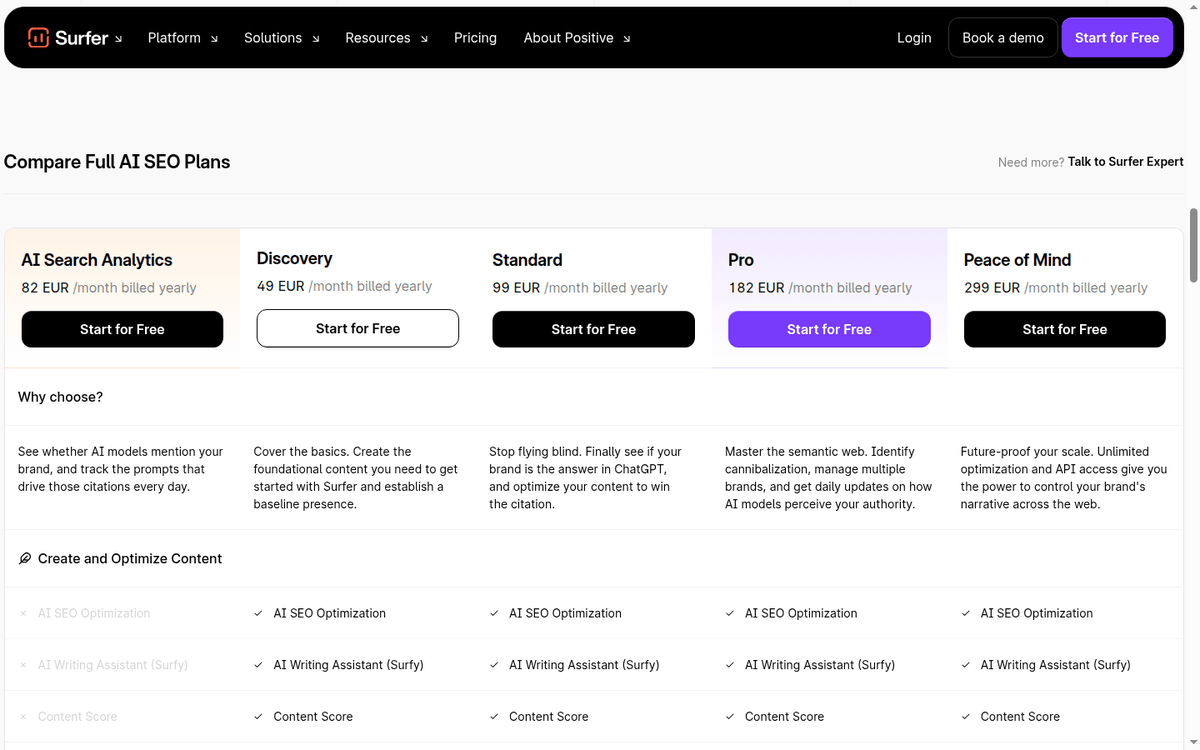
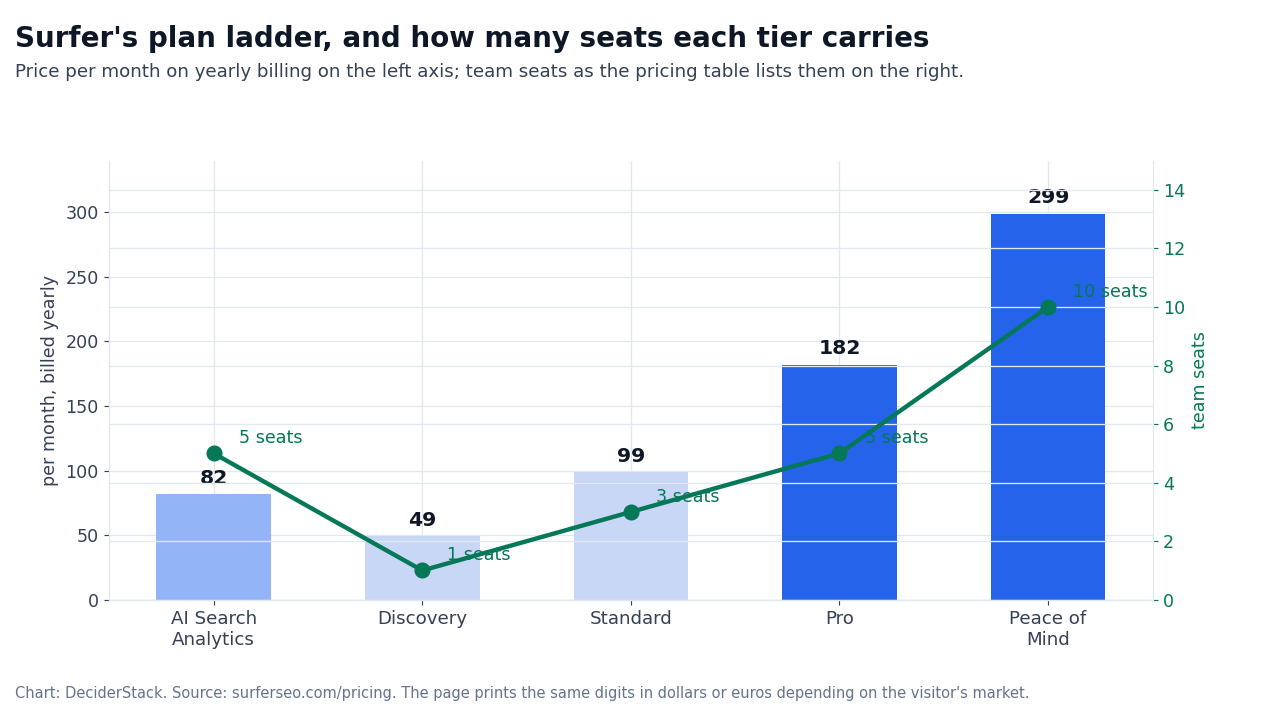
The pricing ladder is the part of Surfer’s offer most often misread. The page quotes every plan per month on yearly billing, and the monthly toggle costs more per month — the vendor’s own FAQ puts the annual saving at up to 17% against paying monthly.
| Plan | Per month, billed yearly | Documents | Team seats |
|---|---|---|---|
| AI Search Analytics | 82 | n/a, analytics product | 5 |
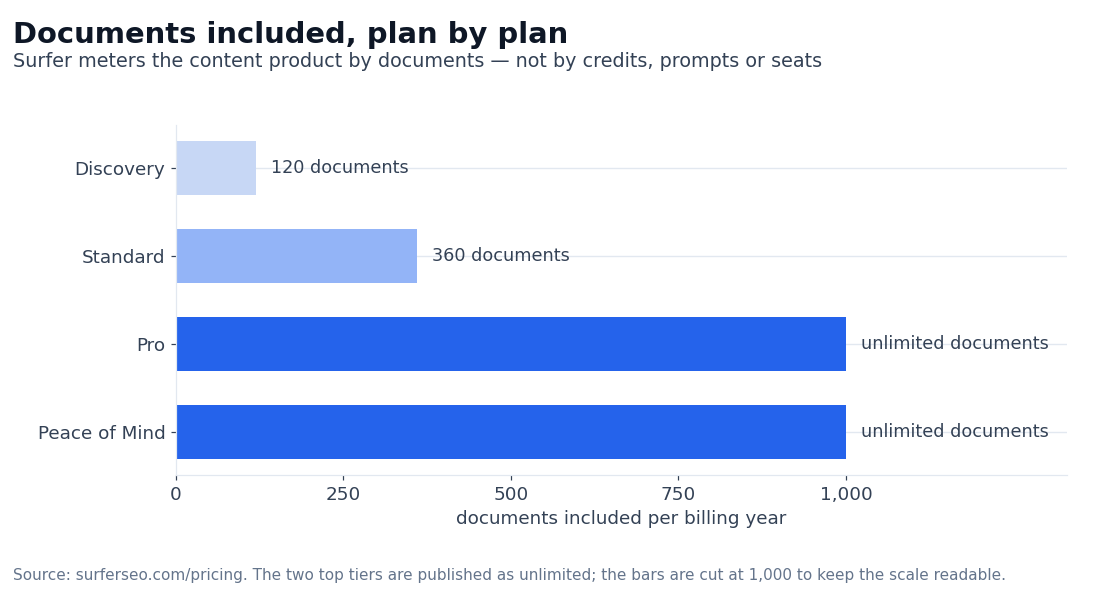
| Discovery | 49 | 120 | 1 |
| Standard | 99 | 360 | 3 |
| Pro | 182 | Unlimited* | 5 |
| Peace of Mind | 299 | Unlimited* | 10 |
| Plan | Content version history | Prompts tracked | Refresh |
|---|---|---|---|
| AI Search Analytics | n/a | 50 | Daily |
| Discovery | 1 day | — | — |
| Standard | 1 week | 25 | Weekly |
| Pro | 1 month | 50 | Daily |
| Peace of Mind | 6 months | 100 | Daily |
Two product lines on one page
The five tiers are not strictly hierarchical. AI Search Analytics is a parallel product line that tracks AI citation; the Discovery / Standard / Pro / Peace of Mind ladder is the content optimization line.
The page presents AI Search Analytics as a product you buy alongside a content tier rather than as a bundle, so read the two line items together.
The top of the ladder carries extras the lower cards do not name.
- Unlimited brand spaces.
- Advanced SERP analysis.
- API access, so the score and the document limits can be pulled into your own reporting.
- A dedicated success manager.
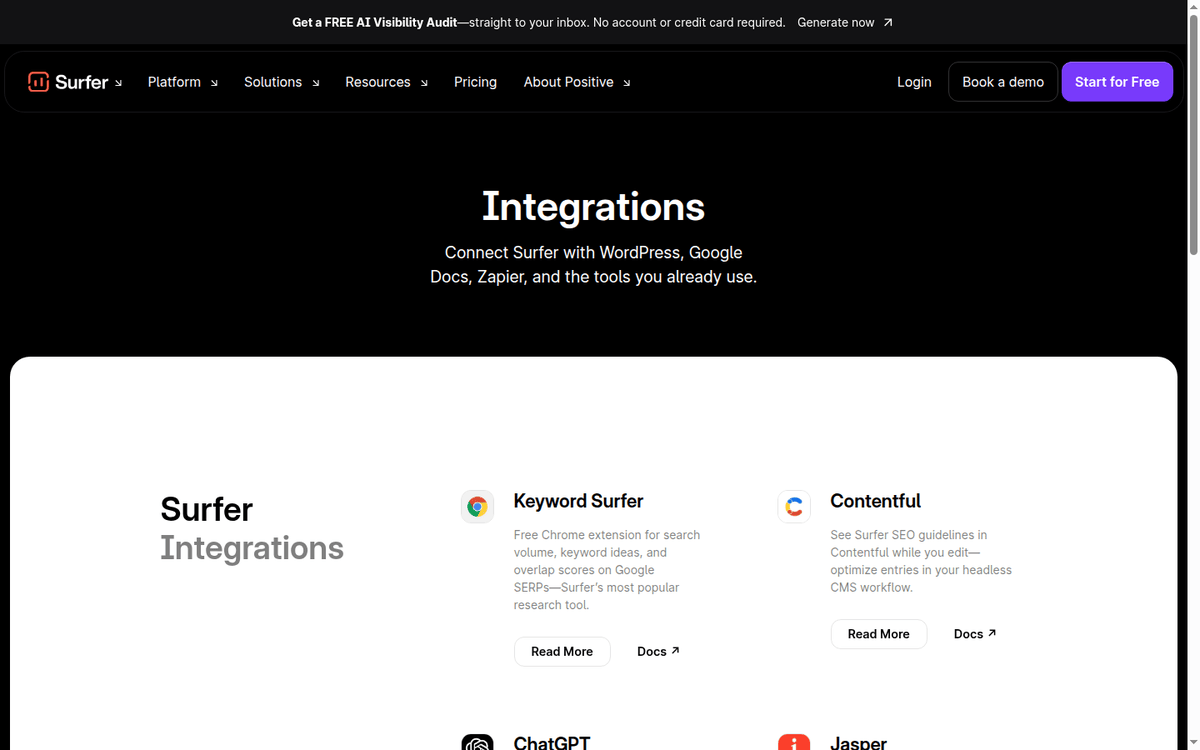
The integration row beside it shows:
- WordPress
- Google Docs
- Contentful
- Zapier
For a team that already writes in Docs, the connectors do more work than the feature list. Keyword Surfer, Contentful, ChatGPT and Jasper sit behind the same add-on row as WordPress and Google Docs.
The “Price for 10k credits/mo” framing that other vendors use does not apply to Surfer. Surfer bills by documents (the content optimization product) or by AI prompts tracked (the AI Search Analytics product).
If your workload is one high-volume article per week, the unlimited-documents Pro plan at 182 a month on the yearly plan is the right pick. If your workload is 30 articles per month, the Discovery plan’s 120 documents are not enough — you need Standard at 360 documents.
The documents meter is the number to hold against your own publishing calendar. If the plan cannot cover the articles you actually ship in a year, the tier above it is the real entry price, whatever the headline rate says.
Rules the plan cards leave out
Two billing rules live in the vendor’s FAQ rather than on the plan cards. Surfer takes credit and debit cards on both intervals, and bank transfers on yearly plans only. On an annual plan the document credits reset yearly, or when you change plan — not month by month.
A seasonal workload cannot bank a quiet month’s documents for a busy one.
The number worth watching is not the currency symbol but the billing interval. Surfer prices every content plan per month on yearly billing, and the monthly toggle costs up to 17% more — the vendor’s own figure.
If you are evaluating Surfer for the first time, take the “Start for Free” link, run one of your own articles through the editor, and only then decide whether a year is worth committing to.
How the Content Score holds up in the editor
The Content Score is the workflow that put Surfer on the map in 2018–2020, and it is still the most useful single feature for a content team that ships SEO-optimized long-form articles. The flow is:
- Enter a target keyword.
- Surfer runs SERP analysis on the top results.
- You get a Content Score target range and a list of NLP terms to include.
- You write the draft in the Surfer editor; the score updates as you add terms.
- You publish when the score clears.
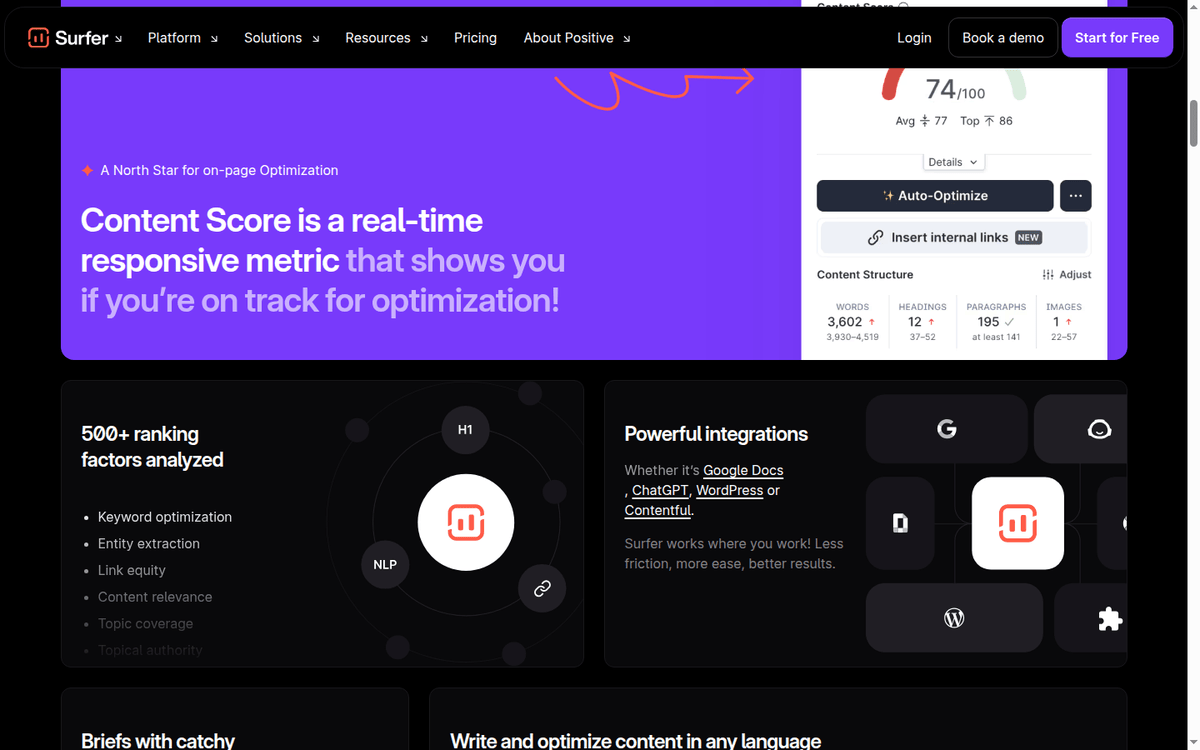
In practice, Content Score is competitive with other on-page optimization tools (Frase, MarketMuse, Clearscope) for English-language B2B and SaaS content.
The competitive advantage is the editor integration — you see the score climb in real time as you edit, rather than copying the draft out to a separate tool for scoring. For a writer who has never used an on-page optimizer, the editor integration is the difference between using the tool and abandoning it.
The output quality is competitive with other AI long-form writers for English-language B2B and SaaS content. It is weaker for highly-technical content where the AI needs domain context it does not have. It is competitive for affiliate content where the SERP has clear topical authority.
The point the Content Score stops helping
What the score cannot price is the editing time behind it. A draft at 90 still needs a human pass for accuracy, tone and the claims you would have to stand behind. The score measures coverage of the SERP’s terms, not the quality of the argument, so budget the writer’s hours separately from the subscription.
The Content Score is a heuristic against the SERP, not a guarantee of ranking. A 90-score article on a keyword where the SERP is dominated by high-authority domains will not outrank those domains. Treat the score as a “you have covered the SERP’s NLP requirements” check, not as a “you will rank” check.
AI Search Analytics as a line item
The 2026 flagship is AI Search Analytics, and the way it works is:
- you set the prompts you care about (e.g. “best crm for saas,” “top project management tools 2026”)
- Surfer queries ChatGPT, Google AIO and Perplexity on those prompts
- refreshes on a schedule
- and shows you how often your brand appears in the answer and what the answer says about you
Size the prompt list against your own catalog before you commit. One product page and its buyer questions fit inside ten prompts. A small cluster — a handful of landing pages, their comparison queries and the “is it worth it” variants — needs around fifty. A brand-level watch needs a hundred.
The output is a dashboard view of brand mentions over time, with citations ranked by prompt.

The data is sampled, not exhaustive — Surfer does not query every prompt on every model on every refresh. The refresh is daily on AI Search Analytics, Pro and Peace of Mind, and weekly on Standard — the pricing table is explicit about that. It matters if you are tracking a launch rather than a brand.
The honest assessment.
AI Search Analytics is a useful product, but the prompts you track and the engines you query matter more than the dashboard. Tracking 10 prompts on ChatGPT on the AI Search Analytics tier will give you directional data; tracking 100 prompts across three engines is closer to competitive intelligence.
The three engines tracked are not interchangeable.
- ChatGPT is the dominant consumer-facing AI engine for Q&A in 2026.
- Google AIO is the Google-search-engine-augmented-answer engine and matters for SEO-adjacent traffic.
- Perplexity is the citation-first engine and matters for technical/research content.
If your audience is on ChatGPT, the AI Search Analytics tier covers you; if you need Perplexity data, confirm the engine is included in your tier before you commit.
Surfer SEO vs Alli AI: when the choice is real
Surfer SEO and Alli AI overlap on content optimization, on-page AI assistance, and AI-driven content recommendations. Both ship in 2026 with an AI writing assistant built into the editor. The choice between them comes down to three things.
- AI scope. Surfy is a content-editor assistant; Alli AI’s OnPage AI is a deployment-first tool that pushes code changes to a live site. Content-team-led workflow points at Surfer, SEO-led workflow with direct deployment points at Alli AI.
- Data integrations. Surfer connects to Google Docs, WordPress and Jasper; Alli AI deploys into any CMS. If you live in Google Docs, Surfer is the only option in the pair.
- Pricing model. Surfer bills per month on yearly billing by documents; Alli AI publishes USD prices and bills by site. One site with one writer makes Alli AI’s per-site price the more predictable bill, while many articles across many writers suits Surfer’s per-document meter.
The honest decision.
For a content team that lives in Google Docs and ships many articles per month, Surfer is the better choice. For an SEO-led workflow with direct CMS deployment, Alli AI is the better choice. The integrations are the meaningful differentiator; the AI capabilities are roughly equivalent.
One more unit to price before you pick:
- Surfer meters documents
- Scalenut meters articles
- Alli AI bills the site
- Murf AI meters characters of generated speech
If two of those tools share your week, the busiest meter decides the bill.
Surfer SEO vs Scalenut: the GEO-platform overlap
Surfer and Scalenut both pivoted to GEO in 2026, and the choice between them on GEO-specific workloads comes down to three things.
First, the AI visibility depth. Surfer’s AI Search Analytics is a dedicated product at 82 a month on the yearly plan, focused on AI visibility; Scalenut’s AI Visibility Tracking is bundled into every content tier at different prompt counts (10/25/100).
If AI visibility is your primary use case, Surfer’s dedicated tier is more focused; if AI visibility is one feature among many content features, Scalenut’s bundled approach is cheaper.
Second, the content editor. Surfer’s content editor is the heritage product and is more polished than Scalenut’s Cruise Mode for the on-page optimization workflow. Scalenut’s Cruise Mode is more guided (the SERP review step is built into the flow); Surfer’s editor is more flexible (you can write in any order, optimize at any time).
Third, the integrations. Surfer integrates with Google Docs, WordPress, and Jasper; Scalenut integrates with WordPress, Shopify, Semrush, and Copyscape. For Shopify store owners, Scalenut is the only option in the pair. For Google Docs writers, Surfer is the only option.
The honest decision. For AI-visibility-first workloads, Surfer’s dedicated AI Search Analytics tier is the focused pick. For content-first workloads with AI visibility as one feature, Scalenut’s bundled approach is cheaper. The integrations are the meaningful differentiator.
The promo mechanics differ as well. Scalenut’s annual discount is the headline price on its page and doubles the article and audit limits. Surfer’s saving is the smaller of the two: up to 17% against paying monthly, quoted in the vendor’s own FAQ.
Gaps: backlinks, rank tracking, single-engine writing
Three gaps in the 2026 product are worth flagging.
Backlink profile
No backlink-profile product. We could not find one on the pages we checked: the pricing comparison lists the editor, Surfy, the AI-visibility rows and the standard document limits, and nothing that reads referring domains. For backlink profile analysis — your referring domains, your competitors’, your lost links — you still need Ahrefs, Semrush or Majestic.
Rank tracking
No rank tracking at scale.
Surfer shows your AI Search Analytics data and your Content Score after optimization, but there is no traditional rank-tracker dashboard where you monitor 1,000 keywords across devices and geographies. For rank tracking, you still need a dedicated rank tracker (AccuRanker, Ahrefs, Semrush).
Multi-model writing
No multi-engine AI-writing in the same editor. Surfer’s Surfy is a single AI writing assistant. There is no separate multi-engine playground where you switch between GPT-4, Claude, and Gemini for the same prompt. Power users who want that flexibility will be happier in a tool like Jasper (brand voice plus multiple models) or even a manual ChatGPT + Claude workflow.
The naming overlap between Surfer’s “Surfy” AI assistant and Scalenut’s Cruise Mode AI assistant is a real point of confusion in the SERP. Read the brand name in the URL before you assume a feature is in a product.
Where Surfer SEO lands
Surfer SEO in 2026 is a hybrid content-optimization and AI-visibility platform with a strong heritage editor and a useful AI Search Analytics product.
The pricing reads cleanly once you know the two conventions the page uses: every figure is per month on yearly billing, and the currency symbol follows your market while the digits stay put. Which plan is right still depends on your workload shape.
The case for Surfer in 2026 is the polished content editor with real-time Content Score, the dedicated AI Search Analytics tier for GEO-first workloads, and the Google Docs integration for teams that write in Docs.
The case against is the metered documents bill, the absent backlink-profile and rank-tracking products, and the single-engine AI writing assistant in the editor.
Which plan fits depends on the workload:
- One high-volume article per week with unlimited optimization needs: run the trial on the Pro plan to validate the unlimited-documents billing and the multi-seat team features. It runs 182 a month on the yearly plan.
- 30 articles per month with moderate optimization needs, the Standard plan (99 a month on the yearly plan) covers you.
- AI-visibility-first with content as a secondary concern, the AI Search Analytics product (82 a month on the yearly plan) is the focused pick.
- You write in Google Docs and want the editor integration, Surfer is the only option in the category.
Surfer SEO: frequently asked questions
How much does Surfer SEO cost in 2026?
Per month on yearly billing:
- AI Search Analytics 82
- Discovery 49
- Standard 99
- Pro 182
- Peace of Mind 299
The page prints the same digits in dollars or euros depending on your market. Monthly billing exists and costs more per month — up to 17% more, per the vendor’s FAQ.
Does Surfer SEO have a free trial?
Trial links are present on every plan tier (“Start for Free”). No credit card required for the trial; the trial converts to a paid plan at the end of the trial window.
What is the Content Score?
A 0–100 score that grades your draft against the top SERP results on your target keyword. The score updates in real time as you add NLP terms and adjust the structure. A 90-score article has covered the SERP’s NLP requirements; it does not guarantee ranking.
What is AI Search Analytics?
A standalone product at 82 a month on yearly billing that tracks how often your brand appears in ChatGPT, Google AIO, and Perplexity answers on the prompts you care about. It tracks 50 prompts and refreshes daily.
What is Surfy?
Surfer’s AI writing assistant, built into the editor on every tier. Highlight a paragraph, ask Surfy to rewrite / expand / shorten / add NLP terms, and the output appears in the editor. Productivity tool, not a replacement for editing.
What is the difference between Surfer SEO and Alli AI?
Surfer is content-team-led with Google Docs and WordPress integrations; Alli AI is SEO-led with direct CMS deployment. The AI capabilities are roughly equivalent; the workflow integration is the differentiator.
Does Surfer integrate with Google Docs?
Yes. The Surfer Google Docs add-on brings Content Score and Surfy into the Google Docs editor.
Can I cancel anytime?
Yes. Annual subscriptions cancel at the end of the billing cycle; monthly subscriptions cancel immediately with prorated refund.
Source pages we read
Surfer SEO pricing — the plan ladder, the documents limits, the team seats and the refresh cadence Surfer SEO — the product pages behind the editor and Surfy
How we put this together: the tier prices, the document allowances, the team seats, the version-history rows and the refresh cadence come from surferseo.com/pricing, read in September 2026. We have not bought a paid Surfer SEO plan.
Figures that depend on a real workload, a real target or a real integration are flagged where they appear in the text rather than being estimated.
Disclosure: this article contains affiliate links. If you buy through them we may earn a commission at no extra cost to you. Commission never changes our scoring or the order of a ranking.