Key facts — four published tiers, all billed annually
- Trial — free, for a 50-100 record pilot
- Start — €56/month, one user or a small team
- Grow — €128/month, the most common production tier
- Scale — €352/month, agencies and 24/7 outbound
The first time a sales ops team sets a Phantombuster automation on a recurring schedule and watches 500 LinkedIn profile visits land in a Google Sheet every Monday at 9am without anyone touching a keyboard, the value proposition lands.
Phantombuster runs “Phantoms” (cloud-hosted scraping and automation agents) and “Automations” (recurring workflow chains) on its own infrastructure. The user’s laptop can be off, the browser can be closed, the LinkedIn session can be logged out.
The cloud-execution model is the single biggest difference between Phantombuster and running scrapers on your own machine. It is also why a sales team with no engineering hire can still run real outbound automation in 2026.
This is the version a RevOps lead, growth marketer, or sales-ops buyer reads before committing €56-€352/month to a cloud automation platform.
We walk through the four published tiers:
- Trial
- Start
- Grow
- Scale
and the four-credential model that defines Phantombuster’s pricing:
- Execution Time
- Email Credits
- AI Credits
- URL Finder Credits
The LinkedIn and Sales Navigator automation story is the platform’s bread-and-butter, the 100+ pre-built automations library is the on-ramp, and the cost scenarios show what real outbound workflows cost. Pricing and product data come from phantombuster.com, and the vendor lists prices in EUR — this review keeps them in EUR.
Figures that need a paid account to verify are marked as such where they appear.
The cloud-execution model: why this is not a desktop scraper
The most-important thing to understand about Phantombuster’s pricing is what Execution Time actually measures. Execution Time is the wall-clock time your automations spend running on Phantombuster’s cloud servers. If a Phantom scrapes 1,000 LinkedIn profiles and the scrape takes 25 minutes, that is 25 minutes of Execution Time consumed.
The reason this matters is that the cloud-execution model changes who can run the workload. A team running scrapers on their own laptops needs the laptops on, the browsers running, and the IP addresses stable. The team’s scraping throughput is bounded by their own machine count.
A team running Phantombuster hands all of that infrastructure to Phantombuster. The Phantoms run on Phantombuster’s servers, with Phantombuster’s IP rotation, with Phantombuster’s browser automation. The user defines the schedule; the cloud handles the rest.
This is the reason Phantombuster’s pricing ladder is structured around Execution Time rather than per-record cost. A 1,000-record scrape that runs in 25 minutes and a 100-record scrape that runs in 90 minutes consume different Execution Time despite the record-count disparity.
The Execution Time model rewards workflows that are efficient per minute, regardless of the absolute record volume.
The cloud-execution model also means Phantombuster is the legal target for any platform whose ToS the automations touch. LinkedIn in particular has a long-running dispute with Phantombuster over whether scraping public profiles violates the LinkedIn ToS.
Phantombuster’s position is that scraping publicly visible data is legal in most jurisdictions; LinkedIn’s position is that any automated access to LinkedIn violates the LinkedIn User Agreement.
For a team running Phantombuster against LinkedIn, the honest version is that there is real legal risk, and you should consult counsel before scaling LinkedIn-specific automations beyond small experiments.
The four-credential model: what each credit pool actually buys
Phantombuster’s pricing in 2026 publishes four credit pools per plan. Each pool maps to a different activity. Mixing up the pools is the most-common cost-of-mistake for first-time buyers.
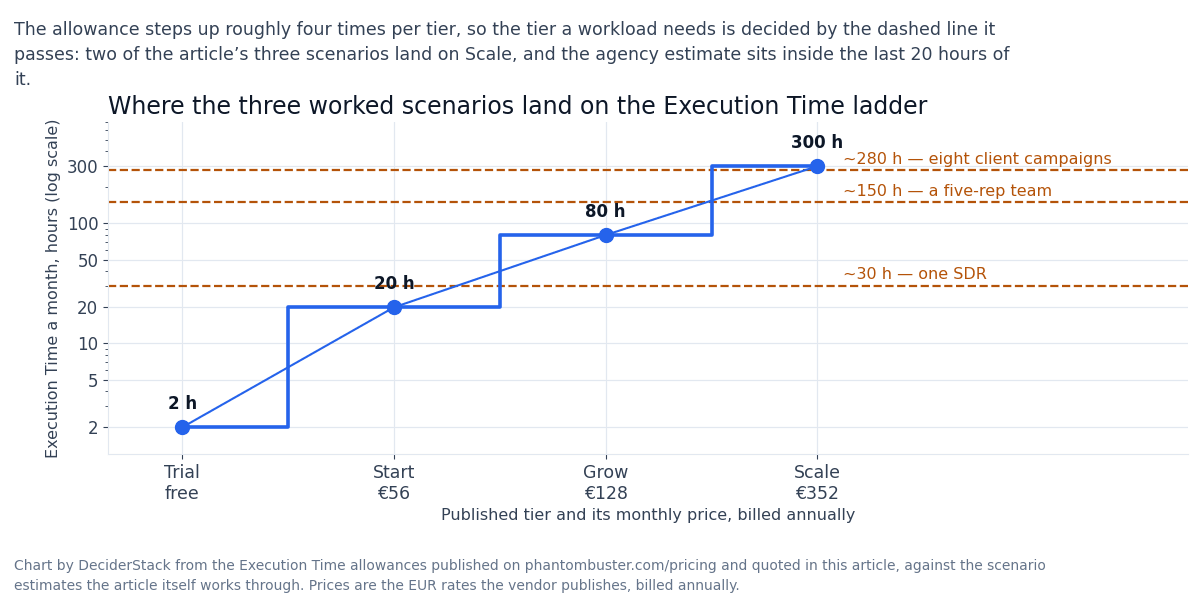
Execution Time is the headline metric. It is the wall-clock time your Phantoms and Automations spend running on Phantombuster’s servers, measured in hours per month:
- The Trial carries 2 hours
- Start includes 20 hours
- Grow includes 80 hours
- Scale includes 300 hours
The pricing page does not publish rollover terms for Execution Time, so plan on the monthly allowance resetting rather than accumulating. There is no automatic overage charge; when you run out, your automations pause until next month’s reset.
Email Credits are spent when Phantombuster enriches profiles with email addresses. Each email lookup consumes some number of credits based on the source provider (Dropcontact, Hunter, or Phantombuster’s own waterfall):
- On Trial, you get 50 email credits
- Start includes 500
- Grow includes 2,500
- Scale includes 10,000
Email Credits are sold as a monthly allowance; the pricing page does not publish rollover terms for them.
AI Credits are spent when Phantombuster’s AI features run — generating outreach message variants, filtering scraped data, classifying intent, or running AI agents:
- Trial comes with 1,000 AI credits
- Start includes 10,000
- Grow includes 30,000
- Scale includes 90,000
The pricing page does not publish rollover terms for AI Credits either.
URL Finder Credits are spent when Phantombuster searches a platform (Sales Navigator, LinkedIn Recruiter, Twitter, etc.) for profile URLs based on a query:
- The Trial grants 100 URL finder credits
- Start includes 1,000
- Grow includes 10,000
- Scale includes 20,000
These are the most-misunderstood credit pool — a single Sales Navigator search for “VP Sales at SaaS companies in Texas” might consume 50-100 URL finder credits depending on the result size.
The reason the four-pool model matters is that the cost-of-mistake pattern depends on the workflow. A team running LinkedIn profile scraping + email enrichment burns Email Credits faster than Execution Time. A team running AI-generated outbound messaging burns AI Credits faster.
A team running Sales Navigator search to build lists burns URL Finder Credits fastest. Plan for the credit pool that your dominant workflow burns first, not the one with the highest headline number.
The four published tiers: Trial, Start, Grow, Scale
The pricing ladder is structured around the four credit pools plus Automation Slots (the number of recurring automations you can have running simultaneously). All prices are billed annually by default; monthly billing carries a premium.
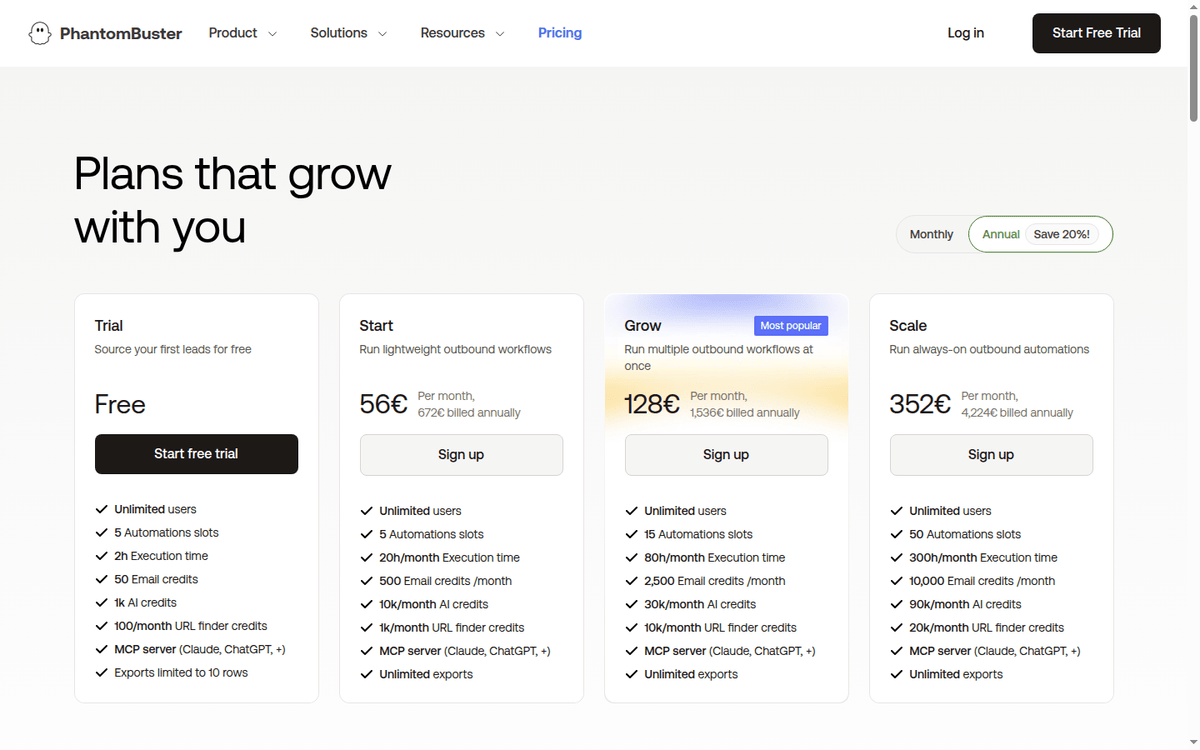
Trial is free and intended for evaluation. It includes:
- 5 Automation Slots
- 2 hours of Execution Time per month
- 50 Email Credits
- 1,000 AI Credits
- 100 URL Finder Credits per month
Trial ships with access to:
- the MCP server (Claude, ChatGPT, and other MCP-compatible agents)
- 15+ platform integrations
- 100+ pre-built automations
- intent signals
- the basic data extraction features
The catch: exports are limited to 10 rows.
The Trial is the right surface to evaluate Phantombuster on a 50-100 record pilot workflow. It is not a real production plan.
Start (€56/month, €672 billed annually) is the first paid tier. It includes:
- 5 Automation Slots
- 20 hours/month Execution Time
- 500 Email Credits/month
- 10,000 AI Credits
- 1,000 URL Finder Credits/month
- unlimited exports
The Start plan suits a single user or a small team running a few targeted LinkedIn workflows against a defined prospect list. It also fits an agency operator running one or two client campaigns at a time.
Grow (€128/month, €1,536 billed annually) is the most-popular tier, per Phantombuster’s own published positioning. It includes:
- 15 Automation Slots
- 80 hours/month Execution Time
- 2,500 Email Credits/month
- 30,000 AI Credits
- 10,000 URL Finder Credits/month
- unlimited exports
Grow fits a sales team running multiple concurrent outbound workflows — LinkedIn profile scraping plus Sales Navigator list building plus AI-personalized email sequences, with daily or twice-daily refresh schedules.
Scale (€352/month, €4,224 billed annually) is the high-volume tier. It includes:
- 50 Automation Slots
- 300 hours/month Execution Time
- 10,000 Email Credits/month
- 90,000 AI Credits
- 20,000 URL Finder Credits/month
- unlimited exports
Scale is aimed at agencies running multiple client campaigns simultaneously, for sales organizations running 24/7 outbound automation, or for growth teams building lead-generation pipelines at scale.
There is no public Enterprise tier; sales-led conversations are available for higher Execution Time allotments or specialized compliance requirements.
The important pricing detail: the published monthly prices assume annual billing. Monthly billing on Start runs roughly €69-€75, monthly billing on Grow runs roughly €159-€169, monthly billing on Scale runs roughly €439-€459. The annual discount is roughly 18-22%.
LinkedIn and Sales Navigator automation: the bread-and-butter workflow
The dominant use case for Phantombuster is LinkedIn and Sales Navigator automation. The platform ships purpose-built Phantoms for the most-common LinkedIn workflows:
- Profile scraping — extract public profile data from a list of LinkedIn URLs (name, title, company, location, connections count, recent activity)
- Sales Navigator search scraping — extract prospect lists from a Sales Navigator search URL (filtered by title, company size, geography, seniority)
- Profile visits — automatically visit a list of LinkedIn profiles (the “warm-up” mechanic that triggers profile viewers to reciprocate)
- Connection requests — send automated LinkedIn connection requests to a list of profiles (with templated note)
- Messaging sequences — send LinkedIn messages on a defined cadence after a connection is accepted
- Post engagement — auto-like or auto-comment on posts from a defined prospect list
- Email enrichment — find email addresses for a list of LinkedIn profiles via Dropcontact, Hunter, or Phantombuster’s waterfall
The automation library covers 100+ pre-built workflows across:
- Sales Navigator
- Twitter/X
- GitHub
- Google Maps
- Yelp
- dozens of niche platforms
Most workflows are configurable through a UI without code, but advanced users can extend them with Phantombuster’s API.
The honest version on LinkedIn automation: the platform works, and the workflows produce real pipeline for real teams. The legal risk on LinkedIn-specific automations is real and unresolved. LinkedIn has pursued legal action against scrapers in the past, and the ToS question is genuinely contested.
The prudent pattern is to keep volume modest and avoid triggering LinkedIn’s anti-automation signals. Account restrictions follow. Consult legal counsel before treating LinkedIn automation as a primary pipeline source.
The MCP server: the newest layer
Phantombuster ships an MCP server. The MCP (Model Context Protocol) is the emerging standard for AI agents to access external tools. The published plan list names Claude and ChatGPT as the MCP clients the server is built for, exposing the platform’s Phantoms and Automations to those agents.
A user working in Claude can ask “build me a list of 50 VP Sales at Series B SaaS companies in Texas.” The Phantombuster MCP server handles the Sales Navigator search, the URL extraction, and the email enrichment. A structured result comes back inside the AI agent.
The MCP integration is included on every Phantombuster plan at no extra cost. The credit pools (Execution Time, AI Credits, URL Finder Credits) still apply. For a team whose sales reps are already working inside Claude or ChatGPT, the MCP integration is a real differentiator that competing platforms have not caught up to.
Cost scenarios: what real workflows cost
Three worked examples using the published EUR pricing. They are planning estimates, not measured runs: the real burn depends on your workflow shape and your platform mix.
Scenario 1: Single SDR, daily LinkedIn + email outreach:
- Daily Sales Navigator scrape (200 URLs/day)
- profile visit warm-up (200 visits/day)
- connection requests (50/day)
- email enrichment on accepted connections (20/day)
Estimated Execution Time: ~30 hours/month. Estimated URL Finder Credits: ~6,000.
Estimated Email Credits: ~600. Recommended plan: Grow at €128/month (€1,536/year). The Start plan’s 1,000 URL Finder Credits would run out by day 5.
Scenario 2: 5-person sales team, multi-channel outbound. Each rep runs LinkedIn + Sales Navigator + email + phone cadence:
- Estimated Execution Time per team: ~150 hours/month
- Estimated URL Finder Credits: ~20,000
- Estimated Email Credits: ~3,000
- Recommended plan: Scale at €352/month (€4,224/year)
The Grow plan’s 80 hours of Execution Time would burn out by week 3.
Scenario 3: Agency running 8 client campaigns simultaneously. Each client gets a LinkedIn + email outbound stack:
- Estimated Execution Time: ~280 hours/month
- Estimated URL Finder Credits: ~40,000
- Estimated Email Credits: ~8,000
Recommended plan: Scale at €352/month, but monitor the URL Finder Credits carefully — Scale’s 20,000 URL Finder Credits would run out mid-month at this volume. A sales conversation about a custom plan is the right move.
The pattern: single-user or small-team workflows cost €56-€128/month on Start or Grow. Multi-rep sales teams cost €128-€352/month on Grow or Scale. Agency-volume workloads push toward Scale plus a sales conversation about higher credit allotments.
When Phantombuster is the wrong pick
Three buyer profiles where Phantombuster is not the right platform in 2026.
First, teams that need pure technical scraping without the cloud-execution overhead. If your team has engineering capacity and wants to run scrapers on your own infrastructure with full code control, Scrapy, Playwright, or Apify are the right picks.
Phantombuster’s no-code UI is a feature for non-technical operators; it is a constraint for engineering teams that want to write custom scrapers.
Second, teams that want a flat contact database, not outbound automation. If your sales process is “give me a list of 5,000 contacts and I will email them through Outreach,” Apollo or ZoomInfo is the simpler, cheaper answer. Phantombuster’s value is in the automation and orchestration, not in the data itself.
Phantombuster enriches and routes; it does not own the contact database.
Third, teams operating in jurisdictions where LinkedIn and similar platform ToS are strictly enforced.
If your team is in a market where legal risk on LinkedIn automation translates to direct operational risk (some EU jurisdictions have stricter rules on platform ToS enforcement), the prudent pick is a more conservative outbound stack. Purchased contact lists plus email-only outbound.
How Phantombuster compares to Apify, Browse AI, and LinkedIn Sales Navigator
A short comparison is worth doing here. The question a RevOps lead asks first is usually “Phantombuster, Apify, or Browse AI?”
| Dimension | Phantombuster | Apify | Browse AI | Sales Navigator alone |
|---|---|---|---|---|
| Pricing model | Tiered (4 plans, EUR) | Usage-based (compute units) | Tiered (3 plans) | Per-seat only |
| LinkedIn automation | Native, purpose-built | Generic scrapers | No native | Manual |
| No-code UI | Yes | Limited | Yes (visual) | N/A |
| Cloud execution | Yes (4 tier ladder) | Yes (compute units) | Yes | N/A |
| Pre-built automations | 100+ | 74,000+ (actors) | Prebuilt robots, count not published | N/A |
| Email enrichment | Yes (Dropcontact, Hunter) | Via integrations | Limited | No |
| MCP server | Yes | Yes | No | No |
| Best for | Outbound automation | Custom scraping at scale | Visual scraping | Manual prospecting |
| Free tier | Trial (2h exec) | $5/mo credit | 50 credits/mo | No |
The honest comparison: Apify suits engineering teams that want to write custom scrapers and run them at scale. Browse AI fits non-technical users who want to record a visual scraping workflow (point-and-click on a website, no code).
Phantombuster suits sales teams that want purpose-built LinkedIn and outbound automation with cloud execution and AI integration.
The honest version
The 2026 version of Phantombuster is the most-capable no-code cloud automation platform for sales-led outbound. The four-tier pricing is transparent. The cloud-execution model means the user’s laptop is irrelevant after the workflow is configured.
The 100+ pre-built automations cover the dominant outbound workflows out of the box. The MCP server integration is a real differentiator for teams already working in AI agents.
The honest version is on the four-credit model. Mixing up Execution Time, Email Credits, AI Credits, and URL Finder Credits is the most-common cost-of-mistake pattern.
A team that plans on the headline Execution Time number and ignores URL Finder Credits will burn out of URL Finder in week two and pause all Sales Navigator workflows. Plan for the credit pool your dominant workflow burns first.
The second honest version is on LinkedIn legal risk. The platform works, and the workflows produce pipeline. The legal question is genuinely contested. For a team scaling LinkedIn automations beyond modest experiments, consult counsel before treating LinkedIn-specific workflows as a primary pipeline source.
The third honest version is on the no-code ceiling. Phantombuster’s UI covers 90% of the workflows a sales team needs. The remaining 10% require the API, custom Phantoms, or webhook integrations. A team that hits the no-code ceiling mid-quarter and needs custom engineering will spend more time and money than they planned.
Where we ran out of public evidence
Three classes of figures in this review depend on a real Phantombuster account we did not run for this piece. They are called out below, and we recommend you validate them on your own workflow shape before you commit to Grow or Scale.
The first is the actual Execution Time consumption for your specific automations. The published Execution Time per plan is a ceiling. The real consumption depends on the workflow complexity, the platform being scraped (LinkedIn is slower than Google Maps), and the data volume per run. Track Execution Time for two billing cycles before committing to Scale.
The second is the actual URL Finder Credit consumption for Sales Navigator searches. The published URL Finder Credits per plan assume average search sizes. A Sales Navigator search returning 10,000 results consumes many more URL Finder Credits than a search returning 100 results.
Benchmark on your own search sizes before budgeting on the assumption that the published URL Finder allotment will cover your month.
The third is the actual deliverability impact of Phantombuster-generated outreach. The platform’s email enrichment and AI message generation can produce real pipeline at scale. The deliverability of AI-generated emails depends on the email sending infrastructure downstream (Instantly, Lemlist, Smartlead).
Phantombuster is the data layer; the deliverability layer is separate. Run a 30-day pilot before scaling.
FAQ: credits, time, and LinkedIn limits
How much does Phantombuster cost per month?
- The published pricing starts at €0 for the Trial (2 hours Execution Time, 50 Email Credits, 1,000 AI Credits, 100 URL Finder Credits)
- Start is €56/month (20h Execution, 500 Email, 10k AI, 1k URL Finder)
- Grow is €128/month (80h Execution, 2,500 Email, 30k AI, 10k URL Finder)
- Scale is €352/month (300h Execution, 10,000 Email, 90k AI, 20k URL Finder)
Annual billing is the default; monthly billing carries a roughly 20% premium.
Is Phantombuster legal for LinkedIn automation?
The legal question is genuinely contested. LinkedIn’s User Agreement prohibits automated access; Phantombuster’s position is that scraping publicly visible data is legal in most jurisdictions.
For a team running Phantombuster against LinkedIn at scale, consult counsel before treating LinkedIn-specific automations as a primary pipeline source. Keep volume modest to avoid triggering LinkedIn’s anti-automation signals.
What is Execution Time?
Execution Time is the wall-clock time your Phantoms and Automations spend running on Phantombuster’s cloud servers, measured in hours per month. A 1,000-profile LinkedIn scrape that runs in 25 minutes consumes 25 minutes of Execution Time. The monthly allowance is the ceiling, and the pricing page does not publish rollover terms for unused hours.
What is the difference between Phantombuster and Apify?
Phantombuster is purpose-built for sales-led outbound automation (LinkedIn, Sales Navigator, email enrichment). The UI is no-code and the pre-built automations are pre-configured for outbound workflows.
Apify is a general-purpose scraping platform with 74,000+ pre-built “actors” (custom scrapers) and a usage-based pricing model (compute units). Phantombuster suits sales teams; Apify suits engineering teams writing custom scrapers.
Does Phantombuster have an MCP server?
Yes. Phantombuster ships an MCP server, exposing the platform’s Phantoms and Automations to MCP-compatible AI agents; the plan page names Claude and ChatGPT. The MCP integration is included on every Phantombuster plan at no extra cost. The credit pools (Execution Time, AI Credits, URL Finder Credits) still apply when the MCP server runs a workflow.
Can Phantombuster replace a contact database like Apollo or ZoomInfo?
No. Phantombuster enriches and routes; it does not own the contact database. A typical Phantombuster workflow uses Sales Navigator as the source list and enriches with email and phone data. For a team that wants a flat contact database with sequences built in, Apollo or ZoomInfo is the simpler answer.
Phantombuster suits workflows that need automation, multi-platform orchestration, or AI integration that Apollo cannot provide.
The documentation and pricing pages behind this
- Phantombuster pricing — the four-tier pricing (Trial, Start €56, Grow €128, Scale €352), Execution Time / Email Credits / AI Credits / URL Finder Credits per plan, annual vs monthly billing rates
- Phantombuster — company overview, the 2016 founding, cloud-execution positioning, the pre-built automations library and the MCP server listing
How we put this together: plan prices, execution-time and credit allowances, the four credit pools and the annual-versus-monthly billing rates come from phantombuster.com/pricing, quoted in EUR as displayed on the page. We have not run a paid Phantombuster account.
Figures that depend on a real workload, a real target or a real integration are flagged where they appear in the text rather than being estimated.
Disclosure: this article contains affiliate links. If you buy through them we may earn a commission at no extra cost to you. Commission never changes our scoring or the order of a ranking.