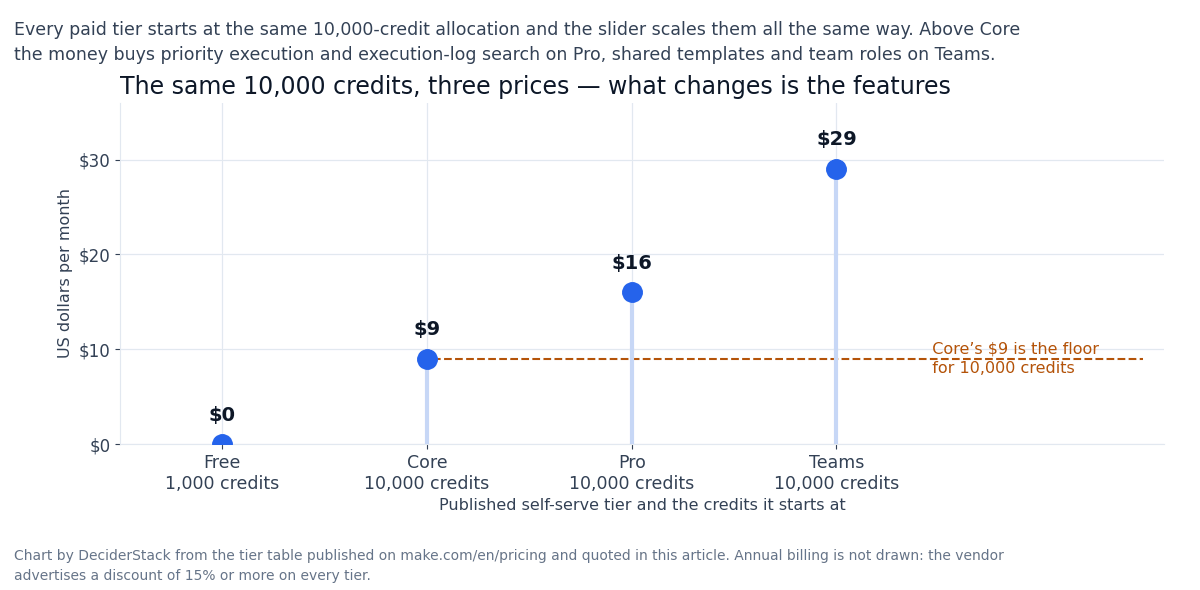
Free runs at 1,000 credits a month and Core is $9 for 10,000; Pro is $16 and Teams $29, with enterprise priced on request. Production scenarios burn 5,000–20,000 credits a month, so the median buyer lands on Core — validate one workflow on the free plan, measure your own burn, then upgrade.
Multi-branch logic Zapier cannot express in a single Zap is where Make wins; at very high volume the credit meter works against you, and Zapier’s linear task model is still the quicker one to learn.
Make.com is the visual workflow automation platform that took the Integromat name off the front door in 2020 and rebuilt itself around a credit-metered pricing model where every module action in your scenario. Adding a Google Sheet row, fetching a Gmail message, calling an HTTP endpoint — costs one credit.
In 2026 the platform is the most credible alternative to Zapier in the no-code automation category. The new headline product is maia by make, an ai-agent builder that lets you describe a workflow in natural language and have make generate the scenario for you.
If you came here for a “Make.com review” in 2026, the honest answer is that Make is the right pick for teams that want visual-first workflow design and credit-metered pricing. That maia is a real product but not a replacement for understanding how scenarios are constructed.
This review walks through what Make.com actually ships in 2026: the Free / Core / Pro / Teams / Enterprise tier ladder, the credit-pricing math on real scenarios.
The maia ai agent builder, the 3,000+ apps library and the 350+ ai apps subset, and the honest fit — when make is the right choice, when zapier is the better pick, and when n8n or a custom code pipeline wins. Every dollar figure on the pricing table comes from make.com/en/pricing.
The numbers that depend on a real workload — your actual monthly credit burn on a five-scenario production pipeline, your time-to-debug on a failing scenario — are marked as estimates where they appear.
The pitch and the catch in 2026
Make.com is a visual workflow builder with a credit-metered billing model. You build scenarios — directed graphs of modules where data flows from one app to the next — and every module action costs one credit.
A scenario with five modules that runs 100 times per month consumes 500 credits; a scenario with 20 modules that runs 1,000 times per month consumes 20,000 credits.
The “module” granularity is what differentiates Make from Zapier. Zapier bills per task (one task = one action = one app call), and most users think in task counts. Make bills per module-action, and most users think in scenario runs.
If your workflow has 10 modules and runs 100 times, Make counts 1,000 credit actions; Zapier counts 100 tasks because Zapier tasks are scenario runs, not module steps.
The credit math on the same workload can be cheaper on Make (because scenarios are more efficient) or more expensive on Make (because complex scenarios have many modules per run).
What you build with Make: any repeatable workflow that connects two or more apps. Lead routing from webform to CRM to email sequence. Invoice generation from Stripe to Google Sheets to Slack. Social media scheduling from a content calendar to multiple platforms.
AI agent workflows that call OpenAI, Claude, or Gemini on every row of a spreadsheet. The 3,000+ apps library covers the long tail; the 350+ AI apps subset covers the LLM and embedding model landscape.
The credit meter is the most important thing to understand before you commit to a Make plan. A scenario with 10 modules running 1,000 times per month consumes 10,000 credits — which is the Core plan’s headline allocation. If your scenarios run more frequently or have more modules, you need a higher allocation.
Use the scenario detail panel to see your real credit burn before you upgrade.
Make.com pricing in 2026: Free, Core, Pro, Teams, Enterprise
The pricing ladder is one of the cleanest in the SaaS automation category. Five tiers, scaling from $0 to custom Enterprise, with a credit volume slider on each tier that lets you pick the monthly allocation up front.
| Plan | USD per month | Credit allocation | Active scenarios | Minimum interval | API access | Enterprise apps |
|---|---|---|---|---|---|---|
| Free | $0 | 1,000 credits/mo | Limited | 15 minutes | — | — |
| Core | $9 | 10,000 credits/mo | Unlimited | Down to 1 minute | Yes | — |
| Pro | $16 | 10,000 credits/mo | Unlimited | Down to 1 minute | Yes | — |
| Teams | $29 | 10,000 credits/mo | Unlimited | Down to 1 minute | Yes | — |
| Enterprise | Custom | Custom | Unlimited | Custom | Yes | Yes |
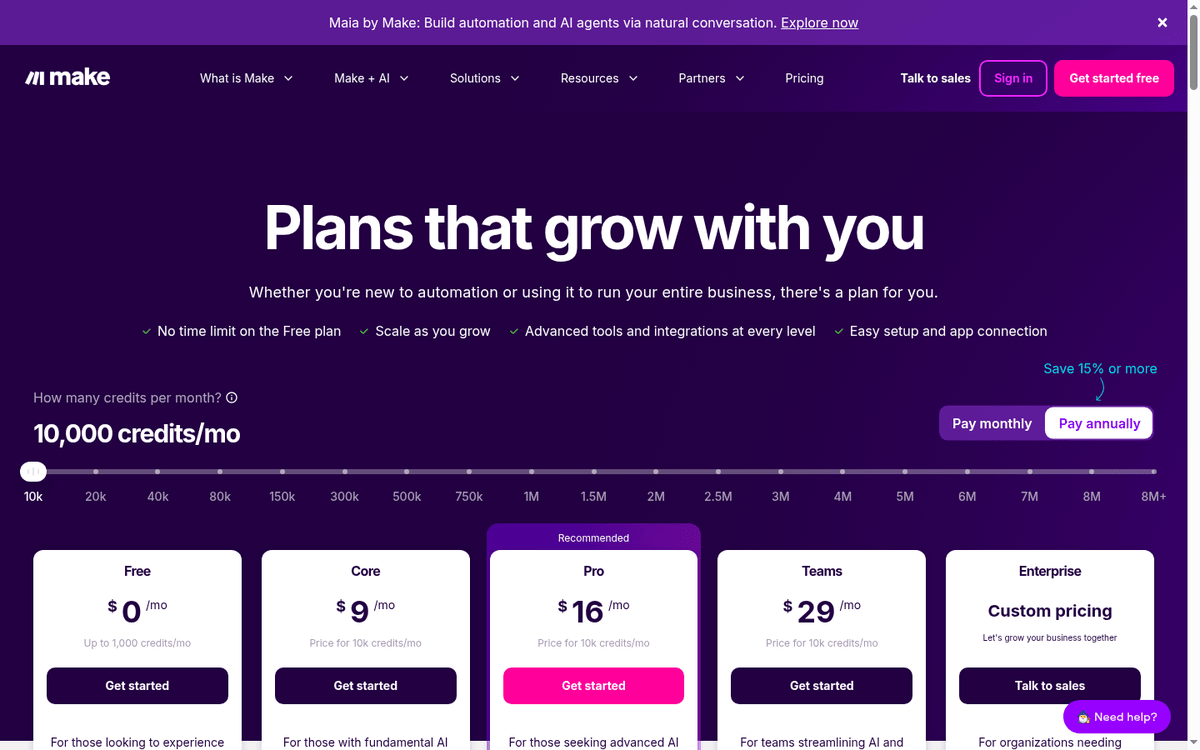
The credit allocation column is the headline number for the Free/Core/Pro/Teams comparison; the price column is the headline for budgeting. The credit allocation scales beyond 10K via the slider on the pricing page, which runs up to 8M+ credits.
Pricing scales linearly with allocation; annual billing saves 15% or more on every tier.
The differentiator across Core / Pro / Teams / Enterprise is feature depth, not credit volume. Pro adds priority scenario execution, custom variables, and full-text execution log search. Teams adds team roles and shared scenario templates.
Enterprise adds:
- custom functions support
- enterprise app integrations
- 24/7 support
- value engineering access
- overage protection
- and advanced security features
The “Price for 10k credits/mo” label on the pricing page means $9 Core / $16 Pro / $29 Teams is the price at the lowest credit allocation. If you need 40K credits, the price is roughly 4x the $9 Core price, which is the linear scale the page advertises. Plan your credit allocation honestly before you budget.
Maia by Make: the AI-agent builder
Maia by Make is the 2026 product that has most people talking about Make, and the honest assessment is that Maia is a real product but not a magic wand.
What Maia does. You describe a workflow in natural language (“when a new row is added to this Google Sheet. Call openai to summarize the row, then post the summary to a slack channel”), maia generates the scenario graph, you review the result, and you publish. The output is a working scenario you can edit in the visual editor.
What Maia does not do. Maia does not replace understanding scenarios. A generated scenario that fails on edge cases (empty row, malformed input, rate-limited API) needs debugging, and debugging a Maia-generated scenario is the same debugging as a hand-built scenario. Maia saves the build time; it does not save the maintenance time.
The honest framing. Maia is a productivity multiplier for an experienced Make user who can review a generated scenario and edit the modules that don’t match the requirement. For a first-time Make user, Maia generates scenarios faster than they could build them by hand, but the user still needs to learn the platform to debug what Maia builds.
Maia is included in every plan at no additional cost. The 350+ AI apps in the Make ecosystem (including OpenAI, Claude, Gemini, Mistral, Cohere, Hugging Face) are what you call from inside a scenario when you want AI behavior. Maia is the agent that builds the scenario, not the ai inside the scenario.
Make.com vs Zapier: when the credit math wins
The most common comparison shopper runs Make vs Zapier. Both products connect apps, both products have visual builders, both products have AI integrations in 2026.
The pricing model. Zapier bills per task (one task = one action = one app call) on tiered plans from $19.99/month (Free: 100 tasks) to custom Enterprise. Make bills per credit (one credit = one module-action) on tiered plans from $0 (1,000 credits) to custom Enterprise. The unit cost depends on the workflow shape, not on the vendor.
The decision rule of thumb. If your workflows are simple (one trigger, one action), Zapier’s task model is more predictable and usually cheaper. If your workflows are complex (one trigger, 10–20 actions including data transformation), Make’s credit model is usually cheaper because Make bills per action rather than per workflow run.
The visual builder. Make’s visual builder is more flexible than Zapier’s linear task list — you can branch, loop, and aggregate inside a single scenario. Zapier’s builder is simpler to learn but cannot express a multi-branch workflow without splitting it into multiple Zaps.
For technical users who think in graphs, Make wins; for non-technical users who think in linear sequences, Zapier wins.
The AI integrations. Both products integrate with OpenAI, Claude, Gemini, and the long tail of AI services. Make has the dedicated Maia product for AI-agent building; Zapier has Zapier Agents and Tables. Both are real products; both are 2026 additions; both are still being built out.
Make’s scenarios can do things Zapier’s Zaps cannot (multi-branch logic, data aggregation, error handling inside a single scenario). If you have ever split a workflow into multiple Zaps because the linear task list could not express the logic, Make’s visual builder will save you real time.
What the platform does not do well
Three workloads fit Make poorly in 2026.
Code-first automation. If your team is comfortable in Python or Node and the workflow involves custom business logic, a code pipeline (Airflow, Prefect, Temporal) is a better fit than Make. Make’s Make Code App (custom JavaScript or Python inside a scenario, billed at 2 credits per 1 second of execution) supports custom code.
The maintenance story for complex code is worse than a real codebase.
Large-scale data pipelines. Make’s per-credit billing works against you at very high volume. A scenario that consumes 1M credits per month costs roughly $900/month on Core; the same workload in Airflow on a small EC2 instance costs a fraction of that. Make is the right pick up to ~100K credits per month; beyond that, evaluate a dedicated data pipeline.
Compliance-sensitive workloads in regulated industries. Make states that it has completed SOC 2 Type II and SOC 3 audits and that it adheres to GDPR, but the procurement story for HIPAA or FedRAMP is not published on the pricing page. For regulated industries, evaluate the compliance posture before you commit.
The 2-credit-per-1-second Make Code App rate is published on the pricing page and is consistent across all paid plans. A 5-second Python execution costs 10 credits — the same as 10 standard module actions. Plan custom code into your credit budget.
The integration landscape in 2026
The 3,000+ apps library covers the long tail of SaaS:
- every productivity suite
- every CRM
- every marketing automation platform
- every payment gateway
- every database with a REST API
The 350+ AI apps subset covers:
- OpenAI
- Claude
- Gemini
- Mistral
- Cohere
- Hugging Face
- plus a long tail of vector databases
- embedding APIs
- and AI-specific endpoints
The integrations that matter for the median 2026 buyer:
- Google Workspace (Gmail, Sheets, Drive, Calendar)
- Slack
- Notion
- Airtable
- HubSpot
- Salesforce
- Stripe
- Shopify
- WordPress
- plus the AI tier (OpenAI, Anthropic, Google AI)
All of these ship as native Make modules, not as third-party Zapier-style custom integrations.
The MCP server (Connect your AI to your Make scenarios from anywhere with Make MCP Server) is a 2026 addition that lets external AI clients call Make scenarios directly.
The 350+ AI apps are not the same as the 3,000+ apps library. The ai subset is curated and includes both llm providers (openai, claude, gemini) and ai-adjacent services (vector databases, embedding apis, ai content tools). The full ecosystem is much larger if you count HTTP modules and custom app integrations.
FAQ: credits, operations, and overage
How much does Make.com cost in 2026?
Free $0 (1,000 credits/mo); Core $9 (10K credits/mo) up to $29/mo Teams for the same allocation, with the credit slider scaling up to 8M+ at proportional pricing. Enterprise is custom. Annual billing saves 15% or more.
Does Make.com have a free plan?
Yes — Free with 1,000 credits per month, a 15-minute minimum interval, and limited active scenarios.
What is one Make credit?
One module action in a scenario. A scenario with 10 modules that runs once consumes 10 credits. Custom code via the Make Code App consumes 2 credits per 1 second of execution time.
What is Maia by Make?
A natural-language AI agent builder that generates Make scenarios from your description. Included in every plan at no additional cost. Saves build time, not maintenance time.
How does Make.com compare to Zapier?
Make bills per module-action; Zapier bills per task (workflow run). For complex multi-branch workflows, Make’s visual builder is more flexible than Zapier’s linear task list. For simple trigger-action workflows, Zapier is usually cheaper.
Can I cancel anytime?
Yes, you can cancel a subscription at any time in the dashboard. No long-term contract on Free/Core/Pro/Teams.
What integrations are available?
3,000+ apps including 350+ AI apps. Native modules for:
- Google Workspace
- Slack
- Notion
- Airtable
- HubSpot
- Salesforce
- Stripe
- Shopify
- WordPress
- and the major LLM providers
What is the Make MCP Server?
A 2026 feature that lets external AI clients call Make scenarios directly via the Model Context Protocol. Useful for AI-agent workflows that need to trigger Make scenarios from inside an LLM context.
Source list: pricing and documentation pages
Make.com pricing Make.com Maia
How we put this together: the tier ladder, the credit allocation slider, the credit rates for code execution and the Maia and MCP product notes come from make.com/en/pricing, quoted in USD as displayed. We have not run a paid Make account.
Figures that depend on a real workload, a real target or a real integration are flagged where they appear in the text rather than being estimated.
Disclosure: this article contains affiliate links. If you buy through them we may earn a commission at no extra cost to you. Commission never changes our scoring or the order of a ranking.