
LambdaTest is one of the few products on this site where the brand on the box has changed between the time you searched for it and the time you read this. The company rebranded from LambdaTest to TestMu AI; the marketing site at lambdatest.com now forwards to testmuai.com, and the vendor’s public pages do not date the switch.
The product underneath is the same: a browser-and-device cloud for cross-browser testing, with a layer of AI authoring tools bolted on top.
If you arrived here looking for “LambdaTest pricing” or “LambdaTest review,” the platform is still the one you would have found before the rebrand, but the marketing surface now reads TestMu AI.
Five product families, five separate ladders, and no single price for the platform: which ladder you need is the whole decision.
| Product family | What it covers |
|---|---|
| Live | Manual and automated browser sessions on a hosted grid |
| Real Device | Physical iOS and Android handsets, alongside Live |
| Automation | Selenium, Playwright and Cypress suites in the cloud |
| HyperExecute | The same suites on the faster cloud, sharded across workers |
| SmartUI | Visual regression and accessibility checks on screenshots |
The ladders are not graded the same way: Live is priced by environment, Automation by parallel sessions and minutes, HyperExecute by wall-clock time.
It fits a QA team whose cross-browser or device matrix has outgrown its own CI, and one moving test creation to AI-authored scripts.
It is not a test-management platform, and it will not pay off on a single app tested in a single browser.
Every rate in the families above is the per-month figure on annual billing, and KaneAI is billed apart, per agent.
This review is what an editorial team puts together before recommending the platform to a QA lead who is tired of running Selenium on a single MacBook.
It belongs to our cloud and infrastructure coverage, next to the rest of the CI and browser-cloud work.
We walk through what the rebrand actually changed. We cover the:
- Live
- Real Device
- Automation
- HyperExecute
- SmartUI
product families. We cover the pricing tiers in each family, the AI authoring tool (KaneAI), and the free tier.
We close with the comparison to BrowserStack and Sauce Labs, plus the workloads where the platform is the wrong pick. Pricing and product data come from the vendor’s public pricing and about pages, read in September 2026.
No paid TestMu AI plan was bought for this article, so anything that depends on a real test suite is described as published rather than measured.
Inside the TestMu AI rebrand
The brand swap from LambdaTest to TestMu AI is complete: the marketing site at lambdatest.com forwards to testmuai.com, and the pricing page introduces the company as “TestMu AI (Formerly LambdaTest)”.
The vendor does not publish a date for the change. The product surface is the same cloud, the same browser-and-device matrix, and the same Selenium/Playwright/Cypress integration story. What changed is the AI positioning.
The company is now framed as “the world’s first full-stack Agentic AI Quality Engineering Platform,” with autonomous agents that plan, author, execute, analyze, and optimize tests. The AI authoring tool KaneAI is the lead product; the browser-and-device cloud is the substrate.
The customer logos cited on the about page are unchanged:
- Microsoft
- OpenAI
- Nvidia
- Boomi
- GitHub
- Best Egg
- Workday
- Akamai
- Louis Vuitton
- NBCUniversal
- City Furniture
- Cox
- Transavia
- Estée Lauder
- TripAdvisor
- boohoo
The 3M+ user figure is unchanged. The platform footprint (3,000+ browser-OS combinations, 10,000+ real devices) is unchanged.
The pricing model has shifted slightly toward the AI authoring tool. KaneAI was the headline addition in late 2025 and is now the front door of the platform.
The credit mechanic on KaneAI (Starter / Pro / Max) is the new shape that QA leads budget against; the Live / Real Device / Automation / HyperExecute / SmartUI families continue underneath.
Live sessions, manual and automated
Live is the entry point for QA teams that need to test a public-facing web app against a real browser on a real OS without setting up a local matrix. The free tier gives you one parallel test and manual sessions of two minutes each, refreshed every month.
Paid tiers start at $15/mo for Virtual Live (billed annually) for parallel automated sessions on Linux browser VMs. ChromeOS Live runs $29/mo for one parallel test on ChromeOS VMs. Real Device Plus Live is $39/mo for one parallel test on a real device.
The seat and its allowance
The trade-off in the Live family is between the cost of the seat and the type of environment. Linux browser VMs are the cheapest. Windows VMs are next. macOS VMs are more expensive. Real iOS and Android devices are the most expensive. If your test matrix is mostly Chrome on Windows, the Live ladder lands at the low end.
If your matrix includes Safari on iOS or any mobile browser, plan on the upper end.
Two capabilities sit underneath the ladders rather than on them. Geolocation testing runs across 150+ countries, with GPS location mocking on the mobile side, and the Lambda Tunnel exposes locally hosted or private apps to the cloud grid. Teams testing an internal staging environment usually need the tunnel before they need a higher tier.
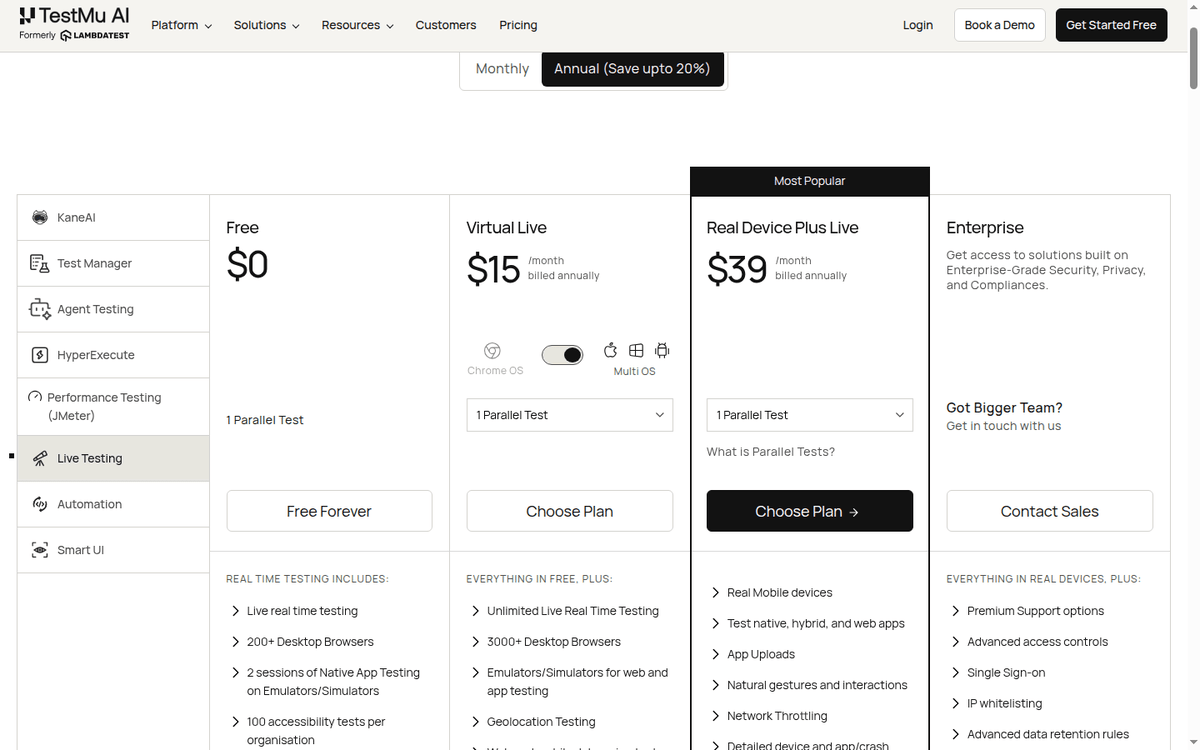
The free Live entry is deliberately thin: one parallel test, manual sessions capped at two minutes each, refreshed monthly. That is enough to feel the browser matrix, not to run a regression suite. The 300 free minutes sit one family over, in HyperExecute, and they are a lifetime allowance rather than a monthly one.
Physical handsets, iOS and Android
Real Device is the family you pick when you need to test against the actual hardware and OS stack that real users are running. The free tier gives you five sessions a month on real hardware, two minutes each; the 100 free minutes belong to the Automation family.
The paid tiers start at $39/mo (Real Device Plus Live, billed annually) for one parallel test on a real device.
The published promise is access to 10,000+ real devices across the major iOS and Android SKUs.
The matrix is broad enough that any consumer-facing mobile app can find its target devices on the cloud. Any B2B mobile app can find the mainstream enterprise devices (iPhone 12+, Pixel 6+, Samsung Galaxy S21+) on the cloud. The devices you cannot find are the long tail of low-end Android devices from regional vendors.
If your market is sub-Saharan Africa or rural India, you may need a local device farm on top of the cloud.
Why the real devices cost more
The trade-off against emulators is the standard one. Real devices are slower to bring up, more expensive per minute, and harder to instrument. They are also the only way to catch the bugs that show up only on real hardware:
- Bluetooth interactions
- NFC
- camera quality
- accelerometer
- real-world network conditions
For a public-facing mobile app, real-device testing is not optional.
Selenium, Playwright and Cypress suites
Automation is the family you pick when you want to run a Selenium, Playwright, or Cypress suite against the browser matrix. The free tier gives you 100 minutes of free web and mobile automation with two parallel sessions, and that allowance is valid for life rather than resetting each month.
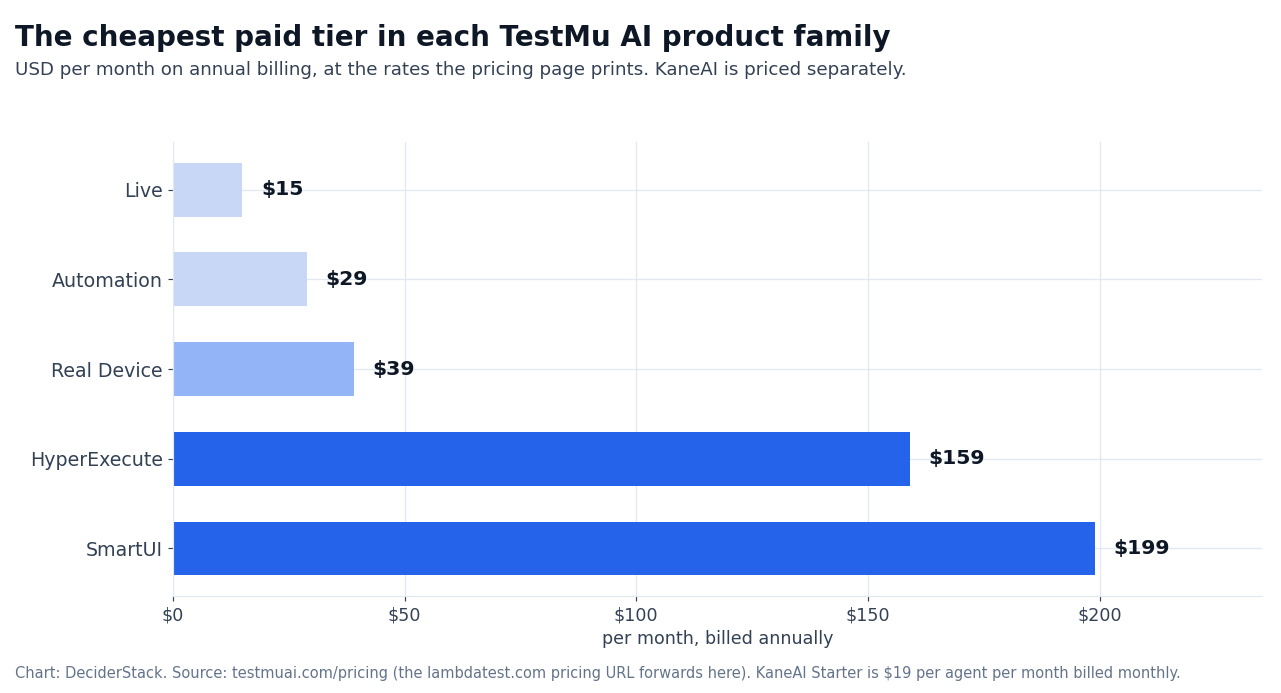
The paid tiers start at $29/mo for Web Automation on Desktop (billed annually) for desktop browsers. Web Automation higher tier is $79/mo for a wider matrix. Virtual Automation Cloud is $139/mo for a private cloud option. The top tier at $199/mo is called Real Device Plus Automation Cloud.
Three lines on that page are not part of the five testing families.
- Test Manager is a separate subscription billed by seat.
- JMeter-based performance testing is licensed by concurrent virtual users — 100, 2,000 or 8,000 of them.
- Parallel mobile tests on HyperExecute still need the matching real-device licenses on top.
The integration story is the standard one. Selenium WebDriver support is the bread and butter, Playwright support is solid, Cypress support is recent but functional. If you have not settled on a framework yet, our Playwright against Selenium comparison covers where the two diverge on the same suite.
Our Playwright walkthrough covers the browser-automation basics if you are coming from scripting rather than QA. The CI integrations cover:
- GitHub Actions
- GitLab CI
- Jenkins
- CircleCI
- the standard cloud-CI players
The reporting surface is a dashboard with screenshots, video recordings, and network logs for each test run.
The trade-off against self-hosted Selenium Grid is the standard one.
The cloud wins on browser-OS matrix breadth and on parallel-run scale. It loses on long-running test suites where the per-minute cost adds up. For a CI pipeline that runs 1,000 tests on every commit, the math depends on per-test runtime. For a nightly regression suite that runs once a day, the cloud is typically cheaper than the self-hosted Grid.
The same managed-browser idea shows up outside testing as well. Our Browserless review covers a hosted headless-browser fleet for automation work that never writes a test, and the trade-offs there have the same shape — rented browsers, metered by use.
HyperExecute: the fast Selenium/Playwright cloud
HyperExecute is the family’s fast-lane cloud for Selenium, Playwright, and Cypress. The pricing lands at $159/mo (billed annually) for a HyperExecute Public Cloud tier, with higher tiers available for the dedicated cloud and the enterprise option.
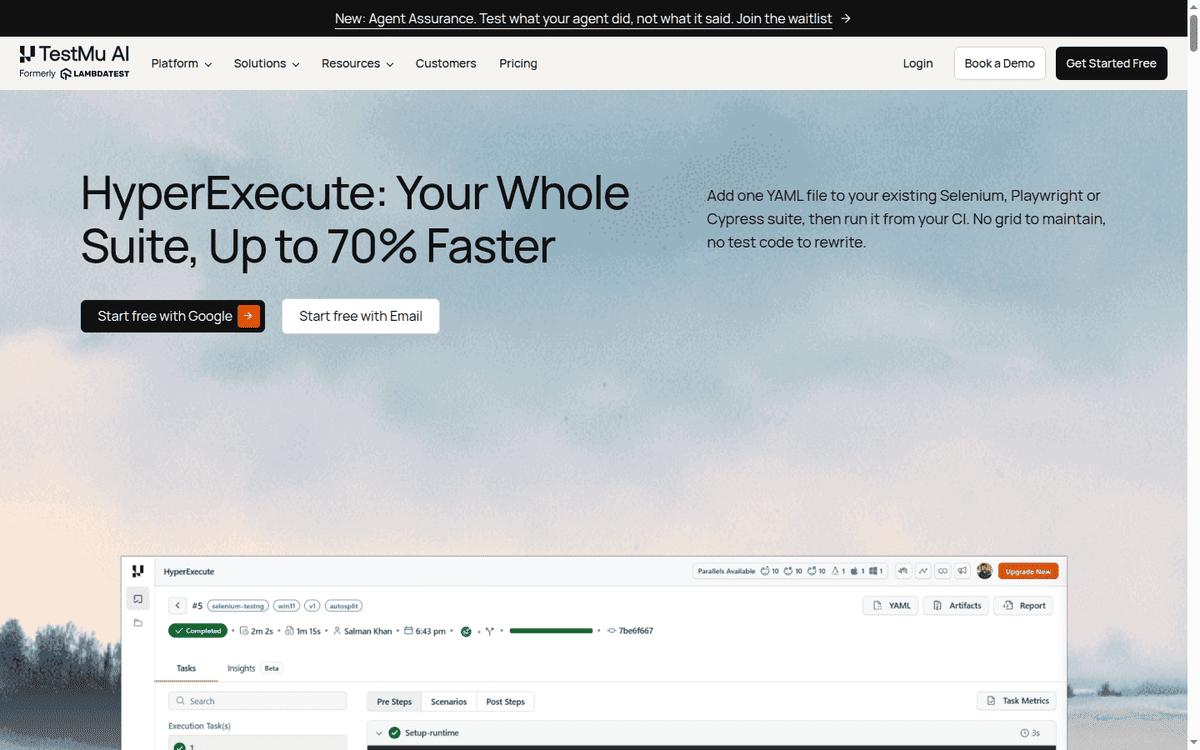
The performance promise is 70% faster test execution than a standard Selenium Grid on equivalent hardware, achieved through a tuned scheduling layer and a smaller per-test cold-start.
HyperExecute’s page makes the claim in a single line — one YAML file added to an existing Selenium, Playwright or Cypress suite — and shows a finished run in the cloud dashboard underneath it.
The honest read: HyperExecute is fast on the kinds of suites it was designed for — Selenium and Playwright scripts that can be sharded across many parallel workers. It is less differentiated on Cypress suites, which already run fast on a well-tuned runner.
It is not the right shape for long-running end-to-end tests that need to hold a browser session open for an hour.
Reading the 70% claim
Treat the 70% figure as the vendor’s own benchmark rather than a property of your suite. The saving comes from sharding, so a suite that cannot be split into independent chunks will see less of it, and a suite that is already parallel will see more.
The trade-off against standard Automation is the standard one.
HyperExecute wins on test-suite wall-clock time. It loses on cost per minute, which is slightly higher than Automation’s per-minute rate. The break-even is on a suite that runs often enough that the wall-clock saving matters more than the per-minute surcharge.
SmartUI: visual regression and accessibility
SmartUI is the visual regression and accessibility family. The free tier gives you 2,000 screenshots as a lifetime allowance, with one month of build history kept. The paid tier lands at $199/mo (billed annually) for 15,000 screenshots, with higher tiers available.
The visual regression story is the standard one:
- You upload a baseline screenshot
- you run the test
- SmartUI compares the new screenshot to the baseline
- the diff is reported at the pixel level with tolerance thresholds
The accessibility story runs on top of axe-core (the open-source accessibility engine), with a UI surface that flags the issues per page.
The trade-off against Percy and Chromatic is the standard one. SmartUI is cheaper on the entry tier and includes accessibility on the same tier. Percy has the deeper Storybook integration; Chromatic has the deeper visual review surface. For a team that wants visual regression and accessibility on the same bill, SmartUI is worth a serious look.
KaneAI: the AI authoring surface
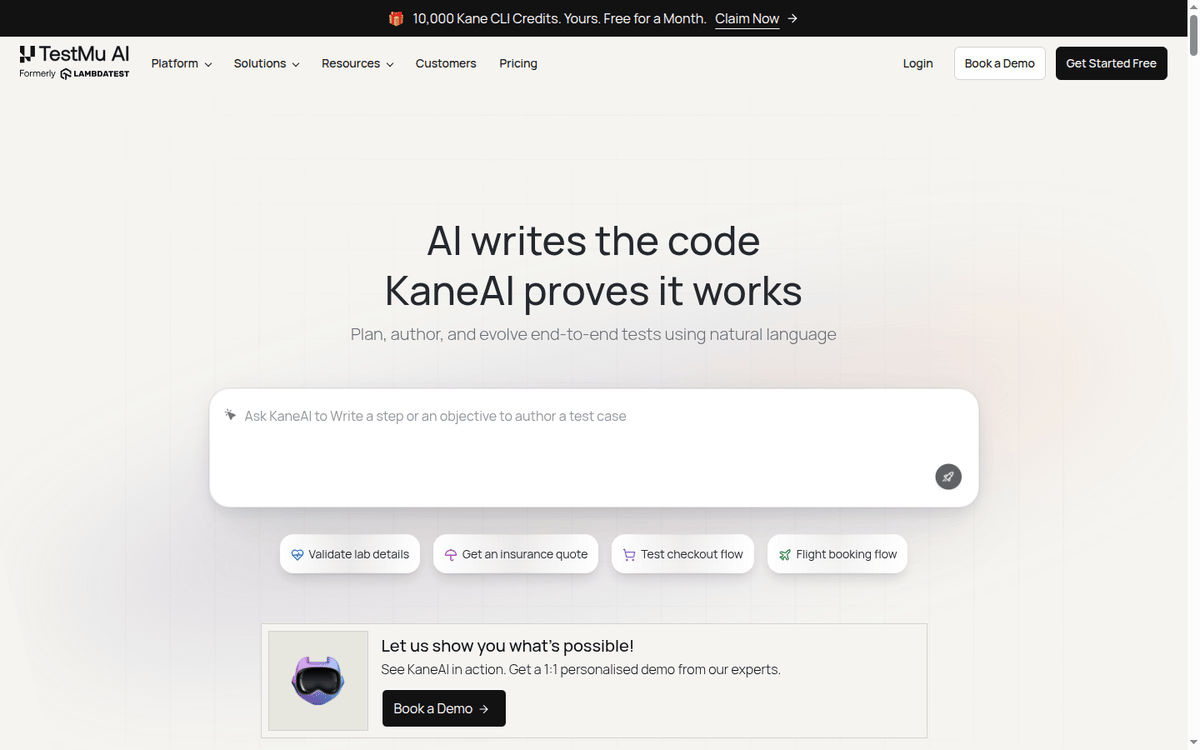
KaneAI is the AI authoring tool that wraps across the Live, Real Device, Automation, HyperExecute, and SmartUI families.
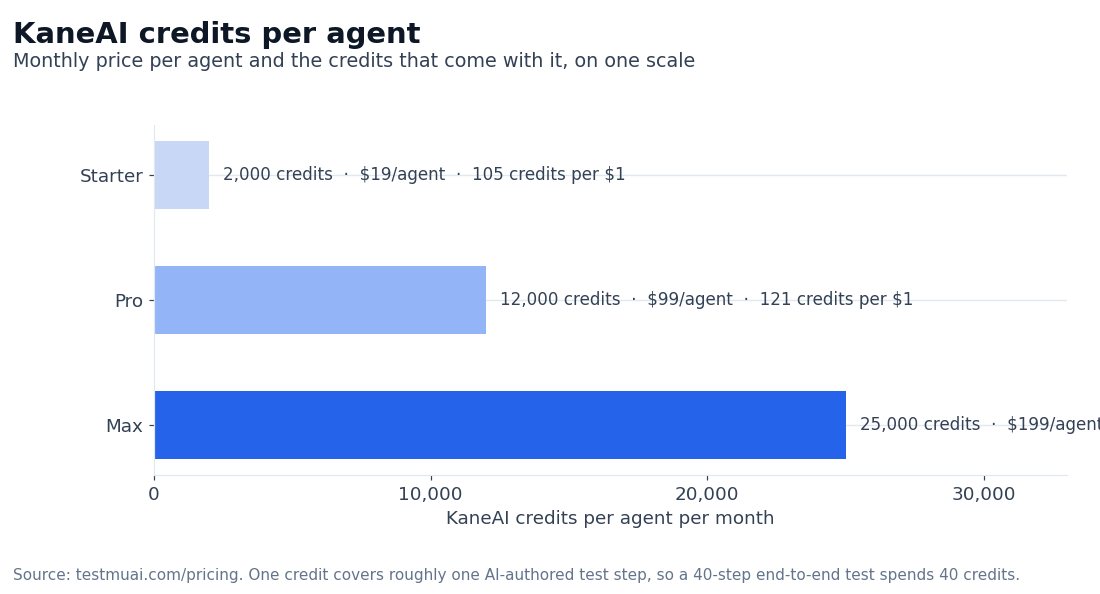
The pricing is per agent, with three credit plans.
- KaneAI Starter is $19/agent/mo billed monthly, or about $17/agent/mo on annual billing, and gives you 2,000 credits per agent per month, local authoring through Kane CLI, and a single Test Manager seat per agent.
- KaneAI Pro at $99/agent/mo gives you 12,000 credits, access to Cloud KaneAI Web authoring, and 100 HyperExecute minutes per month.
- KaneAI Max at $199/agent/mo gives you 25,000 credits, Mobile Cloud authoring, and additional HyperExecute minutes.
Annual billing saves about 10%, putting the Starter at roughly $17/agent/mo, Pro at $89, Max at $179.
Price the credits against your own catalog before you pick a rung. One credit covers roughly one authored step, so a 40-step end-to-end test spends 40 of them and the Starter allowance is about fifty runs a month.
How credits are counted
The credit mechanic is the unit of work.
- One credit covers roughly one AI-authored test step.
- A 40-step end-to-end test consumes 40 credits.
- A 100-step regression suite consumes 100 credits per run.
The math is straightforward; the actual cost on your real test catalog depends on the test depth you want from the AI author.
The trade-off against handwritten Selenium is the standard one.
KaneAI wins on the time-to-first-test for a new QA engineer who does not know Selenium. It loses on the depth of the test logic you can express. Handwritten Selenium handles edge cases that prompt-based authoring still gets wrong.
The maintainability of AI-authored tests on a six-month-old catalog is not yet proven, and the accuracy of KaneAI on your own catalog is the deciding factor. We have not measured it.
The free tier
The free tier is scattered across the product families rather than bundled in one place, and that shape matters if a free plan is part of your evaluation.
The free allowance in each family
- Automation carries the most generous allowance: 100 minutes of web and mobile testing with two parallel sessions, valid for life.
- HyperExecute adds 300 minutes with up to two concurrent sessions.
- Live keeps a free-forever tier with one parallel test and manual sessions of two minutes each, refreshed monthly.
- Real Device contributes five free sessions a month.
- SmartUI allows 2,000 screenshots, also a lifetime allowance, with one month of build history retained.
Signing up needs no credit card.
The free tier’s real job
The free tier is genuinely usable for exploratory testing and for a small nightly regression suite. It is not enough for a heavy CI pipeline or for a 50-browser matrix. The upgrade path is the paid tier in the relevant family.
| Product family | Cheapest paid entry |
|---|---|
| Live | $15/mo, Virtual Live |
| Real Device | $39/mo, Real Device Plus Live |
| Automation | $29/mo, Web Automation on Desktop (Linux) |
| HyperExecute | $159/mo, Public Cloud |
| SmartUI | $199/mo, 15,000 screenshots |
BrowserStack and Sauce Labs, head to head
The honest head-to-head depends on the workload.
Against BrowserStack. BrowserStack is the closest peer in the cross-browser testing cloud category.
Both run Selenium, Playwright, and Cypress on real browsers and real devices. Where BrowserStack reads stronger to us is the buying process of a larger QA organization: a deeper test-management surface, and a cleaner split between App Live and App Automate for mobile.
Where TestMu AI reads stronger is price — its entry tier lands lower on both Live and Real Device — and the AI authoring surface, where KaneAI is further along than BrowserStack’s AI features.
We have not benchmarked either cloud on a shared suite, so treat that split as a reading of the two product surfaces rather than a measured result.
Against Sauce Labs. Sauce Labs is the other major peer here, and it is the name that comes up first when the buyer sits inside a regulated US vertical.
We could not verify a compliance comparison from either vendor’s public pages — the certifications that decide those deals are not published on the pages we checked — so the part we can stand behind is narrower: TestMu AI wins on price and on the AI authoring surface.
If your evaluation starts from a procurement checklist rather than a price, Sauce Labs is where that conversation usually begins.
When LambdaTest / TestMu AI is the wrong pick
Three workloads where the platform is not the right shape.
Already covered in your CI
A single-browser-matrix test surface that your team already handles in CI. The cost math does not work out — the free tier of GitHub Actions or a self-hosted Selenium Grid handles the same workload without a per-minute bill.
Test-management-first teams
A test-management-first workflow. LambdaTest is a testing cloud, not a test-management platform. If your team needs:
- test plans
- test cycles
- requirement traceability
- Jira integration
as the front door, a dedicated test-management platform (TestRail, Zephyr, Xray) is the right primary. LambdaTest sits as the execution layer underneath.
Long sessions
A long-running end-to-end test suite that holds a browser session for hours. The per-minute rate on the Live and Automation families adds up fast on long sessions. For that workload, HyperExecute is the better shape, but if you cannot split the suite into parallel short sessions, a self-hosted Grid may be the more cost-effective option.
Figures we could not measure
Three sets of figures in this review depend on a real workload, and we have not run one — no paid TestMu AI plan was bought for this article. Test them against your own stack before you commit a suite to the platform.
HyperExecute wall-clock
The actual HyperExecute wall-clock on your real Selenium suite. The 70%-faster claim is the published number; the real number depends on the test structure and the parallel sharding.
The parallel-test math on a 50-browser matrix. The per-minute math is straightforward; the matrix coverage depends on the per-test setup time, which is workload-specific.
The KaneAI accuracy on your real test catalog. The AI authoring surface is improving fast; the accuracy on your specific catalog of legacy tests is the deciding factor.
FAQ about the TestMu AI plans
Did LambdaTest rebrand?
Yes. The company now trades as TestMu AI and the old domain still resolves. The product surface is the same cloud, the same browser-and-device matrix, and the same Selenium/Playwright/Cypress integration. What changed is the marketing brand and the AI positioning. The lambdatest.com domain still works and redirects to testmuai.com.
How much does LambdaTest cost per month?
- The Live family starts at $15/mo billed annually (Virtual Live)
- Real Device starts at $39/mo
- Automation starts at $29/mo
- HyperExecute Public Cloud is $159/mo
- SmartUI starts at $199/mo for 15,000 screenshots
- KaneAI (the AI authoring tool) starts at $19/agent/mo for Starter
Is there a free LambdaTest tier?
Yes, and it is spread across the families:
- 100 lifetime minutes of automation with two parallel sessions
- 300 HyperExecute minutes
- a free-forever Live tier with one parallel test and two-minute manual sessions
- five real-device sessions a month
- 2,000 SmartUI screenshots
No credit card is required.
How does LambdaTest compare to BrowserStack?
Both are cross-browser testing clouds with Selenium, Playwright, and Cypress support. LambdaTest wins on price (the entry tier lands lower) and on the AI authoring surface (KaneAI). BrowserStack wins on enterprise polish (the test-management surface is deeper) and on the App Live / App Automate split for mobile.
Does LambdaTest support Playwright?
Yes. Playwright is one of the supported test frameworks alongside Selenium and Cypress. The Playwright integration is solid across the Automation and HyperExecute families.
Can I run Selenium tests on LambdaTest?
Yes. Selenium WebDriver is the bread-and-butter integration. You point your existing Selenium tests at the LambdaTest hub URL, configure the browser-OS capabilities, and run the suite. The reporting surface is the LambdaTest dashboard with screenshots, video recordings, and network logs.
Sources
- LambdaTest (TestMu AI) pricing — Live, Real Device, Automation, HyperExecute, SmartUI, KaneAI tiers (captured September 2026)
- LambdaTest (TestMu AI) about — rebrand to TestMu AI, customer logos, 3M+ users, platform surface (captured September 2026)
- LambdaTest documentation — Selenium, Playwright, Cypress, KaneAI integration guides (captured September 2026)
How we put this together: the family entry prices, the free-tier allowances, the annual-versus-monthly rates and the KaneAI credit plans come from the vendor’s pricing page at testmuai.com/pricing (the lambdatest.com pricing URL forwards there), read in September 2026. We have not bought a paid TestMu AI plan.
Figures that depend on a real workload, a real target or a real integration are flagged where they appear in the text rather than being estimated.
Disclosure: this article contains affiliate links. If you buy through them we may earn a commission at no extra cost to you. Commission never changes our scoring or the order of a ranking.