What does a ScraperAPI credit actually cost on the target you scrape?
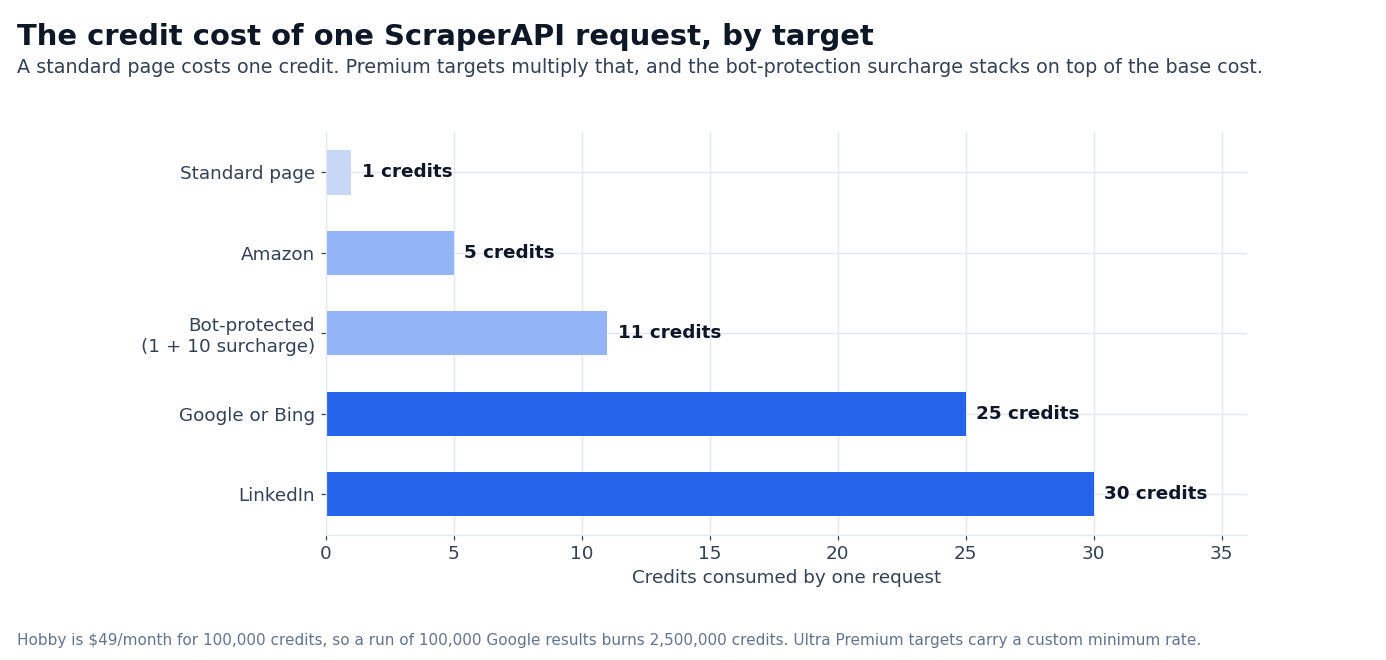
Standard page — one credit, the headline rate the marketing leads with.
Google and Bing — the SERP targets, priced far above the standard page in the published table.
LinkedIn — the most expensive of the named targets on the same table.
Amazon — cheaper than a standard page, despite being a premium target.
Bot-protected sites — Cloudflare, Datadome and PerimeterX targets add a surcharge on top of the base cost, which changes the real burn on a hard target.
The whole scraping API category is priced the same way, per target rather than per request; the ladder runs from Hobby to Enterprise.
ScraperAPI is one of the oldest “send a URL, get HTML back” services in the category, and the 2026 product is the same simple pitch it has run since launch: pay per API credit, get a managed headless browser with rotating proxies and anti-bot handling built in, no infrastructure to manage on your side.
If you came here for a “ScraperAPI review” in 2026, the honest answer is that the product has not changed much while the pricing ladder has added upper tiers: Scaling, Professional, Advanced, and Enterprise.
The credit math — what a credit actually costs on which target — has become more complex in a way that matters if you scrape hard targets like Google or LinkedIn.
The numbers that depend on a real workload — your actual success rate on a specific anti-bot target, the real cost per successful scrape in production — are flagged in the text rather than estimated, the same convention we use in our best web scraping api catalog and across our review pieces.
What ScraperAPI actually does
ScraperAPI runs as a managed endpoint. You send a URL plus parameters (render=true for JavaScript, country_code=us for geotargeting, session_number=123 for sticky sessions), and ScraperAPI handles the proxy rotation, headless browser render if requested, CAPTCHA solving where needed, and returns HTML or JSON.
The “managed” word does a lot of work in that sentence. The proxies rotate automatically from the residential and mobile pools. The headless browser renders JavaScript when you ask for it; captcha solving is built into the credit cost on supported sites; the rate limiter returns 429 with no charge when you exceed your concurrent-thread limit.
You do not write retry logic, you do not run a proxy pool, you do not maintain a headless browser deployment.
What you do write is the credit math. Every API call costs some number of credits depending on the target site. A standard page costs 1 credit; a Google search result page costs 25 credits; a LinkedIn profile page costs 30 credits.
If your workload is scraping 100,000 Google search results per month, your real credit cost is 2,500,000 credits, not 100,000, and the Hobby plan’s 100K credit allowance is one-twenty-fifth of what you need.
ScraperAPI publishes a Domain Cost Estimator in the dashboard that takes any URL and tells you exactly how many credits it will cost before you scrape. The estimator is the right starting point for any new target. Trust it over the headline “1 credit per request” framing in marketing.
ScraperAPI pricing in 2026: seven tiers
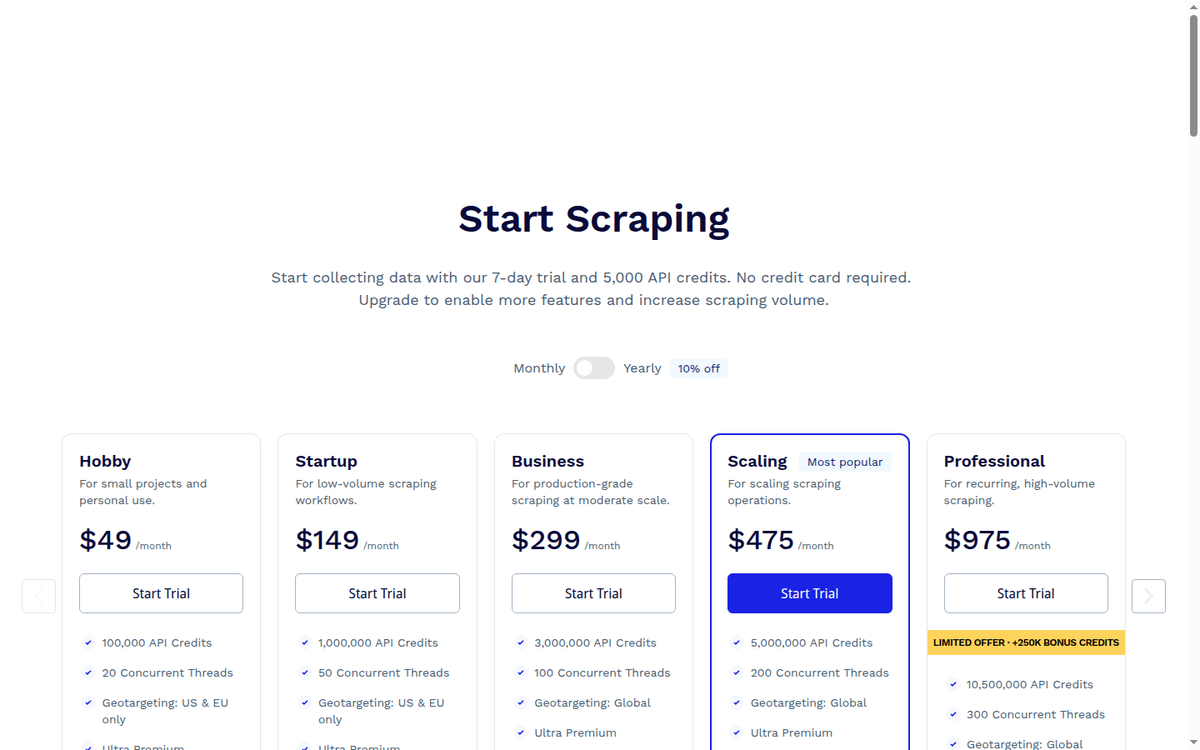
The pricing ladder has seven published tiers. The lower three (Hobby, Startup, Business) are the credit-allowance tiers; the upper four (Scaling, Professional, Advanced, Enterprise) are the volume tiers with pay-as-you-go overage built in.
| Plan | Monthly USD | Annual USD/mo | API credits | Concurrent threads | Geotargeting | Analytics history | PAYG overage |
|---|---|---|---|---|---|---|---|
| Hobby | $49 | $44.10 | 100,000 | 20 | US & EU | Last 30 days | — |
| Startup | $149 | $134.10 | 1,000,000 | 50 | US & EU | Last 30 days | — |
| Business | $299 | $269.10 | 3,000,000 | 100 | Country-level (Global) | Unlimited | — |
| Scaling (POPULAR) | $475 | $427.50 | 5,000,000 | 200 | Country-level (Global) | Unlimited | Yes |
| Professional | $975 | $877.50 | 10,500,000 | 300 | Country-level (Global) | Unlimited | Yes |
| Advanced | $1,975 | $1,777.50 | 21,500,000 | 500 | Country-level (Global) | Unlimited | Yes |
| Enterprise | Custom | — | 22,000,000+ | 500+ | Country-level (Global) | Unlimited | Yes |
Hobby and Startup are the only published plans with US-and-EU-only geotargeting; country-level targeting starts at Business. The Analytics history moves from “last 30 days” on Hobby and Startup to “unlimited” on Business and above.
The annual discount is 10% on every tier. The Scaling tier is labeled “Most popular” on the official pricing page, which is a useful signal for the median workload. PAYG overage is available on the four upper tiers (Scaling, Professional, Advanced, Enterprise); the three lower tiers cannot roll over and instead prompt an upgrade when you hit 100% of credits.
The Professional and Advanced tiers carry LIMITED OFFER banners for +250K and +500K bonus credits respectively. Treat those as the headline-on-page framing; the underlying credit allowances are the ones to budget against.
Credit costs for premium targets
The credit cost per request is the part of ScraperAPI that most buyers underestimate. The published “1 credit per standard page” framing is true, but it is the most-favorable framing; the realistic per-request cost on hard targets is much higher.
| Target | Credits per request |
|---|---|
| Standard page | 1 |
| Amazon | 5 |
| Google or Bing (any subdomain) | 25 |
| 30 | |
| Bot-protected sites (Cloudflare, Datadome, PerimeterX) | +10 (in addition to base cost) |
| Ultra Premium targets | Custom minimum rate (Enterprise exception) |
The Cloudflare/Datadome/PerimeterX surcharge is the line item that breaks Hobby-tier buyers most often. If you scrape a Cloudflare-fronted site at scale, your effective per-request cost is 11 credits (1 base + 10 surcharge), not 1. At 100,000 Cloudflare requests per month, your real credit burn is 1,100,000 — eleven times the Hobby allowance.
The credit cost is published per-target and is consistent across all plans. The Domain Cost Estimator in the dashboard returns the per-request cost for any URL before you send the request. If you do not see the estimator in your dashboard, you can also set a max_cost parameter on any request to cap the credit burn at a known maximum.
The credit cost is not the only thing to budget. The Hobby and Startup tiers have a hard concurrent-thread limit (20 and 50); exceeding that limit returns 429 with no charge, not an upgrade prompt. If your workload needs high concurrency, you need at least Business.
The 7-day free trial and the free plan
ScraperAPI has two onboarding paths. The 7-day trial comes with 5,000 API credits, no credit card required, and is the right starting point if you want to validate a real target before you commit to a paid plan. The free plan is permanent: 1,000 API credits per month with a maximum of 5 concurrent connections, available after signup.
The 1,000-credit free plan is enough for ad-hoc scraping of standard pages (1,000 standard-page requests/month) but not enough for any serious workload. If you outgrow the free plan, the upgrade path is Hobby ($49/month, 100,000 credits), which is a 100x jump in credit allowance for $49.
The 7-day trial is the better validation path. Run a 1,000-page pilot on a real target, measure your real success rate, measure your real credit burn on premium targets. Only then decide whether hobby is enough or you need to jump to startup.
The trial credits and the free plan credits are different buckets. Trial credits (5,000) expire after 7 days; free plan credits (1,000/month) reset monthly. If you exhaust the trial credits before day 7, the dashboard prompts you to convert to a paid plan or fall back to the free plan.
ScraperAPI vs ScrapingBee: when the credit is the wrong shape
ScraperAPI and ScrapingBee are the two managed scraping-API incumbents in 2026, and the choice between them comes down to three things.
First, billing unit. ScraperAPI bills per API credit with credit costs that vary by target; ScrapingBee also varies its credit cost by target, running from 1 to 75 credits a request depending on rendering and proxy options. If your workload is mostly standard pages, both products cost about the same per request.
If your workload is mostly Google or LinkedIn, ScraperAPI’s premium-target credit cost makes ScrapingBee cheaper on a per-successful-request basis.
Second, feature surface. ScrapingBee has a stronger JavaScript rendering story with explicit headless browser controls (render_js, wait_for, stealth_proxy profiles). ScraperAPI has a stronger credit-allowance story with seven tiers up to 22M+ credits on Enterprise. If you scrape one hard target at low volume, ScrapingBee; if you scrape many targets at high volume, ScraperAPI.
Third, anti-bot handling. Both products use rotating residential proxies and CAPTCHA solving. ScraperAPI’s published credit costs for Cloudflare/Datadome/PerimeterX-protected sites (+10 credits per request) imply more aggressive anti-bot infrastructure than ScrapingBee’s published per-request range.
If anti-bot is the deciding feature, run both on the same target in the trial window and measure.
The honest decision: for standard-page scraping at volume, ScraperAPI’s tier ladder gives you more headroom. For premium-target scraping at low volume, ScrapingBee’s published per-request range is easier to budget. For multi-target scraping where the mix is unknown, ScraperAPI’s Domain Cost Estimator is a better planning tool.
When ScraperAPI is the wrong pick
Three workloads fit ScraperAPI poorly in 2026.
Large-volume Google scraping. At 25 credits per Google search request, a 100,000-keyword rank-tracking workload costs 2,500,000 credits per month, which is Startup-tier pricing ($149) for what is essentially one feature. Specialized SERP API products (SerpApi, Scale SERP, DataForSEO SERP) are cheaper per-request than ScraperAPI’s credit cost for this workload.
Heavy Cloudflare-class scraping. The +10 credit surcharge per Cloudflare/Datadome/PerimeterX-protected request stacks fast. If your workload is scraping only Cloudflare-fronted sites, a dedicated anti-bot API (Bright Data Web Unlocker, ZenRows, ScrapeOps) returns the same HTML at a lower per-request cost.
Compliance-sensitive workloads. ScraperAPI does not have a published enterprise compliance story (SOC 2, ISO 27001, GDPR DPA) that matches Bright Data or Oxylabs. If your workload involves regulated data (financial, healthcare), the procurement-grade vendor wins.
The credit cost is a public number, but the success rate is a private number. Treat any vendor-published success rate as a marketing figure and run your own 1,000-request pilot in the 7-day trial before you commit.
FAQ
How much does ScraperAPI cost in 2026?
Seven tiers from Hobby $49/month (100K credits) to Enterprise custom (22M+ credits). Annual billing saves 10%. 7-day free trial with 5,000 credits, no credit card.
What is one API credit?
One standard-page request costs 1 credit. Google/Bing 25, LinkedIn 30, Amazon 5. Cloudflare/Datadome/PerimeterX-protected sites add 10 credits on top of the base cost.
Does ScraperAPI have a free plan?
Yes — 1,000 credits per month with a maximum of 5 concurrent connections. Available after signup.
How long is the free trial?
7 days with 5,000 API credits. No credit card required for the trial.
Does ScraperAPI offer a refund?
Yes — 7-day no-questions-asked refund policy on paid plans. Contact support to request.
What is the difference between ScraperAPI and ScrapingBee?
ScraperAPI bills per credit with variable credit costs by target; ScrapingBee bills per credit with a published per-request range. ScraperAPI has a deeper tier ladder (7 vs ScrapingBee’s 4). For standard-page scraping the products are close; for premium-target scraping the credit math differs.
Can I cancel anytime?
Yes, you can cancel a subscription at any time in the dashboard. There is no charge for cancellation.
What happens if I exceed my credit allowance?
Hobby, Startup, and Business plans prompt an upgrade at 100% credit usage. Scaling, Professional, Advanced, and Enterprise plans support PAYG overage at a fixed per-credit rate, with a monthly spending cap available.
What payment methods are accepted?
Mastercard, PayPal, American Express, wire transfer, Visa.
Sources
ScraperAPI pricing ScraperAPI credit costs docs
How we put this together: the seven tier prices on monthly and annual billing, the credit allowances, the per-target credit costs and the +10 bot-protection surcharge come from scraperapi.com/pricing and the documentation, quoted as displayed. We have not run a paid ScraperAPI account.
Figures that depend on a real workload, a real target or a real integration are flagged where they appear in the text rather than being estimated.
Disclosure: this article contains affiliate links. If you buy through them we may earn a commission at no extra cost to you. Commission never changes our scoring or the order of a ranking.