
What it sells credits, not seats or users — every plan is a monthly allowance of them plus a published credit-to-model rate.
The meter models generated; one credit count buys different output on different generation paths, so the real cost per model moves with the workflow.
Free ceiling the free allowance is public-only and carries no commercial license, which rules it out for client work.
Annual switch paying yearly cuts the monthly equivalent but does not change the credit allowance itself.
Top-ups one-off credit packs sit outside the subscription and never force a plan change.
Tripo AI does not sell “seats” or “users”. It sells credits. Every plan comes with a monthly allowance and a published credit-to-model conversion rate, so the plan ladder below reads as a rate sheet rather than a feature list.
That framing makes Tripo one of the few 3D-generation platforms where you can estimate cost per model before you sign up — if you know roughly how many models you will generate in a month, the rate sheet tells you the bill.
Below: the actual credit math, the queue-priority trade-off, the limits that matter for production work, and the cases where Tripo stops being a fit.
How Tripo thinks about pricing
Tripo’s pricing page is organized around four concepts that show up in every plan card (tripo3d.ai/pricing, captured 2026-09):
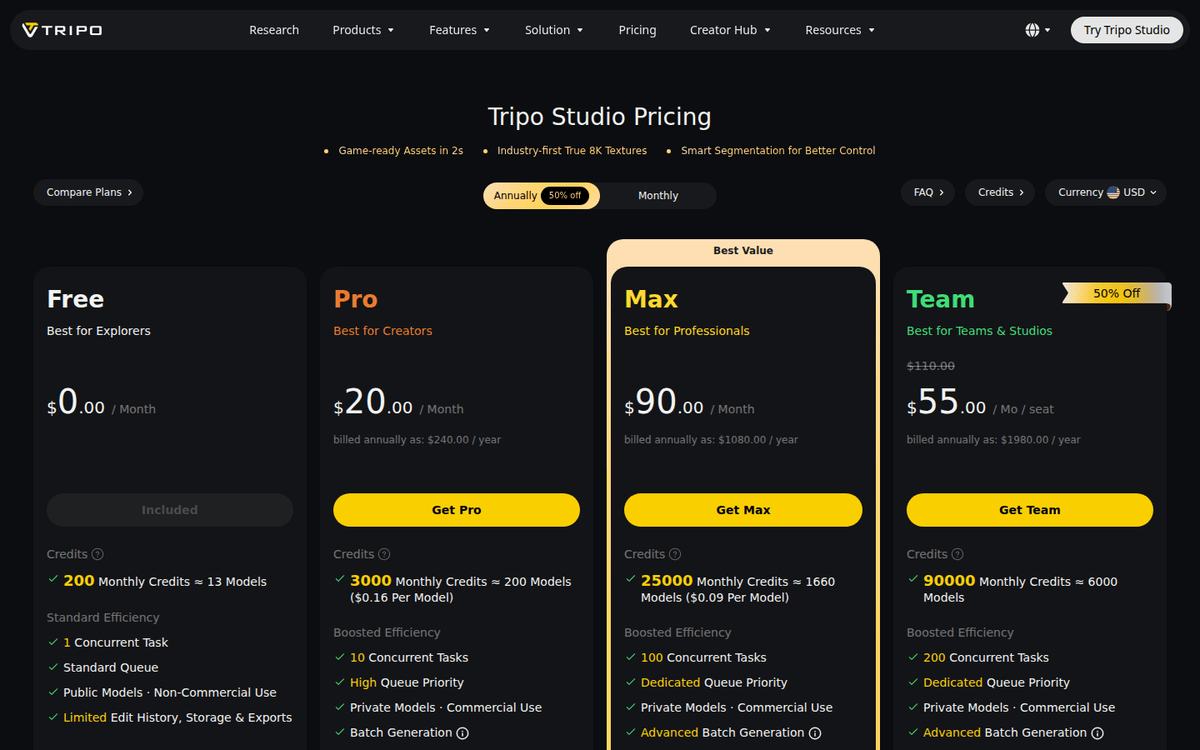
- Monthly credits — the renewable allowance, mapped to “≈ N models” on each card.
- Concurrent tasks — how many generations can run in parallel (1 / 10 / 100 / 200).
- Processing priority — Standard / High / Dedicated. This is what controls queue time when the platform is busy.
- Commercial use and history — Free restricts you to public, non-commercial models; paid plans unlock private models, commercial use, and longer edit history.
The credit-to-model ratio is a vendor-published estimate. Real consumption depends on whether you choose the standard or “better quality” path, whether you generate image-to-3D or text-to-3D, and whether you apply advanced features like Smart Segmentation, 8K textures, or Ultra Mesh Quality.
The page shows the headline number as a planning aid, not a guarantee.
Plans and what each tier costs
The table below is USD. Pro and Max list the same rate on monthly and annual billing; the only annual discount on the page is Team, where the per-seat price drops from $110 to $55 (tripo3d.ai/pricing).
| Plan | Monthly | Annual total | Monthly credits | Estimated models | Concurrent tasks | Queue |
|---|---|---|---|---|---|---|
| Free | $0 | $0 | 200 | ≈ 13 | 1 | Standard |
| Pro | $20 | $240/yr | 3,000 | ≈ 200 | 10 | High |
| Max | $90 | $1,080/yr | 25,000 | ≈ 1,660 | 100 | Dedicated |
| Team | $110/seat | $1,980/yr (3 seats) | 90,000 | ≈ 6,000 | 200 | Dedicated |
A new-user promo offers 50% off the first month on annual plans — the cookie banner on the pricing page is the signal that the promo is active for the visitor. We did not verify whether the discount renews after the first term; the published phrasing is “first month” only (tripo3d.ai/pricing).
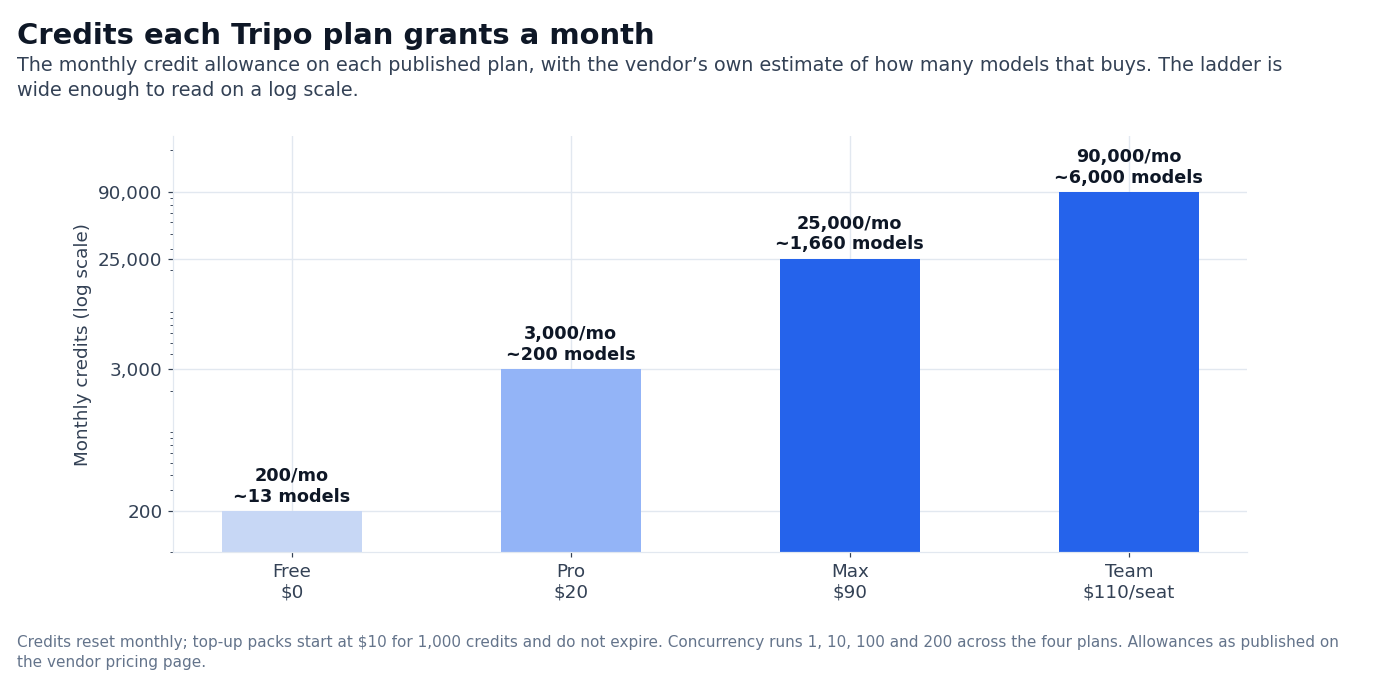
The Team plan is the only multi-seat tier. Pricing is published at $55/seat/month on the annual cycle, which works out to $110/seat/month on the monthly cycle. Three seats is the implicit default in the published annual total ($1,980/year).
Credit top-ups for one-time bursts
If you blow through the monthly allowance, Tripo sells credit packs that do not require a subscription change (tripo3d.ai/pricing):
- $10 → 1,000 credits
- $100 → 10,000 + 2,000 bonus credits
- $500 → 50,000 + 12,000 bonus credits
- $1,000 → 100,000 + 30,000 bonus credits
The bonus structure rewards larger packs — a $1,000 pack gives you 30% more credits than the $100-per-10k baseline. For studios running a one-off production cycle, that is the cheapest path to burst capacity.
Where the limits bite
The fine print on the comparison table is where Tripo differs from a typical SaaS:
- Edit history: Free 1 day, Pro 7 days, Max/Team permanent. If you need to roll back a model you generated two weeks ago on Free, that asset is gone.
- Free retries: Free 3, all paid plans unlimited. Useful for image-to-3D inputs that occasionally fail on first try.
- Model storage: Free 10, paid plans unlimited.
- Exports: Free 15 (H2.5 models only), paid plans unlimited.
- Batch generation: Free 10 models per batch, Pro/ Max/Team 30 per batch. This is the headline workflow difference for production use — Free is single-shot, paid plans support batch pipelines.
Image-generation tool access scales with the plan too. Free is locked to Nano Banana; Pro, Max, and Team unlock Nano Banana, Nano Banana Pro, Nano Banana 2, GPT Image 2, and Midjourney. 8K texture access is unlimited on Max and Team, limited on Pro.
The advanced creation features — Multi-view to 3D, Ultra Mesh Quality, Smart Low Poly, Rigging & Animation, DCC Bridge — are all paid-plan only.
Credit cost per generation path
Tripo does not publish a flat per-generation credit price. Instead, the rate card combines three independent axes: the path you choose (standard vs better quality), the model class (H2.5 vs higher-detail outputs), and the optional advanced features you toggle on.
The headline “≈ N models” estimates are calculated against the standard path with default quality; switching to better-quality, multi-view-to-3D, or 8K textures will consume more credits per output.
A few concrete signals from the comparison table:
- Pro/Max/Team include 20 free image generations per day, with an 80% discount on additional generations. The free plan has no such allowance.
- Pro/Max/Team includes 3 free Pro Refine credits per month. Free and Pro do not.
- 8K texture access is unlimited on Max/Team and limited on Pro. If your production pipeline expects 8K by default, that is a structural reason to pick Max rather than Pro.
- Smart Segmentation (the part-based transform / texture edit / retopology feature set) is limited on Free, unlimited on paid plans.
The bottom line: the published “model” estimates assume the cheapest path. Real cost-per-output on a mixed-use workflow will land higher — particularly if you lean on advanced features. This is exactly the kind of thing that should be modeled with a small pilot before committing to an annual plan.
DCC bridge and the studio use case
The DCC Bridge is the feature that makes Tripo interesting to studios rather than individual creators. It exports generated meshes into the DCC tools the studio already uses (tripo3d.ai/pricing): Blender, 3ds Max, Unity, Unreal, Maya, Cocos, Godot, ZBrush.
The list is the same on Pro, Max, and Team — the only difference between those tiers is volume and priority.
If you are an individual hobbyist generating a single model per week, the DCC Bridge is irrelevant. If you are a studio running an asset pipeline, it is the single most important feature on the page, because the alternative is rebuilding topology in your DCC of choice.
The use cases Tripo highlights
The Tripo Studio homepage groups its use cases into six buckets: Product & Ecommerce, Industrial Design, VR/AR/XR, 3D Printing, Game Character, and Animation & Film. Four of them carry the clearest pricing implications:
- Animation & Film is the muscle-memory use case — previs, blocking, character exploration. High concurrency and batch generation matter here, which is why Pro and above dominate.
- Product & E-commerce is about generating variants of a product photo for catalog work. Image-to-3D is the entry point, and the bulk math gets you into Max or Team quickly.
- Industrial Design leans on Smart Segmentation and Ultra Mesh Quality — both paid features. Pro is usually the floor.
- VR/AR/XR leans on 8K textures and Smart Low Poly — both Max-and-above features for unlimited access.
We did not benchmark generation quality between Tripo models or compare against Meshy, Luma Genie, or Rodin. The “game-ready assets in 2s” claim is from the pricing page headline; independent verification of generation time and topology cleanliness would need a model-by-model run, not a pricing-page read.
What you give up on Free
The free plan is genuinely useful for evaluation: 200 credits per month, ≈ 13 models, access to the Nano Banana image generator, public models, non-commercial use only. That is enough to validate that Tripo’s output matches your quality bar. It is not enough for a production pipeline, because of three structural limits:
- Concurrent tasks: 1. A single generation at a time. No batch generation.
- Edit history: 1 day. Iteration cycles longer than a day lose their roll-back.
- No commercial use. Free outputs are explicitly non-commercial, which kills any monetization path.
If you intend to use Tripo outputs commercially — for sale, for client work, or in a published game — you need at least Pro.
The “cost per model” calculation
The published numbers tell a story if you do the arithmetic. The vendor prints $0.16 per model on Pro and $0.09 per model on Max; read straight off the same page, $20 across 200 models is about $0.10 and $90 across 1,660 is about $0.054, so the vendor rate is the more conservative number to budget on.
Team drops further as you add seats. Top-ups are more expensive per credit than subscription credit, so burst behavior should be planned against the larger packs.
We did not verify the model’s rate. The published estimate is for “standard efficiency” generation; better-quality paths, multi-view-to-3D, and Smart Segmentation consume more credits per output. Real per-model cost in a mixed-use workflow will land higher than the published ratio.
Who Tripo is for
Three profiles fit:
- Solo creators and indie developers who need a few models per week with commercial rights. Pro at $20/month is the floor.
- Studios with a defined production pipeline that can exploit batch generation, DCC Bridge, and 8K textures. Max or Team, with top-ups for burst weeks.
- E-commerce and product teams that need consistent variant generation at scale. The Max tier’s 1,660-model monthly allowance is the right ballpark.
Three profiles should pass:
- Teams that need a real-time, low-latency generation API — Tripo is a Studio product, not an embedded inference engine.
- Pure hobbyists who want to play with 3D but do not need commercial rights. Free is enough; do not pay for Pro.
- Studios that already have a working 3D pipeline and only need a fallback for occasional generation. Tripo’s value is at the top of the pipeline, not as an afterthought tool.
The decision usually comes down to three numbers: how many models per month, whether you need 8K textures or DCC export, and whether the work is commercial. If the answer to “commercial” is yes, the floor is Pro. If you also need 8K textures and DCC export at scale, Max is the right ballpark.
If you have multiple operators needing shared workspace and centralized billing, Team is the only tier that offers that explicitly.
Max is $90/month for 25,000 credits (~1,660 models), 100 concurrent tasks, dedicated queue, permanent history, 8K texture access, advanced batch generation.
The price jump (4.5×) buys ~8× the model volume plus unlimited 8K textures (tripo3d.ai/pricing).
—
Sources:
- Tripo AI pricing page: https://tripo3d.ai/pricing (captured 2026-09)
- Tripo AI homepage and use cases: https://tripo3d.ai/
FAQ
Can I use Tripo AI for free?
Yes. Free includes 200 monthly credits, ≈ 13 standard models, public models only, non-commercial use. The trial is not time-boxed — Free is a permanent tier (tripo3d.ai/pricing).
How do credits work in Tripo AI?
Each generation consumes a published number of credits depending on the path you choose (standard vs better quality, single-view vs multi-view, basic vs advanced tools). Monthly credits reset at the start of each cycle; top-up credits do not expire.
What is the difference between Pro and Max?
Pro is $20/month for 3,000 credits (~200 models), 10 concurrent tasks, high queue priority, 7-day history, unlimited storage and exports.
What does the Team plan include beyond Max?
Team adds shared workspace, centralized billing, and team management. The per-seat price is $55/seat/month on annual billing. Volume is 90,000 credits (~6,000 models) with 200 concurrent tasks.
Do credits roll over month-to-month?
The published comparison table does not state a rollover policy for monthly credits. Top-up credits, by contrast, are a one-time purchase; the pricing page does not document an expiry.
Does Tripo train models on my outputs?
The pricing page does not state a training policy. We did not find a published data-usage policy on the pricing or homepage during this capture; a separate review of the terms of service would be required for a definitive answer.
How we put this together: the Free, Pro, Max and Team rates, the monthly credit allowances, the concurrent-task and queue tiers, the top-up pack prices, the free-plan limits and the use-case list come from tripo3d.ai/pricing and the vendor homepage, quoted as displayed. We have not run a paid Tripo account.
Figures that depend on a real workload, a real target or a real integration are flagged where they appear in the text rather than being estimated.
Disclosure: this article contains affiliate links. If you buy through them we may earn a commission at no extra cost to you. Commission never changes our scoring or the order of a ranking.