If you searched for an Omnisend review because you’re considering leaving Klaviyo, the first thing to know is that Omnisend is a marketing platform built around email + SMS + web push for ecommerce stores.
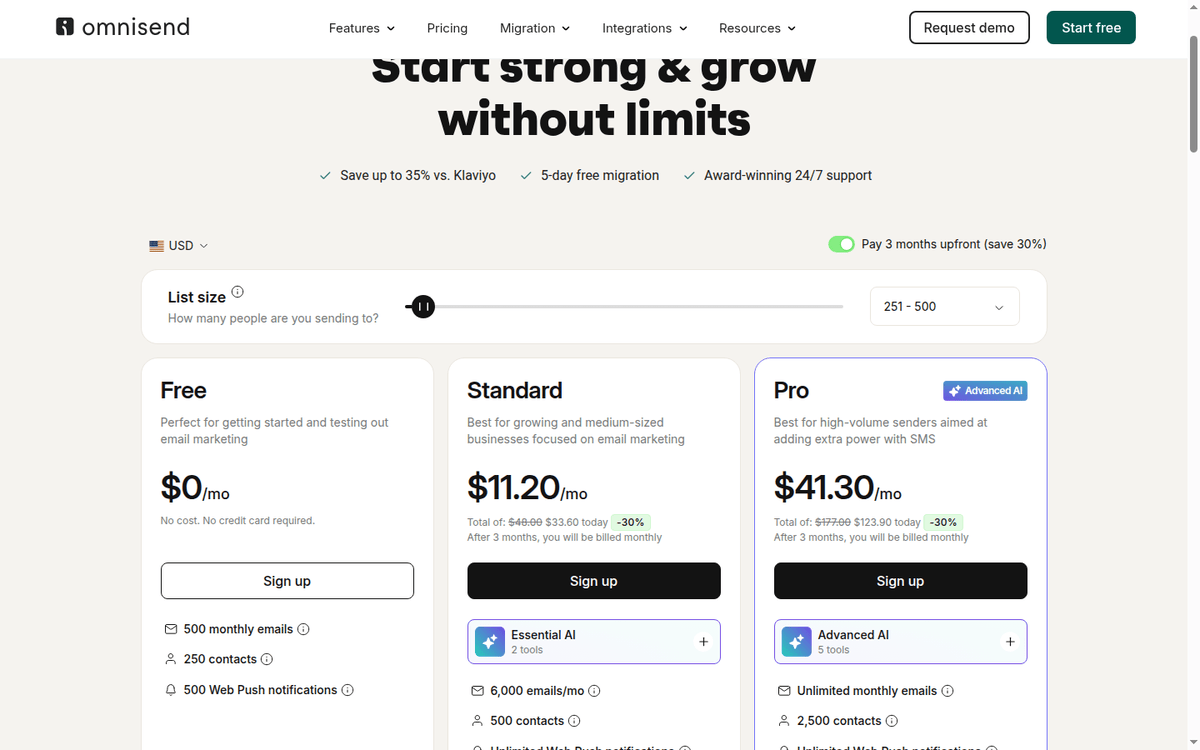
Free the whole email and SMS channel set on a contact cap, with the send allowance set apart from list size.
Standard the entry paid rung: a larger billable list, a bigger send ceiling and the first tier of the AI tools.
Pro opens the SMS channel and the advanced AI set, and turns the fixed send ceiling into a fair-use multiple of the list.
Custom quoted off list size and send volume for stores that outgrow the published tiers.
Both Standard and Pro run a 3-months-upfront promotion that takes 30% off the first 3 months ($33.60 total for Standard, $123.90 total for Pro), then bill monthly at the standard rate.
It is not a generic email tool. It plugs into Shopify, WooCommerce, BigCommerce, Wix, WordPress, Ecwid, Shoplazza, and PrestaShop.
The pricing is shaped accordingly. The plan you pay for depends on how many contacts you have, not how many emails you send.
This review walks through what Omnisend actually sells, what the four plan tiers include in dollars, and the contact-and-email billing rules that catch new customers out. We also cover the real SMS cost per message at US rates and where Omnisend sits against Klaviyo at the same workload.
Pricing and product facts come from the public Omnisend pages captured in September 2026. We did not purchase a plan, so figures are read off the published pricing page.
What Omnisend actually sells, and what its free tier really includes
The headline on Omnisend’s homepage is “Email & SMS marketing so good, it’s boring.” The product story is narrower than a generic ESP like Mailchimp. Omnisend is positioned for ecommerce stores.
The homepage names Shopify, Shopify Plus, WooCommerce, BigCommerce, Wix, Ecwid, Shoplazza, PrestaShop, and nopCommerce as built-for platforms, and the integration count is 305+ pre-built connectors plus a public REST API.
The Free plan is more capable than its name suggests.
The pricing-page FAQ answers the question directly: with the Free plan, “you can use all the features of our paid plans, as well as a variety of channels, including SMS, push notifications, Google Customer Match, and Facebook Custom Audiences.” The limits are 500 emails per month and 250 contacts.
SMS is not bundled as a quota on Free — you can still send SMS as an add-on, but you do not get a free SMS credit allowance like Klaviyo’s $5/month.
This is the part of Omnisend that catches people out. “All features” on Free does not mean “all channels with unlimited use.” It means feature parity on automation, segmentation, signup forms, custom events, audience sync, and AI tools. Paired with hard ceilings on how much of each you can actually send.
The contact-and-email bill: how Omnisend’s pricing ladder is built
The pricing page exposes a list-size slider that runs from the 0–250 contacts bracket up to 150,001+ in roughly 60 brackets. The plan you see in the headline — Free, Standard, Pro — is the entry tier; the dollar number changes as your contact bracket rises.
The headline Standard at $11.20/mo is the price at the 0–250 contact bracket (the same band Free covers). The headline Pro at $41.30/mo is the price at the 0–250 contact bracket too.
This is why a reviewer quoting “Omnisend Standard is $11.20/mo” is technically correct but operationally misleading. The actual monthly bill at a 5,000-contact ecommerce store is not $11.20. The pricing page’s footer states the billable rule plainly.
You are billed for subscribers and non-subscribers who received automated messages. Unsubscribed contacts are not billed.
That is the same rule most ESPs use, but Omnisend flags it more loudly than peers. The migration page repeats the warning: importing contacts from a previous platform with many non-subscribed contacts will increase your billable contact total and may move you to a higher pricing tier.
Email sends are a separate ceiling on top. Free caps at 500/month. Standard is “12× your list size” — meaning a 1,000-contact Standard account can send 12,000 emails per month.
Pro is unlimited with a fair-use cap “up to 60× list on Pro” — meaning a 1,000-contact Pro account has a 60,000-email soft ceiling before the platform asks you to upgrade for higher volume.
The third leg of the bill is SMS, and it is sold separately on Standard and below.
Pro vs Standard: where the AI features actually change the math
The price gap between Standard ($11.20/mo entry) and Pro ($41.30/mo entry) is large enough that you should know what you actually get. The pricing-page comparison table puts it as follows
- Standard (“Essential AI 2 tools”). Forms AI (build high-converting forms from a prompt — design, copy, visuals). Reports AI (AI insights from your data). 6,000 emails/mo on the entry tier. 500 contacts included. Unlimited web push. SMS as paid add-on.
- Pro (“Advanced AI 5 tools”). Everything Standard has, plus Dynamic content (show or hide blocks based on audience filters), Personalized product recommender AI (analyzes browsing and purchase behavior to insert products automatically), and Personalized sending time. Unlimited monthly emails (fair-use up to 60× list). 2,500 contacts included. SMS starting at $0.007/SMS baked into the channel; you still buy credits separately but the Pro plan ships with the SMS channel active.
The three “Advanced AI” tools that distinguish Pro are the load-bearing features for a real ecommerce store. Dynamic content means you can run a single newsletter where the hero product block is different per segment — high spenders see a VIP early access, churn-risk contacts see a “we miss you” offer.
Product recommender AI is what powers the “you might also like” blocks; Standard forces you to insert those manually or via static segments. Personalized sending time is the closest thing Omnisend has to a send-time-optimization model.
If your store does not run a catalog bigger than what you can hand-curate, and you do not care about send-time optimization, Standard is the right pick. If you have more than a handful of SKUs and want the catalog-aware features, Pro is the right pick.
SMS volume pricing, US and global rates
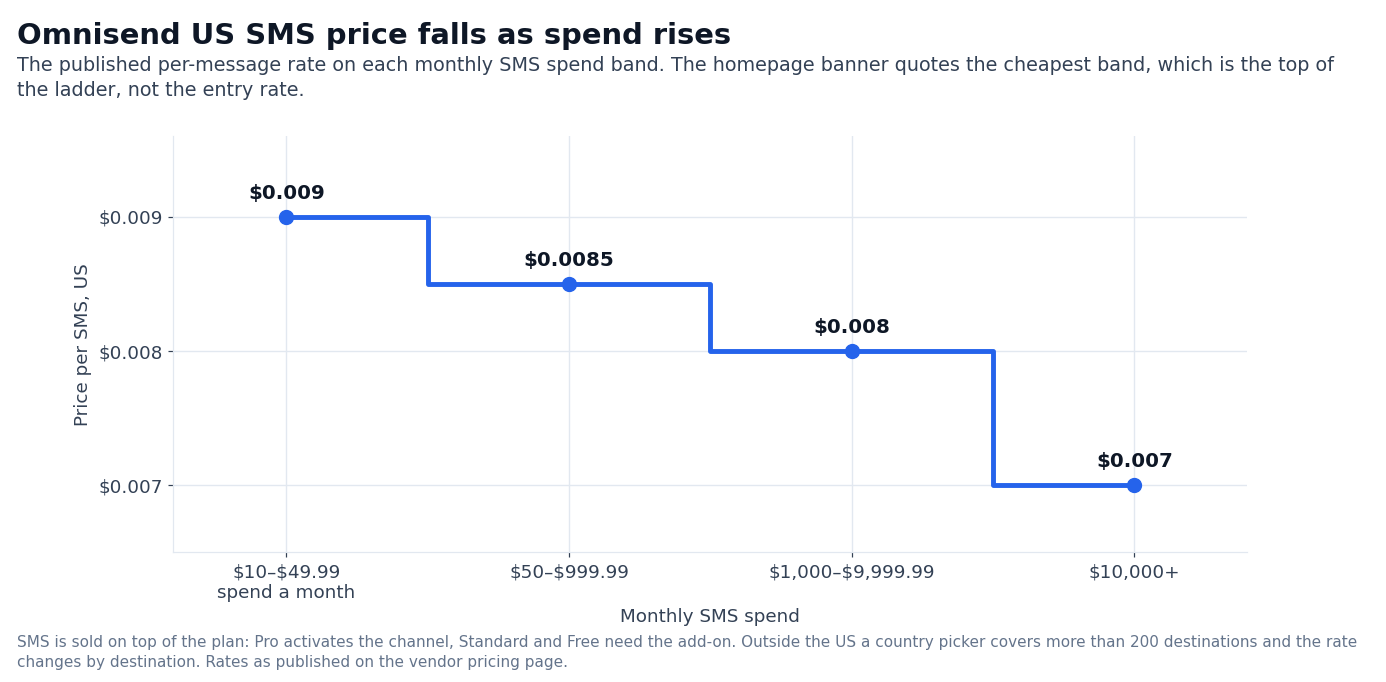
Omnisend publishes its SMS rates as a four-tier ladder by monthly SMS spend, US-only. The numbers on the pricing page (US currency, US high-volume) are:
| Monthly SMS spend | Rate per SMS |
|---|---|
| $10 to $49.99 | $0.009 |
| $50 to $999.99 | $0.0085 |
| $1,000 to $9,999.99 | $0.008 |
| $10,000+ | $0.007 |
The homepage banner says “Now starting at $0.007/SMS,” which matches the top of the ladder. This is competitive with Twilio’s US A2P rates for the same volumes. Twilio’s published US SMS starts around $0.0079 for the same high-volume tier.
Klaviyo’s published US SMS rates sit in the same neighborhood with a separate carrier-fee structure.
Outside the US, the pricing page exposes a country picker covering more than 200 regions, and rate-per-SMS varies materially by destination. The pricing page explicitly does not give a single global number; rate per country is published live in the SMS calculator.
One important structural note: Pro ships with the SMS channel active at $0.007/SMS. Standard ships without an SMS quota, so if you want SMS on Standard you buy it as a paid add-on (the same volume-tier rates apply).
MMS is separate. MMS lets you insert images or GIFs in text messages, and Omnisend places the format with US and Canada recipients while SMS (text-only) reaches multiple countries.
The Free plan, decoded
Free is the most generous free tier in the ecommerce-ESP market if you read the fine print. It has three real limits that determine whether you stay on it past your first quarter.
- 500 emails per month. For a 250-contact store sending one newsletter, that’s two sends a month. For a 250-contact store running cart-abandonment automations, that’s one bad weekend away from the limit. The pricing-page FAQ explicitly answers what happens: “If you exceed your email sending limit on the Free or Standard plan, we’ll give you the option to upgrade your plan (and we’ll send you a friendly email too). You’ll always be asked to confirm an account upgrade before it happens.” Pro users never hit this — they send unlimited.
- 250 contacts. Once you cross 251 active billable contacts (subscribed or non-subscribed who received automated messages), you must move to Standard. There is no in-between.
- No bundled SMS quota. Free can send SMS, but you buy credits the same way Standard does. Klaviyo Free, by contrast, includes $5 of mobile messaging credits per month.
The Free tier is the right entry point for an early-stage store validating its first abandoned-cart automation. It is not the right long-term home for a store past 250 contacts or one that needs more than 500 emails a month.
Omnisend vs Klaviyo, head-to-head at the same workload
The migration page has a side-by-side table. We treat every cell as a vendor self-report, since the page is Omnisend’s own marketing, not third-party. The full table Omnisend runs:
| Feature | Omnisend | Klaviyo (per Omnisend) |
|---|---|---|
| Account Expert threshold | $400/month | $4,000/month |
| Support response time | Less than 4 minutes | Respond to technical inquiries in 1 business day |
| Product recommender | Yes | Yes |
| Churn prediction and RFM analysis | Yes | Yes |
| Global SMS capability | Yes | No |
| Web push notifications | Yes | No |
| List cleaning tool | Yes | No |
Below the table, Omnisend publishes a sample pricing comparison at one tier: Omnisend $413/mo with 24/7 chat and email support versus Klaviyo $720/mo. That is the vendor’s own math at one specific contact count; we have not independently replicated it against Klaviyo’s pricing calculator.
What we can verify from Klaviyo’s public pricing page (captured September 2026): Klaviyo Free includes 250 active profiles, 500 emails per month, $5 of mobile messaging credits, and $5 of Composer usage. Composer is Klaviyo’s AI tool; the $5/month credit is a small starting budget, not a full AI tier.
The structural differences that matter when you choose:
- Account Expert at $400/mo vs $4,000/mo is a 10× gap. If your monthly bill is between $400 and $4,000, Omnisend gives you a named human; Klaviyo does not. Above $4,000/mo, both vendors offer high-touch support.
- Web push. Omnisend has it on every plan. Klaviyo does not — you would need a separate web-push tool, like OneSignal or PushEngage.
- Global SMS. Omnisend ships SMS in 200+ countries. Klaviyo’s SMS coverage is heavily US/Canada/UK-focused, with EU coverage available but with carrier fees layered on.
- List cleaning. Omnisend has a list-cleaning tool on the same page. Klaviyo suppresses and segments, but does not show a one-click “clean my list” feature on the same page.
The price comparison Omnisend runs ($413 vs $720/mo at one tier) is consistent with what customers have posted on Twitter and Reddit in the past year.
The rule of thumb circulating in the ecommerce community is “Omnisend costs roughly half of Klaviyo at the same list size.” But that rule has not held in every tier and every region. The honest answer: the math depends on your list size, your SMS volume, and whether you need web push.
When Omnisend is the wrong pick
There are five ecommerce scenarios where Omnisend’s design choices cost you more than they save you.
- You are a B2B company, not a store. Omnisend’s signup forms, automations, and product-recommender AI are tuned for SKU-driven catalogs. If you sell services, software, or B2B lead nurturing, Klaviyo, Mailchimp, or Customer.io will fit better.
- You need a built-in landing-page builder. Omnisend has signup forms and popups, but not full landing pages. If you want one platform for ecommerce email plus landing pages plus funnels, look at Mailchimp (which has a landing-page builder) or a dedicated builder like Carrd or Unbounce.
- You are sending mostly SMS and very little email. Omnisend’s pricing is built around contacts, not SMS volume. If your business model is SMS-first (e.g., two-factor notifications or order updates via SMS), Twilio is cheaper at scale.
- You need a self-hosted or on-premise ESP. Omnisend is cloud-only. There is no self-hosted Omnisend, and there is no white-label version for agencies beyond the partner program.
- You have a contact list above 150,000. The pricing page exposes the brackets up to 150,001+, after which it routes to Custom pricing via sales. If your list is several hundred thousand contacts, both Klaviyo and Customer.io have public calculators where you can model the bill; Omnisend will require a sales conversation before you see the number.
What we did not verify
A few claims on the Omnisend pages we did not independently test, and which a buyer should pressure-test on their own:
- Deliverability rates on Gmail, Outlook, and Yahoo. We did not run a sender-score test. Omnisend names global compliance and deliverability as a feature, but the captured pages do not show specific inbox-placement percentages.
- Real-world open and click rates. The pricing page does not publish average open or click rates by industry. Third-party benchmarks (Klaviyo’s internal benchmarks, Mailchimp’s annual report) put ecommerce email open rates between 15% and 25%, but the Omnisend-specific number is not published.
- Omnisend AI segmentation quality. Forms AI and Reports AI are described on the pricing page. The AI homepage promotes audience trend detection. We did not benchmark the segmentation output against Klaviyo’s AI or against a manual segmentation workflow.
- The Klaviyo $720/mo comparison. That number is published by Omnisend on its own
/migrate-from-klaviyopage at one specific contact count. We did not independently reproduce it against Klaviyo’s pricing calculator. - Migration timeline for stores with more than 50,000 contacts. The published 5-business-day migration is the typical case. Very large lists or stores with heavily customized automations may run longer.
FAQ
Is Omnisend cheaper than Klaviyo?
At most list sizes below 150,000 contacts, yes — Omnisend runs a sample comparison of $413/mo versus $720/mo at one tier on its /migrate-from-klaviyo page, and the same page advertises up to 35% savings versus Klaviyo. The exact gap depends on your list size, your SMS volume, and whether you need web push notifications.
Does Omnisend have a free plan?
Yes. The Free plan includes every channel (email, SMS, web push, Google Customer Match, Facebook Custom Audiences) with a 500-email/month cap and a 250-contact cap. SMS is sold as a paid add-on; there is no bundled SMS credit on Free, unlike Klaviyo’s $5 mobile messaging credit on its own Free tier.
How much does Omnisend cost for a 5,000-contact store?
Headline prices ($11.20/mo Standard, $41.30/mo Pro) are the 0–250 contact bracket. The actual price at 5,000 contacts is higher; the pricing page exposes a slider with roughly 60 brackets up to 150,001+. You need to move the slider or contact sales for the exact number at your list size.
Does Omnisend include SMS in the price?
Only on Pro, where the SMS channel is active and SMS credits start at $0.007/SMS for US high-volume sends. Standard and Free require an SMS add-on purchase, billed at the same volume-tier rates ($0.009, $0.0085, $0.008, $0.007 per SMS, depending on monthly spend).
Can I send MMS?
MMS lets you insert images or GIFs in a text message, and Omnisend positions it toward US and Canada recipients; text-only SMS goes out in multiple countries.
Does Omnisend migrate me from Klaviyo for free?
Yes. Omnisend’s /migrate-from-klaviyo page describes a 5-business-day migration where their team moves contacts, segments, flows, and templates. Historical campaign reports do not transfer; the page recommends exporting them as PDFs from Klaviyo before switching.
What integrations does Omnisend support?
305+ pre-built integrations, with explicit built-for support for Shopify, Shopify Plus, WooCommerce, BigCommerce, Wix, Ecwid, Shoplazza, PrestaShop, and nopCommerce. A public REST API at api-docs.omnisend.com covers anything that is not pre-built.
Does Omnisend have an AI feature?
Yes. Standard ships with Forms AI and Reports AI (called “Essential AI 2 tools”). Pro and Custom add Dynamic content, Personalized product recommender AI, and Personalized sending time (collectively “Advanced AI 5 tools”). Omnisend MCP also lets you drive campaigns and segments from ChatGPT or Claude.
Is there a free trial?
The Free plan is the trial — it is not a time-limited trial. You can stay on Free indefinitely as long as your list is 250 contacts or fewer and you send 500 emails or fewer per month. Paid plans do not require a credit card to start.
Sources
- Omnisend pricing
- Omnisend homepage
- Omnisend migration from Klaviyo (vendor self-reported comparison)
- Omnisend migration from Mailchimp
- Omnisend integrations
- Omnisend REST API documentation
- Omnisend support center
- Klaviyo Free tier (Free plan features, captured September 2026)
How we put this together: the Free, Standard and Pro rates, the contact-based billing rule, the 500, 6,000 and unlimited email ceilings, the four US SMS bands, the AI feature split, the integration count and the vendor comparison table come from omnisend.com/pricing, the vendor homepage and the migration page, quoted as displayed. We have not purchased an Omnisend plan.
Figures that depend on a real workload, a real target or a real integration are flagged where they appear in the text rather than being estimated.
Disclosure: this article contains affiliate links. If you buy through them we may earn a commission at no extra cost to you. Commission never changes our scoring or the order of a ranking.