The pitch a credit-metered design platform that plans a brief and routes the work across several models instead of one.
The shift the latest landing page leads with an AI Agent that turns a brief into image, video, slides and audio assets under one subscription.
The old suite Branding, Image, Video, Storyboard, Slides and Audio still sit underneath, with a chat-side helper called Designs Claw.
Who it fits solo creators, agencies and small in-house teams that would otherwise stitch together five separate tools.
How it bills top-up credit packs for active subscribers, priced per credit and apart from the monthly tier.
Designs.ai started as a one-stop AI design platform for non-designers: a logo maker, a video maker, a banner maker, and a copy generator, all fronted by a single subscription. In September 2026 the product is in the middle of a repositioning.
The latest landing page leads with “Introducing AI Agent” — a brief-to-asset planner that routes work across multiple models (Claude, ChatGPT, Gemini, Grok) and ships ready-to-use image, video, slides, audio, copy and branding artifacts under one roof.
Underneath sits the old suite — Branding, Image, Video, Storyboard, Slides, Audio — and a new chat-side helper called Designs Claw.
Pricing data here is captured from designs.ai/pricing in September 2026 via a Playwright DOM snapshot (the page is rendered client-side; static HTML does not contain the prices).
Who Designs.ai fits
You are a solo creator or small business owner who needs a logo, a couple of social posts, and a short video every week.
You are a marketing lead at a small D2C brand and want one bill for design, copy, and short video instead of paying for Canva, ElevenLabs, and an editor separately. You are an agency producing high-volume creative for multiple clients under tight timelines.
Or you are an in-house team that wants a shared AI workspace where every output stays on brand without a designer in the loop.
Designs.ai is the wrong shape if you are a designer who needs pixel-level control — you will be fighting the AI to get the layout exactly right. It is also the wrong shape if your work is long-form video, motion graphics, or print-grade brand systems: the platform optimizes for social and campaign assets.
And if your team is already deep in Adobe, Figma and After Effects, switching costs will outweigh the iteration-speed gain.
Pricing ladder, in real numbers
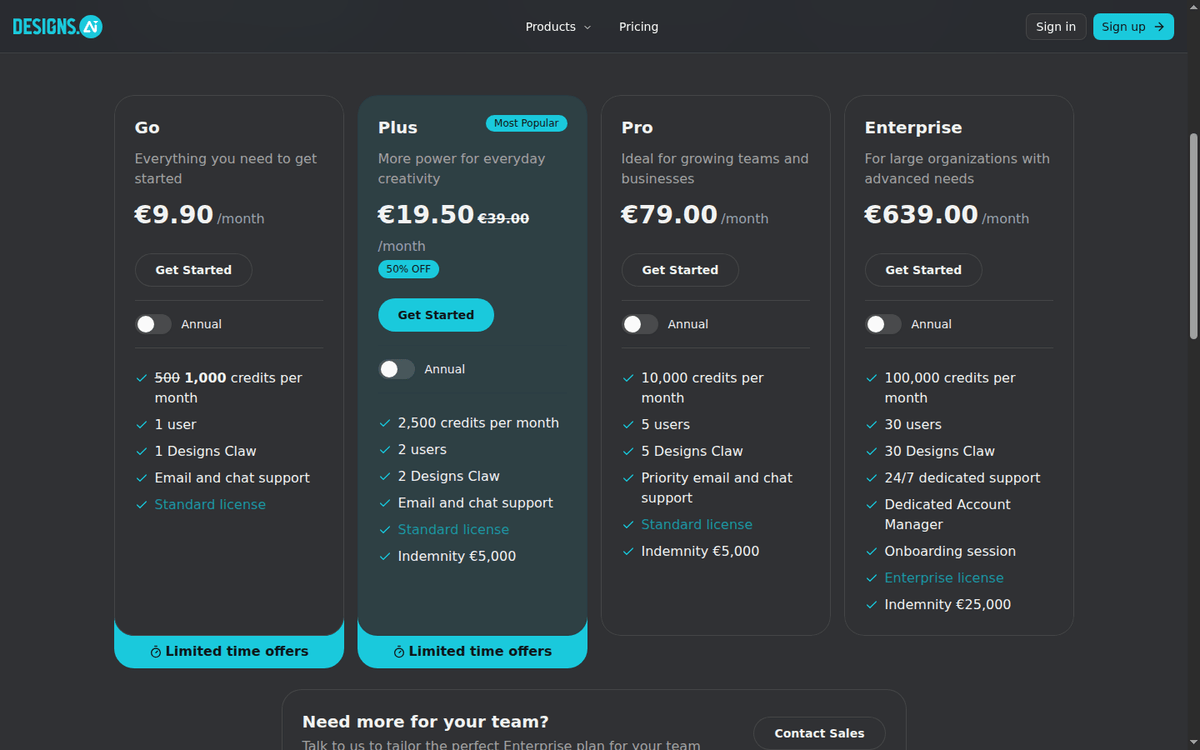
Designs.ai publishes four tiers on /pricing, billed annually by default; monthly billing is available at higher rates. A “Limited Time Offers” banner shows promotional cuts running through December 2026; we record the regular prices and call out the promo explicitly so the numbers stay auditable.
| Tier | List price | What’s included |
|---|---|---|
| Basic | €9.90/month (annual) | 500 credits/mo (promo doubles to 1000), 1 user, 1 Designs Claw, email and chat support, standard license |
| Plus | €39.00/month (annual), promo €19.50 (50% off) | 2,500 credits/mo, 2 users, 2 Designs Claws, indemnity €5,000, standard license |
| Pro | €79.00/month (annual) | 10,000 credits/mo, 5 users, 5 Designs Claws, priority email and chat, indemnity €5,000 |
| Enterprise | €639.00/month (annual) | 100,000 credits/mo, 30 users, 30 Designs Claws, 24/7 dedicated support, dedicated AM, onboarding, enterprise license, indemnity €25,000 |
Two things to read carefully. First, the headline page shows prices in euros, even on the US landing page; FX matters if your finance books are in USD. Second, the promo cuts Plus in half but is timed — once it lapses, Plus reverts to €39.00/month, not €19.50.
A free trial is not offered in the same shape as a free tier. The site sells paid subscriptions and lets you cancel within the refund window; some users report a 7-day trial via in-app promotion, but the public pricing page does not list a permanent free plan.
Credit math, in plain numbers
The single number that decides whether Designs.ai works for you is the monthly credit allotment. A credit is consumed when the AI generates an asset — image, video frame, slide, audio cut, brand variant. Generations are not unlimited; the platform is metered, not “all-you-can-eat.”
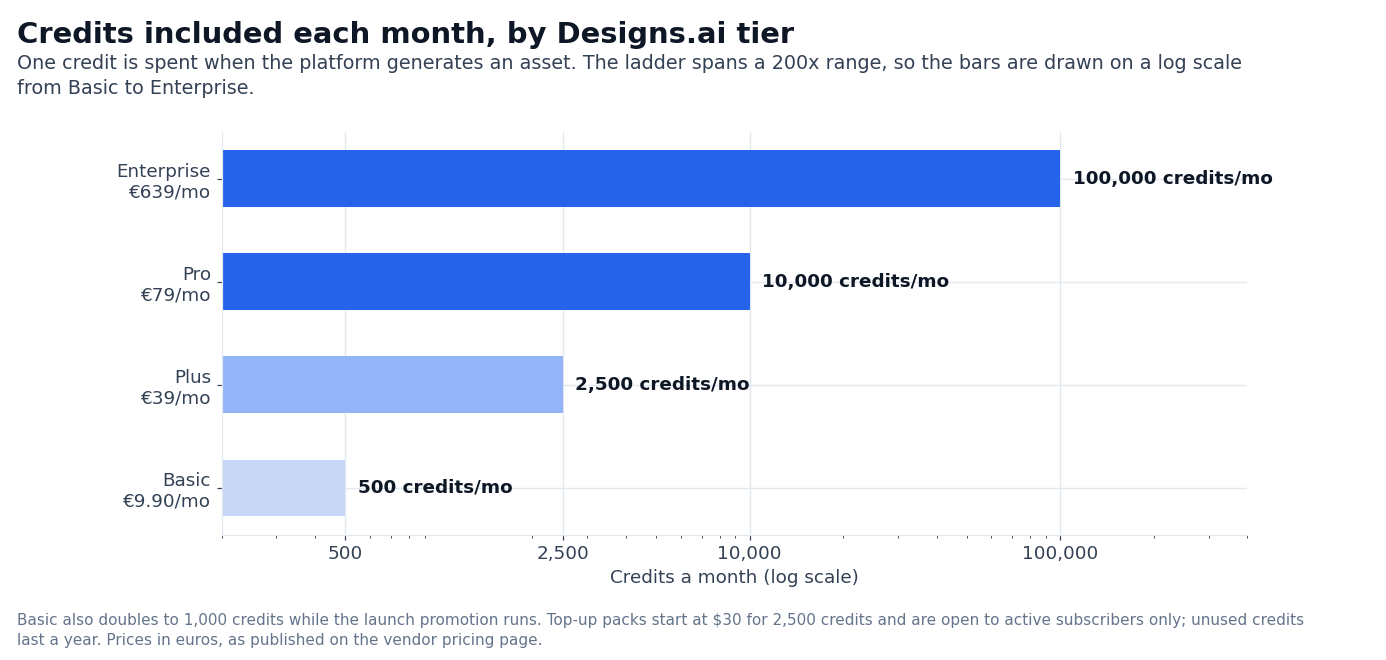
The honest read on Basic at 500 credits/mo (promo 1000): a small logo suite plus a handful of social posts per week. A 10-second AI video typically costs more credits than a single image — a brand running weekly video will run out before the end of the month. Most small businesses will hit the cap in week three.
Plus at 2,500 credits/mo is the working tier. 2,500 generations supports a solo creator running daily social plus a weekly short video, or a one-person agency serving two clients. The indemnity cap of €5,000 covers most client IP disputes for small commercial work.
Pro at 10,000 credits/mo is the team tier. Five users and 5 Designs Claws mean a real marketing team can run parallel campaigns without serializing requests. Priority support is the practical differentiator when an export stalls during a campaign launch.
Enterprise at 100,000 credits/mo and 30 seats is the agency tier. The dedicated account manager, onboarding session, and €25,000 indemnity are the variables that matter — the credit count is roughly 10× Pro and absorbs a multi-client production load.
Top-up credits, when the meter runs short
Designs.ai sells one-time top-ups for active subscribers who hit the monthly cap. Top-up packs are priced per credit, with steep volume discounts.
| Pack | Credits | Price | Per-credit |
|---|---|---|---|
| Starter Top-Up | 2,500 | $30 | $0.012 |
| Growth Top-Up | 5,000 | $50 | $0.010 |
| Power Top-Up | 10,000 | $80 | $0.008 |
Three caveats. Top-ups are only available to active subscribers — there is no a-la-carte credit buying outside a paid tier (per the designs.ai/pricing page). Credits are valid for one year from purchase, so unused credits do not roll over indefinitely.
And top-ups are non-refundable, so the recommendation is to start with the smallest pack and only stack larger ones once you confirm the volume.
What Designs.ai actually does
The platform is a credit-metered AI design suite with a brand-aware agent layer. You upload brand assets — logo, colors, type, voice — and the AI enforces the system prompt across every output.
The agent layer is the new front door. You describe the brief in plain words. The AI Agent asks clarifying questions one at a time, picks the right specialist agent for each task, routes to the best-fit model (Claude, ChatGPT, Gemini, Grok), and delivers ready-to-use assets.
The premise is that you stop switching tools; the AI stitches image, video, slides, audio and copy under one brand voice. The honest read is that for well-defined briefs (a social campaign, a product launch), the agent saves real time. For vague briefs (“make us look modern”), you will iterate anyway.
The specialist agents map onto the legacy tools. Brand Agent handles logo and identity. Image Agent produces visuals from a concept. Storyboard Agent turns scenes into video plans. Video Agent produces finished video. Slides Agent builds decks. Audio Agent generates studio-quality audio narration and music.
Designs Claw is the chat-side helper. It runs inside chat apps and turns an instruction in the chat thread into an asset — a poster, a Google review reply, a daily social post. Hosting is included in every plan; you only pay the credit cost of the output.
The Claw is positioned for the long tail of small marketing jobs that would otherwise interrupt someone’s day.
Smart Model Routing, and what it costs you
The pricing page says the platform routes each task to the model best suited for it. That is a marketing claim worth pausing on. “Best suited” in practice means the platform picks the model that has the strongest track record for that specific output class — image goes one way, copy another, video another.
You can override per task, and Pro and Enterprise tiers expose the model picker explicitly.
The honest read is that the routing matters most for users who do not know which model to choose. If you already know that you want Sora for video and Claude for copy, you can drive the platform manually; if you do not, the default routing is a real timesaver.
The risk is lock-in — if your team builds workflows around the auto-route and a specific model changes its output style, you will feel it.
Compliance, licenses, and the indemnity question
Designs.ai is GDPR-compliant and SOC-compliant per the page footer. The standard license covers personal and most small-business commercial use; the Enterprise tier expands to an enterprise license with broader commercial and redistribution rights.
The indemnity cap is the IP-defense promise: the vendor covers legal defense costs up to the stated amount if a customer is sued over IP generated through the platform. €5,000 on Plus and Pro is real money for a freelancer but small for an agency;
€25,000 on Enterprise is meaningful but still not a substitute for dedicated media-liability insurance.
Designs.ai vs alternatives, head to head
The honest comparison depends on what you are trying to do.
Against Canva. Canva is the design tool for non-designers. Canva wins on flexibility (you can design anything, not just ad variants) and on the free tier (genuinely useful).
The platform wins on AI generation speed (one brief, multiple assets) and on brand consistency (the system prompt is enforced across every output).
For a team that needs to ship a single hero asset, Canva is the right shape. For a team that needs brand-on creative at scale, the platform is closer.
Against Adobe Firefly + Creative Cloud. Adobe wins on pixel-level control and on integration with Illustrator, Photoshop, and After Effects. The platform wins on iteration speed (brief in, asset out) and on price (Pro at €79/mo vs an Adobe Creative Cloud team license multiple times higher).
For an agency whose designers live in Adobe, switching costs are prohibitive. For a small team that does not have an in-house designer, this is the lower-cost path.
Against Synthesia + ElevenLabs + Jasper. These are point tools stitched together. Designs.ai wins on having one brand system prompt across all of them and on one bill.
The point tools win on depth: Synthesia’s video avatars are more realistic, ElevenLabs’ voice cloning is more flexible, Jasper’s long-form copy is more polished.
For a team that needs the strongest depth on one medium, point tools are the closer fit. For a team that needs breadth across mediums under one brand voice, Designs.ai is the right shape.
Against in-house designers. A full-time designer at $80k loaded cost is roughly $5k–$7k/month. Designs.ai Pro at €79/month is a fraction of that, but the comparison is not “AI vs designer” — it is “AI plus designer” vs “designer alone.” The AI handles the iteration volume.
The designer handles the polished hero work and the brand decisions. Most teams end up using both.
What we could not verify
Three claims in this review depend on real production data we could not benchmark without running an active campaign or paying for premium tiers.
The actual lift on brand-consistent AI output vs ad-hoc prompts. The vendor markets that brand-as-system-prompt enforcement reduces rework; we did not measure rework time on a controlled campaign.
The credit cost per asset at scale. A 10-second AI video and a complex slide deck may consume more credits than the headline numbers suggest; per-asset consumption depends on model chosen and render complexity. We did not stress-test credit burn across mediums.
The indemnity trigger terms. €5,000 / €25,000 are the headline figures. What triggers the indemnity — output flagged for infringement, lawsuit served, claim of fair-use violation — is governed by the license agreement, which we did not read line-by-line.
Five more questions we get asked
Q: Designs.ai vs Canva — which is right for a solo creator on a budget?
A: Canva. The free tier is genuinely useful, and the design flexibility is broader. The platform is the right choice when you need brand-consistent assets across multiple mediums under one bill, and you are willing to pay the credit cost.
Q: Is the Pro tier enough for a five-person marketing team?
A: Yes, with verification. Pro at €79/month delivers 10,000 credits and 5 seats. Five marketers running parallel campaigns will burn credits fast; the working test is whether 10,000 credits survive the month. If not, Enterprise at €639/month is the next tier.
Q: Can Designs.ai replace a designer?
A: For most production teams, no. The platform replaces the iteration volume a designer would otherwise spend on variants and ad tests. It does not replace the designer’s role on hero creative, brand systems, or motion graphics. Most production teams end up using both.
Q: Does Designs.ai work for TikTok and Reels?
A: Yes. The Video Agent produces short-form vertical video with captions and stock footage, sized for TikTok, Reels, and Shorts. The output is slideshow-grade, not motion-graphics-grade — good enough for testing, not for hero.
Q: How long does it take to publish a campaign?
A: For a brand with assets uploaded, a brief-to-assets run on the AI Agent takes 2–5 minutes per asset. A multi-asset campaign with a hero image, three social variants, and a short video runs in 10–15 minutes once the brief is clear. The bottleneck is review, not generation.
FAQ
How much does Designs.ai cost?
Basic is €9.90/mo (annual), Plus is €39.00/mo (annual; €19.50/mo on the limited-time promo), Pro is €79.00/mo, Enterprise is €639.00/mo. Monthly billing is available at higher rates.
Does Designs.ai have a free plan?
Designs.ai does not publish a permanent free plan. The platform sells paid subscriptions and runs limited-time promos through December 2026.
What is a credit?
A credit is consumed when the AI generates an asset (image, video frame, slide, audio cut, brand variant). Credit cost varies by asset type.
Can I buy credits without a subscription?
No. Top-up packs are available only to active subscribers on a paid tier.
Are top-up credits refundable?
No. Top-up packs are non-refundable and valid for one year from purchase.
Does Designs.ai support multiple models?
Yes. The platform routes work across Claude, ChatGPT, Gemini, and Grok. Pro and Enterprise tiers expose the model picker; lower tiers rely on smart routing.
Is Designs.ai GDPR-compliant?
Designs.ai is GDPR-compliant and SOC-compliant per the page footer.
What is Designs Claw?
A chat-side helper included with every plan that turns a plain-language instruction inside your chat app into a designed asset. Hosting is included; you pay the credit cost of the output.
How we put this together: the Basic, Plus, Pro and Enterprise rates, the monthly credit allowances, the top-up pack prices, the credit-validity and refund rules and the agent and model-routing claims come from a rendered capture of designs.ai/pricing, quoted as displayed. We have not run a paid Designs.ai account.
Figures that depend on a real workload, a real target or a real integration are flagged where they appear in the text rather than being estimated.
Disclosure: this article contains affiliate links. If you buy through them we may earn a commission at no extra cost to you. Commission never changes our scoring or the order of a ranking.