- Free collection: a limited set of free mockups that requires attribution, not a published plan tier with a monthly quota.
- Professional: the single-user tier — 5,300+ scenes, unlimited 4K exports, commercial use, Figma plugin, Adobe Express add-on, shareable preview links, website screenshot tool, single-user license.
- Team: the multi-user tier — everything in Pro + team management, SAML SSO, unified billing, pay by invoice & ACH, priority support.
- Free trial: there is no time-limited trial on the paid tiers; the free collection is the evaluation path.
Mockups used to require Photoshop. Mockuuups Studio turns the same task into drag-and-drop: drop your app screenshot into a device frame, browser window, or print scene, adjust the angle and background, export at 4K.
The pricing page publishes two tiers — Professional and Team — and points anyone who wants to try the library at a free collection of mockups, which the FAQ describes as limited and requiring attribution.
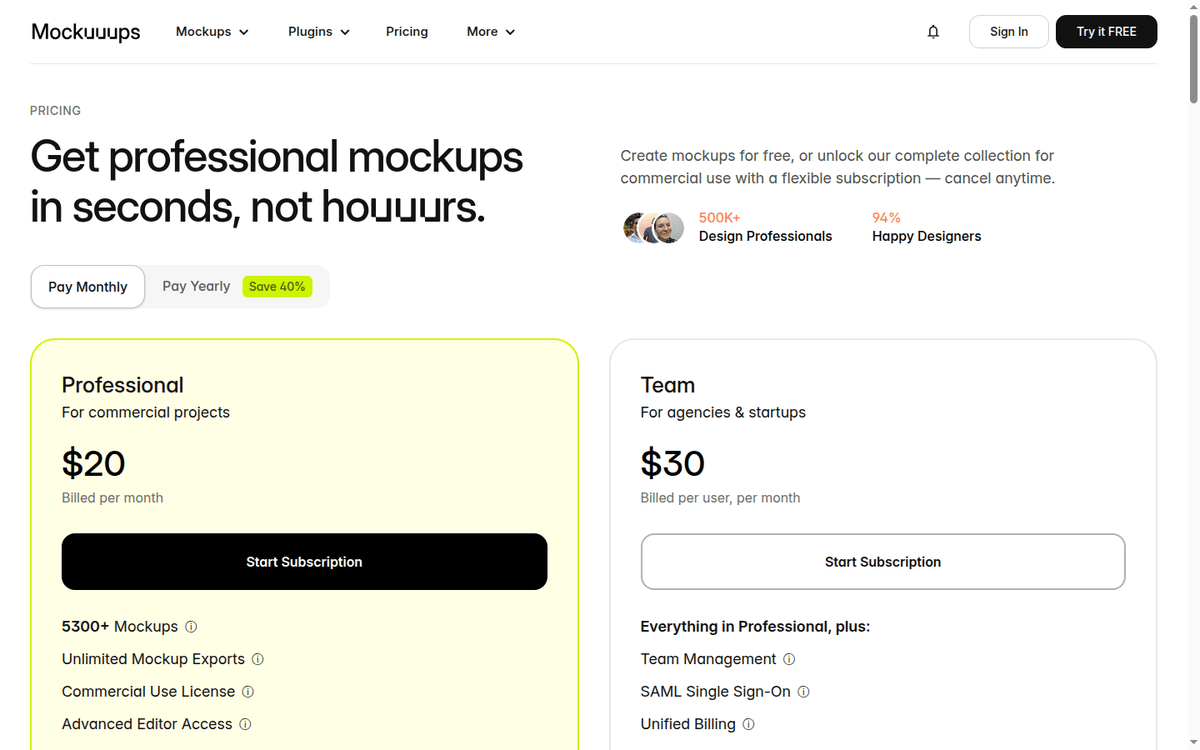
The published USD pricing is twenty dollars a month for Professional and thirty dollars a month per user for Team. Annual billing saves forty percent. We read the pricing page and walked through the feature list to map what each tier actually unlocks.
Below: the price math, the regional discount caveat, the Figma and Adobe Express integrations, and the workloads where Mockuuups Studio beats Smartmockups or Screely.
The price ladder in one table
The pricing page lists both monthly and yearly billing on the same card. Numbers below are USD list price for non-VE visitors (mockuuups.studio/pricing).
| Tier | Monthly | Yearly (effective per mo) | Scenes | 4K export | Seats |
|---|---|---|---|---|---|
| Free collection | $0 | $0 | subset, attribution required | no | — |
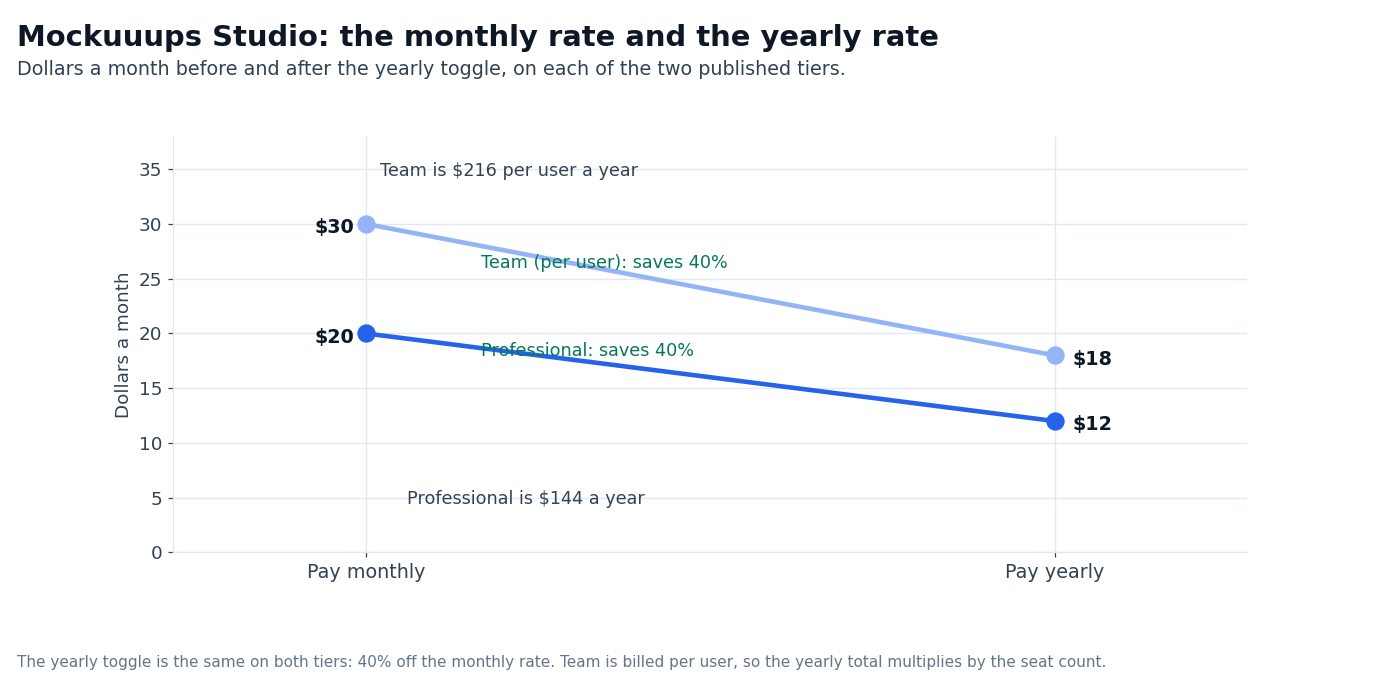
| Professional | $20/mo | $12/mo ($144/yr) | 5,300+ | yes | 1 |
| Team | $30/user/mo | $18/user/mo ($216/user/yr) | 5,300+ | yes | unlimited |
Two price mechanics matter:
- Annual saves 40%. Pro Monthly at $20/mo is $240/yr; Pro Yearly at $144/yr saves $96 per year. Team Monthly at $30/user/mo is $360/user/yr; Team Yearly at $216/user/yr saves $144/user/yr.
- The displayed price carries a regional discount. The page reads the visitor’s location and applies a discount to every plan — 65% in the capture we read from a South-East Asian IP, nothing at all from a European one. The USD list price is what buyers outside those regions pay.
Both mechanics are visible on the same pricing page. The regional discount is geolocation-based, not a coupon code.
What the free collection actually gives you
The free path is a collection of mockups rather than a plan tier. The FAQ describes it as limited and requiring attribution, and the free exports are for evaluation and personal preview only. For anything published externally, the attribution requirement is the constraint to plan around.
Free is sufficient if:
- You are evaluating whether drag-and-drop mockups fit your workflow before paying.
- You need a low-res mockup for an internal document or a Slack message.
- You are previewing the library for yourself rather than publishing for a client.
Free is not sufficient if:
- You publish mockups on a public landing page or in marketing material, where the attribution requirement has to be honored.
- You need 4K resolution for retina displays or print.
- You share a single seat across a team — the Professional license is licensed to one person, and the free collection carries no team rights at all.
The pricing page does not document a monthly cap that triggers a downgrade if you stop paying. The downgrade path is manual cancellation, not auto-downgrade.
What Professional actually unlocks
Professional is the published single-user tier. The pricing page describes a fixed feature bundle rather than per-feature pricing (mockuuups.studio/pricing).
- 5,300+ mockup scenes with regular library updates. The library includes device frames: iPhones, iPads, Android phones, laptops, watches; browser windows: Chrome, Safari, Edge, Firefox; and print mockups: business cards, posters, books.
- Unlimited mockup exports at 4K resolution. Watermark removed.
- Commercial use license. The pricing page states “you can use exported mockups for yours or client’s projects.”
- Advanced editor with hands, backgrounds, and other overlays that let you compose a multi-element mockup scene.
- Figma plugin that drops your Figma frame into a device scene without leaving Figma.
- Adobe Express add-on that does the same inside Adobe Express.
- Shareable preview links — public URLs of mockups for sharing with clients without sending the file.
- Website screenshot tool — capture a live website screenshot to drop into a mockup.
- Single-user license — sharing a login between multiple people is explicitly disallowed.
For solo designers, indie developers, and small content teams, Professional is the published entry point. The price ladder ($20/mo or $144/yr) is straightforward.
We did not export at 4K or test the Figma plugin in a live workflow. The features listed are published as in-plan on the pricing page; the per-feature depth — e.g. how many devices are in the library, what Figma frames are supported — is not documented.
What Team actually adds on top of Professional
Team adds the operational features that agencies and small studios need to run multi-user workflows (mockuuups.studio/pricing).
- Team management — invite and organize team members in one workspace.
- SAML Single Sign-On — secure access through your company’s identity provider. Important for enterprise procurement.
- Unified billing — single invoice and bill management for the team.
- Pay by invoice & bank transfer — large teams can settle through invoice and ACH bank transfer rather than card-only billing.
- Priority support — fast, top-priority help.
Team is priced per user per month, which means a five-person team on Team Yearly is $1,080/yr ($216 × 5). The single-user Professional license prohibits shared logins; Team is the published way to run a multi-user workspace.
What Team does not publish:
- A minimum seat count. The pricing page does not list “3-seat minimum” or similar.
- Whether SSO is required for all users or can be enabled per-user.
- Audit logs or admin-level visibility into exports.
For an agency or a design studio running multiple designers on the same mockup library, Team is the published option. The yearly savings ($216 vs $360 per user) materially change the budget math on five-or-more seat teams.
How Mockuuups Studio compares to Smartmockups, Screely, and Rotato
The mockup-generator category has a few established players. Mockuuups Studio’s published positioning is scene volume (5,300+), the Figma/Adobe Express integrations, and the Team-tier operational features.
- Smartmockups is now part of Canva: the domain leads into Canva’s own mockup tooling rather than selling a standalone subscription. Teams already inside Canva may not need Mockuuups Studio.
- Screely focuses on quick browser-window mockups. It is the lighter, browser-frame-first option in the category; its own terms were not re-read for this piece.
- Rotato positions itself on 3D device mockups with rotating animations. If your deliverables need video or animated device scenes it is the category to look at; Mockuuups Studio is static-image-first.
For a designer who already lives in Figma and needs to drop frames into device scenes, Mockuuups Studio’s Figma plugin is the integration that Smartmockups (post-Canva acquisition) does not match as cleanly.
For teams that need SSO, unified billing, and bank-transfer payment, Mockuuups Studio’s Team tier is the published option.
The regional discount caveat and how to handle it
The pricing page reads the visitor’s IP and applies a discount to every plan.
In the capture we read from a South-East Asian IP the page carried a “Regional discount applied — you’re saving 65% on all plans” note and priced the cards in local currency; read from a European IP the same page shows no discount at all.
We cite the USD list price in this review because that is what most readers will see.
The Pay Monthly / Pay Yearly switch does not change the regional adjustment — it is applied on top. If your location triggers the discount and you want the list price, the switch will not get you there; the page reads the list price from a region without the discount.
What lives inside the 5,300+ scene library
The pricing page advertises “5,300+ mockups” and “regular library updates” but does not enumerate the catalog. From the marketing site and the Studio itself, the library breaks into four broad families (mockuuups.studio/).
- Device frames. iPhones (from iPhone 6 through current generations), iPads, Android phones — Pixel, Galaxy, generic —, MacBooks, watches, and standalone devices in multiple finishes and angles.
- Browser windows. Chrome, Safari, Edge, Firefox, and a generic “browser” frame — useful for SaaS landing pages where the browser chrome is part of the design.
- Print mockups. Business cards, posters, books, magazine covers, billboards. The print family is the less-common leg of a tool that started as a SaaS-marketing helper.
- Hands and backgrounds. Standalone overlays that let you compose a multi-element scene rather than a single device.
The pricing page describes “regular updates” without a frequency. We did not benchmark the catalog against a snapshot from a year ago; the count of 5,300+ is the published floor as of the pricing-page capture.
The Figma plugin and Adobe Express add-on in practice
Two integrations matter for designers who already work inside a specific design tool:
- Figma plugin. Pull a Figma frame directly into a device scene from inside Figma. The published positioning is “speed up your design workflow” — the alternative is to export the Figma frame as a PNG and upload it to the Studio, which adds a step. We did not verify which Figma versions are supported, whether layered frames are preserved, or whether frames outside the canvas viewport are handled cleanly.
- Adobe Express add-on. Same idea inside Adobe Express — drop an Express composition into a mockup scene. Adobe Express is the lighter-weight alternative to full Adobe Creative Cloud, so the add-on targets the same workflow.
For a designer who lives in Figma, the plugin is the integration that matters. For a team on Adobe Express, the add-on is the equivalent. For a team on neither, the Studio’s web editor is the standalone path.
What we did not verify
The pricing page is the source for every number in this review. Items we did not confirm hands-on:
- The exact 5,300+ scene count and how often the library is updated.
- Whether 4K exports are available in PNG, JPG, or both formats.
- Figma plugin: which Figma versions are supported and whether layered Figma frames are preserved.
- Adobe Express add-on: integration depth inside Adobe Express.
- The Team tier seat limit (the pricing page says “multi-user workspace” without a fixed cap).
- Whether there is a public API for automated mockup generation.
Who Mockuuups Studio is for
Three profiles fit Mockuuups Studio cleanly:
- Solo designers and indie developers who publish mockups on a website, in marketing material, or in social posts. Professional at $20/mo or $144/yr is the published entry tier with commercial use cleared.
- Small design studios and content teams that need multi-user workflow. Team at $30/user/mo or $216/user/yr adds SSO, unified billing, and bank transfer payment.
- Figma-first designers who drop frames into device scenes as part of their daily workflow. The Figma plugin is the published integration; Pro is the entry tier that includes it.
Three profiles should pass:
- Canva Pro subscribers who already have Smartmockups bundled in. Adding Mockuuups Studio on top is a duplicate spend for the same workflow.
- Teams that need 3D animated device mockups. Rotato is the published option for video deliverables; Mockuuups Studio is static-first.
- Casual users who publish a mockup every few months. The free collection covers a one-off personal preview; paying $20/mo for the export license is overkill until mockups are part of a paid workflow.
Is Mockuuups Studio worth the price tag? For a designer publishing mockups as part of a paid workflow, Professional at $144/yr is the right entry. For a team that needs SSO and bank-transfer billing, Team at $216/user/yr is the published tier.
The yearly savings (40% off) materially change the budget math; the USD list price ($20/mo Pro, $30/user/mo Team) is what readers outside the discounted regions will actually pay.
FAQ
How much does Mockuuups Studio cost?
USD list price: Free $0; Professional $20/mo or $144/yr; Team $30/user/mo or $216/user/yr. Annual billing saves 40% versus monthly. The pricing page applies a regional discount by visitor location — 65% on all plans in the capture we read.
Is Mockuuups Studio free?
There is no time-limited trial on the paid tiers. The free material is a limited collection of mockups that requires attribution, rather than a plan tier with a published monthly quota.
What does Professional include?
5,300+ mockup scenes, unlimited 4K exports without watermark, commercial use license, advanced editor with hands and backgrounds, Figma plugin, Adobe Express add-on, shareable preview links, and a website screenshot tool. Single-user license.
What does Team add over Professional?
Team management, SAML Single Sign-On, unified billing, pay by invoice & bank transfer (ACH), and priority support. Priced per user per month.
Does Mockuuups Studio have a Figma plugin?
Yes. The plugin is included with Professional and above. We did not verify which Figma versions are supported or whether layered frames are preserved.
Can I use the mockups commercially?
Yes, on Professional and above. The pricing page states “you can use exported mockups for yours or client’s projects.”
What is the regional discount?
The page applies a discount by visitor location — 65% on all plans in the capture we read, nothing at all from a European IP. The USD list price ($20/mo Pro, $30/user/mo Team) is what readers outside those regions will pay.
Can I share my account with a teammate?
No. The Professional license explicitly disallows sharing a login between multiple people. Team is the published multi-user tier.
Is there an API?
The pricing page does not document an API. There is no public mention of programmatic mockup generation on the published pricing or feature list.
Sources
- Mockuuups Studio pricing: https://www.mockuuups.studio/pricing (captured 2026-09)
- Mockuuups Studio home: https://www.mockuuups.studio/ (captured 2026-09)
How we put this together: the two plan prices, the yearly rates, the scene count, the feature list and the FAQ wording come from mockuuups.studio/pricing, quoted as displayed, with the regional-discount note taken from a capture made from a South-East Asian IP.
We did not export at 4K, run the Figma plugin or buy a seat, so anything that depends on a live workflow is flagged where it appears.
Figures that depend on a real workload, a real target or a real integration are flagged where they appear in the text rather than being estimated.
Disclosure: this article contains affiliate links. If you buy through them we may earn a commission at no extra cost to you. Commission never changes our scoring or the order of a ranking.