There is no surprise line item for developer seats.
— the pricing model this review starts from
Appsmith started life as an internal-tools builder for engineering teams that did not want to wait three sprints for a CRUD admin. The product you install today is not quite that product, and that is what makes a 2026 review worth writing.
Appsmith has tightened its drag-and-drop builder, added AI copilots that generate custom widgets from natural language, and publishes SOC 2 Type 2 compliance across its tiers.
The Apache 2.0 community edition still answers the procurement objection Retool hits in regulated buyers. Whether that is enough depends on what your team is shipping and what your finance team will pay for it.
This review walks through what Appsmith ships today, the three-tier pricing ladder (Free / Business / Enterprise), the data-source breadth that sets it apart from point-and-click form builders, and the head-to-head with Retool that almost every buyer runs in their first week.
| Product | a visual application builder for internal tools |
| License | Apache 2.0 community edition, self-hosted |
| Compliance | SOC 2 Type 2 published across the tiers |
| Copilots | prompt-to-widget generation from natural language |
| Billing | per user — no surprise line item for developer seats |
The dollar figures come from appsmith.com/pricing, captured in September 2026 via Firecrawl.
Anything that depends on a real workload — the build time on a 12-table Snowflake admin, the maintenance overhead on a 20-widget app, the true cost per seat for a contractor-heavy team — is flagged as unverified in this review, the same convention we use across our review pieces.
What ships in 2026
Appsmith is a visual application builder that sits on top of your data. You drag a Table widget onto the canvas, point it at a Postgres or Snowflake query, wire a button to a JS function, and the result is a working admin panel that runs against live data.
The escape hatch is the key feature: every widget, every query, every workflow step is fully editable in JS/HTML/CSS. There is no invisible abstraction layer to fight.
The 2026 product has four working surfaces. The canvas builder is the main one — drag-and-drop, responsive grid, prompts-to-code copilots that generate widgets and workflow logic from natural language.
The IDE is a centralized JS editor with auto-complete, multi-line editing, debugging, and linting.
The data layer covers a published connector catalog: Postgres, MySQL, MongoDB, MSSQL, DynamoDB, Snowflake and BigQuery on the database side, REST and GraphQL on the API side, Salesforce, Stripe, Slack and Google Workspace on the SaaS side, and OpenAI, Anthropic and the other LLM vendors.
The integration page counts 61 services and the documentation names around 45 data sources. Versioning is Git-backed from day one — three repos on the Free tier, unlimited on Business and above — with branch protection and CI/CD on Enterprise.
Customers cited on the product page include AWS, Bytedance, Dropbox, Tubi, GSK, and Northeastern University. That is a real enterprise mix, not just indie logos.
What the workspace actually looks like
The default workspace is one canvas with three columns — a widget palette on the left, the canvas in the middle, the property inspector on the right.
The navigator at the bottom shows every widget in the page as a tree; click any node and the inspector jumps to its config. The entity explorer on the left splits queries, JS functions, and data sources into separate trees.
Pages, modals, and tabs are first-class entities, so a multi-page admin is a tree of named entities rather than a single bloated page.
The 2026 version also ships a Workflows surface — separate from pages, optimized for backend automation. A workflow is a sequence of steps — queries, JS functions, integrations — that runs on a trigger: cron, app event or webhook.
This is where the “internal tools” framing gets stretched: a workflow can run an ETL job, fan out a Slack notification, post to a webhook — anything you can wire in JS.
It is not a replacement for Airflow or Temporal, but for ops workflows that need a UI to trigger and inspect, it is the right shape.
Deployment and self-hosting
Appsmith ships three deployment modes. Self-hosted Community Edition is the open-source path — Docker image, Kubernetes Helm chart, or a cloud marketplace template — AWS, Azure, DigitalOcean, Render —.
Managed Cloud is the hosted option; pricing is the same as self-hosted but Appsmith runs the operations. Managed Hosting on Enterprise is a dedicated single-tenant deployment for buyers who need isolation guarantees the multi-tenant Cloud does not offer.
The self-host story is what unblocks the regulated-buyer conversation. SOC 2 Type 2 is published on all three tiers of the hosted Cloud, Free included; if you self-host, the SOC 2 audit boundary is your own cloud account, not Appsmith’s.
For banking, healthcare, and public-sector buyers this is the difference between a 3-month procurement cycle and a 12-month one.
Appsmith pricing in 2026: three tiers
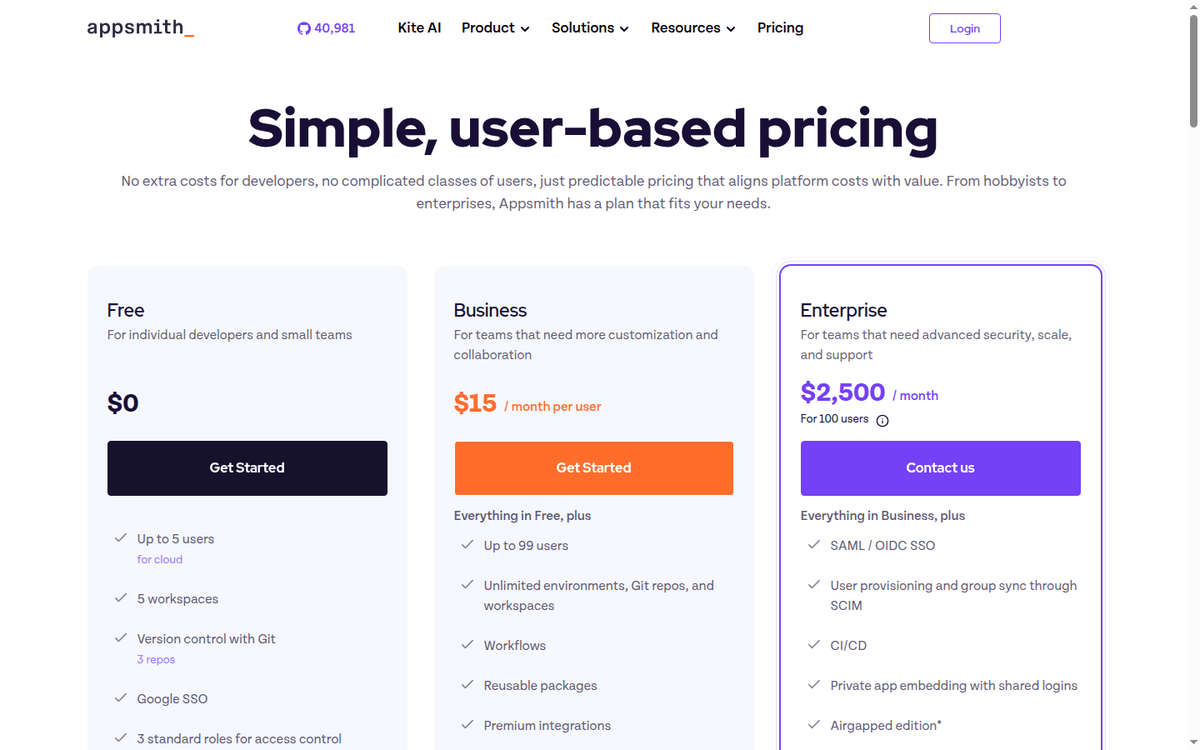
Appsmith’s pricing is per-user on Business, flat-fee on Enterprise, and free on Community. There is no surprise line item for developer seats — anyone building or editing in your instance counts as a single user.
Members added mid-cycle are billed for the full month. Business accounts are billed at the end of each month; annual billing is the Enterprise norm.
| Plan | Price | Users | Workspaces | Git repos | SSO | Support |
|---|---|---|---|---|---|---|
| Free | $0 | 5 | 5 | 3 | Google SSO | Community Discord |
| Business | $15 / user / mo | Up to 99 | Unlimited | Unlimited | Google SSO | Email + chat, priority |
| Enterprise | $2,500 / mo flat | 100 (unlimited above) | Unlimited | Unlimited | SAML / OIDC + SCIM | 24×7 with SLAs, dedicated CSE |
The Business tier is the meaningful one for most teams. Workflows, reusable packages, premium integrations, custom roles, audit logs, removable “Powered by Appsmith” branding, and anytime backup/restore synced to AWS S3 all land here.
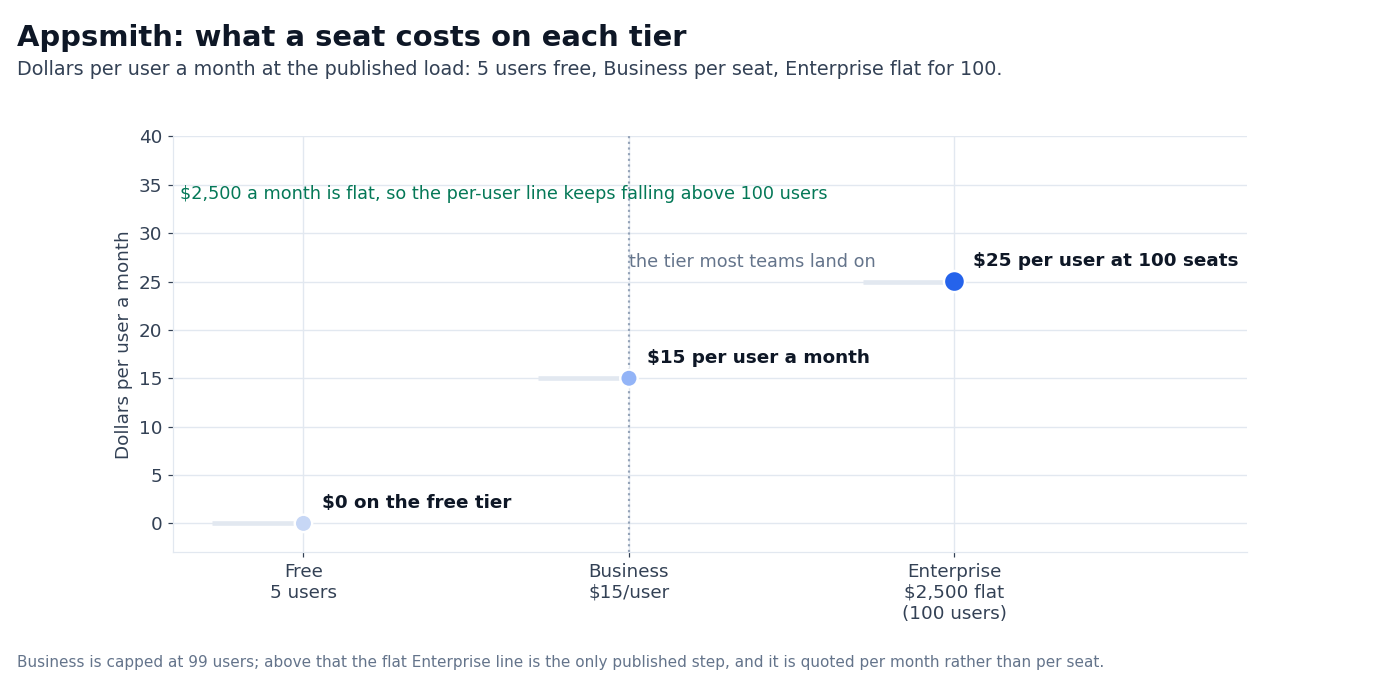
The Enterprise tier at $2,500/mo flat for 100 users is the airgapped and managed-hosting step up — that math works out to roughly $25/user if you fully load it, $25/user-or-less above 100 users.
Add-ons on Enterprise include the airgapped edition and managed hosting.
A free 15-day Business trial unlocks for every new signup, no credit card required. At the end of the trial you either activate Business or drop back to Free.
The Community edition (Apache 2.0, self-hosted) is fully maintained and stays free regardless of the trial — that is the procurement-friendly path for teams that need on-prem by default.
The full plan-comparison matrix is at appsmith.com/pricing. Where a figure needed a paid account to verify — actual SCIM sync overhead, the real cost of a contractor-heavy team, the rollout cost of the airgapped edition — we flag it as unverified in this review.
Building with the AI copilots
The 2026 feature that earns Appsmith its keep is the prompt-to-widget copilot.
Describe what you want (“a card showing top 10 customers by MRR with a status pill and a link to the order detail”) and the copilot generates the JS, the data query, and the wiring.
You can then edit the generated code directly — there is no abstraction layer to escape from.
The drag-and-drop builder is fast on the standard widgets: table, chart and form; the time sink is usually the auth layer and the row-level permissions, which are workload-specific.
The bigger win is on workflow logic — the copilot produces a usable first draft of the JS function for a multi-step approval flow, which a developer then trims rather than writes from scratch. The honest version: this is not a no-code tool.
It is a developer tool with a no-code entry point. If your team does not have someone who can read JS, the AI drafts will pile up faster than they get cleaned.
Appsmith vs Retool in 2026
The head-to-head that almost every buyer runs in their first week is Appsmith vs Retool. Both build internal admin tools, both have drag-and-drop UIs with code escape hatches, both ship with REST/GraphQL/database/SaaS connectors. They diverge on the four dimensions that matter.
Licensing. Appsmith Community Edition is Apache 2.0, self-hosted, free. Retool’s free plan is closed-source and capped at 5 users, with unlimited apps but a monthly cap on workflow runs and AI credits.
For regulated buyers who need self-host by default, Appsmith removes the procurement conversation entirely.
Pricing model. Retool charges per builder and per internal user, and meters workflow runs and AI credits separately. Appsmith charges $15/user/mo on Business and bundles workflows and premium integrations into that price.
For a 20-person team, the Appsmith Business line lands at $300/mo before any seat additions; the equivalent Retool line lands higher once workflows are in use.
We did not benchmark a real 20-user rollout, so the apples-to-apples bill on your real seat mix is unverified here.
Code escape hatch. Both expose JS for widget logic. Retool leans more visual (its “query” model is GUI-first, with JS as escape). Appsmith leans more code-first (its JS editor is the central surface, with the visual builder as entry point).
Developers who want to own the code lean Appsmith; ops/PMs who want to point-and-click lean Retool.
AI features. Retool has Retool AI and Agents for building custom AI workflows on top of internal data. Appsmith has prompt-to-widget copilots for code generation. Different shapes: Appsmith’s AI is a developer productivity tool, Retool’s is an end-user app feature.
Both platforms are honest tools. The buying decision is less about which is “better” and more about which one matches the team’s working style and the procurement constraints you walk in with.
Appsmith vs ToolJet and Budibase
If Retool is the closest peer, ToolJet and Budibase are the alternatives worth a look. ToolJet is the closest open-source competitor to Appsmith — also Apache-style licensing, also drag-and-drop, also JS escape hatch.
ToolJet’s edge is its multi-page app support and its growing workflow engine; Appsmith’s edge is its longer track record with Fortune 500 buyers and its more mature Git-backed versioning.
Budibase is the third option, also self-host friendly, with a stronger form-builder angle than either of the other two and a more limited database connector set.
For the open-source-first crowd, the question is less Appsmith vs Retool and more Appsmith vs ToolJet. The honest answer is that they are close, and the deciding factor is usually the data-source connector you cannot live without.
Appsmith’s Snowflake, BigQuery, and LLM connectors are the deepest in this category.
When Appsmith is the wrong tool
Three workloads where Appsmith is the wrong pick. First, public-facing customer apps. Appsmith is built for internal admin tools.
The public-embed story is a feature on Business and private apps stay an Enterprise feature; for a real customer-portal workload you want a real web framework, not a low-code admin builder. Second, mobile-first apps.
Appsmith is responsive but its widget library is desktop-first. A mobile-native workload belongs in React Native or Flutter, not in Appsmith. Third, high-volume transactional workflows.
Appsmith’s workflow engine handles approval flows and orchestrations cleanly, but it is not a replacement for a real job-queue + worker fleet on a high-volume event pipeline.
Use Temporal or Airflow for that, wire the result back into an Appsmith admin if you want to surface it visually.
What we couldn’t verify (and what to test yourself)
Three classes of figures in this review depend on real workload measurement and we could not benchmark them without a paid customer account. They are flagged as unverified in this review, and we recommend you test them on your own stack before committing.
The first is build-time on a real 12-table Snowflake admin. Appsmith’s drag-and-drop is fast; the time sink is usually the auth layer and the row-level permissions, which are workload-specific.
The second is the maintenance overhead on a 20-widget app over six months. Appsmith’s Git-backed versioning helps, but the real cost is the developer time spent wiring business-logic changes through widgets and queries.
The third is the contractor-heavy team math. If your team rotates contractors, the per-user billing on Business can stack up faster than the flat-fee Enterprise line — run the math on your real churn rate.
FAQ
Is Appsmith really free?
The Apache 2.0 Community Edition is free and self-hosted, with no user cap that affects most teams. The Business and Enterprise tiers add the hosted cloud option, premium integrations, workflow and audit features, custom roles, SAML SSO, and the AI copilots at production scale.
Does Appsmith work offline?
Self-hosted Appsmith runs entirely on your infrastructure, including the LLM features if you point them at a local model. The hosted Cloud edition needs network access to your data sources the same way any cloud-hosted tool does.
How is Appsmith different from Retool?
The licensing model is the biggest split: Appsmith Community is Apache 2.0, and Retool’s free plan is closed-source with a 5-user cap. Beyond that, Appsmith is more code-first (JS editor is the central surface), Retool is more GUI-first.
Pricing on paid tiers lands in the same range; the head-to-head is usually a working-style fit rather than a feature gap.
Can I migrate from Retool to Appsmith?
Appsmith supports REST/GraphQL/database queries the same way Retool does, so the data layer is portable. The widget logic, app structure, and access-control rules have to be rebuilt — there is no one-click importer.
Does Appsmith support multi-page apps?
Yes. Appsmith supports multi-page apps with a routing layer. The app shell, navigation, and page state are all configurable. The depth of the multi-page model is not as deep as a React app, but for internal admin tools it is enough.
Sources
- Appsmith pricing — three-tier pricing ladder, trial terms, FAQ (captured September 2026)
- Appsmith product page — capabilities, customer logos, AI copilot positioning (captured September 2026)
- Appsmith documentation — installation guides, framework reference, Git integration
- Appsmith GitHub repository — Apache 2.0 source, public roadmap, release cadence
How we put this together: the three plan prices, the user caps, the feature matrix, the trial terms, the SOC 2 row and the license terms come from appsmith.com/pricing and appsmith.com/product, quoted as displayed, with the connector counts read from the integration page and the documentation.
We have not run a paid Appsmith workspace, built a production app or benchmarked a rollout of our own, so the workload numbers stay flagged where they appear.
Figures that depend on a real workload, a real target or a real integration are flagged where they appear in the text rather than being estimated.
Disclosure: this article contains affiliate links. If you buy through them we may earn a commission at no extra cost to you. Commission never changes our scoring or the order of a ranking.