The platform is the AI-native customer support agent product that prices on conversations rather than seats or resolutions.
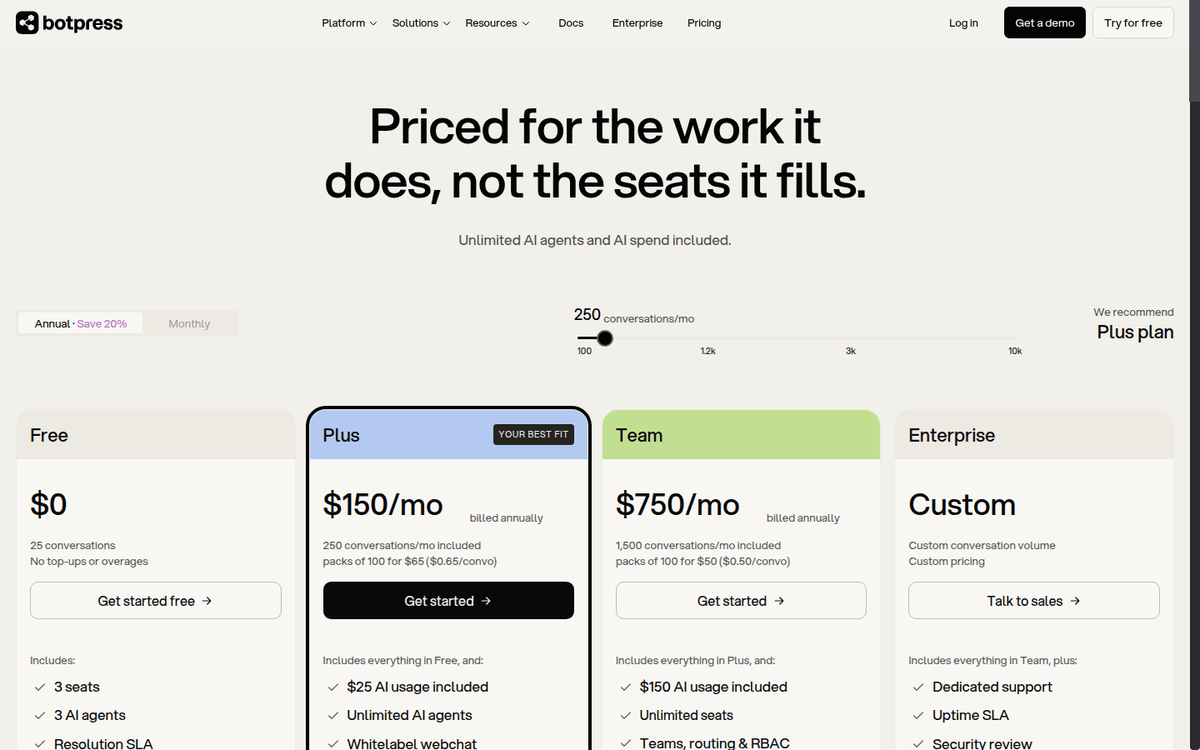
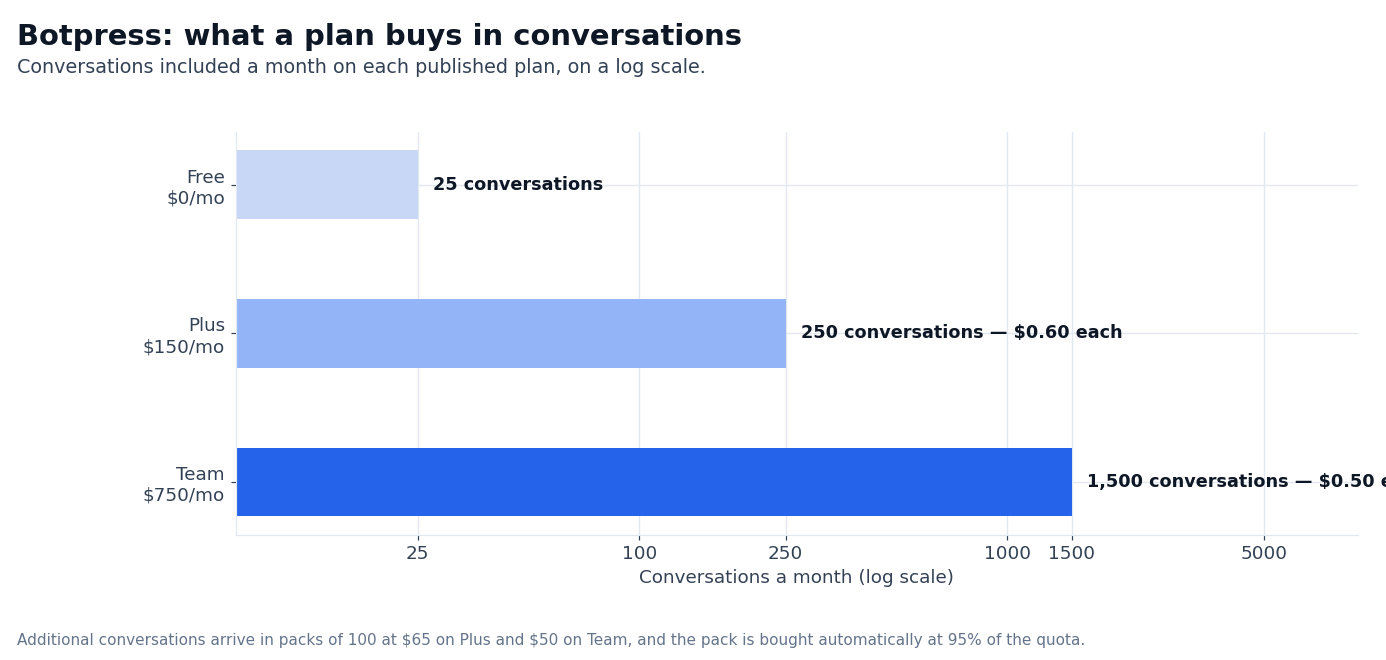
The headline numbers shape up clearly: the Free plan includes 25 conversations per month, 3 seats, and 3 AI agents; Plus runs $150/mo annual with 250 conversations, 3 seats, and unlimited AI agents; Team runs $750/mo annual with 1,500 conversations, unlimited seats, and $150 of AI spend included.
Enterprise is a quote. The “unlimited AI agents and AI spend included” framing is the differentiator — most chatbot platforms charge per resolution, and the math is unpredictable at scale.
This review is what an editorial team looks at before recommending Botpress to a small support team looking to automate ticket resolution, a mid-market helpdesk stack migration to AI, or an enterprise customer-experience team replacing a legacy chatbot product.
We walk through the platform shape — Desk, Studio, Viber and ADK, all four products on the same pricing model, the conversation-based pricing math, the AI spend credit mechanic, the storage extensions, and the head-to-head with Intercom, Zendesk AI, Ada, Tidio, and the manual chatbot configuration.
Pricing comes from botpress.com captured via Firecrawl in September 2026. Anything that needs a paid Botpress account to measure on a real support traffic pattern is flagged as unverified in this review.
The product in 2026
Botpress runs four products on one pricing model. The first is Botpress Desk, the AI-native helpdesk. The product handles customer conversations across channels — webchat, WhatsApp, Instagram, email, Viber — routes them to AI agents or human agents, and tracks the conversation count for billing.
The second is Botpress Studio, the visual drag-and-drop environment for building AI agents. Studio is where the brand defines the agent behavior, the knowledge base — tables, vector storage, file storage — the routing logic, and the integration surface.
Studio produces an agent that can be deployed to Desk, Viber, or ADK.
The third is Botpress Viber, the Viber-channel connector for brands whose customer base uses Viber. Viber is a meaningful channel in Eastern Europe, the Middle East, and parts of Asia.
The fourth is Botpress ADK (Autonomous Development Kit), the developer surface for building custom agents, integrations, or product extensions on top of Botpress primitives. ADK is the API + SDK surface that engineering teams use to embed agent logic into a custom product flow.
The pricing is identical across all four surfaces. A Plus account is a Plus account regardless of which surface the brand uses. Every account gets the same AI spend meter, the same conversation count, the same category breakdown.
Brand-side, this means the procurement math is centralized: one Botpress contract covers the helpdesk, the studio, the Viber channel, and the developer-side agent surface.
The pricing reality: conversations, not seats or resolutions
Botpress runs a Free / Plus / Team / Enterprise ladder with conversation-based metering. The conversation is the unit of billing. A conversation is any user interaction that ties up agent time. A conversation spans two months counts in both months.
Multiple anonymous sessions each count as separate conversations. Voice calls count as 3 minutes = 1 conversation.
| Plan | Annual / monthly | Conversations | Seats | AI agents | AI spend included |
|---|---|---|---|---|---|
| Free | $0/mo | 25 conversations/mo | 3 seats | 3 agents | $0 |
| Plus | $150/mo annual ($1,800/yr) | 250 conversations/mo, packs of 100 at $65 ($0.65/convo) | 3 seats | Unlimited agents | $25 |
| Team | $750/mo annual ($9,000/yr) | 1,500 conversations/mo, packs of 100 at $50 ($0.50/convo) | Unlimited | Unlimited agents | $150 |
| Enterprise | Quote | Custom | Custom | Unlimited | Custom |
The mechanic worth understanding is the auto-recharge. When an account reaches 95% of its quota — Plus at 238 of 250, Team at 1,425 of 1,500 — the platform automatically purchases a pack of 100 conversations. The pack persists month-to-month until removed.
Unused conversations in a pack expire at month end — they do not roll over.
The auto-recharge cannot be turned off. The pricing page answers the question directly: “No. Pausing conversations means pausing the product entirely — whether an AI agent or a human is handling it.” The trigger point and the pack size are not configurable either.
A second mechanic worth understanding is the AI spend credit grant. When an account reaches 95% of its AI spend limit (Plus = $23.75 of $25, Team = $142.50 of $150), Botpress auto-purchases a $10 credit grant of AI spend on the brand’s behalf.
$10 is sold at cost. Unlike conversation packs, AI credit grants do not expire at month end — any unused balance carries over for up to 12 months from the end of the month it was purchased. Credit grant auto-recharge is unavailable on Free.
A third mechanic is storage. Storage comes in three types: table rows (structured data in Botpress Tables), vector storage (knowledge base embeddings), and file storage — uploaded PDFs, images, etc. Free is hard-capped with no add-ons.
Plus and Team publish their defaults in the comparison table — 100K table rows, 1GB vector and 10GB file storage on Plus; 500K, 5GB and 50GB on Team — and both can expand storage for $40/mo, which adds a further 100K table rows, 1GB vector and 10GB file storage.
What we couldn’t verify
The actual conversation count on a real support traffic pattern, the integration depth with Zendesk and Salesforce Service Cloud, and the per-conversation cost on a real volume profile.
Anything that depends on the actual traffic shape — frequent support chats with multiple turns, occasional high-volume days — on a paid account is flagged as unverified here.
The published pricing, the storage table and the tier mechanics are visible on botpress.com and we confirmed them; the operational numbers need a paid account.
The conversation model and why it matters
The conversation-based pricing is the most important detail in the comparison. Most chatbot products price per resolution. Botpress prices per conversation.
Per-resolution pricing creates disputes over what “resolved” means. A resolution that requires handoff to a human is not a resolution. A resolution that fails the QA pass is not a resolution.
Botpress argues that “perversely, raises your bill when your bot gets smarter” — as the bot’s resolve rate climbs, the per-resolution cost goes up because more conversations counted as resolutions.
Per-conversation pricing is auditable. The conversation count is the count of conversations tied to agent time in the billing month. The math is predictable. Per the FAQ: “Conversations are predictable — you know your monthly cost before the month starts.
Resolution pricing creates disputes over what ‘resolved’ means.”
The implication for the math. A brand paying $750/mo for 1,500 conversations averages $0.50 per conversation. At a 50% AI resolve rate, the brand buys 1,500 conversations and the AI handles 750 of them. The cost per resolved conversation is $1.00.
At a 30% resolve rate, the cost per resolved conversation is $1.67. At a 70% resolve rate, the cost per resolved conversation is $0.71.
The brand does not pay for resolutions; the brand pays for conversations, and the resolve rate is the brand’s efficiency metric.
This is the right model for AI agents. The math aligns with what the brand wants: a better bot resolves more conversations per conversation, and the brand’s cost-per-resolved-conversation drops. Per-resolution pricing models punish improvement.
The AI spend meter
The AI spend is the second meter. Every conversation burns AI spend because every conversation calls an LLM. Botpress includes a $0.10 AI spend per conversation covered by them — meaning the first $0.10 of LLM cost per conversation is on Botpress’s tab. Beyond $0.10, the brand pays.
The brand-side AI spend meter. Plus includes $25/mo, which covers ~250 conversations at the average $0.10/conversation baseline. Team includes $150/mo, which covers ~1,500 conversations at the same baseline.
A brand using a more expensive model (Anthropic Opus, OpenAI o1) will burn through the $25 or $150 faster than a brand using a less expensive model (Haiku, GPT-4o-mini).
The auto-recharge for AI spend. When the brand reaches 95% of the AI spend limit, Botpress purchases a $10 credit grant at cost. The $10 amount is not configurable. The trigger point is not configurable.
Brand-side, this means brands that expect to exceed their AI spend limit should budget for the $10 increments in addition to the plan price.
When it’s the right pick
Three workloads where Botpress is the strongest available option. First, small-to-mid market customer support teams replacing an email-only or chat-only helpdesk with an AI-native stack.
The Free → Plus → Team ladder is the simplest published conversation-pricing ladder in the category. A brand migrating from Zendesk or Intercom to Botpress can land on Plus at $150/mo annual and run the entire support chat on the platform.
Second, multi-channel brands deploying AI agents across WhatsApp, webchat, Instagram, and Viber. The unlimited-agent story is what makes this economical — a brand can deploy one AI agent per channel without paying per agent.
Third, engineering teams building custom support flows or product integrations. The ADK + Studio combination is the API surface for embedding agent logic into a custom product.
For these workloads, the math compounds with conversation volume. A 1,500-conversation-per-month brand on Team pays $750/mo for the platform + AI spend. Compare to Intercom’s AI tier (Fin) at a per-resolution cost that compounds.
Per the Botpress FAQ on resolution pricing: “Resolution pricing creates disputes over what ‘resolved’ means and, perversely, raises your bill when your bot gets smarter.” Botpress’ per-conversation model avoids that misalignment.
When it’s the wrong pick
Three workloads where Botpress is not the best fit. First, enterprise support teams that need deep integration with the legacy helpdesk stack — Zendesk, Salesforce Service Cloud, ServiceNow.
Botpress’ integration surface with the legacy helpdesk stack is thinner than with the AI-native stack. Brands expecting a one-to-one Zendesk-Skill migration will find Botpress’ integration story underbuilt.
Second, large support teams that need SLA / CSAT / agent-productivity analytics.
The Botpress analytics surface covers conversations, AI spend, and team performance; it does not cover the SLA / CSAT / agent-productivity metrics that enterprise support teams expect. Third, brands with strict on-prem or air-gapped requirements.
Botpress is a cloud SaaS; brands that need on-prem or air-gapped deployments will need to look at on-prem chatbot vendors — Avaamo, Kore.ai, Cognigy — or build in-house.
The alternatives, briefly
| Vendor | Differentiator | Best for | Watch out for |
|---|---|---|---|
| Botpress | Conversation-based pricing, unlimited AI agents, four-product surface on one pricing | Small-to-mid market support teams, multi-channel AI deployments, custom agent surface | Thinner integration with legacy helpdesk stack; analytics surface light |
| Intercom Fin | Industry-leading brand, deep CRM + helpdesk | Established SaaS companies, brand-name procurement | Sold per resolution rather than per conversation |
| Zendesk AI | Deepest helpdesk + AI integration, broadest enterprise tier | Enterprise support, regulated industries | A heavier setup than the conversation-priced options |
| Ada | AI-first helpdesk, enterprise-grade | Mid-market to enterprise, ecommerce-heavy brands | Sold per resolution, with a high entry tier |
| Tidio | SMB-friendly chatbot + live chat | Small ecommerce businesses | Less depth on AI agent capabilities |
| In-house build | Custom to your needs | Engineering teams with AI depth | High opportunity cost |
The competitor columns here are each vendor’s published positioning rather than terms we re-read for this piece. The honest comparison in 2026: Intercom wins on brand recognition and CRM depth. Zendesk wins on enterprise helpdesk + AI integration.
Ada wins on AI-first helpdesk for enterprise. Tidio wins for small ecommerce. The platform wins for the conversation-based pricing model and the unlimited-agent story that pairs with it.
The honest version on Botpress
The 2026 Botpress is the strongest version of the platform we have seen. The conversation-based pricing is the most important procurement detail, and the published tier mechanics are clearer than most competitor pricing pages.
The four-product surface under one pricing model is what brands with multi-channel or custom-product deployment needs are looking for.
The honest version is on the integration depth with the legacy helpdesk stack. The platform is AI-native. The integration surface with Zendesk, Salesforce Service Cloud, ServiceNow, and the enterprise ITSM products is thinner than with the AI-native stack.
Brands migrating from Zendesk to Botpress will find that the migration covers the chat side well, and the deeper helpdesk surfaces — advanced routing, SLA, CSAT, agent productivity — need to be rebuilt rather than imported.
The second honest version is on the analytics surface. The platform covers conversations, AI spend, and team performance. It does not cover the SLA / CSAT / agent-productivity metrics that enterprise support teams expect.
Brands evaluating Botpress for an enterprise helpdesk replacement should plan to integrate a separate analytics layer or live without the enterprise-grade support analytics surface.
What we couldn’t verify (and what to test yourself)
Three classes of figures in this review depend on a real Botpress account that we did not run for this piece. They are flagged as unverified in this review, and we recommend you test them on your own traffic before committing.
The first is the actual conversation count on your real support traffic.
The published conversation metric covers “a chat started that ties up agent time.” A support traffic profile of two long-form conversations per day is not the same as a profile of 100 short-form chats per day.
Benchmark the actual conversation count on a 30-day pilot before committing to Team. The second is the actual AI spend on your model choice.
Anthropic Claude Sonnet burns less than OpenAI o1; the published $25/month Plus AI spend covers one model class more than another. Run a 7-day pilot on the cheapest model and read the AI spend meter before committing.
The third is how fast your own knowledge base grows into the storage table.
The defaults are published per tier — Plus 100K table rows, 1GB vector and 10GB file storage; Team 500K, 5GB and 50GB — and the $40/mo add-on adds a further 100K table rows, 1GB vector and 10GB file storage.
Measure your own growth against those ceilings before committing.
FAQ
How much does it cost per month?
Four plans. Free at $0/mo: 25 conversations, 3 seats, 3 agents. Plus at $150/mo annual with 250 conversations, 3 seats, unlimited agents, and $25 AI spend.
Team at $750/mo annual with 1,500 conversations, unlimited seats, unlimited agents, and $150 AI spend. Enterprise is a custom quote. Annual billing saves 20% versus monthly.
How does it count conversations?
A conversation is any user interaction that ties up agent time. A conversation spans two months counts in both months. Multiple anonymous sessions each count as separate conversations. Voice calls count as 3 minutes = 1 conversation. AI-only and human-assisted conversations count the same.
What happens when I hit my conversation limit?
You never get cut off. Once you reach 95% of your quota, a pack of 100 conversations is auto-added. You’ll be notified at 75% and 100%. Packs persist month-to-month until removed. Unused conversations in a pack expire at month end.
Can the platform replace Intercom?
For small-to-mid market support teams with conversation-based pricing preference, this is the more cost-efficient alternative. Intercom wins on brand recognition, CRM depth, and the polished UX. The platform wins on per-conversation pricing and the unlimited-agent story.
Does the platform work with WhatsApp?
Yes. The Studio product can deploy AI agents on WhatsApp, webchat, Instagram, email, Viber, and any other channel with a connector. The pricing is the same across all channels.
What is the ADK?
ADK is the Autonomous Development Kit — the API + SDK surface for engineering teams to build custom agent flows, integrations, or product extensions on top of the platform primitives. Pricing is the same as the rest of the platform.
Is there a free trial?
The Free plan is permanently free with 25 conversations per month, 3 seats, and 3 agents. There is no time-limited trial — the Free plan is the trial, and the brand upgrades to Plus when ready.
Sources
- Botpress pricing — Free / Plus / Team / Enterprise ladder, conversation pricing mechanics, auto-recharge, AI spend credit grant, storage add-on (captured September 2026)
- Botpress about — company positioning, four-product surface, autonomous-engine framing (captured September 2026)
- Botpress industries page — AI-native customer support platform, use cases by industry (captured September 2026)
- Botpress docs — Studio, Desk, Viber, ADK product surfaces, integration catalog (captured September 2026)
How we put this together: the four plan prices, the conversation counts, the pack prices, the AI spend terms, the storage table and the FAQ wording come from botpress.com/pricing, quoted as displayed.
We have not run a paid Botpress workspace or measured conversations and AI spend on a real support queue, so the operational numbers need a pilot of your own.
Figures that depend on a real workload, a real target or a real integration are flagged where they appear in the text rather than being estimated.
Disclosure: this article contains affiliate links. If you buy through them we may earn a commission at no extra cost to you. Commission never changes our scoring or the order of a ranking.