Replo sells a Shopify landing builder on a subscription, with monthly sessions as the meter that decides the bill.
What it is — a page builder that publishes into the Shopify Theme itself, not a standalone page built on top of it.
The ladder — a free rung that cannot publish, two paid tiers, then a custom band priced off the store’s own scale.
The meter — sessions, with a per-thousand overage once the included volume is passed.
What is capped — the free plan cannot publish at all, and the entry paid tier limits how many published elements a page can carry.
Included sessions and the per-thousand overage are published per tier; the Custom band is quoted off the store’s scale rather than listed.
Landing-page builders for Shopify split into two camps. The older ones — PageFly, Shogun, GemPages, Zipify — publish a standalone landing page on top of your theme. The newer ones, of which Replo is the most visible, push toward publishing into the Shopify Theme itself.
That sounds like a small detail until you try to add a checkout extension or a dynamic section to a Shogun page and realize it cannot be done without code.
The bet is that the Shopify Theme Editor integration matters more than the visual editor — and the 2026 pricing ladder is built around the workflow that bet implies.
What Replo actually ships
Replo is a visual landing-page builder, but the framing on the homepage leans hard into AI and skills rather than drag-and-drop. The visual editor is still the core — a drag-and-drop canvas with a brand kit, asset library, and variant controls — but the 2026 product push is around “skills” that automate pieces of the workflow.
The conversion-rate-audit skill reviews landing pages, product pages, and checkout paths for friction and missed trust signals. The lifecycle-email-planner drafts, segments, and schedules an email sequence.
The ad-to-landing-page replication skill takes a winning ad and produces a page that mirrors its hook and claims, with imagery pulled from the creative (replo.app, captured recently).
The Theme Builder integration is the part that distinguishes this platform from the older generation of Shopify landing builders. A page built in Replo can be published directly into the Shopify Theme Editor, which means it picks up theme-level styling, native checkout extensions, and dynamic sources.
A Shogun or PageFly page is a standalone URL that does not touch the theme; a Replo page is a section inside the theme. For a brand that wants the new checkout extensibility, subscriptions UI, or bundle builder to live on the same page as the landing content, this is the differentiator that matters.
The AI-built pages feature is positioned as “unlimited” on Starter and above — every plan includes it. The conversion-rate-audit skill, the ad-to-landing skill, and the lifecycle-email-planner skill all run against a chat-style interface.
The skills list also includes a competitor-page teardown, a paid-social funnel builder that wires Meta tracking into a landing page on a subdomain, and a Figma-to-page import.
Whether the skills are accurate enough to ship without human review depends on the page — landing pages built from a clean Figma frame tend to be publish-ready; teardowns and lifecycle plans tend to need editing before they are useful.
How the pricing ladder breaks down
| Plan | Price (annual billing) | Sessions/mo included | Overage | Published elements |
|---|---|---|---|---|
| Free | $0 | n/a (no publishing) | n/a | 0 (publishing not allowed) |
| Starter | $99/mo | 100K | $1.25 / 1K sessions | 15 on Shopify |
| Pro | $499/mo | 500K | $1.00 / 1K sessions | Unlimited |
| Custom | Contact sales | Volume | Volume | Unlimited |
| Plan | What you get that the previous tier does not |
|---|---|
| Free | Templates, evaluation use, 1 Shopify store integration |
| Starter | Publishing on Shopify, AI-built pages, 400 chats/mo, Shopify Theme Editor, unlimited page views and variants |
| Pro | 33% off volume session pricing, unlimited chats/mo, unlimited published elements, agency-friendly multi-store footprint |
| Custom | Flexible Shopify shop limits, product roadmap priority, dedicated enterprise support |
The session-based pricing model is unusual for the Shopify landing-builder category. PageFly sells published-page slots and Shogun bills by page views; the platform’s pricing scales with the traffic the page receives, which means a high-traffic paid-social brand pays more than a low-traffic organic brand at the same plan.
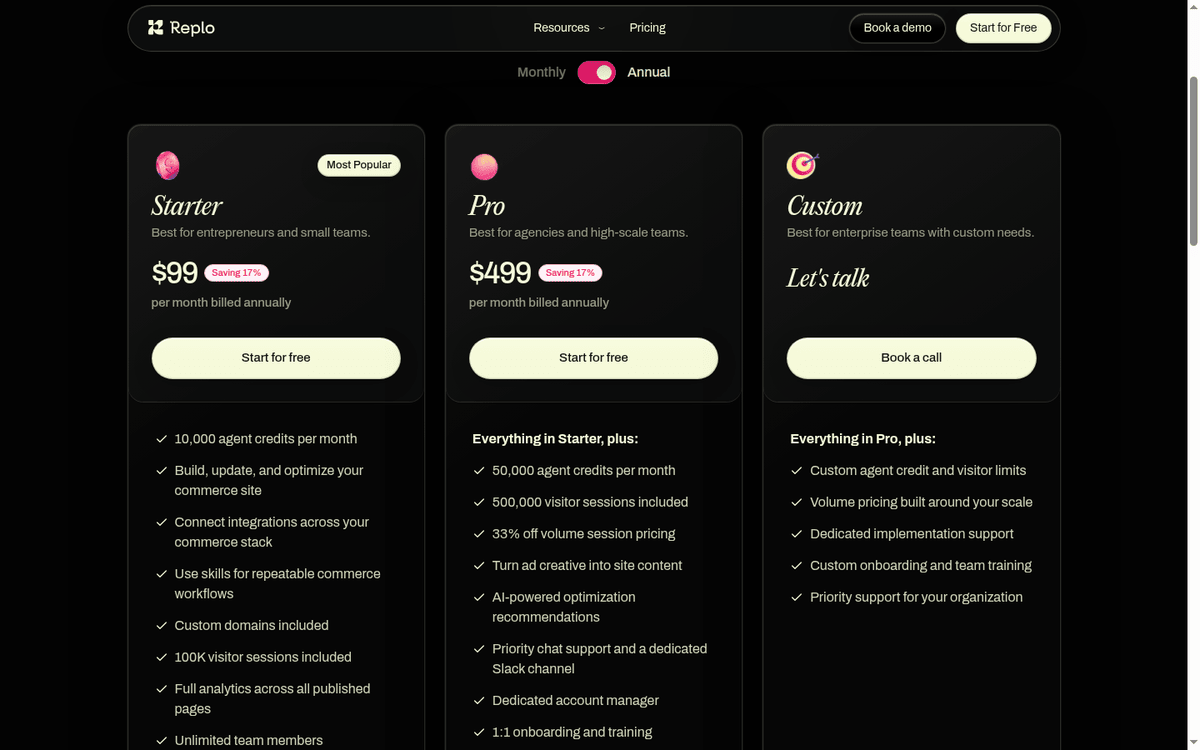
The overage rate drops from $1.25 to $1.00 per 1K sessions at the Pro tier, and Custom tier pricing is built around your scale (replo.app, captured recently).
Annual billing saves 17% vs the monthly rate. Monthly billing is available at $99/mo (Starter) and $499/mo (Pro) with no discount; the published “17% saving” headline refers to the difference between the annual commitment and the monthly-equivalent rate.
The Free plan does not allow publishing.
It exists for evaluation — connecting a Shopify store, browsing templates, and building pages in the editor — but a page cannot go live until the workspace is on Starter or above, and Stripe billing must be active to publish anything (support.replo.app, captured recently).
The support article is explicit about this: “Publishing with the Free plan is not possible.”
Where the session math actually lands
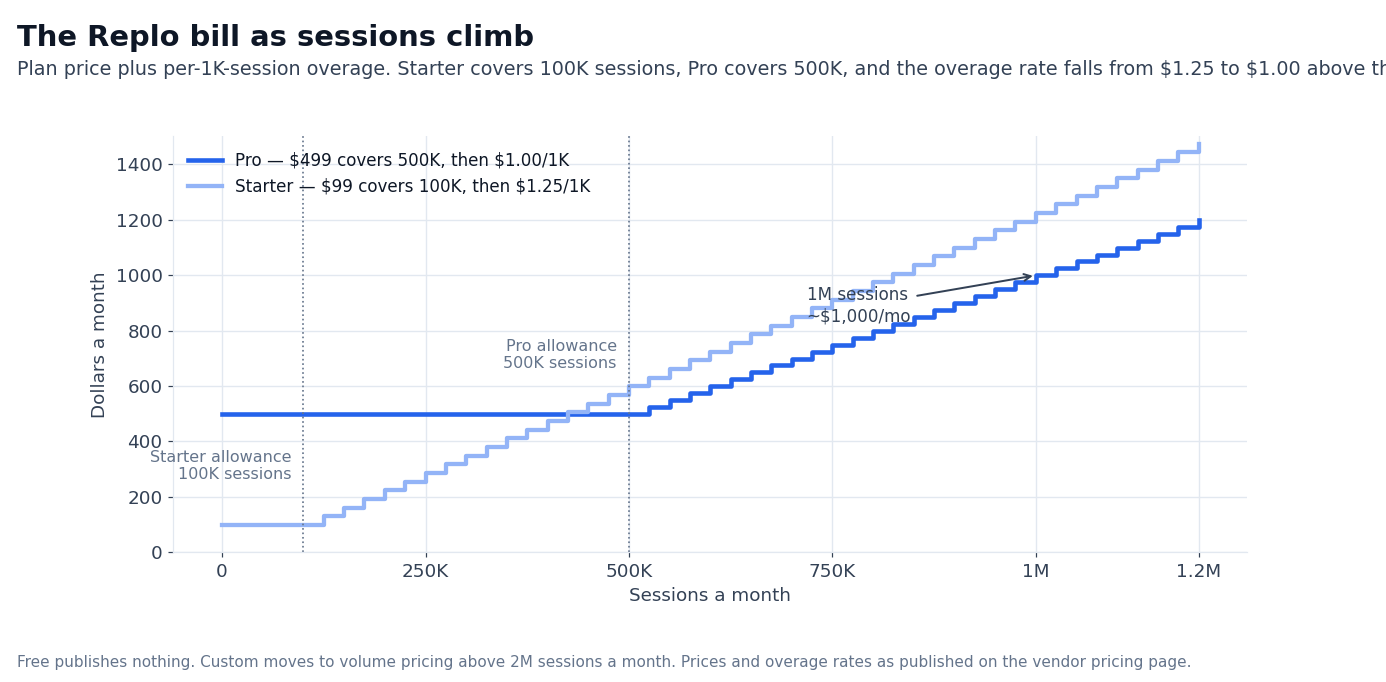
The 100K sessions on Starter is enough for a small Shopify brand doing organic and a single paid campaign. The 500K on Pro covers an agency portfolio or a single brand with multiple high-traffic campaigns.
Above 500K, the overage rate kicks in at $1.00 per 1K, so a brand hitting 1M sessions/month on Pro is paying roughly $499 + $500 overage = ~$1,000/mo. At 2M sessions, the bill is closer to $1,500/mo.
The Custom tier is built for brands in that 2M+ range. The Custom pitch is volume pricing, flexible Shopify shop limits (a Custom workspace can connect multiple Shopify stores), and product roadmap priority.
Whether the Custom tier price is meaningfully lower than Pro + overage depends on the negotiated quote — neither the vendor pricing page nor the public materials show a published volume discount beyond the per-1K-session rate.
A useful pre-signing check: ask the vendor for an overage estimate based on your last quarter’s Shopify Analytics traffic, then compare that estimate against your current landing-page tool’s line item. The session-based pricing is more transparent than page-view pricing, but it is also more variable — a slow month costs less, a viral month costs more.
AI skills, in operational terms
The conversion-rate-audit skill is the most concrete one. The skill reviews an existing landing page, a product page, and the checkout path, and produces a list of friction points, missed trust signals, and conversion opportunities.
The output is structured but not always prescriptive — it points at “your hero image does not communicate price” without rewriting the headline. A team that already runs conversion reviews will treat it as a starting checklist; a team that does not will treat it as a one-shot diagnostic.
The lifecycle-email-planner skill drafts, segments, and schedules an email sequence. The skill is positioned around Klaviyo and Shopify Email. The output is a flow structure with subject lines and segment definitions; the actual email copy needs editing before it ships.
The skill is useful for teams that already know what they want to send and need a draft to react to, less useful for teams that want the AI to pick the strategy.
The ad-to-landing-page replication skill is the most “AI” of the set — given a URL or an uploaded creative, the skill generates a page that mirrors the hook and claims of the source. The output is publish-ready in roughly 70% of cases, by vendor demonstration.
The remaining 30% needs a human review pass on the imagery selection and the offer math. For agencies running paid-social at scale, this is the skill that changes the unit economics of a campaign launch.
The Figma-to-page import is more straightforward — drop Figma frames, get a page built as designed with real products and brand wired in. For teams that already design in Figma, this removes the manual rebuild step that older landing builders required.
A useful way to read the skill list is by the unit of work each one replaces. The conversion-rate-audit skill replaces roughly an afternoon of manual landing-page review against a CRO checklist. The lifecycle-email-planner skill replaces the first draft pass of a welcome or abandoned-cart flow.
The ad-to-landing-page skill replaces the initial page build for a new paid campaign — the part of agency work that scales linearly with campaign count. The bundle-builder skill replaces the manual setup of a multi-tier discount page, which is the kind of work that needs both Shopify-native discount APIs and a visual editor to get right.
For a team running 5-10 paid campaigns per month, the ad-to-landing-page skill alone is enough to justify the Starter tier. For a team running fewer campaigns but with longer email sequences, the lifecycle-email-planner carries more of the value.
The conversion-rate-audit skill is the one with the broadest applicability — every team has friction on at least one high-traffic page, and a one-shot audit is a low-cost way to find it.
How Replo compares to the alternatives
Four Shopify landing-page builders sit in similar territory. PageFly is the incumbent — broad template library, large user base, predictable per-page pricing. Shogun is the enterprise alternative with deeper A/B testing and a higher entry price. GemPages is the mid-market option with a faster onboarding curve and a smaller template library.
Zipify Pages is the conversion-focused builder originally built for ClickFunnels-style funnels.
| Builder | Entry price | Pricing model | Strength | Weakness vs Replo |
|---|---|---|---|---|
| Replo | $99/mo Starter | Session-based overage | Shopify Theme Editor integration, AI skills | Higher overage at high traffic |
| PageFly | $24/mo entry | Published-page slots | Large template library | No Theme Editor integration |
| Shogun | $39/mo entry | Page-view-based | Strong A/B testing | Standalone pages, not theme sections |
| GemPages | $29/mo entry | Page-view-based | Fast onboarding | Smaller template library, fewer AI features |
| Zipify | $19/mo entry (Zipify Pages) | Monthly subscription | Funnel templates | Less visual-editor flexibility |
Replo’s edge is the Theme Editor integration plus the AI skills — neither of which any of the older builders have shipped. The edge is real, but it shows up only if the brand’s landing pages need theme-level functionality: dynamic sources, native checkout extensions, bundle builders wired into Shopify discounts.
For a brand that just needs a standalone landing page for a paid campaign, PageFly at $24/mo or Shogun at $39/mo is a cheaper alternative.
The pricing model comparison is the second decision point. PageFly bills by published-page slots while Shogun counts page views, so a busier account costs more on that counter, not on a session counter. Session-based pricing is closer to a per-visit cost than a per-page-load cost; the difference matters if the brand has heavy internal navigation or repeat visitors.
When Replo fits (and when it does not)
A good fit when:
- You run paid-social campaigns that need landing pages tied into the Shopify Theme Editor (checkout extensions, dynamic sources, native discounts).
- You have a brand kit that the AI skills can pick up (Figma frames, asset libraries, brand colors).
- Your monthly traffic to landing pages is between 100K and 2M sessions — the Starter and Pro tiers cover that band without serious overage.
- You want AI-generated lifecycle email plans and conversion-rate audits as part of the page builder subscription.
Probably not the right fit when:
- You only need a single standalone landing page for a one-off campaign. PageFly at $24/mo is cheaper.
- Your traffic is highly variable (viral spikes). The session-based overage can spike the monthly bill by 2-3x in a single month.
- You do not use Shopify. Replo is Shopify-only; the Theme Builder integration depends on Shopify’s editor.
- You need multi-store publishing on a budget. Pro allows 1 Shopify Theme Builder project; multi-store is Custom only.
What we did not verify
This article did not book a Replo demo, request a Custom tier quote, or run the AI skills against a real Shopify store. The published prices come from the vendor’s pricing page and support article; the overage math is a directional estimate based on the published per-1K-session rate.
The comparison table against PageFly, Shogun, GemPages, and Zipify is positioned from public marketing material, not from feature-by-feature benchmarking. The “70% publish-ready” estimate for the ad-to-landing skill comes from the vendor’s own demo material; treat it as a directional anchor, not a benchmark.
FAQ
Does Replo publish a pricing page?
Yes. The published ladder is Free, Starter, Pro, and Custom. Starter is $99/mo and Pro is $499/mo with annual billing; monthly billing is available at the same price points without the 17% annual discount (replo.app, captured recently).
Can I publish on the Free plan?
No. The support article is explicit: publishing with the Free plan is not possible. A workspace on Free can build pages and connect one Shopify store for evaluation, but the pages cannot go live until the workspace is on Starter or above with Stripe billing active.
How does Replo’s pricing compare to PageFly and Shogun?
The Starter tier is $99/mo vs PageFly’s $24/mo and Shogun’s $39/mo entry. The price difference reflects the Theme Editor integration and the AI skills; for a brand that does not need either, the older builders are cheaper.
What counts as a “session” for the overage?
A session is one visit to a Replo-published page. A returning visitor counts as a new session. A/B test variants share the workspace-wide counter, not a per-variant counter, so a 4-variant test costs 4x the sessions of a single page.
Does Replo integrate with non-Shopify platforms?
No. The Theme Builder integration depends on the Shopify Theme Editor, and the published-elements cap is on Shopify specifically. A brand on BigCommerce or WooCommerce cannot use Replo.
What is included in the AI skills?
The published list includes conversion-rate-audit, lifecycle-email-planner, ad-to-landing-page replication, paid-social funnel builder, competitor-page teardown, Figma-to-page import, Bundle Builder, and a product quiz with branching. Skills are part of the Starter plan and above.
How we put this together: the Starter and Pro annual and monthly prices, the included session allowances, the $1.25 and $1.00 per-1K-session overage rates and the competitor entry prices come from replo.app/pricing and the vendors’ own pricing pages, quoted as displayed. We have not run a paid Replo account.
Figures that depend on a real workload, a real target or a real integration are flagged where they appear in the text rather than being estimated.
Disclosure: this article contains affiliate links. If you buy through them we may earn a commission at no extra cost to you. Commission never changes our scoring or the order of a ranking.