Actions — the meter that counts every time an agent runs a tool, and resets when the plan renews.
Vendor Credits — the pass-through cost of the models and tools an action touches, and the meter that can roll over.
Most AI-agent platforms sell a flat monthly subscription and hide LLM costs inside it. Relevance AI splits the bill into two separate units: Actions (counted every time an agent runs a tool) and Vendor Credits (passed-through cost for LLM and tool usage).
That distinction is the most important pricing fact on this product, because it determines whether your real spend matches the published rate or climbs past it.
We read the docs pricing page in full to see how the two units interact, where the rollover rules kick in, and which workloads quietly run out of one before the other.
How the platform is structured
Relevance AI is positioned as an “AI Workforce” platform — a place to build agents that handle repetitive GTM and ops work and delegate them across teams. The product surface breaks into three primitives (relevanceai.com/docs/get-started/pricing, captured 2026-09):
- Agents and Tools: you build agents that combine a reasoning model with tools (the actions they can take).
- Workforces: groups of agents that share a task list and a queue.
- Triggers: events from 1,000+ apps that kick off an agent run.
The platform supports three agent modes — Chat, Calling, and Meeting. Chat is included from Pro upward; Calling and Meeting require Team. Around the agents sit 2,000+ app integrations and the Custom Apps / API integration path. SOC 2 and GDPR compliance are published across all paid plans; SSO/RBAC/audit logs are gated to Enterprise.
A useful mental model is to think of an Agent as a “junior hire that runs tools.” Each tool execution costs one Action; each LLM call or tool-cost line item draws against Vendor Credits. The two limits move independently, and you need to budget both — not just the headline subscription price.
Pricing, after the Free plan retirement
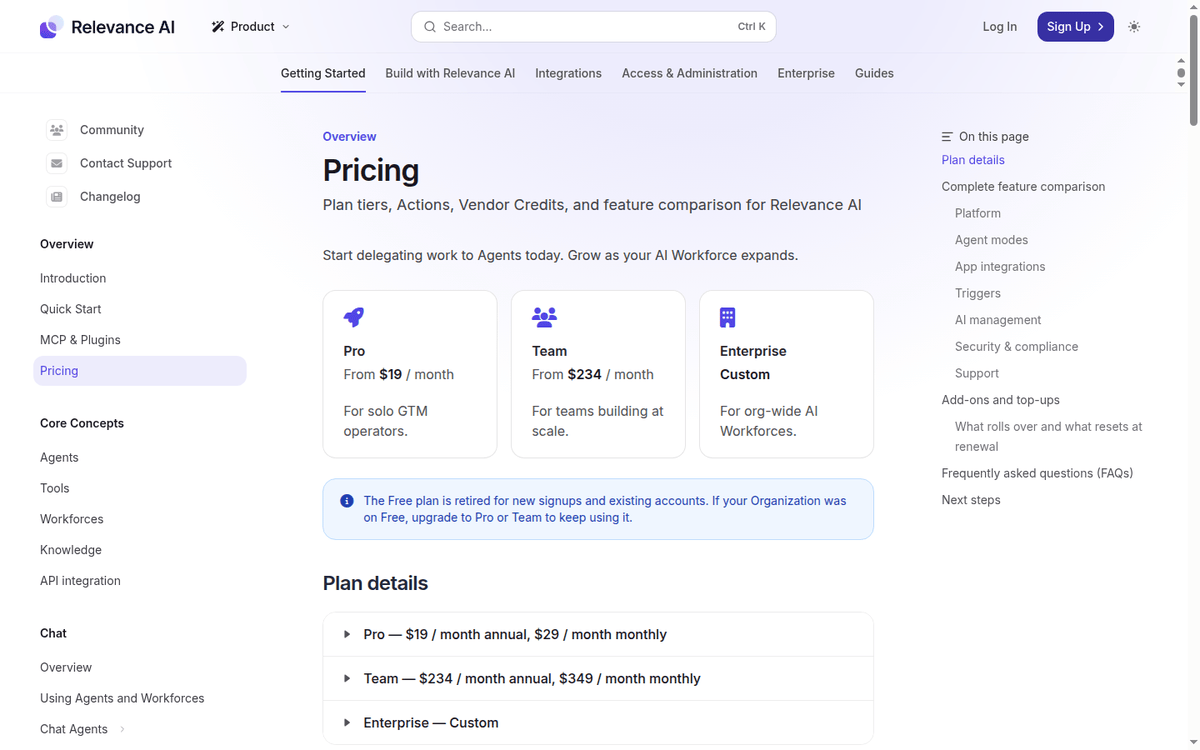
The most important recent change is the retirement of the Free plan. The pricing page states it bluntly: “The Free plan is retired for new signups and existing accounts. If your Organization was on Free, upgrade to Pro or Team to keep using it.” New users land directly on the paid tiers (relevanceai.com/docs/get-started/pricing).
| Plan | Annual (per month) | Monthly billing | Actions/year | Vendor credits | Build users | End users |
|---|---|---|---|---|---|---|
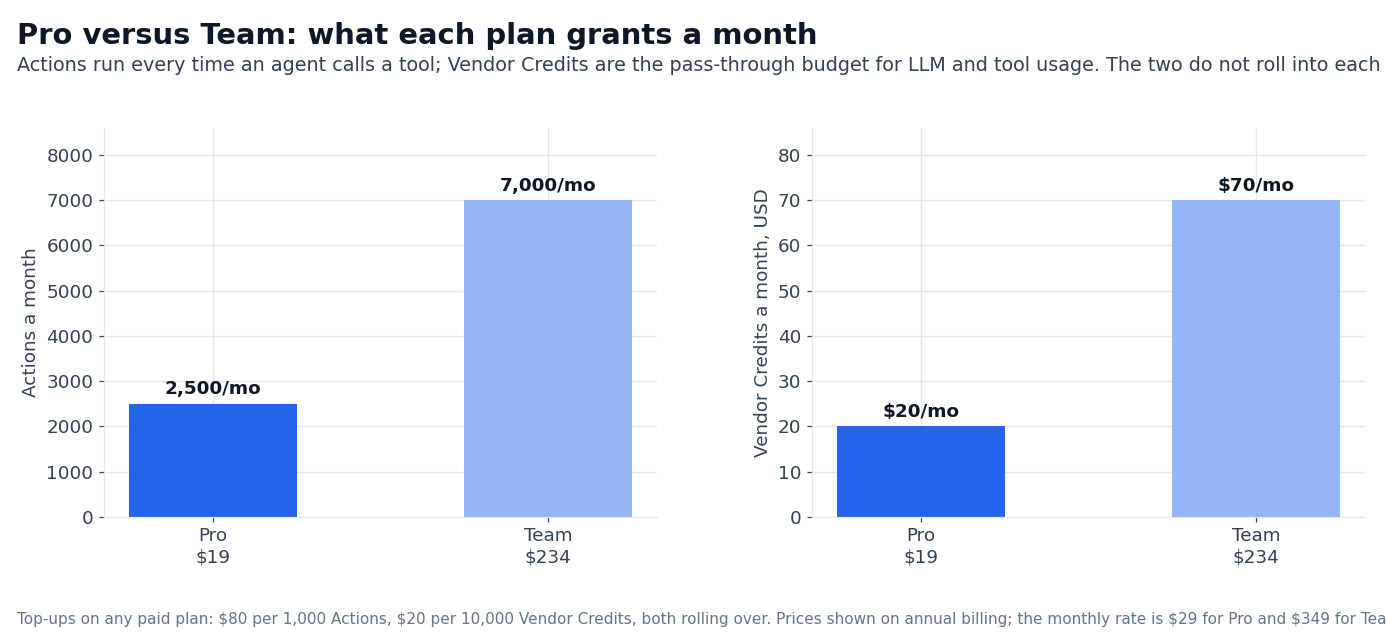
| Pro | $19 | $29 | 30,000 (2,500/mo) | $240/yr ($20/mo) | 2 | — |
| Team | $234 | $349 | 84,000 (7,000/mo) | $840/yr ($70/mo) | 5 | 45 |
| Enterprise | Custom | Custom | Custom | Custom | Unlimited | Unlimited |
Annual billing saves 33% versus monthly on both Pro and Team. Enterprise is the only tier with custom Actions and Vendor Credits, SSO, RBAC, audit logs, multi-org management, and a dedicated account manager. Sales-led pricing.
Two notes that matter for budgeting:
- The plan is applied at the Organization level, not per user. Everyone in the Organization shares the Actions and Vendor Credits. If you have multiple teams in one Organization, their consumption draws from the same pool.
- Subscriptions cannot be transferred between Organizations. If you start on Pro and later need a separate legal entity, you cannot migrate the subscription; you start a new one.
Actions vs Vendor Credits
The docs are unusually explicit about what each unit measures (relevanceai.com/docs/get-started/pricing):
- An Action is counted when an Agent runs a Tool — even a single email send is one Action. A multi-step workflow counts each tool call separately.
- A Vendor Credit covers LLM and tool usage costs at wholesale, with no markup. Credits roll over indefinitely while your subscription is active.
The separation is purposeful: Actions measure work done; Vendor Credits measure cost of doing it. If you build a heavy workflow that calls many tools per task, Actions are your binding constraint. If you call expensive LLMs (or a lot of long-context inference), Vendor Credits are your binding constraint. Most teams will hit one before the other.
We did not benchmark Action consumption per workflow type. The platform publishes Actions/month but not a per-workflow-type average. Pilot a typical workflow for a week before committing to an annual plan — that is the only way to know which limit you actually hit.
Top-ups when one runs out
If either unit runs out mid-cycle, you can top up without changing your plan (relevanceai.com/docs/get-started/pricing):
- Extra Actions: $80 per 1,000.
- Extra Vendor Credits: $20 per 10,000.
Top-ups require an active paid subscription. The increment is fixed (Actions must be bought in 1,000 steps, Vendor Credits in 10,000 steps) and the rates are published on the docs page. The same numbers apply on Pro and Team; Enterprise customers confirm with their account manager.
BYOK and the wholesale credit math
One of the most useful features for high-volume operators is Bring Your Own API Keys (BYOK). If you have direct LLM provider contracts (OpenAI, Anthropic, Google), you can route inference through those keys and bypass Relevance AI’s Vendor Credits entirely. The Action count still applies, but the per-call LLM cost comes from your own contract.
The docs are clear about the wholesale framing: Vendor Credits cover LLM and tool usage at “wholesale with no markup”, and you can bring your own API keys to bypass them entirely. For teams that already pay Anthropic or OpenAI direct, that is the cheaper path on a per-token basis — at the cost of having to manage multiple vendor relationships.
What rolls over and what resets
The rollover rules are spelled out in the docs (relevanceai.com/docs/get-started/pricing):
- Vendor Credits roll over indefinitely while your subscription is active — both the plan’s included Vendor Credits and any top-ups you purchase.
- Plan Actions reset at each renewal to the plan’s default amount. Unused monthly Actions do not roll over.
- Action top-ups roll over to the next billing cycle.
The asymmetry matters. If you have a light month followed by a heavy one, the Vendor Credits from the light month will still be there for the heavy month. The Actions from the light month will not. For workloads with seasonal spikes, this is a structural reason to buy Action top-ups rather than rely on plan Actions for the spike.
Where each tier unlocks
The feature comparison table in the docs separates Pro from Team along clear lines:
- Pro includes Chat mode, all 2,000+ integrations, BYOK, premium triggers (WhatsApp, LinkedIn, Telegram), A/B testing, schedule tasks, smart escalations, SOC 2/GDPR. Calling and Meeting agent modes are gated to Team. Analytics Dashboard, Calling/Meeting agents, and priority support are Team-only.
- Team adds Calling & Meeting agents, Analytics Dashboard, priority support, 45 End Users (Pro has none), and 5 shared projects.
- Enterprise layers on Salesforce/Snowflake/Zendesk triggers, Agent Evaluations, Work Hour Controls, Multi-Org Management, SSO (SAML), RBAC, Audit Logs, dedicated account manager, and custom implementation.
A useful way to read the table: the question is not Pro vs Team, it is whether you need Calling/Meeting agents or End Users. If neither matters, Pro is enough. If either matters, Team pays for itself.
For most solo GTM operators, the practical ceiling on Pro is the 2-Build-User limit. Two seats is enough for an operator and an engineer to collaborate on the same set of agents, but it stops there. If your account-based marketing team wants to spin up their own agents without depending on the platform owner, you need Team.
The 45 End Users on Team is the structural way to share agent outputs across the broader organization without paying for additional Build Users.
Platform metrics published on the homepage
The Relevance AI homepage surfaces four platform-level numbers (relevanceai.com/, captured 2026-09):
- 1.24M tasks/month, +4.9× year-over-year.
- $11.8k/month spend, -69% year-over-year.
- Avg cost/task $0.09, down from $0.14.
- Eval pass rate 96.4%, with a 90% internal bar.
These numbers are vendor-published. We did not audit the underlying data, and the platform does not publish a third-party verification report. Treat the trajectory as marketing-validated, not independently audited.
Customer logos on the pricing page
The pricing page lists customer logos in an Enterprise cluster: Canva, Databricks, Confluent, Autodesk, Lightspeed Commerce, Rakuten Advertising, Freshworks, Aveva, Employment Hero, Qualified, Send Payments, and Zembl (relevanceai.com/pricing). The case studies page goes deeper for individual customers.
The pattern is mostly enterprise and mid-market — Relevance AI does not publish logos from individual GTM operators, which is the Pro tier’s natural buyer. That does not mean Pro is underused; it means the page targets the audience that closes six-figure contracts.
Who Relevance AI is for
Three profiles fit:
- Solo GTM operators running inbound enrichment, pre-meeting prep, or lead-research agents. Pro at $19/month annual is the floor, BYOK lets you route LLM cost through your own OpenAI/Anthropic contracts.
- Sales and marketing teams that need Calling and Meeting agents plus 45 End Users per Organization. Team at $234/month annual is the right ballpark; the Calling/Meeting modes justify the price.
- Enterprises that need SSO/RBAC/audit logs, Salesforce/Snowflake/Zendesk triggers, and a dedicated account manager. Enterprise is sales-led; the published pricing page does not list a number.
Three profiles should pass:
- Teams that need a simple chatbot on a website. Relevance AI’s Calling and Meeting agents are overkill for that use case; Manychat, Tidio, or Landbot will be cheaper.
- Companies that want zero LLM spend because their entire agent runs on simple rule-based flows. Actions still apply; Vendor Credits will not, but the Agent platform is the wrong shape for that workload.
- Tiny teams with one operator and no IT support. The Organization-level subscription model and the Action vs Vendor Credit split require some operational literacy. A simpler chatbot builder may be a better fit.
—
Sources:
- Relevance AI docs pricing (plans, Actions, Vendor Credits, top-ups, rollovers): https://relevanceai.com/docs/get-started/pricing (captured 2026-09)
- Relevance AI pricing page (Enterprise tier and customer logos): https://relevanceai.com/pricing
- Relevance AI homepage (platform metrics): https://relevanceai.com/
FAQ
Does Relevance AI still have a free plan?
No. The Free plan was retired for new signups and existing accounts; an Organization still on Free must upgrade to Pro or Team to keep using it. New users start on Pro (relevanceai.com/docs/get-started/pricing).
What counts as an Action?
Every time an Agent runs a Tool. A simple email send is one Action; a multi-step workflow is many. Actions are counted at the Organization level (relevanceai.com/docs/get-started/pricing).
What are Vendor Credits for?
LLM and tool usage costs, passed through at wholesale with no markup. They roll over indefinitely while your subscription is active.
Can I bring my own API keys?
Yes. BYOK is included on Pro and Team. The Action count still applies, but Vendor Credits are not consumed when you use your own LLM keys.
What’s the difference between Pro and Team?
Calling and Meeting agent modes, 45 End Users per Organization, Analytics Dashboard, priority support, and 5 shared projects are Team-only. If you do not need Calling or Meeting, Pro is enough.
How do top-ups work?
$80 per 1,000 Actions, $20 per 10,000 Vendor Credits, on any active paid plan. Action top-ups roll over; Vendor Credit top-ups roll over indefinitely.
Can I transfer my subscription to a new organization?
No. Subscriptions are bound to the Organization that purchased them. Starting a new Organization means a new subscription.
How we put this together: the Pro and Team rates on annual and monthly billing, the Actions and Vendor Credit allowances, the top-up rates and the feature gates come from relevanceai.com/docs/get-started/pricing, quoted as displayed. We have not run a paid Relevance AI plan.
Figures that depend on a real workload, a real target or a real integration are flagged where they appear in the text rather than being estimated.
Disclosure: this article contains affiliate links. If you buy through them we may earn a commission at no extra cost to you. Commission never changes our scoring or the order of a ranking.