Flowpage is the consumer-facing link-in-bio and mini-landing-page builder from Flowcode, a US QR-code platform whose published customer logos include Ford, SoFi and Uber Eats, with case studies running from Love Corn to the NFL Shop.
The parent company claims 75% of Fortune 500 brands use the platform and counts 1B+ connections across the Flowcode and Flowpage ecosystem — a credential worth knowing for a product most people file under “link in bio”.
What Flowpage actually sells
Flowpage is a link-in-bio / mini-landing-page builder — the category that Linktree invented and that Stan Store, Beacons, Bio link and others have fragmented.
The page itself is a scrollable mobile-first landing with clickable cards that link out to social profiles, products, scheduling pages, lead-magnet downloads and any other URL the creator wants to surface.
The 2026 product surface splits into three layers:
- The page builder — drag-and-drop blocks, mobile-first templates and brand customization: logo, HEX colors, fonts.
- Flowcodes — dynamic QR codes that can be edited after creation.
- FlowID — a 360° customer identity layer that captures first-party data, powers retargeting, and tracks every customer interaction across Flowcodes, FlowURLs and FlowHubs (flow.page, captured recently).
The same parent company (Flowcode, the dtx company) operates the enterprise side. The customer logos and case studies — Ford, SoFi, Uber Eats, NFL Shop, Welch’s, CLEAR, Waterpik, Love Corn — are shared across Flowcode’s enterprise deployments and Flowpage’s consumer link-in-bio product.
The infrastructure is the same; the consumer pricing tier is what changes.
How the three consumer plans break down
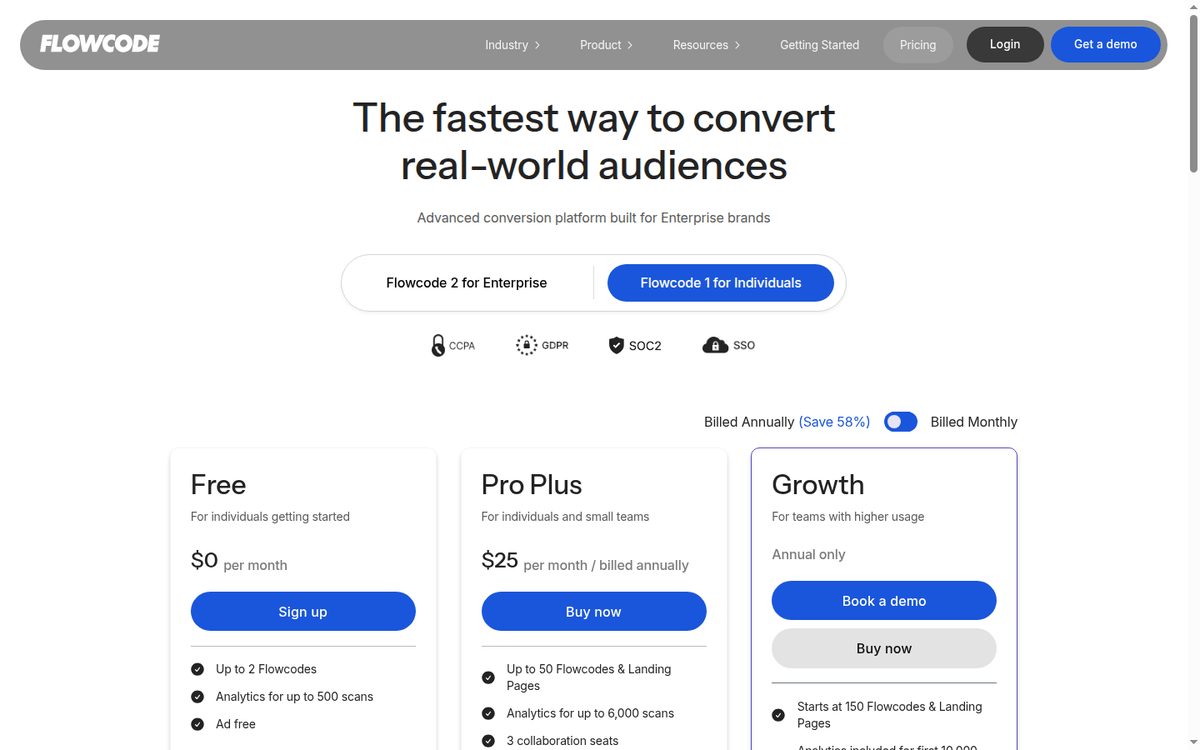
The published pricing on the parent Flowcode site lists three consumer-relevant tiers:
| Plan | Price | Codes & pages | Analytics | Seats |
|---|---|---|---|---|
| Free | $0/mo | 2 Flowcodes, 2 mobile landing pages | 500 scans | 1 |
| Pro Plus | $25/mo billed annually | 50 Flowcodes & landing pages | 6,000 scans | 3 |
| Growth | $250/year | 150+ Flowcodes & landing pages (tiered) | 10,000 scans with geolocation | Tiered, custom |
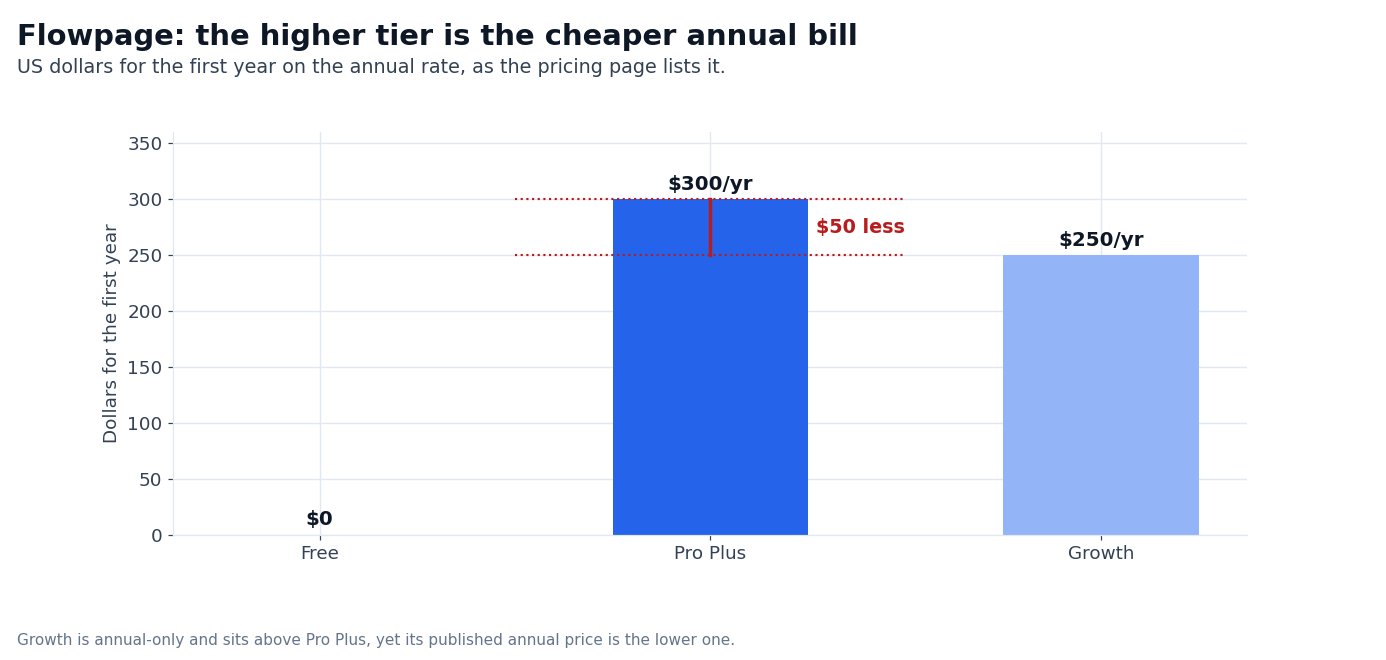
The “Save 58%” badge on the toggle is the vendor’s own framing of annual billing against paying month to month. On the two numbers the page shows, a year of Pro Plus works out at $300, while Growth is $250. Growth is annual-only.
A year of Pro Plus works out to $300 at the annual rate, and Growth is $250 — $50 less, so the higher tier is the cheaper annual bill. Growth also unlocks CRM integrations, API access, custom seat packages and priority support.
For a creator expecting to stay on the platform for more than a year, Growth is the cheaper path.
What the Flowcode parent platform adds
The consumer product gets three things from being part of the Flowcode enterprise platform:
- Dynamic QR codes that can be edited after creation — change the destination URL and every existing QR code updates without reprinting.
- Real-time analytics with geolocation on Growth — useful for creators running live events or location-based content.
- The compliance stack — CCPA, GDPR, SOC 2 Type 2, SSO — that an enterprise-grade platform can afford to ship and a pure-consumer link-in-bio tool cannot (flowcode.com/pricing, captured recently).
For an individual creator, the compliance and enterprise features are not the differentiator — Linktree and Beacons ship with GDPR tools and basic compliance. The differentiator is the parent platform’s scale: the same infrastructure that powers Ford’s and SoFi’s QR deployments is what Flowpage runs on.
That is a quiet but real advantage when the link-in-bio page is shared at scale — a viral TikTok, a campaign landing on a billboard.
What the Free tier is good for and where it stops
The Free tier includes:
- Up to 2 Flowcodes (dynamic QR codes)
- 2 mobile landing pages
- Analytics for 500 scans
- 15,000 templates
- 480 forms
- 1 platform seat
- Custom redirect domain (5)
- CSV reports
- PDF exports
- UTM traffic charts
For a creator with one or two links to surface — a portfolio, an Instagram handle, a recent product — Free is enough. The 500 scans per month is the real limit — anything above that requires Pro Plus. The 2-Flowcode cap is the other practical limit for anyone running QR codes in the wild.
Where Free stops being enough:
- More than 2 QR codes in active rotation — campaigns, packaging, business cards, table tents
- More than 500 scans per month (a single viral post can push you over)
- Need for collaboration (3+ seats on Pro Plus, custom on Growth)
- Need for CRM integration or API access (Growth tier only)
How Flowpage compares to the alternatives
| Tool | Free tier | Entry paid | Differentiator |
|---|---|---|---|
| Flowpage | 2 codes, 500 scans | Pro Plus $25/mo annual | Parent platform scale, FlowID identity layer |
| Linktree | 1 page, limited blocks | Pro, about $5/mo billed annually | Largest user base, marketplace, social tiles |
| Stan Store | 1 page, basic | A paid Creator tier | Built-in product sales |
| Beacons | 1 page, basic | A paid Pro tier | Built-in email, media kit, brand deals |
| Bio.link | 1 page, basic | A paid Pro tier | Simpler UX |
| Taplink | 1 page, limited | A paid Pro tier | Multi-page builder, CRM |
Flowpage sits at the higher-priced end of the consumer link-in-bio category. Linktree’s paid Pro tier is the cheapest path with the largest feature set for most creators. Stan Store is a better fit for creators who sell digital products directly from their page. Beacons bundles email and brand-deals tools that Flowpage does not.
Where Flowpage wins:
- QR code quality. The Flowcode parent platform produces dynamic QR codes that scan reliably and can be edited after printing. Most link-in-bio competitors do not ship QR codes at all, or ship them as static images.
- Analytics depth. Geo-location, UTM charts, CSV/PDF exports, scan device/time/date — the Growth tier is closer to a small-business analytics platform than a link-in-bio tool.
- Compliance. CCPA, GDPR, SOC 2 Type 2, SSO. None of the consumer-first competitors ship SOC 2.
Where Flowpage loses:
- Price. $25/mo entry paid is 2-5x the cheapest competitors. The savings on annual billing help, but the absolute entry point is high.
- Creator-economy integrations. Stan Store and Beacons ship with built-in product sales, email, and brand-deals tools. Flowpage does not.
- User base. Linktree is the default for most creators; the network effect on marketplace, templates, and integrations favors incumbents.
Who Flowpage is for
A real fit when:
- You need QR codes that can be edited after creation — for packaging, business cards, table tents, event signage.
- You run campaigns that produce more than 500 scans per month and need analytics depth — geolocation, UTM, device data.
- You want the compliance posture of an enterprise platform — SOC 2, CCPA, GDPR, SSO — without paying enterprise prices.
- You are already using Flowcode at the enterprise level and want the same platform for personal link-in-bio pages.
Probably not the right fit when:
- You need a single page with simple social links — Linktree Free or Bio.link Free is the cheaper entry.
- You sell digital products directly from your page — Stan Store or Beacons bundles that natively.
- You are price-sensitive — $25/mo entry paid is high for the link-in-bio category.
- You want the largest template marketplace and the most active creator community — Linktree is the default for a reason.
FAQ
Is Flowpage really free?
Yes — the Free tier includes 2 Flowcodes, 2 mobile landing pages, 500 scans per month, and a few thousand templates. It is enough for a creator with one or two links to surface and modest scan volume.
How much does Flowpage cost?
Three published plans: Free $0/mo, Pro Plus $25/mo billed annually, and Growth $250/year. The vendor badges annual billing as saving 58% against paying month to month.
Can I edit QR codes after I print them?
Yes — Flowcode/Flowpage dynamic QR codes can be edited after creation. Change the destination URL and every existing QR code updates without reprinting.
Is Flowpage the same as Linktree?
No — Flowpage is from Flowcode, an enterprise QR platform. Linktree is the consumer-first link-in-bio incumbent. Flowpage’s edge is QR code depth and enterprise-grade analytics; Linktree’s edge is user base and creator-economy integrations.
Does Flowpage work for selling products?
The Free and paid tiers support clickable cards that link to any external URL — you can link out to Shopify, Stan Store, Gumroad, or your own storefront. Flowpage has no built-in checkout: the pricing table lists eCommerce integrations instead, and the selling itself happens in the store you link to.
Sources
- Flowpage homepage — captured recently
- Flowcode pricing page (consumer tiers) — captured recently
How we put this together: the Free, Pro Plus and Growth prices, the Flowcodes, page, scan and seat allowances and the compliance list come from flowcode.com/pricing, quoted as displayed on the annual billing the page shows; the Growth figure is read from the markup the page ships while the card itself renders no number.
The comparison entries for the other link-in-bio tools are limited to what each vendor prints on a public page.
We have not published a live Flowpage, run a QR campaign or measured scan volume, so anything that depends on your own audience stays flagged where it appears.
Figures that depend on a real workload, a real target or a real integration are flagged where they appear in the text rather than being estimated.
Disclosure: this article contains affiliate links. If you buy through them we may earn a commission at no extra cost to you. Commission never changes our scoring or the order of a ranking.