Light use the free rung keeps the app set and AskFred, with transcription carrying the vendor’s rate-limit flag.
Daily use Pro goes unlimited on transcription and summaries, adds Voice Agents, and leaves the pool where it was.
Team use Business is where the pool grows and conversation intelligence, team analytics and public meeting access arrive.
More seats the pool does not follow, and extra credits come as packs sold to paid plans.
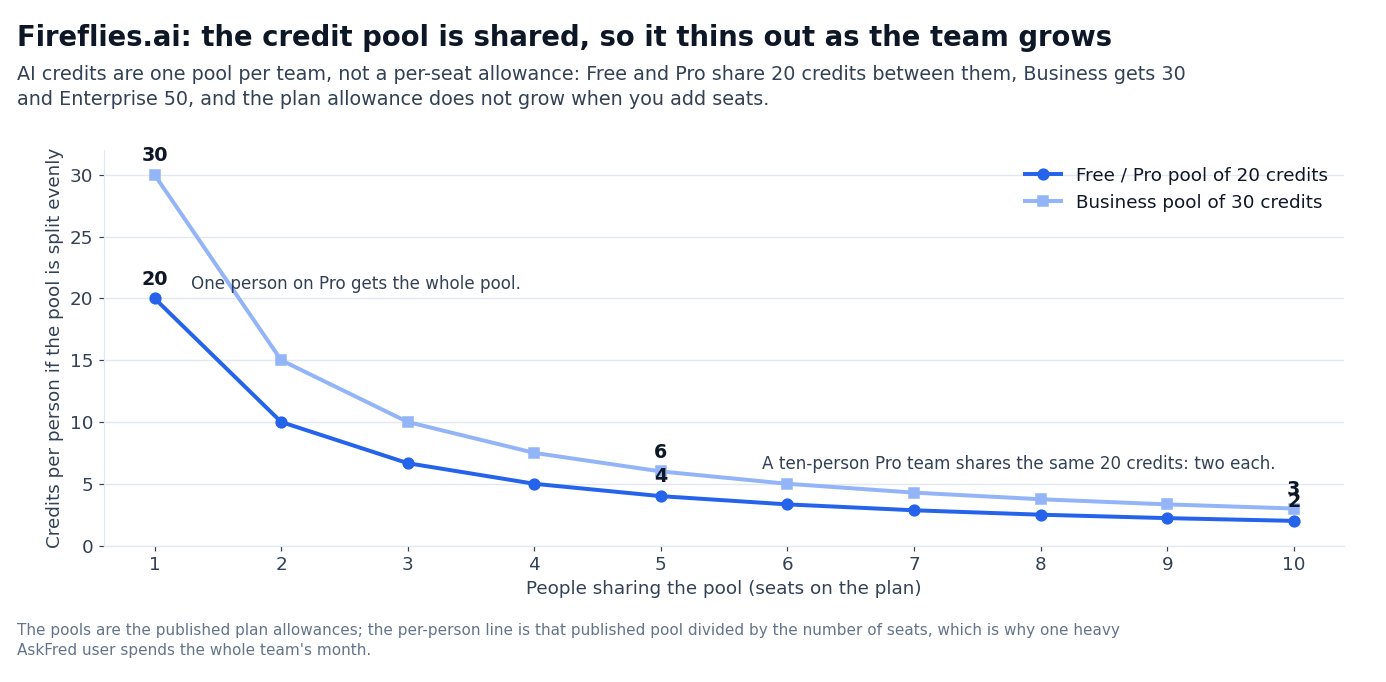
The figure that decides a Fireflies bill is the credit pool rather than the seat count. The pool is granted to the team, so a bigger team buys seats and not credits.
One assistant, four surfaces
Fireflies.ai pitches itself as “the #1 AI assistant for your meetings”. Its home page lists the main surfaces: transcription, AI summaries, AskFred (an AI assistant that chats with your meetings), meeting search and integrations. Voice Agents appear in the FAQ rather than in a homepage block.
The platform is one product, not a bundle: every tier ships the same surfaces, with usage multipliers on top.
What sets it apart from plain transcription is language coverage, the chat layer, and agents that join calls.
- It transcribes in 100+ languages with unlimited transcription on paid tiers. Free has “unlimited transcription*” with the asterisk flagging rate limits. Pro, Business and Enterprise transcribe without it, across the same 100+ languages.
- AskFred is the AI chat layer. You can ask AskFred questions like “what did the customer say about price?” and it pulls answers from the corpus of past meeting transcripts. Pro and Business include AskFred; Free includes it too, with the shared credit allowance limiting how much you can chat.
- Voice Agents join meetings as participants. Voice Agents are AI participants that join Zoom, Meet or Teams calls to take notes, answer questions, or capture action items in real time. It is the same live-conversation job the AI receptionists do on the phone, which our Smith.ai review covers. The feature is included on Pro, Business and Enterprise.
The published user count is “used across 1 million+ companies.” Compliance covers GDPR, SOC 2 Type II and HIPAA. It sits with the rest of our AI tools coverage.
Every tier, both rates
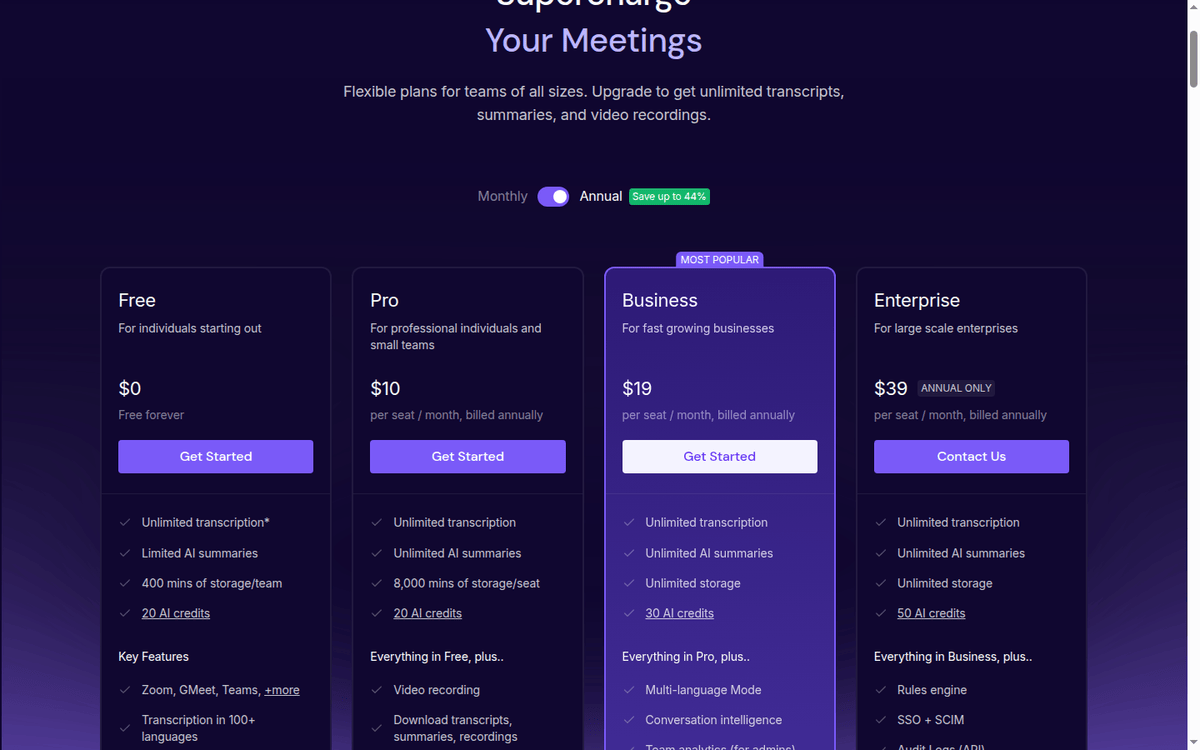
All numbers below come from the fireflies.ai/pricing page. Pricing is published in USD per seat, and the annual rate is the one each card shows as the current price, with the monthly rate struck through beside it.
Switching to annual billing saves 44% on Pro and 34% on Business, which is the “Save up to 44%” badge on the toggle.
There is a free tier, not a free trial.
| Plan | Per seat/month (annual) | Per seat/month (monthly billing) | Transcription | AI summaries | Storage (total) | AI credits (shared) | Voice Agents | Conversation intelligence | Team analytics | Public meeting access |
|---|---|---|---|---|---|---|---|---|---|---|
| Free | $0 | $0 | Unlimited* (rate-limited) | Limited | 400 mins/team | 20 | Not included | Not included | Not included | Not included |
| Pro | $10 | $18 | Unlimited | Unlimited | 8,000 mins/seat | 20 | Yes | Not included | Not included | Not included |
| Business | $19 | $29 | Unlimited | Unlimited | Unlimited | 30 | Yes | Yes | Yes | Yes |
| Enterprise | $39 | Not offered | Unlimited | Unlimited | Unlimited | 50 | Yes | Yes | Yes | Yes |
*Fireflies flags the asterisk: rate limits apply on Free.
The grid covers the rates. What sits behind them is where the plan decision turns.
- The annual rate is the headline, and the monthly rate sits beside it struck through. Pro reads $18 → $10 per seat a month billed annually, and Business reads $29 → $19. The “Save up to 44%” badge on the toggle describes the Pro gap; Business saves 34%.
- AI credits are pooled for the team, and the plan allowance is a one-time grant. Free and Pro get 20 credits between them; Business gets 30 and Enterprise 50. The allowance does not grow when you add seats. The credit counter is visible in the dashboard.
- Free is permanently free. Free is not a trial. It includes AskFred with the credit allowance and the desktop, mobile, and Chrome apps. The asterisk on “unlimited transcription” is the published rate-limit flag, not a hidden charge.
The pricing page does not publish how many credits each AskFred query or Voice Agent action consumes — the in-product documentation covers it.
What AI credits actually unlock
The AI credit system is the part of Fireflies pricing that drives upgrade decisions, and the pricing page is more honest than most about how it works. Credit metering is the norm in this category, and our Tripo AI review is priced the same way. What the meter charges, and what it does not, is the part worth reading closely.
AskFred is the main consumer. Every AskFred query is charged in credits, and the vendor prices it dynamically: the cost depends on the complexity and effort of the query rather than on a fixed rate.
On Free and Pro the shared 20-credit pool covers light usage. Business at 30 credits is the practical starting point for a team that uses AskFred daily.
Voice Agents consume credits too. The vendor lists Voice Agents among the features that draw on the credit pool. No per-action rate is published on the pricing page; the in-product guide covers how the pool is charged. Every paid tier includes Voice Agents; Free does not.
AI summaries mostly do not touch credits at all. Template-based summaries are free, and reprocessing a summary costs nothing; credits are spent on custom summary sections. Free has “limited AI summaries”; Pro, Business and Enterprise have unlimited ones.
The credit pool can be raised, but only on a paid plan. Fireflies publishes credit add-ons for paid tiers and upgrades a plan automatically when the pool runs out; Free has neither. The first step up is Business at 30 credits, then Enterprise at 50.
The honest answer on the upgrade decision: Pro at $10/seat/mo is the practical starting point for any individual contributor who wants unlimited transcription, unlimited AI summaries and Voice Agents. Business at $19/seat/mo is the right step once conversation intelligence, team analytics and public meeting access are part of the workflow.
Add-ons, rate limits and the Business-only list
One genuine add-on and a set of limits sit below the plan cards.
Credit packs are the one add-on, and they are published for paid plans. Fireflies sells extra AI credits in fixed packs and bills the overage automatically once a plan pool runs out.
The packs run from 50 credits at $5 a month to 10,000 at $600, and paying annually takes 20% off the same pack.
| Credits per month | Monthly price | Annual price (save 20%) |
|---|---|---|
| 50 | $5 | $4/mo |
| 200 | $20 | $16/mo |
| 1,000 | $90 | $72/mo |
| 2,500 | $200 | $160/mo |
| 5,000 | $375 | $300/mo |
| 7,500 | $450 | $360/mo |
| 10,000 | $600 | $480/mo |
Free has no credit pack at all: when the shared pool runs out, the vendor shows a paywall instead of an upgrade.
Public meeting access is Business-only. Public meeting access lets a non-Fireflies user join a meeting via a public link without signing up. The feature is on Business and Enterprise.
User groups are Business-only. User groups let admins partition seats into subgroups with their own access controls and reporting. Pro does not include user groups.
The rate limits apply to uploads and imports, not live meetings. Uploaded files, API and Zapier uploads, Dropbox, Box and OneDrive imports and dialer calls are capped at 3,000 minutes a month per source. Teams get 3,000 × seats, up to 150,000 minutes per source, with overage billed at $0.01 a minute.
Live meetings with the notetaker bot, Google Meet through the Chrome extension and mobile recordings carry no rate limit. Recording length is the separate cap: 2 hours on Free.
Multi-language Mode is Business-only. Business unlocks a multi-language transcription mode that switches languages mid-meeting. Pro does not include multi-language mode; Pro and Free default to single-language per meeting.
Against Otter, Read AI and the rest
Fireflies sits in a meeting-AI market with Otter, Read AI, Avoma, Gong, Chorus, Salesloft Conversations, and Microsoft Copilot for Sales. The differentiators that come up most often are the AI credit model, Voice Agents, the integrations catalog, and the per-seat pricing.
| Tool | Published pricing | Free tier | AI credits | Voice Agents | Conversation intelligence | CRM sync | Best-fit signal |
|---|---|---|---|---|---|---|---|
| Fireflies.ai | Yes (per-seat grid) | Yes (rate-limited transcription) | 20 Free/Pro, 30 Business, 50 Enterprise | Yes (Pro+) | Business+ | Salesforce, HubSpot | Sales teams and customer-facing orgs that want AI meeting notes + CRM sync |
| Otter | Yes (per-seat) | Yes (limited mins/month) | Minutes, not credits | Otter Sales Notetaker | Yes (deal intelligence, live coaching) | Salesforce, HubSpot | Teams that want live transcription with a simple UI |
| Read AI | Yes (per-seat grid) | Yes (limited) | Read credits | Yes (Agents) | Yes | Salesforce, HubSpot | Teams that want meeting analytics (sentiment, engagement) |
| Avoma | Yes (per-seat) | Trial only (14 days) | Not published | Not published | Yes | Salesforce, HubSpot | Revenue teams that want conversation intelligence + coaching |
| Gong | Sales-quoted | — | N/A | Not the focus | Yes (core) | Salesforce, HubSpot | Enterprise revenue teams with large budgets |
| Chorus (ZoomInfo) | Bundled in ZoomInfo | — | N/A | Not the focus | Yes | Salesforce, HubSpot | Companies already using ZoomInfo |
| Microsoft Copilot for Sales | No separate price; M365 Copilot is $30/user/month billed yearly | — | Bundled | Yes (limited) | Yes | Dynamics, Salesforce | Microsoft-centric orgs |
Otter is the closest competitor for transcription, and it meters usage in minutes rather than credits. Read AI publishes its whole ladder, from a free plan to an Enterprise+ seat under $40 a month, and leans on meeting analytics. Avoma is the coaching-led option and keeps only a two-week trial rather than a free tier.
Gong wins on enterprise conversation intelligence but is sales-quoted across the board and out of reach for smaller teams.
Where Fireflies.ai fits
The fit depends on how many customer-facing meetings land on the calendar in a week.
- Individual contributors running 5–15 customer-facing meetings per week. Pro at $10/seat/mo annually is the right step: unlimited transcription, unlimited AI summaries, Voice Agents and Personal/Email Assistant. Storage is 8,000 mins per seat, and the team shares 20 AI credits. Most sales reps and customer success managers land here.
- Sales and customer-facing teams that need conversation intelligence. Business at $19/seat/mo annually is the practical starting point for any team that wants multi-language mode, conversation intelligence, team analytics, public meeting access and user groups. Unlimited storage removes a real friction point for teams that record every call.
- Teams already running on Salesforce or HubSpot. Fireflies syncs meetings, action items and summaries into Salesforce and HubSpot on Pro+. Business adds the conversation intelligence layer that feeds engagement scores and talk-listen ratios into CRM. For teams that measure rep performance on calls, the CRM sync is the most useful part of the product.
Where it does not fit
Fireflies.ai is not the right pick in a few clear cases.
- Enterprise revenue orgs with large budgets. Gong, Chorus and Avoma all publish deeper conversation intelligence and rep coaching than Fireflies. The trade-off is price — Gong and Chorus are sales-quoted only, so the figures in circulation come from third-party reviews, not the vendors’ pages. For teams that need real coaching and pipeline analytics, Fireflies’ Business tier is too thin.
- Microsoft-centric orgs. If the meeting stack is Teams + Dynamics + M365 Copilot, Microsoft Copilot for Sales covers meeting notes and CRM sync natively. The integration cost is zero and the data stays inside the M365 tenant.
- Teams that want a free tier without asterisks. Fireflies’ free plan is permanent and unusually wide for a free tier: unlimited transcription, AskFred and the desktop, mobile and Chrome apps. The upload rate limits and the 400-minute storage ceiling bite once a workspace records daily, and Otter meters its free plan by the minute.
- Highly regulated industries. Fireflies carries SOC 2 Type II and GDPR coverage, and HIPAA compliance is listed as an Enterprise feature on the pricing page. FedRAMP appears nowhere in the vendor’s material, so US federal buyers should treat the compliance pack as part of the Enterprise negotiation.
Small print that changes the bill
A handful of small-print points change real cost.
- Annual billing is where the saving sits. Pro falls from $18 to $10 per seat a month and Business from $29 to $19. That is 44% and 34% respectively, the “Save up to 44%” badge on the toggle.
- Plan credits are described two different ways. The terms of service say credits expire at the end of a subscription period and do not roll over. The in-product guide says the credits included with a plan on sign-up are one-time and do not expire. Purchased credits are the ones the guide is explicit about not carrying over.
- The 20-credit pool is shared, not per seat. Free and Pro pool 20 credits across the team, Business 30 and Enterprise 50. The pricing page links to an in-product guide (fireflies.ai) for how much each AskFred query or Voice Agent action draws.
- Storage is a total, not a monthly quota. Free’s 400 minutes per team and Pro’s 8,000 per seat are how many meeting minutes you can keep, not how many you add each month. Nothing resets mid-cycle, and Business and Enterprise are unlimited team-wide.
- No refund window is published. Annual plans bill annually; mid-cycle downgrades take effect at renewal.
- Enterprise is published, with one condition. Enterprise is $39 per seat a month on annual billing only, with 50 AI credits, unlimited storage, a rules engine, SSO with SCIM and API audit logs. HIPAA compliance, private storage, custom data retention and a dedicated account manager come in the same tier.
- There is one add-on, and it is credits. The credit packs in the section above are the only line item sold next to the plans; extra storage is not sold separately at all.
The bottom line, tier by tier
Fireflies.ai is one of the few meeting-AI vendors that publishes a complete price grid, Enterprise included. It gives a permanent free tier with the AI chat layer (AskFred) and ships Voice Agents as a paid feature on Pro.
Pro at $10/seat/mo annually is the right step for any individual contributor who wants unlimited transcription, unlimited AI summaries and Voice Agents without sales calls. Business at $19/seat/mo annually is the practical starting point for sales and customer-facing teams that need conversation intelligence, team analytics, public meeting access and user groups.
The AI credit system is the main caveat. Free and Pro share a pool of 20 credits; Business raises it to 30 and Enterprise to 50. The pool does not grow when the team does, so one heavy AskFred user can spend everyone’s month.
The step from Pro to Business adds $9 per seat a month on annual billing and brings 10 more credits plus the conversation intelligence layer.
Read the credit documentation in-product before choosing a tier if your team will lean on AskFred daily.
For individual contributors, sales reps and customer-facing teams that want AI meeting notes, Voice Agents and CRM sync, Fireflies.ai is one of the better-priced meeting-AI options in 2026. For enterprise revenue orgs that need real conversation intelligence, for Microsoft-centric teams, or for buyers who need a FedRAMP path, the alternatives are stronger.
Switching from monthly to annual billing saves 44% on Pro and 34% on Business.
The pricing page does not publish the per-action cost; the in-product guide covers it.
FAQ
How much does Fireflies.ai cost in 2026?
Fireflies.ai has four tiers in USD per seat. Free is $0 and Pro is $10/seat/mo billed annually or $18/seat/mo billed monthly. Business is $19/seat/mo annually or $29/seat/mo monthly, and Enterprise is $39/seat/mo on annual billing only (fireflies.ai/pricing).
Does Fireflies.ai have a free plan?
Yes. Free is a permanent tier, not a trial. It includes rate-limited unlimited transcription, limited AI summaries, 400 mins of storage per team, a shared pool of 20 AI credits, AskFred and the desktop, mobile and Chrome apps. The asterisk on “unlimited transcription” flags the rate limit.
What are the AI credits on Fireflies.ai?
AI credits are a shared pool that pays for AskFred queries, Voice Agent actions and custom summary sections. Free and Pro get 20 credits between them, Business 30 and Enterprise 50, and the pool does not grow with seats. The vendor’s terms of service and its in-product guide describe expiry differently, so ask before you plan around unused credits.
What are Fireflies.ai Voice Agents?
Voice Agents are AI participants that join Zoom, Google Meet, Microsoft Teams or Webex calls to take notes, answer questions, or capture action items in real time. The feature is included on Pro, Business and Enterprise. Voice Agents consume AI credits.
What is Fireflies.ai AskFred?
AskFred is the AI chat layer that lets you query your meeting transcripts with natural language. You can ask questions like “what did the customer say about price?” and AskFred pulls answers from the corpus of past meetings. The feature is included on every tier; what changes is the size of the shared credit pool behind it.
Does Fireflies.ai integrate with Salesforce and HubSpot?
Yes. Fireflies lists CRM autofill for Salesforce and HubSpot, which extracts meeting data and pushes it into the CRM, and Pro comes with unlimited integrations. The vendor does not publish the tier at which CRM autofill starts, so confirm that before buying for a single seat.
What is conversation intelligence?
Conversation intelligence is the layer that analyses meeting transcripts for talk-listen ratio, sentiment, topic detection, and engagement scoring. Fireflies ships conversation intelligence on Business and Enterprise. Otter, Read AI, Avoma and Gong all sell a version of it — Otter’s is deal intelligence and live coaching, and Avoma’s is the coaching layer.
Is Fireflies.ai SOC 2 compliant?
Yes. The vendor’s security page states certification for GDPR, SOC 2 Type II and HIPAA without breaking it down by tier, and the pricing page lists HIPAA compliance as an Enterprise feature. FedRAMP is not mentioned anywhere; ask for the compliance pack as part of an Enterprise negotiation if you need it.
Can Fireflies.ai transcribe in multiple languages?
Yes. Fireflies transcribes in 100+ languages on every tier. Business unlocks multi-language mode that switches languages mid-meeting; Pro and Free default to single-language per meeting.
Can Fireflies.ai join meetings automatically?
Yes. Fireflies integrates with Zoom, Google Meet, Microsoft Teams and Webex to auto-join scheduled meetings. On Pro, Business and Enterprise, Voice Agents can also join as AI participants.
How we put this together: the four plan cards and the billing toggle, the credit add-on table, the AI credit guide, the storage and rate-limit guide, the security page, the CRM integration notes and the competitor pricing pages, quoted as displayed. We have not run a paid Fireflies.ai account.
Figures that depend on a real workload, a real target or a real integration are flagged where they appear in the text rather than being estimated.
Disclosure: this article contains affiliate links. If you buy through them we may earn a commission at no extra cost to you. Commission never changes our scoring or the order of a ranking.