One upload is meant to replace the middle of the production pipeline: the transcript, the show notes and the social drafts that follow.
- The work it removes — the rewriting that happens between a finished recording and a week of published posts.
- What decides your tier — how many recorded hours you push through the library each month, not how many people sit on the account.
- The honest flag — the creator and minute counts on the pricing page do not match the ones on the vendor’s own about page, so read both as marketing.
The sources it accepts decide whether the workflow survives contact with your stack: YouTube, Spotify, Apple Podcasts, Instagram Reels and TikTok in, with Zoom, Loom and Google Drive as upload paths.
A 60-minute recording leaves roughly four hours of work behind it: show notes, tweets, a newsletter post and a LinkedIn carousel. Castmagic’s pitch is that the middle of that pipeline can be automated, and for a podcast or a stream the pitch mostly holds up.
The product built for that work is Castmagic: drop in an audio or video file. Get back:
- transcripts
- shownotes
- summaries
- tweets
- blog drafts
- LinkedIn posts
- email newsletters
- clip scripts
The platform learns the brand voice and the layout the creator is writing into.
The headline figures on its pricing page are 75,000+ creators served and 10M+ minutes of content processed. The about page, on the same site, publishes 35,000+ creators and 5M+ minutes, so treat the round numbers as marketing rather than as audited counts.
The user list in the public case studies includes Noah Kagan, Jake Decker, Justin Moore, Mixergy and Andrew Warner.
This review is what an editorial team looks at before recommending Castmagic to a podcast host, a video streamer, or a founder running a long-form content engine. It sits with the rest of our AI tools coverage pages.
What follows is the platform shape (Studio, API, Magic Chat), the pricing reality (Hobby / Starter / Team at $19 / $48 / $139 a month on annual billing), and the integrations across the major podcast and video sources. The head-to-head with Opus Clip, Descript, Riverside, and the manual workflow.
Pricing comes from castmagic.io captured via Firecrawl in September 2026. The figures that would need a paid Castmagic account to measure on a real catalog of episodes are named at the end of this review rather than filled in with an estimate.
It is an AI content engine built for long-form creators who want to multiply one recording into a week of content without rewriting it themselves.
The core loop is: upload audio or video, the platform returns transcripts in 60+ languages, plus:
- summaries
- timestamps
- shownotes
- blog drafts
- social posts
- email newsletters
- LinkedIn posts
- quote cards
- clip scripts
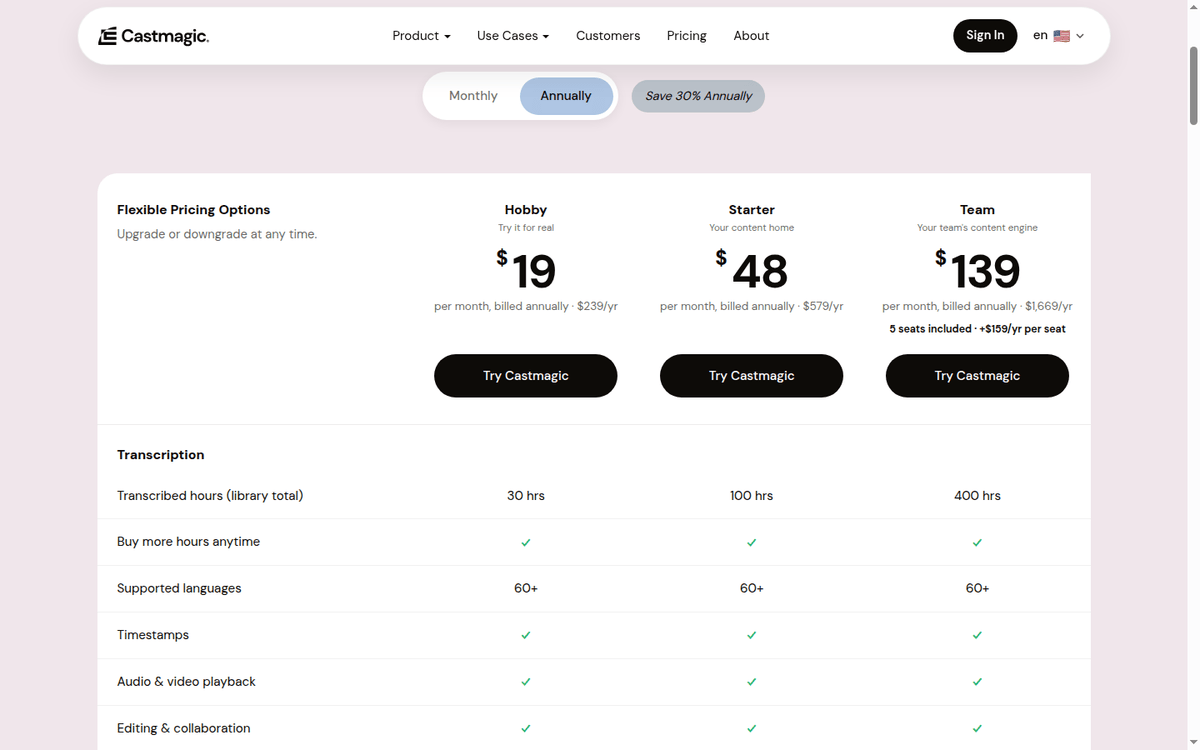
Every plan includes unlimited AI content generation and Studio clips; the difference between tiers is the hour bank (30, 100, or 400 transcribed hours) and the seat count.
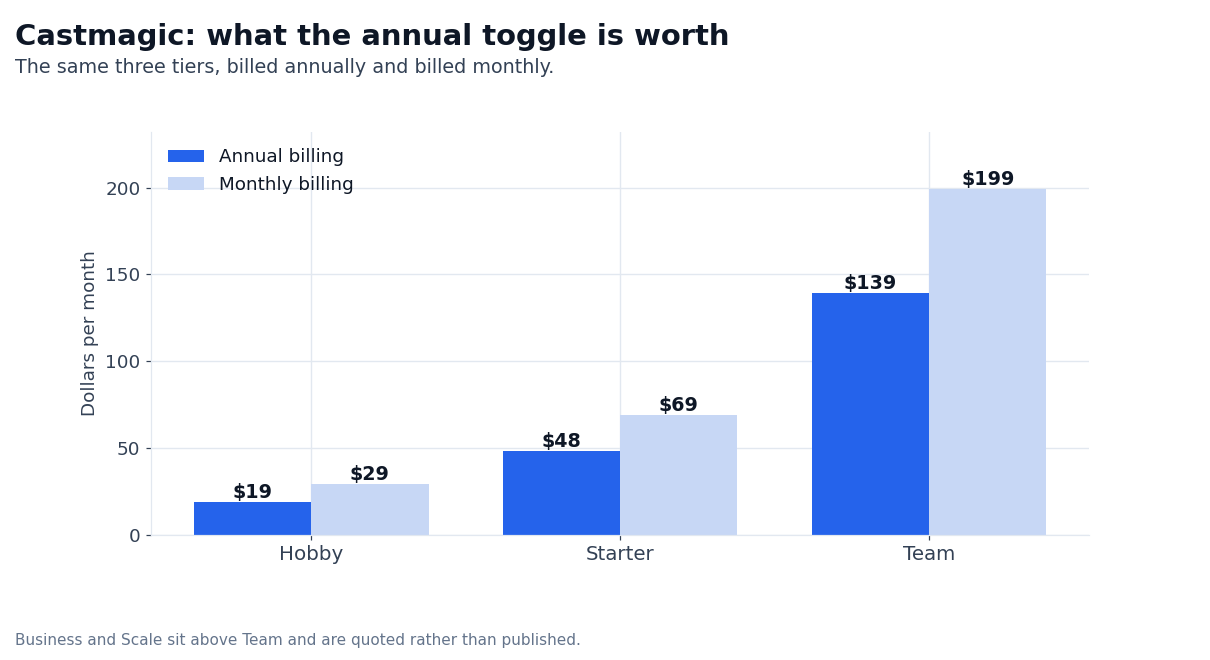
The pricing model is the simplest in the AI content category. Three published tiers, monthly or annual, with a 30% discount on annual. The Hobby tier at $19/mo is enough for a solo podcaster shipping one weekly episode. Starter at $48/mo is the working tier for a creator doing 3–5 episodes per week.
Team at $139/mo adds 5 seats, 400 hours, and per-seat pricing at $19/mo per additional seat. Beyond that, Business and Scale start at $699/mo on annual billing ($999/mo monthly) and are quoted up from there.
What the platform earns on is the friction reduction. The minutes between “I just finished recording” and “the post is live” collapse from hours to minutes. The platform does not replace a human editor for the parts that need a real judgment call. It replaces the mechanical pieces. The transcript. The timestamp block.
The social snippets. The email rehash. The output is a generated artifact that the creator then edits into the published piece.
Where it falls short is in the deep editorial work — the platform generates the components, but the creator still has to stitch them into the final content. It is also a Studio-first product; the API exists and is documented, but most usage happens through the web app.
For teams that need a full pipeline integration (CMS, podcast hosting, social scheduling) the API is the answer, but the documentation surface is thinner than the Studio surface.
What Castmagic does to a recording
The platform runs on three surfaces that share one content library. The first surface is Studio, the web app. Creators drop in their file or paste a YouTube / RSS / podcast URL. The platform returns a transcript and the full set of content artifacts. The creator edits the artifacts into published pieces. Studio is the primary user surface.
The second surface is the API, a programmable pipeline that takes audio or video in and returns transcripts (in any format), AI-generated content, translations, and rendered clips back. Webhooks signal completion events. The API is the surface a podcast network, a media operation, or an agency uses to run Castmagic at scale.
The third surface is Magic Chat, which is the conversational layer that lets the creator iterate on the output. The Magic Chat experience lets creators iterate. “Make the shownotes shorter.” “Give me five tweets in a more conversational voice.” “Translate the summary to Spanish.” Conversational refinement, where the prompt engineering happens.
The shape is closer to Notion than to a chat app. Creators store a library of past uploads, the platform remembers brand voice and formatting preferences per workspace, and the library compounds. Each new episode teaches Castmagic more about the creator’s voice, and the second-month output is materially better than the first.
Three published tiers, two quotes and a 30% annual discount
Castmagic runs three published tiers and two negotiated ones. Every tier includes unlimited AI content generation, Studio clips, and integrations. The difference between tiers is the transcription hour bank and the seat count.
| Plan | Annual / monthly | Hours | Seats | What it is |
|---|---|---|---|---|
| Hobby | $19/mo annual ($239/yr) or $29/mo monthly | 30 hours library | Up to 3 seats | “Try it for real” — solo creators who ship one weekly podcast |
| Starter | $48/mo annual ($579/yr) or $69/mo monthly | 100 hours library | Up to 5 seats | “Your content home” — the working tier for a creator shipping 3 to 5 episodes a week per week creator |
| Team | $139/mo annual ($1,669/yr) or $199/mo monthly | 400 hours library | 5 seats included, $19/mo per seat after that (unlimited team size) | “Your team’s content engine” — small teams running multiple shows |
| Business | From $699/mo annual or $999/mo monthly | Custom | Custom volume, more seats and storage, dedicated support | Studios and platforms running 10+ shows |
| Scale | From $699/mo annual or $999/mo monthly, quoted up | Custom | Custom volume, dedicated infrastructure, custom integrations | Podcast networks, agencies, media ops |
The mechanic worth understanding is the library total. The transcribed hours are a ceiling on the library, not a monthly drip that resets: the published row is “Transcribed hours (library total)”, and the pricing page adds “Buy more hours anytime”.
A creator on Hobby in the eighth month still has the same 30-hour ceiling as one who signed up last week. The upgrade path is about raising the ceiling, not about recovering anything you lose. Switching tiers does not delete the library.
Annual pricing saves 30% versus monthly across all three published tiers. The annual billing is the more cost-efficient path for any creator who expects to stay on the platform past three months.
The 30/100/400 hour tiers map to a meaningful cadence:
- 30 hours covers roughly a weekly 30-minute podcast. A solo creator publishing one episode per week uses about 25–30 hours of library in the first year on Hobby. Year two is the year the upgrade pressure starts, and that is the year the library mechanic starts to bite.
- 100 hours suits a daily short-form video creator or a weekly long-form podcaster who replays. Starter is the working tier for a creator with multiple shows, a podcast network running 3–5 feeds, or a video-first creator doing TikTok / YouTube.
- 400 hours covers a small team running multiple weekly shows plus a short-form side. Team is the right tier for a small content team of three to five people or a podcast agency running several client accounts.
Every published tier supports 60+ languages for transcription and translation. Languages include:
- English
- Dutch
- French
- German
- Hindi
- Indonesian
- Italian
- Japanese
- Korean
- Mandarin (Simplified)
- Norwegian
- Polish
- Portuguese
- Russian
- Spanish
- Swedish
- Turkish
- Ukrainian
on the published list. Plus a longer list of other languages in the platform settings.
The Studio clips feature is on every plan, and the storage row is published:
- 50 GB on Hobby
- 250 GB on Starter
- 1 TB on Team
What this review does not measure is the clip-generation quality on a real catalog and the price of extra credits on Business, so those two sit in the closing section instead of being estimated here.
The content surface: what gets generated
Castmagic generates a complete content package from a single upload. The published content types cover most long-form use cases. Summaries and takeaways. Perfectly accurate transcripts with speaker separation. Timestamped overview and shownotes ready for a podcast hosting platform. Long-format articles (1,500–3,000 words).
Email newsletters. LinkedIn posts. Interactive ChatGPT instances (per-show). Blog content. Social media carousels. Tweets and longer threads. Ready-to-use quotes and highlights. Video scripts. Email templates and sequences. YouTube descriptions. Client follow-ups. Lead magnets.
The length of that list is the differentiator.
Most AI podcast tools generate shownotes and a tweet or two. The list above covers:
- the transcript
- the timestamped overview
- the article draft
- the newsletter
- the LinkedIn post
- the carousel
- the quote card
- the video script
- the client follow-up
Every one of them stays editable in Magic Chat before the creator publishes.
The volume is what changes the math for a creator running multiple shows.
The artifacts are starting points, not finished pieces. The same is true across the AI tools we cover: our Scalenut review walks the identical trade-off for long-form article drafting, and the Murf AI review covers the voice side of the same stack.
A blog draft comes back at 1,500–2,500 words; the creator edits the voice, adds the images, restructures the headline, and publishes. A tweet thread comes back as 7–12 tweets; the creator trims to 5, swaps the opener, and ships.
The platform is honest about this — the website positions Castmagic as a 10x content engine, not a “publish without thinking” tool. The 10x is in the parts that are mechanical. The judgment calls stay with the creator.
The integrations: studio + ecosystem
Castmagic’s Studio takes a pasted URL or an uploaded file. The features page names YouTube, Spotify, Apple Podcasts, Instagram Reels and TikTok as the sources it accepts, and Zoom, Loom and Google Drive as the upload paths, with RSS feeds for shows that publish one.
The same page lists Zoom, Google Drive, Zapier and RSS under integrations. Destinations are exports rather than direct publishes: the artifact comes back as Markdown, plain text or a copy-to-clipboard block.
The API side covers the broader ecosystem. The Castmagic docs at docs.castmagic.io go through the webhook structure (transcription completed, content ready, clip ready), the supported audio and video formats and the per-request model choice.
API customers are typically podcast networks, agencies, and platforms integrating Castmagic into a content workflow rather than using it as a stand-alone tool.
The transcription accuracy is a real differentiator. Castmagic reports “perfectly accurate” transcripts across the 60+ supported languages. The honest read is that the platform is in the top tier for English podcast transcription; non-English languages are good but the platform’s edge fades as you move away from English content with clear audio.
The buyers this fits, and the ones it does not
Three workloads where Castmagic is the strongest available option. First, weekly podcast hosts who are spending 4+ hours per episode on the post-production rewrite. A weekly podcast at 30–60 minutes generates ~10 minutes of shownotes, 5–10 social snippets, and 1–2 long-form posts that re-purpose the episode.
The platform takes that work from a half-day to an hour. Second, video-first creators running daily TikTok / Reels / YouTube Shorts who want to repurpose the long-form recording into short-form clips, captions, and carousels. Castmagic’s Studio clips feature is built for this use case.
Third, podcast agencies and networks running multiple shows. The Team tier at $139/mo with five seats included and 400 hours of library is the right shape for a 3–5 person agency.
For these workloads, the math is straightforward. A weekly podcast saves 3–4 hours of post-production per episode. At 50 episodes per year and a $50 loaded hourly cost, the platform pays for itself in the first quarter on the Hobby or Starter tier.
The Studio clips and the brand-voice compounding (Castmagic gets smarter about each creator’s voice as the library grows) make the second year materially better than the first.
Three workloads where it is not the best fit, in the same order. First, teams that need a full editorial workflow tool. The platform generates the components, but the editorial stitching — the part where the content gets edited into the final piece — happens outside the platform.
A team that needs Notion-style content collaboration, Asana-style editorial planning, and a single workspace for the entire content lifecycle should look at Notion AI, ClickUp, or Descript for a more complete solution. Second, creators who want a turnkey “publish without thinking” tool. The platform generates drafts.
A creator who wants the AI to publish directly to their Substack, Beehiiv, or WordPress without review will find the flow has a stop sign at the artifact stage. Third, podcast networks that need a full hosting + analytics + monetization stack.
Castmagic is the content engine; if a network needs hosting, dynamic ad insertion, audience analytics, and monetization reports, those features live in Transistor, Spotify for Podcasters, or Megaphone, not in Castmagic. It layers on top of those platforms.
Castmagic against Descript, Opus Clip and Riverside
| Vendor | Differentiator | Best for | Watch out for |
|---|---|---|---|
| Castmagic | The longest artifact list in the category, simple tiered pricing, brand-voice compounding | Weekly podcast hosts, video-first creators, podcast agencies | Editorial stitching still on creator |
| Descript | Industry-leading transcription editor, full video editor | Video-first creators who edit in a transcript-based workflow | Less artifact generation than Castmagic; higher per-seat price |
| Opus Clip | Strong AI short-form clip generation from long-form video | TikTok / Reels creators who want vertical clips first | Less long-form / shownotes artifact support |
| Riverside.fm | Studio-quality remote recording + post-production | Remote podcasters who need multi-track recording | Less artifact generation than Castmagic |
| Manual workflow | The “I write my own shownotes” baseline | Creators who already have a fast workflow | Time cost is the entire reason Castmagic exists |
| Snackable AI | Lightweight, cheaper AI clip generation | Casual creators on a budget | Smaller feature set than Castmagic |
The honest comparison in 2026: Descript wins for transcript-based video editing and is the right answer if the creator edits in the transcript. Castmagic wins for the artifact count and the post-recording multiplication. Opus Clip wins for short-form-first clipping. Riverside wins for recording quality on remote shows.
The manual workflow wins only if the creator has a fast system already.
What the pricing page leaves out
Three published tiers, two quoted ones, a 30% annual discount and 60+ languages in the transcription layer set the scope. Add the artifact list and the API surface, and most of the long-form content multiplication use case is covered. The customer logos and the 75K+ / 10M+ figures are the procurement reference.
The honest version is on the framing. Castmagic is a 10x tool for the mechanical parts of content multiplication, not a replacement for editorial work. The transcript is good. The shownotes are good. The blog draft is good. None of them are publish-ready without the creator’s edit.
The brand-name customer list (Noah Kagan, Mixergy, Andrew Warner, Jake Decker, Justin Moore) says who it is built for: creators who already know how to ship. It is not built for creators who need the AI to ship on their behalf.
The second honest version is on the hour math. The 30/100/400 library totals are generous in the first year of a typical creator’s usage. Year two is the year the upgrade pressure starts for a Hobby creator. The library mechanic is what makes the upgrade feel like a sunk cost.
Losing 200+ hours of accumulated transcript and brand voice learning when switching tiers is a real cost. The platform’s “library total” framing is part of how the upsell works. Buyers should evaluate the upgrade path before the first 30 hours are gone, not after.
Where this review stops short
Three classes of figures in this review depend on a real Castmagic account that we did not run for this piece, and we would test all three on your own catalog first.
A fourth item is not a measurement gap but an attribution one. The customer logos (Noah Kagan, Andrew Warner, Mixergy, Jake Decker, Justin Moore) and the creator counts come from the vendor’s own pages, and we did not cross-validate them through a third party.
The first is the actual clip-generation quality on your own content. Studio clips are available on every plan, but the average number of usable clips per hour depends on the source video. A weekly video podcast with clear audio and well-defined topic transitions yields more usable clips than a noisy interview with overlapping speakers.
Run the pilot on your own catalog before you pay for Team. The second is the Brand Voice compounding on a real library. The platform stores brand voice per workspace and gets smarter over time. The honest read is that the second-month output is materially better than the first, but the specific improvement is content-dependent.
The third is how fast a real catalog fills the published storage row – 50 GB on Hobby, 250 GB on Starter, 1 TB on Team. The ceiling is published; the burn rate for an agency running several client shows is not, so ask sales for the per-seat number in writing before you sign.
FAQ: the questions we get asked most
How much does Castmagic cost per month?
Castmagic has three published tiers: Hobby at $19/mo annual ($239/yr), Starter at $48/mo annual ($579/yr), and Team at $139/mo annual ($1,669/yr) for five seats. Annual billing saves 30% versus monthly. Business and Scale tiers are quoted per studio volume.
Does Castmagic replace a podcast editor?
No. Castmagic generates the components — transcripts, shownotes, social posts, blog drafts, clip scripts. The creator still edits the components into published pieces. For a weekly 30-minute podcast, the typical Castmagic workflow saves 3–4 hours of post-production per episode, but the editorial judgment stays with the creator.
Does Castmagic work for video?
Yes. Castmagic accepts both audio and video uploads. Video creators get the same artifacts as audio creators, plus Studio clips for short-form repurpose. The Studio clips feature is the closest equivalent to Opus Clip on the Castmagic platform.
What languages does Castmagic support?
Castmagic supports 60+ languages for transcription and translation, including English, Dutch, French, German, Hindi, Indonesian, Italian, Japanese, Korean, Mandarin (Simplified), Norwegian, Polish, Portuguese, Russian, Spanish, Swedish, Turkish, and Ukrainian on the published list. The full list of languages lives in the platform settings.
Can Castmagic replace Descript?
It depends on the workflow. Castmagic generates more artifact types than Descript. Descript edits transcripts as video. For a transcript-first video editor, Descript is the right answer. For an artifact-first content engine, Castmagic is the right answer. Most creators running both pick Castmagic for the multiplication side and Descript for the editing side.
Does Castmagic publish directly to Substack or Beehiiv?
Not directly. Castmagic generates the artifacts and exports them as Markdown, plain text, or copy-to-clipboard. The creator pastes the final piece into Substack, Beehiiv, WordPress, or Notion. The direct-publish integration is not part of the published feature list as of September 2026.
Pages behind these numbers
- Castmagic pricing — the three-tier ladder (Hobby $19, Starter $48, Team $139), Business and Scale quote tiers, annual 30% discount, hours library, seat count, language count (captured September 2026).
- Castmagic features — the artifact count (18+ content types per upload), Studio + Magic Chat + Brand Voice + clips (captured September 2026).
- Castmagic about — company positioning and the 35,000+ creators / 5M+ minutes figures; the pricing page is where 75K+ and 10M+ are published (captured September 2026).
- Castmagic docs — API surface, webhook structure, supported formats, language list (captured September 2026).
- Castmagic pricing FAQ — who-it-is-for positioning, language list, pricing mechanics, Plan Details (referenced from the pricing page).
How we put this together: the tier prices, the library-hour ceilings, the seat allowances and the language coverage come from castmagic.io/pricing and the vendor’s own product pages, read in September 2026. We have not run a paid Castmagic workspace.
Disclosure: this article contains affiliate links. If you buy through them we may earn a commission at no extra cost to you. Commission never changes our scoring or the order of a ranking.