- Entry price — the Free tier at $0/mo: 500 records per app, unlimited app actions, 1 app editor.
- Cheapest published app — Starter at $36/mo billed annually ($45/mo monthly), which includes automated App Store and Google Play publishing.
- First-year total — $36 × 12 + $99 + $25 = $556 on Starter, with the store fees paid to Apple and Google rather than to Adalo.
- Built for — non-technical founders shipping an MVP, small businesses replacing a spreadsheet, freelancers and agencies publishing for clients, and citizen developers inside a larger company.
- Wrong shape for — high-volume data processing, custom machine-learning inference, or a hardened security posture.
Adalo is the no-code platform for building database-driven web apps and native iOS and Android apps without writing code.
The promise the company publishes on its pricing page is the part most worth understanding before anything else: “no usage-based charges, no surprise fees.” Every paid tier is a flat monthly fee with no per-action metering, no per-seat overage, and no hidden workload unit (the published Bubble pricing model that charges extra when an app runs hot).
The published pricing starts free for building and testing, and the cheapest path to a published app on the Apple App Store is $36/mo.
The product underneath is a visual canvas plus a hosted PostgreSQL database plus an AI assistant called Ada. You drag components onto a screen, connect them to collections in the database, and publish to web, the App Store, and Google Play from the same project.
Adalo generates true native builds (IPA for iOS, APK for Android) from the same canvas — not a WebView wrapper. The AI assistant (Ada) generates app screens from a natural-language prompt and refines them on follow-up instructions.
This review walks through the published pricing ladder (Free $0, Starter $36/mo, Professional $52/mo, Team $160/mo), the no-usage-based-fees mechanic, the native-publish path to the App Store, and where Adalo is the wrong fit. Pricing and product data come from adalo.com captured via Firecrawl in September 2026.
Anything that depends on a real workload — actual app-store review time on a real submission, the runtime latency on a real production app, the migration cost from Bubble — is marked as an estimate where it appears.
The published pricing ladder
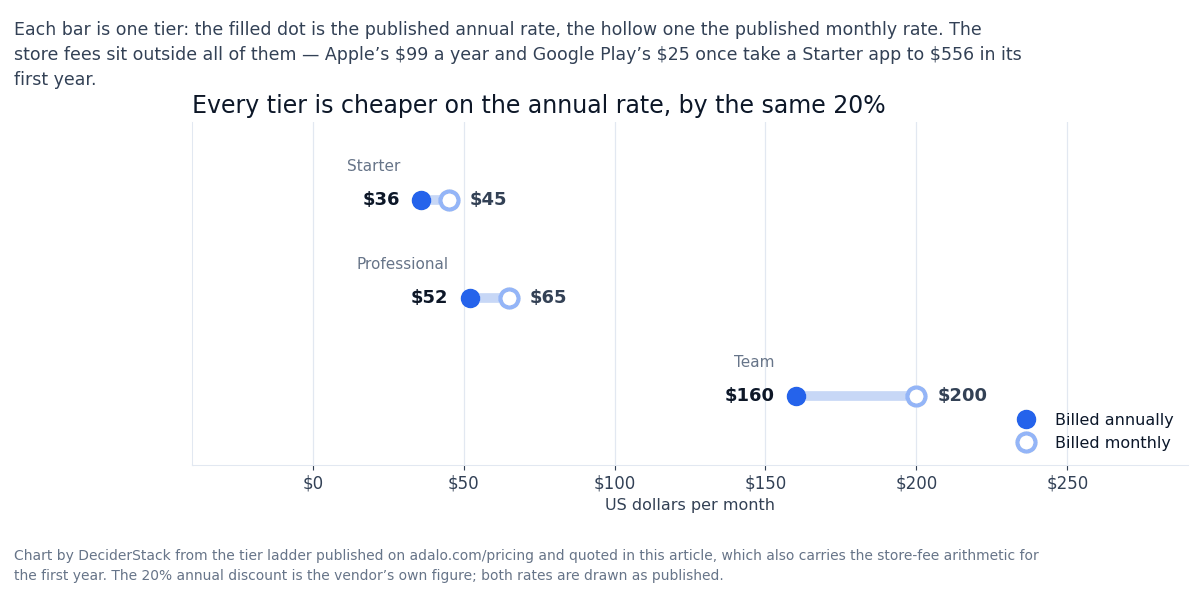
Adalo’s pricing is published in four tiers plus an enterprise product (Adalo Blue). The numbers are in US dollars, billed monthly or annually (annual saves 20%). Every tier has flat monthly pricing — no per-action metering, no workload units, no surprise overage.
Free, $0/mo:
- 500 records per app
- unlimited app actions
- 1 app editor
- hosted PostgreSQL database
- unlimited screens
- unlimited test apps
- multi-screen drag-and-drop canvas
- preview on mobile device
- the Ada AI assistant in beta
The free tier is enough to design your entire app, build it, and test it before deciding to publish. The published limit that matters is 500 records per app — fine for an MVP, tight for a real production workload.
Starter at $36/mo billed annually ($45/mo billed monthly):
- 1 published app
- 1 app editor
- 5GB team storage
- custom fonts
- custom domain
- publish to web
- automated App Store publishing
- no Adalo branding
This is the cheapest published tier for native iOS and Android publishing.
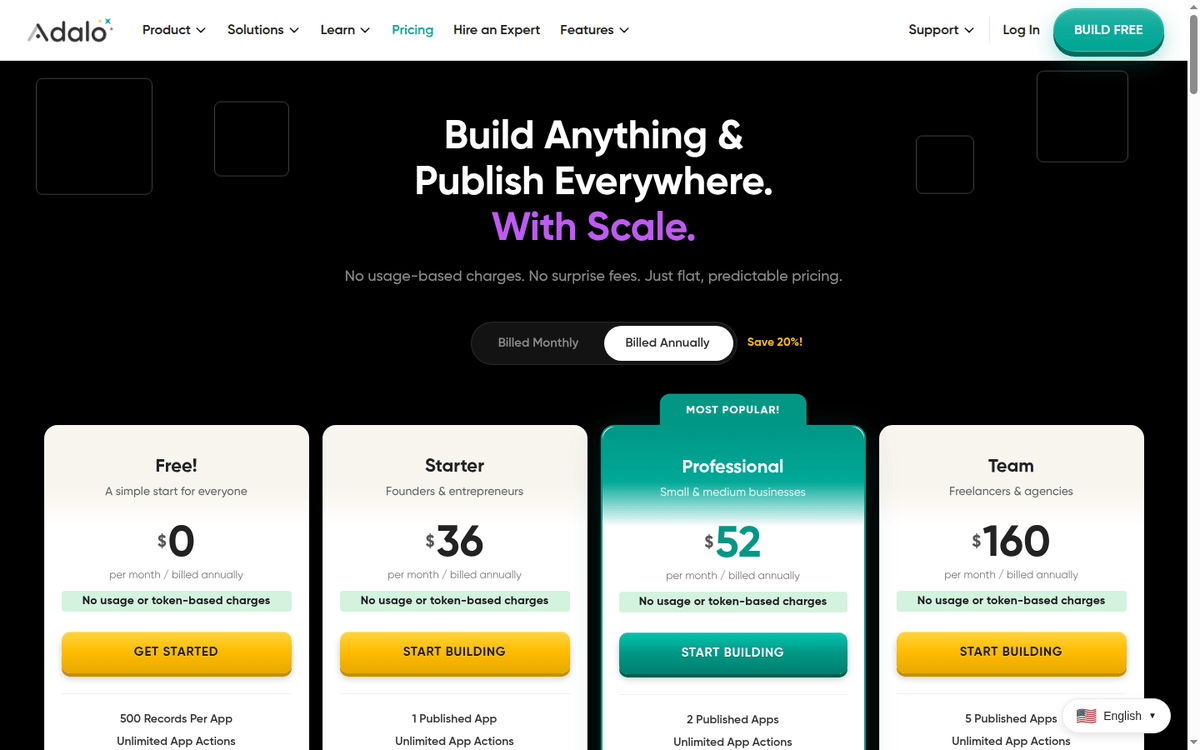
Professional at $52/mo billed annually ($65/mo billed monthly):
- 2 published apps
- 5 app editors
- 25GB team storage
- all Starter features
- custom integrations
- design versions
- geolocation
- custom app actions
- app analytics
- custom formulas
- push notifications
Team at $160/mo billed annually ($200/mo billed monthly):
- 5 published apps
- 10 app editors
- 125GB team storage
- all Professional features
- priority support
- Xano integration
- App and Collections API
- version history
- white labeling
Adalo Blue. Custom enterprise pricing for businesses that need:
- dedicated infrastructure
- on-premise deployment
- custom monitoring
- the ability to connect to legacy systems without a public API
Sales-led, not self-serve.
The published annual discount is 20% on the monthly equivalent. All paid plans include the Ada AI assistant at no extra token cost — the published commitment is “we won’t charge you for tokens or usage or workload units.” Pricing was verified against the adalo.com pricing page in September 2026.
See also the Adalo features page for the Ada AI assistant and the App Store publishing pipeline.
What the published plans include
| Tier | Annual | Monthly equiv. | Published apps | Editors | Team storage | Native iOS/Android |
|---|---|---|---|---|---|---|
| Free | $0 | $0 | 0 | 1 | — | No |
| Starter | $36/mo | $45/mo | 1 | 1 | 5GB | Yes |
| Professional | $52/mo | $65/mo | 2 | 5 | 25GB | Yes |
| Team | $160/mo | $200/mo | 5 | 10 | 125GB | Yes |
| Adalo Blue | Custom | Custom | Custom | Custom | Custom | Yes |
The published differentiator is the no-usage-based-charges mechanic. Adalo does not meter by action, by user, or by workload.
The published comparison on the pricing page positions this against Bubble (which charges Workload Units on top of the $69/mo base) and FlutterFlow (which charges per editor and requires external database and hosting services that add to the total cost). Adalo’s pricing includes a hosted PostgreSQL database on every tier.
The App Store publishing path, in real numbers
The single most concrete promise on the Adalo pricing page is the cheapest path to a published app on the App Store and Google Play. The Starter plan at $36/mo billed annually includes publishing to both stores, automated through Adalo’s build pipeline.
The published workflow is: you design the app in the Adalo editor, click Publish, and Adalo submits the native IPA and APK to the stores on your behalf.
The costs that sit on top of the Adalo subscription and that Adalo cannot waive are the Apple Developer Program ($99/yr) and the Google Play Developer account ($25 one-time). These are paid to Apple and Google directly, not to Adalo.
A published app on both stores costs $36 × 12 + $99 + $25 = $556 in the first year and $531 in subsequent years on the Starter tier.
The published bottleneck is the App Store review process itself. Apple’s review queue is outside Adalo’s control and Adalo publishes no review-time SLA: every submission goes through the same human review, and apps with in-app purchases, account creation, or user-generated content get reviewed more carefully and may take longer.
The published trade-off vs the competition is Adalo’s own comparison on the pricing page: Bubble starts at $69/mo plus Workload Unit overage charges, and FlutterFlow starts at $39/mo per editor but requires external databases and services.
Neither comparison claims a native-mobile path — the position Adalo stakes out is native iOS and Android builds from a single visual canvas at flat pricing.
Ada, the AI assistant
Ada is Adalo’s built-in AI assistant. The published capability is two-fold. First, you can prompt Ada in natural language — “build me a yoga class booking app with three screens” — and Ada generates the screens, the database collections, and the basic actions.
Second, you can refine the output with follow-up prompts — “add a payment screen with Stripe” — and Ada modifies the existing app rather than starting over.
The published commitment is that Ada is included on every plan with no token, usage, or workload-unit charges. The assistant is in beta as of September 2026 — Adalo flags it as “Prompt-Building and Prompt-Editing (Beta)” on the pricing comparison table.
The honest read on Ada is that it is a useful starting point and a quick first draft.
The published case studies on the Adalo site (Sunscreen by Alexandrina Mabonga, Daily Tasker by Eugenio Casale, Kampong CC by Gerhard van der Laarse, Rush CAP by Nikolai Derek) all show apps that started from a template or from a manual build, not from an Ada prompt. Ada is the faster on-ramp, not the replacement for thoughtful design.
Adalo vs Bubble vs FlutterFlow
The honest comparison depends on the workload.
Against Bubble. Bubble is the older and more flexible no-code web-app builder. Bubble wins on:
- the depth of the workflow editor
- the conditional logic
- the data manipulation
- the plugin ecosystem
Bubble loses on the mobile-app story — it is a web-app builder, and the published comparison does not position it as a native mobile builder. Bubble also loses on pricing transparency: Workload Unit metering on top of the base subscription makes the real cost hard to predict.
For a web-only app with deep workflow needs, Bubble is the closer fit. For a native mobile app with predictable costs, Adalo takes it.
Against FlutterFlow. FlutterFlow is the visual builder for Flutter apps. FlutterFlow wins on the depth of the Flutter framework access — you can drop into custom Dart code when needed, and the platform has the most direct path to a custom-styled native app.
FlutterFlow loses on the database and hosting story — FlutterFlow requires you to bring your own Firebase or Supabase backend, and pricing is per editor ($39/mo per editor minimum). Adalo wins on the all-in-one shape (hosted PostgreSQL, native publishing, flat pricing).
For a Flutter developer building a custom-styled app, FlutterFlow is the better fit. For a non-technical founder who wants one bill and one platform, Adalo comes out ahead.
Against Glide, Softr, and the spreadsheet-to-app tools. Glide and Softr are the spreadsheet-to-app builders — you connect a Google Sheet or Airtable base, and they generate a mobile-friendly interface. Glide and Softr win on the speed of building an internal tool from an existing spreadsheet.
They lose on the native App Store publishing story — neither is positioned as a native-binary builder. For an internal tool on top of an existing data source, Glide is the right shape. For a published mobile app on the App Store, Adalo is the pick.
When a different tool fits better
Three workloads where Adalo is the wrong shape.
The first is a marketing or content site. Adalo is an app builder, not a CMS. For a content-heavy site with blog posts, landing pages, and SEO as the primary acquisition channel, Webflow, Framer, or a WordPress are the right tools.
Adalo apps do not index well in Google Search the way a Webflow site does, and the editor is not built for content publishing.
The second is a custom backend with serious data complexity. Adalo’s hosted PostgreSQL is fine for an MVP and for small-to-medium production apps.
For a workload with high-volume data ingestion, complex joins, server-side business logic, or compliance-grade security, a dedicated backend (Supabase, Firebase, AWS Amplify, or a custom Node/Python service) is the right shape. The Adalo Blue enterprise tier covers some of this, but at enterprise pricing.
The third is a multi-tenant SaaS where each customer needs their own isolated data and infrastructure. Adalo does not have a multi-tenant architecture where you can ship “your platform” to hundreds of customers with separate databases.
For that workload, the right shape is a custom SaaS build or a dedicated platform like Bubble (with the right setup) or a custom Retool deployment.
What the public pages leave unanswered
Three classes of figure in this review depend on real workload data we could not benchmark without publishing a production app to the App Store. They are listed below.
The App Store review time for an Adalo-generated IPA is workload-dependent and no review-time commitment is published: an app with user accounts and in-app purchases goes through a longer review than a simple content app. Adalo publishes no SLA on the review timeline.
The runtime latency on a production app is the metric that decides whether the user experience is acceptable. Adalo apps run on a hosted backend; the published response time is fast for small collections and degrades with database size. We have not measured latency on a real production workload.
The migration cost from Bubble, FlutterFlow, or a custom React Native build is the third. The published Adalo Blue positioning includes migration services, but the published cost and timeline are sales conversations. We have not validated a real migration timeline.
FAQ: pricing, publishing, and the AI assistant
How much does Adalo cost?
Adalo pricing starts free for building and testing. Paid plans are Starter $36/mo, Professional $52/mo, and Team $160/mo billed annually ($45, $65, $200/mo billed monthly). All paid plans include native iOS and Android publishing. Adalo Blue is custom enterprise pricing.
Does Adalo have a free plan?
Yes. The free plan supports:
- unlimited test apps with up to 500 records per app
- unlimited screens
- the Ada AI assistant in beta
- the visual canvas
You cannot publish to the App Store or Google Play from the free tier.
Can I publish to the App Store with Adalo?
Yes — on the Starter plan ($36/mo annual) and above. Adalo generates a native iOS binary (IPA) and submits it through your Apple Developer account ($99/yr paid to Apple). You also need a Google Play Developer account ($25 one-time paid to Google) for Android.
Does Adalo charge per action?
No. Every Adalo plan has flat monthly pricing with:
- no usage-based charges
- no per-action metering
- no workload units
- no per-seat overage
The published promise is “no usage-based charges, no surprise fees.”
Is Adalo better than Bubble?
Depends on the workload. Bubble is more flexible for complex web-app workflows; Adalo wins on native mobile publishing and predictable pricing. For a published iOS or Android app, Adalo fits better. For a web-only app with deep workflow logic, Bubble does.
Is Adalo better than FlutterFlow?
Depends on the workflow. FlutterFlow gives Flutter developers more control; Adalo gives non-technical founders a faster on-ramp with a hosted database. Adalo’s pricing is all-in-one ($36/mo includes the database); FlutterFlow is per-editor ($39/mo per editor) and requires an external database.
Can I cancel any time?
Yes. Adalo is month-to-month or annual, no long-term contract. The free tier is permanent.
What does it cost to publish on both stores?
On Starter, the subscription plus the two developer accounts — $99 a year to Apple and a one-time $25 to Google — comes to $556 in the first year.
Does Adalo work offline?
No. Adalo apps talk to the hosted PostgreSQL backend, so a connection is required. An offline-first app needs a local store and a sync layer, which means a custom build.
Can I export an Adalo app to a Flutter codebase?
Adalo does not publish a code-export path. If long-term portability is a requirement, weigh that against platforms that advertise a Flutter export before you commit.
Adalo or Glide for an internal tool?
Glide, when the source of truth is already a spreadsheet. Glide is built for the spreadsheet-to-app workflow; Adalo is built for apps you publish to the App Store. Match the tool to the destination.
How we put this together: tier prices, record and storage limits, the store-publishing path and the Ada assistant notes come from adalo.com/pricing, with annual billing as displayed. We have not published a production app or run a paid Adalo account.
Figures that depend on a real workload, a real target or a real integration are flagged where they appear in the text rather than being estimated.
Disclosure: this article contains affiliate links. If you buy through them we may earn a commission at no extra cost to you. Commission never changes our scoring or the order of a ranking.