
- The solo creator: YouTubers, podcasters, TikTok editors and DJs who want a clean vocal or instrumental extract from a finished track, in minutes, without a desktop DAW.
- The audio professional: mixing engineers, post-production houses, podcast studios and video editors who need separation inside a DAW or a scripted workflow, and want the VST plugin or the API that Pro unlocks.
- Not a one-off job — the free Starter tier covers that more cheaply than any subscription.
- Not for real-time separation or model retraining: this is a file-upload service with a closed model.
LALAL.AI is an AI stem-separation tool that splits a mixed audio track into vocals, drums, bass, guitars, piano, and a handful of other instrument families.
The product underneath is two things at once. It is a consumer web app for YouTubers, podcasters, and bedroom producers who need a clean acapella or instrumental, and it is a B2B API plus VST plugin for audio engineers, post-production houses, and DAW users who need separation inside an existing workflow.
Both halves come from the same parent company, OmniSale GMBH, registered in Cyprus. The marketing still leans on the Phoenix network, which is the vendor’s older engine — the current line-up is Orion, Perseus, and Andromeda.
The pitch is that stem separation used to require a PhD in signal processing and a license to iZotope RX or Spleeter. LALAL.AI ships that capability as a one-click web app with a queue model that gates fast processing behind a paid plan.
That queue mechanic, and the way it interacts with the Lite and Pro price points, is the single most important thing to understand about the product. It is also where the published pricing leaves the most room for a heavy user to overspend.
The published pricing ladder
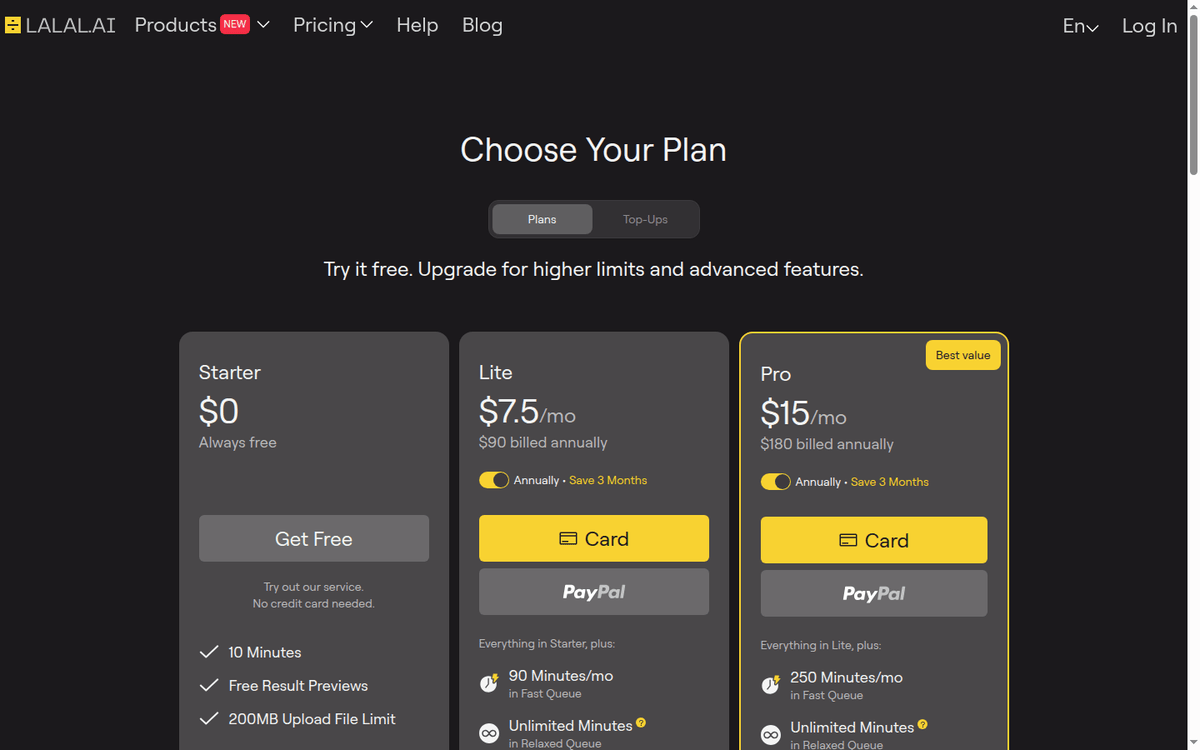
The pricing is published in three subscription tiers plus a one-time top-up system for Fast Queue minutes, with a permanent free tier at the bottom. Prices are quoted in US dollars; the page localizes, so visitors in Europe see euro equivalents — Starter €0, Lite €6.75/mo, Pro €13.5/mo.
Starter, free forever. 10 minutes of Relaxed Queue processing per month, 200MB upload size per file. No Fast Queue minutes, no batch processing, no VST plugin, no API access. Enough to test output quality on a single short track.
Lite at $7.50/mo, or $90 billed annually. Unlimited Relaxed Queue minutes, 90 Fast Queue minutes per month, 2GB upload limit per file, one voice pack slot, batch processing. The right shape for a creator who processes a few stems a week and rarely needs the Fast queue.
Pro at $15/mo, or $180 billed annually. Unlimited Relaxed Queue minutes and 250 Fast Queue minutes a month, 2GB upload limit, three voice pack slots, batch processing. It is also the only tier with the VST plugin, local processing through the desktop app, and API access.
Pro is the working tier for a professional creator or a small studio.
Once you exhaust your Fast Queue minutes for the month, you can buy one-time packs:
| Pack | Fast minutes | Price |
|---|---|---|
| Master | 750 | $50 |
| Premium | 3,000 | $190 |
| Enterprise | 5,000 | $300 |
Top-ups do not change your plan and they do not roll over. Unused Fast Queue minutes reset at the start of each billing period. The Relaxed Queue is unlimited on paid plans but runs at server capacity, so wait times vary with load.
See the lalal.ai pricing page for the current numbers, the desktop app download for the local-processing mechanic on Pro, and the API documentation for the developer surface.
The queue mechanic, in plain terms
Two queues run under the same roof.
The Relaxed Queue processes your files as server capacity allows. You submit a file, it gets in line, and the result lands in your dashboard when the server has bandwidth. Wait times run from a few minutes in quiet hours to several hours during a US-business-hours crunch. Output quality is identical to Fast.
The Fast Queue is the paid priority lane. Files submitted here are processed ahead of the Relaxed backlog, and the published wait is typically under five minutes for a four-minute track. The FAQ does not guarantee a service level, so this is priority rather than a contract.
The part that surprises users is that you cannot switch between the queues by hand. LALAL.AI starts every month in Fast and keeps running your files there until your Fast balance is gone, then falls back to Relaxed for the rest of the period.
If you wanted to save your Fast minutes for one high-priority job, there is no way to pause Fast and work through the backlog first.
Why Pro is the tier that matters
Pro at $15/mo is the cheapest plan carrying the three features that make LALAL.AI useful inside a professional workflow.
- VST plugin. Load separation directly into a Logic Pro, Ableton, FL Studio, Pro Tools, or Cubase session. You drop the plugin on a track, route audio through it, and the stems land on separate DAW channels without a round trip through the web app.
- Desktop app with local processing. The only path to on-device separation — the web version always uploads. Local processing is faster and does not depend on your connection, but it wants a machine with a discrete GPU.
- API access. Programmatic access to the same separation engine the web app uses, which is what turns LALAL.AI into something a pipeline can call.
One caveat on the API: the pricing page does not publish a rate limit, and the FAQ says it varies by plan. Any requests-per-minute figure you see quoted elsewhere is unofficial.
The product surfaces
The vendor now publishes seven product pages rather than the four or five the older write-ups describe. All of them run on the same separation stack.
| Product | What it does |
|---|---|
| Vocal Remover | The original: a track in, vocals and instrumental out |
| Stem Splitter | Multi-stem output, one stem family per separation type |
| Voice Cleaner | Cleaning dialog and vocals of noise |
| Voice Changer | Takes an input voice and re-renders it in a target voice or saved voice pack |
| Voice Cloner | Trains a custom voice pack from a few minutes of clean audio |
| Echo & Reverb Remover | Strips reverb and room from a recording |
| Lead/Back Splitter | Splits lead vocal or lead instrument from the backing layer |
Voice packs are gated by plan — Lite gets one slot, Pro gets three. The API exposes the same engine over REST and returns audio files.
Two billing details are worth pinning down. On Voice Changer, minutes come off your balance for the duration of the output, not the input. On Stem Splitter, the cost is total file length × number of stem separation types, because the engine runs a separation pass per stem family.
That second formula is what bites heavy users. A 10-minute track split into ten stem types costs 100 minutes of budget. On Lite’s 90 Fast minutes a month that is under one full split; on Pro’s 250 it is two and a half.
Stem list: what actually comes out
The stem families the platform can produce are broader than the “vocals, drums, bass, other” shorthand suggests. The published set includes:
- Vocal and Instrumental (the two-way split)
- Drums
- Bass
- Electric Guitar and Acoustic Guitar as separate families
- Piano
- Synthesizer
- Voice and Noise
- String Instruments and Wind Instruments
There is no catch-all “other” stem, and the guitars are not merged into one family. If your workflow assumes a fixed six-stem output, check the split you are buying before you plan around it.
How it stacks up against the alternatives
Against PhonicMind. PhonicMind is the closest direct competitor at the consumer tier, and it is also subscription-based: $9.99/mo on Sing, $18.99/mo on Play, $29.99/mo on Studio, with annual options at $99.90, $189.90, and $299.90 respectively. There is a one-off single purchase at $6.99 as well.
That matters for the comparison: PhonicMind is not a pay-per-track service, so a one-off user compares LALAL.AI’s free 10 minutes against PhonicMind’s $6.99 single, and LALAL.AI wins on price. PhonicMind has no VST plugin and no API.
Against iZotope RX. RX is the professional audio-repair suite, and stem separation is one module inside a much larger toolkit covering de-noise, de-click, de-reverb, breath control, and dialog isolation. RX 12 Advanced is $1,399 perpetual.
RX is the right shape for a post-production studio that needs more than separation; LALAL.AI is the right shape for a creator who only needs separation and wants to pay $15/mo for it. The vocal stem quality is comparable on most material, and RX wins on noisy live recordings.
Against Demucs. Demucs is the open-source separation model from Meta’s research group. Demucs v4 (htdemucs) is competitive with LALAL.AI on most studio material, it is free, it runs on your hardware, and it has no upload limit.
The trade-off is the installation work: Python, a CUDA-capable GPU, and comfort with command-line tools. For a developer or a studio with an ML engineer on staff, Demucs is the right shape. For a non-technical creator, LALAL.AI is the closer fit.
Against Suno and Udio. Those generate new audio from text prompts. LALAL.AI separates existing audio. The two categories do not compete; they complement each other in a production workflow.
Where the platform is the wrong pick
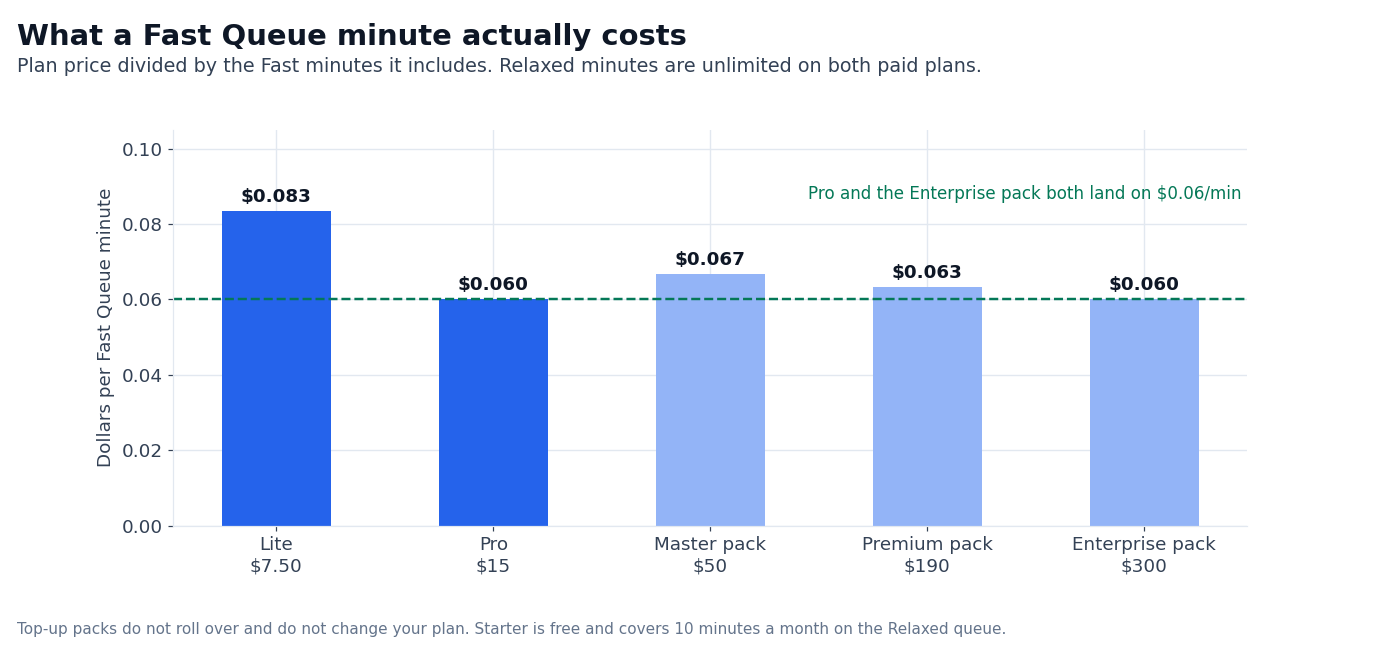
High-volume batch processing on a budget. A podcast network processing 500 episodes a month will find the per-minute cost lands at about $0.06/min on Pro, which covers 250 Fast minutes. The top-up packs price at roughly the same level: $190 buys 3,000 minutes, or $0.063 each.
A self-hosted Demucs pipeline on a dedicated GPU server is cheaper at that scale, and the engineering cost is the trade-off.
Low-latency live separation. LALAL.AI is a file-upload service. Karaoke, live performance, and video conferencing need a real-time engine or hardware, not an upload queue. The VST plugin on a local machine gets close, but processing latency is measured in seconds, not the milliseconds a live workflow needs.
Live multi-track recordings. The platform separates a single mixed file into stems. It does not process multi-track sessions where each instrument already sits on its own channel. If your workflow starts with a Logic Pro or Pro Tools session, your stems are already there.
What we could not verify
Three classes of figure in this review depend on audio-engineering measurements we could not run without processing paid stems on a published test set.
- Separation quality. It is workload-dependent: a clean studio master separates differently from a live concert recording. The vendor publishes no independent benchmark numbers, and we have not run signal-to-distortion measurements on a controlled test set.
- Peak-hour Fast Queue wait time. This is the variable that matters for a studio on a deadline. The published figure is “typically under five minutes,” with no guaranteed level of service, and we have not measured it on a controlled schedule.
- Voice-cloning fidelity at the low end of the training data. The published claim is conversational-grade output from a short pack, and we have not tested the lower bound on a non-celebrity voice.
Top-ups run $50 for 750 minutes, $190 for 3,000, and $300 for 5,000.
You cannot switch by hand — the account runs on Fast until the monthly balance is gone, then falls back to Relaxed.
For occasional use the free tier is the cheaper answer; once you need more than 10 minutes a month, Lite at $7.50 is below PhonicMind’s entry plan.
The other difference is hardware: Demucs runs on your GPU, LALAL.AI runs on theirs.
FAQ
How much does LALAL.AI cost?
Pricing starts free: Starter gives 10 min/mo on the Relaxed queue. Lite is $7.50/mo with 90 Fast min/mo, unlimited Relaxed minutes and a 2GB upload limit. Pro is $15/mo with 250 Fast min/mo, the VST plugin, the desktop app and API access.
Is there a free trial of LALAL.AI?
The Starter tier is the free trial, and it is permanent rather than time-limited: 10 minutes of Relaxed Queue processing a month, 200MB per file, no credit card.
Does LALAL.AI have a VST plugin?
Yes, on Pro only. It runs inside Logic Pro, Ableton, FL Studio, Pro Tools, and Cubase, and the same plan unlocks the desktop app for local processing.
What is the difference between Fast Queue and Relaxed Queue?
Both queues use the same separation engine and produce identical quality. Fast is a paid priority lane that jumps the backlog; Relaxed processes in line and wait times vary with server load.
Does LALAL.AI work on iOS and Android?
Yes, there are iOS and Android apps. The desktop app supports Windows, macOS, and Linux, and one minute balance covers every platform.
Can I cancel any time?
Yes. Subscriptions cancel from your profile page and stay active until the end of the billing period. Top-up minutes are non-refundable, and after cancellation the account reverts to Starter with any remaining Fast minutes expiring.
Is LALAL.AI cheaper than PhonicMind for a casual user?
Neither one is pay-per-track. PhonicMind sells subscriptions from $9.99/mo plus a $6.99 single purchase, and LALAL.AI’s free Starter tier covers 10 minutes a month.
Can I use LALAL.AI commercially?
Yes, on a paid plan. The terms grant commercial use of the stems on Lite and Pro; the Starter tier is for testing and personal use.
Do Demucs or LALAL.AI separate better?
They are comparable on most studio-recorded material, and Demucs v4 (htdemucs) is the free alternative that runs on your own GPU. LALAL.AI has the edge the vendor claims on noisy live recordings, where it isolates vocals more aggressively than a general-purpose model tends to.
How we put this together: tier prices, the Fast and Relaxed queue mechanics, the top-up packs and the per-stem billing formula come from lalal.ai/pricing, quoted in USD as the page serves it. We have not run a paid LALAL.AI plan.
Figures that depend on a real workload, a real target or a real integration are flagged where they appear in the text rather than being estimated.
Disclosure: this article contains affiliate links. If you buy through them we may earn a commission at no extra cost to you. Commission never changes our scoring or the order of a ranking.