The first time you migrate a 50k-visitor-per-day WordPress site from a generic shared host to Kinsta, you notice three things within the first week. The TTFB (time to first byte) drops from 800ms to 180ms because the underlying VMs run on Google Cloud compute rather than a shared box.
The dashboard is dramatically cleaner than cPanel. And the bill is higher than the previous host for the same traffic.
The higher bill is what you are paying for managed infrastructure, automatic scaling, isolated containers, and a 24/7 expert WordPress support team that actually answers tickets about WordPress-specific problems rather than generic LAMP-stack questions. Whether that delta is worth it depends on whether your time has a number.
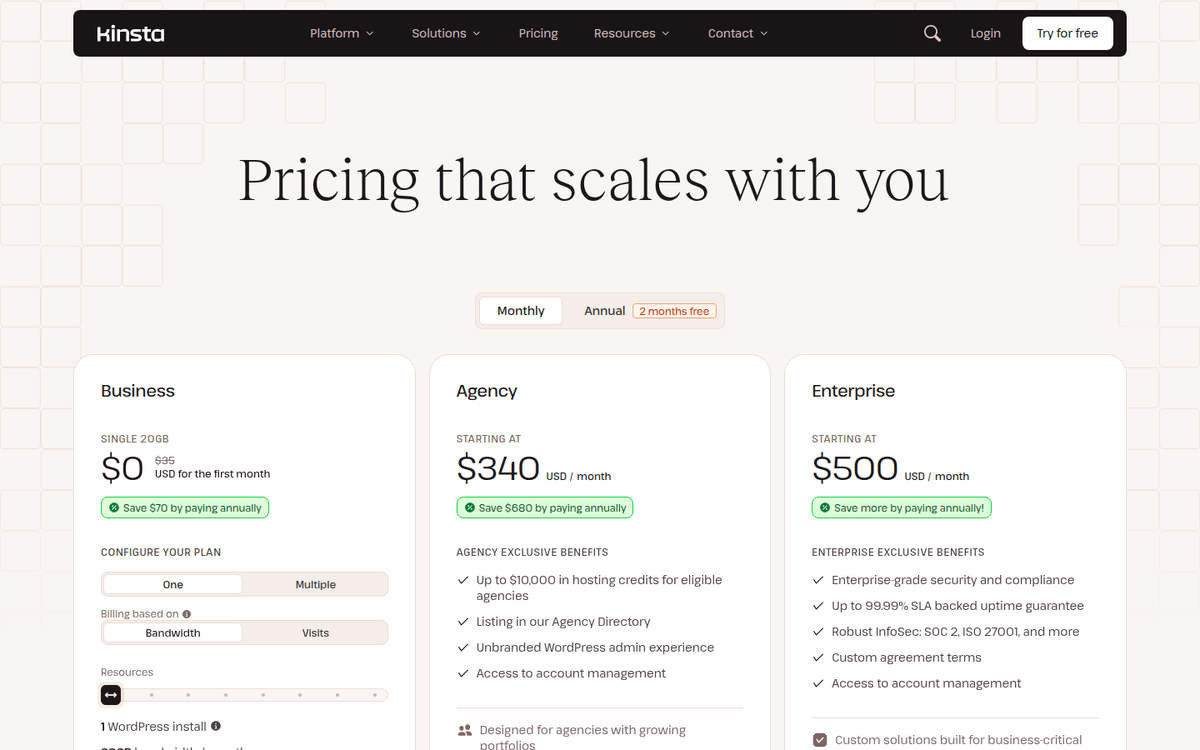
Single-site the entry line for one WordPress site: the Business plans.
Multi-site Launch through Lead: six rungs that step the visit allowance and the PHP workers up together.
Agency multi-site management tools, white-label options on Enterprise plans and consolidated billing.
Enterprise priced on application, with multi-site consolidation and the same support tier as every plan.
The honest version: Kinsta is the right pick for teams that need managed infrastructure on top of WordPress and have the traffic to justify the price. It is the wrong pick for hobby sites, the cheapest shared host, or anyone who wants to manage the server themselves.
The cost-of-mistake frame: what managed WordPress actually costs
Most teams considering Kinsta are coming from one of three places. Each one has a different cost-of-mistake calculus.
The first is a shared hosting escape. A team has outgrown Bluehost, Hostinger, or SiteGround’s shared or entry-tier managed plans. Their TTFB has degraded as the host crammed them onto an over-sold server. Their support tickets about WordPress specifics go to a generic LAMP technician.
The choice is between Kinsta, WP Engine, or Cloudways (the unmanaged-but-managed-via-control-panel alternative). The delta from a $15/month shared host to Kinsta’s $35/month Starter is real but small.
The bigger delta is operational: a team that has outgrown shared hosting has typically outgrown the support tier too, and managed-WordPress pricing is what managed-WordPress support costs.
The second is WP Engine price-shopping. WP Engine and Kinsta are the two most-cited premium managed WordPress hosts. Their pricing ladders are similar.
The honest comparison is on the underlying infrastructure (Kinsta is exclusively Google Cloud C3D; WP Engine runs on AWS and Google Cloud), the dashboard (MyKinsta is widely considered cleaner than the WP Engine portal), and the developer features (Kinsta ships a built-in APM tool, free Cloudflare Enterprise CDN, and a more aggressive auto-scaling posture).
For most teams, the choice between Kinsta and WP Engine comes down to a per-team preference rather than a per-feature gap.
The third is Cloudways or RunCloud self-managed. A team with a DevOps engineer might be running a DigitalOcean or Vultr VPS through Cloudways, paying $14-$60/month for the server plus a Cloudways fee. The total cost-of-ownership is lower than Kinsta’s $35/month Starter if the DevOps engineer has time.
The calculus shifts when the DevOps engineer becomes a bottleneck. Kinsta’s value proposition at this entry point is “your DevOps engineer stops being on-call for WordPress server issues,” and that has a real dollar value if the engineer’s time is the constraint.
The published pricing: single-site, multi-site, agency and enterprise
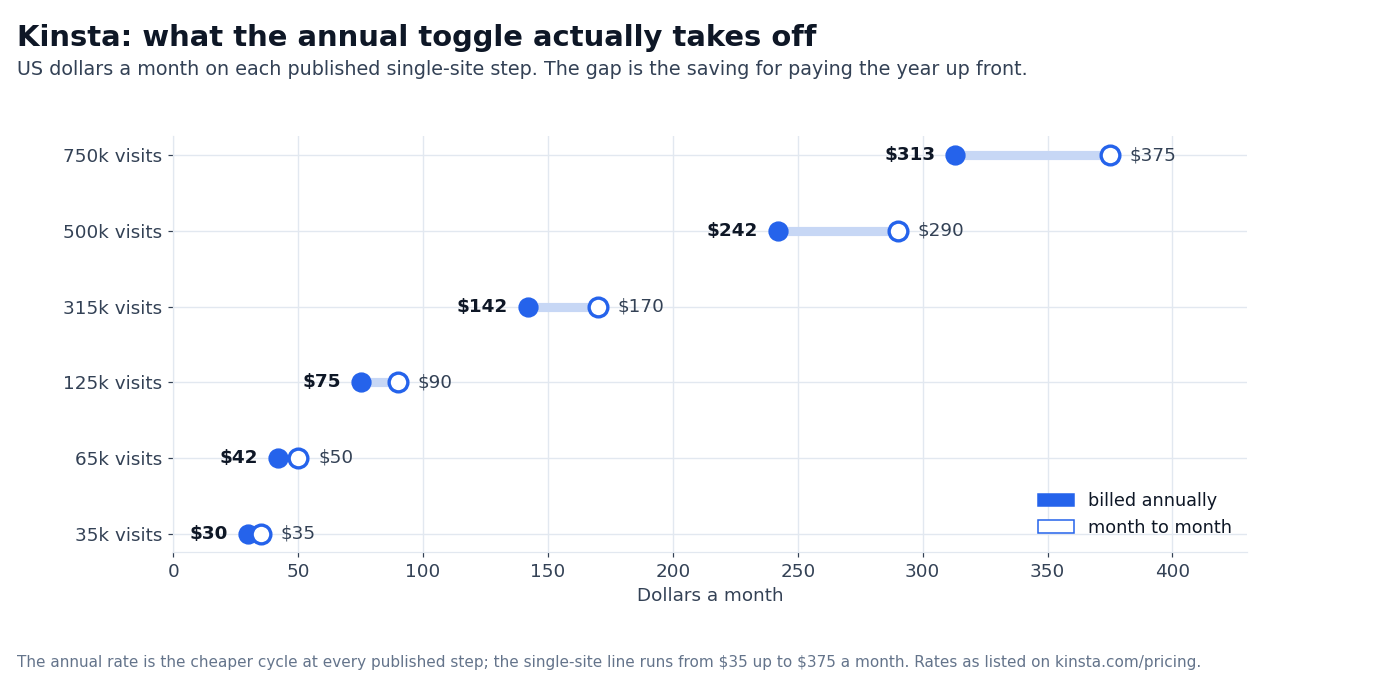
Kinsta’s published pricing in 2026 is four product lines rather than a ten-step ladder. Single-site Business plans run from $35 to $375 a month, multi-site plans run from Launch at $35 to Lead at $299, agency plans start at $340, and Enterprise is priced on application from $500. The first month is free on the entry plans, and the Annual toggle on the page shows every annual rate.
| Plan | Monthly $ | Annual $/mo | Monthly visits |
|---|---|---|---|
| Single 20GB | $35 | $30 | Bandwidth-based |
| Single 35k | $35 | $30 | 35,000 |
| Single 40GB | $50 | $42 | Bandwidth-based |
| Single 65k | $50 | $42 | 65,000 |
| Single 65GB | $90 | $75 | Bandwidth-based |
| Single 125k | $90 | $75 | 125,000 |
| Single 125GB | $170 | $142 | Bandwidth-based |
| Single 315k | $170 | $142 | 315,000 |
| Single 250GB | $290 | $242 | Bandwidth-based |
| Single 500k | $290 | $242 | 500,000 |
| Single 500GB | $375 | $313 | Bandwidth-based |
| Single 750k | $375 | $313 | 750,000 |
| Launch (multi-site) | $35 | $30 | 75,000 |
| Launch Plus | $59 | $50 | 125,000 |
| Build | $69 | $58 | 200,000 |
| Expand | $99 | $83 | 350,000 |
| Scale | $169 | $141 | 650,000 |
| Lead | $299 | $250 | 1,500,000 |
| Agency | from $340 | $284 | On application |
| Enterprise | from $500 | $417 | On application |
Every tier shows both cycles side by side. Annual billing is the cheaper one at every plan: the entry single-site plan is $30/month billed annually against $35 month-to-month, and Lead drops from $299 to $250.
The metric that matters most is visits per month. Kinsta counts a visit as a unique IP per 24 hours, which is the same definition WordPress.com and most analytics tools use. A 100,000-visitor-per-month site is roughly 3,300 visitors per day on average, with peak days running 2-3x higher.
Either the single-site 125k plan at $90/mo or the multi-site Launch Plus plan at $59/mo covers this traffic shape for most small businesses and B2B sites.
The second metric is PHP workers. A PHP worker is a process that handles one page load at a time; if a site has six workers and six simultaneous page requests arrive, the seventh waits.
Kinsta does not publish a PHP worker allocation per plan on the pricing page — what it sells is a PHP performance add-on at $10 per 500 MB a month. That add-on is the lever for a WooCommerce cart-and-checkout flow or a dynamic LMS, where concurrency rather than raw visit count is the binding constraint.
The third metric is storage. Kinsta’s storage limits are based on SSD disk usage. The entry plans carry 10 GB, which covers a content site with reasonable media. WooCommerce stores with thousands of product images can hit 10 GB fast, so the larger-storage plans are the right move for most e-commerce workloads.
The Google Cloud stack: what runs under the dashboard
Kinsta runs on Google Cloud rather than on hardware it owns, and the vendor’s hosting page lists the platform as isolated containers behind a global CDN.
The exact Google Cloud machine family behind a given plan is not itemized on the public pages we checked, so treat a chip-generation name as vendor-side detail rather than a number you can verify. What is published is the outcome: the hosting page ties serving cached content from the CDN to a 50% speed boost.
The architecture is container-based. Each WordPress site runs in its own isolated container with its own resources. There is no over-selling. A site that consumes its plan’s PHP worker allotment cannot starve another site on the same server. This is the operational model that distinguishes Kinsta from Bluehost or Hostinger, where shared hosting puts 100+ sites on a single server.
The stack is anchored on these layers:
- Google Cloud compute — the platform every site is built on
- Isolated containers — per-site resources, no over-selling
- Managed WAF with DDoS protection — published as Cloudflare with Enterprise DDoS protection, on every plan
- CDN and edge caching — 260+ points of presence, which the hosting page ties to a 50% speed boost
- Redis — available as an add-on ($100/mo per site) for object cache, which speeds up WordPress database queries on sites with lots of dynamic content
- Built-in APM tool — request tracing on every plan at no extra cost
The honest version on the stack: the container isolation is the operational point — one site’s load cannot starve another, which is what separates this from a $5 shared box. The Cloudflare-backed firewall and the CDN footprint come with every plan rather than as an upsell.
The Redis add-on at $100/month is the single most-impactful performance investment a Kinsta customer can make on a WooCommerce or LMS workload.
MyKinsta: the dashboard that defines the brand
MyKinsta is Kinsta’s custom-built control panel. It is the most-praised feature in customer reviews and the most-cited reason teams pick Kinsta over alternatives. The dashboard is built in-house and replaces the cPanel, Plesk, or proprietary-but-ugly panels that competing hosts ship.
The MyKinsta surface covers:
- Site management — one-click staging environments, search-and-replace on staging, push-to-production, one-click rollback to any backup
- Backups — automatic daily backups with one-click restore, downloadable as a zip; retention is 14 days on the entry plans and longer on the larger ones and on agency and enterprise contracts, and extra backup frequency is a paid add-on ($20 a site a month for every six hours, $100 for hourly)
- Analytics — bandwidth, visits, top requests, slowest requests, MySQL queries, all in one place with the data granularity that matters for WordPress
- CDN — Cloudflare Enterprise configuration without leaving the dashboard
- DNS — Kinsta DNS management with edge caching at every Cloudflare point-of-presence
- Cache — edge cache, site cache, and object cache configuration in one place
- Logs — error logs, access logs, and Kinsta’s APM tool for tracing slow requests
- SSH and SFTP — terminal access to the container, SFTP file access, WP-CLI pre-installed
The MyKinsta APM (Application Performance Monitoring) tool is the most-recent addition. It traces slow WordPress requests, identifies the plugin or theme function causing the slowdown, and shows the database queries, PHP function calls, and external HTTP requests that contribute to the page load.
For a team debugging a slow WordPress site, the APM tool is worth $50-$100/month on its own.
The honest version: MyKinsta is excellent. The gap to the closest competitor (WP Engine’s portal, Cloudways’ panel) is meaningful.
The gap to a team that wants to SSH into a server and configure Nginx directly is also meaningful — MyKinsta is opinionated, and some server-level customizations are not exposed through the dashboard. For 90% of WordPress sites, this is a feature. For the 10% of WordPress sites with deep server-level customization, it is a constraint.
Free migrations, support tier, and the agency story
Two operational layers round out the value proposition.
Free migrations are offered on every plan. A team moving from another host submits a migration request through MyKinsta, and a Kinsta engineer handles the migration. The engineer handles DNS, SSL, database import, plugin re-configuration, and 301 redirect setup.
The standard timeline is 1-3 business days depending on site complexity. WooCommerce and multisite migrations take longer. There is no extra fee; the migration cost is built into the plan price.
24/7 expert WordPress support is the second differentiator. Kinsta’s support team is staffed by WordPress-trained engineers, not generic LAMP-stack technicians.
A team that opens a ticket about a WordPress-specific issue (plugin conflict, WP_Query performance, WooCommerce checkout problem) gets a WordPress-trained engineer responding. The published SLA is response within a few minutes for production-impacting issues.
The honest version: support quality is consistently praised in third-party reviews, and response time is faster than the median managed-WordPress host.
The agency story is the third piece. Kinsta runs an agency partner program with multi-site management tools, white-label options on Enterprise plans, and consolidated billing. For an agency running 50+ client sites, the agency program covers operations at a lower effective cost than running each site on its own plan.
Enterprise plans are priced on application and include multi-site consolidation.
Cost scenarios: what real workloads cost
Three worked examples using the published pricing, all flagged because your mileage will vary based on actual traffic, storage, and plugin footprint.
Scenario 1: B2B SaaS content site, 30k visits/mo, 5 GB storage. A WordPress site with a content marketing function plus a docs section. Caching configured, no dynamic cart or LMS, average page weight under 2 MB. Recommended plan: the single-site 35k plan at $35/mo, or $30/mo billed annually.
Storage at 10 GB leaves headroom for a docs section. The CDN handles traffic spikes without intervention. Annual cost: $350.
Scenario 2: WooCommerce store, 80k visits/mo, 30 GB storage, Redis. A WooCommerce store with 800 products, dynamic cart and checkout, 30 GB of product images, and the Redis add-on for object caching. Recommended plan: the single-site 125k plan at $90/mo plus Redis at $100/mo — $190/mo in total.
The dynamic cart and checkout are what the Redis add-on and the PHP performance add-on are for. Annual cost: $2,280.
Scenario 3: LMS or membership site, 250k visits/mo, multisite, 100 GB storage. A LearnDash or LifterLMS site with 2,000 active students, dynamic video content, and a multisite network for separate brands.
Recommended plan: the multi-site Expand plan at $99/mo (350,000 visits, five WordPress installs), stepping up to Scale at $169/mo (650,000 visits, ten installs) if the network keeps growing. Annual cost: $990-$1,188.
The pattern: a content site with a low dynamic surface lands on the $35-$90 single-site plans. WooCommerce and LMS workloads climb to the $99-$169 multi-site plans plus the $100/mo Redis add-on. The largest sites move to the agency and enterprise lines, where the entry price is $340 and $500 a month and the contract is a conversation.
When Kinsta is the wrong pick
Three workload shapes where Kinsta is not the right answer in 2026.
First, hobby sites and personal blogs with sub-1,000 visits/month. A $5/month shared host or a free WordPress.com site is the right answer. Kinsta’s $35/month entry plan is not justified for a hobby workload. The performance gain does not matter because there is no performance problem to solve.
Second, teams that want root-level server control. If your team needs to install custom system packages, modify Nginx configurations beyond what the dashboard exposes, or run sidecar services that require server-level access, Kinsta’s managed architecture is the wrong fit. A self-managed VPS through DigitalOcean, Vultr, or RunCloud is the answer.
Third, non-WordPress workloads. Kinsta is exclusively WordPress. If your application runs on Laravel, Django, Next.js, or a static site, Kinsta is not the right host. For static sites, Cloudflare Pages or Vercel is the right answer. For Laravel, Vapor or a managed Laravel host. For Next.js, Vercel itself.
How Kinsta compares to WP Engine, Cloudways, and SiteGround
A short comparison is worth doing here. The question a CTO asks first is usually “Kinsta, WP Engine, Cloudways, or a cheaper option?”
| Dimension | Kinsta | WP Engine | Cloudways | SiteGround |
|---|---|---|---|---|
| Underlying cloud | Google Cloud | AWS + Google Cloud | DO/Vultr/AWS/Linode | Google Cloud |
| Visits on entry plan | 35k/mo | 25k/mo | Depends on server | Unlimited |
| Dashboard | MyKinsta (best-in-class) | WP Engine portal | Cloudways panel | Site Tools |
| CDN | Cloudflare-backed, every plan | Cloudflare Enterprise (paid) | Cloudways CDN | SiteGround CDN |
| Free migrations | Yes | Yes | No (DIY) | Yes (limited) |
| Redis add-on | $100/mo | Available | Available | Not available |
| WooCommerce optimized | Yes | Yes | Yes | Limited |
| Multisite | Multi-site plans | All plans | DIY | Limited |
| Agency program | Yes | Yes | Limited | No |
| Best for | Premium WP, agencies | Premium WP, agencies | DevOps-managed WP | Small WP sites |
The honest comparison: WP Engine is the closest peer, with similar pricing and similar positioning. The choice between them is mostly about team preference on dashboard UX and Cloudflare Enterprise availability. Cloudways is the right pick when you have a DevOps engineer who wants server control. SiteGround is the right pick when the budget is the dominant constraint.
The honest version on Kinsta
The 2026 version of Kinsta is the most-capable managed WordPress platform on Google Cloud’s current-gen compute. The C3D stack is real and the performance shows up. The MyKinsta dashboard is genuinely best-in-class. The free migrations and expert WordPress support are real operational value, not marketing fluff.
The Cloudflare-backed firewall with Enterprise DDoS protection comes with every plan, which is not universal in the category.
The honest version is on price. Kinsta is premium-priced managed WordPress hosting. A $35/month Starter plan is three to seven times the cost of a shared host, and a multi-site Scale plan at $169/month is more than many teams pay for full self-managed infrastructure.
The value proposition holds for teams whose time has a dollar number (CTOs, agency operators, WooCommerce stores where downtime means lost revenue). It does not hold for hobby sites, $5/month bloggers, or teams that want server control.
The second honest version is on the WooCommerce and LMS story. Kinsta handles WooCommerce and LMS workloads well, but the plan’s visit ceiling and the optional performance add-ons are the binding constraints. A heavily dynamic site that runs out of concurrency will see slow TTFB during traffic spikes.
The Redis add-on at $100/month is the single most-impactful performance investment on these workloads. A team that skips Redis and assumes Kinsta’s default stack will cover a busy WooCommerce store will be disappointed.
The third honest version is on the managed-host ceiling. Kinsta’s managed architecture means you cannot install custom system packages, you cannot run a non-PHP sidecar service, and you cannot modify the Nginx configuration beyond what the dashboard exposes. For 90% of WordPress sites, this is a feature. For the 10% of sites that need server-level customization, it is a wall.
What we couldn’t verify
Three classes of figures in this review depend on a real Kinsta account we did not run for this piece. They depend on your own traffic shape, so validate them on it before you pick a tier.
The first is the actual concurrency headroom on your specific workload. The published visit allowance is a planning figure, not a guarantee of response time under load. A site with unoptimized plugins can stay slow at half its plan’s visit count. Run a trial month on your own workload before you pick a tier.
The second is the actual CDN saving. The CDN is bundled with every plan rather than billed as a line item, so the saving only exists if you were buying an equivalent separately. The real number depends on your traffic pattern, your origin response time, and your cache-hit rate.
Benchmark on your own traffic before you budget on the assumption that the CDN will remove a specific bandwidth line item.
The third is the actual MyKinsta APM insight value. The APM tool is included free on every plan. The actual value depends on whether your site has slow requests to debug and whether the APM traces point to the right plugin or theme function. For some sites, the APM tool surfaces real bottlenecks.
For others, the slow requests are external (third-party API calls) and the APM cannot fix them.
FAQ
How much does Kinsta cost per month?
The published pricing starts at $35/month for a single-site plan ($30/month billed annually) and runs to $375 on that same line, with multi-site plans from $35 to $299 a month, agency plans from $340, and Enterprise from $500 on application. Annual billing is cheaper at every plan.
A B2B content site typically lands on the $35-$90 single-site plans; a WooCommerce or LMS workload lands on the $99-$169 multi-site plans plus the $100/mo Redis add-on.
Is Kinsta worth it compared to shared hosting?
For a hobby site or a personal blog with sub-1,000 visits per month, no. A $5/month shared host or a free WordPress.com site is the right answer. For a B2B SaaS marketing site, a WooCommerce store, or an agency running client sites, yes.
The performance gain (180ms TTFB vs 800ms on shared hosting), the managed support tier, the free migrations, and the bundled CDN are real value at $35-$169/month. The delta is justified when your time has a dollar number.
What is the difference between Kinsta and WP Engine?
Both are premium managed WordPress hosts with similar pricing and similar positioning. Kinsta runs exclusively on Google Cloud C3D compute-optimized VMs. WP Engine runs on AWS and Google Cloud. Kinsta’s MyKinsta dashboard is widely considered cleaner than the WP Engine portal.
Kinsta bundles the Cloudflare-backed firewall and CDN on every plan; check the equivalent line on the other vendor yourself. For most teams, the choice comes down to per-team preference on dashboard UX and which Cloudflare Enterprise tier you want.
Can Kinsta host WooCommerce?
Yes, and Kinsta’s WooCommerce performance is one of its strongest stories. The C3D compute stack, the PHP worker allocation per plan, and the Redis add-on at $100/month give WooCommerce stores the dynamic-content performance they need.
The honest version: a WooCommerce store that pushes the PHP worker ceiling during traffic spikes will see slow TTFB. The Redis add-on is the single most-impactful performance investment on a WooCommerce workload.
Does Kinsta include a CDN?
Yes. Every Kinsta plan includes CDN and edge caching across 260+ points of presence, which the vendor ties to a 50% speed boost. Edge caching and DDoS protection are bundled rather than charged as a separate CDN line, which is the meaningful part for a team moving from a host that bills CDN separately.
What is the MyKinsta APM tool?
MyKinsta APM (Application Performance Monitoring) is Kinsta’s built-in performance tracing tool, available on every plan at no extra cost.
The APM traces slow WordPress requests, identifies the plugin or theme function causing the slowdown, and shows the database queries, PHP function calls, and external HTTP requests that contribute to the page load. For a team debugging a slow WordPress site, the APM is worth $50-$100/month on its own.
Sources
- Kinsta pricing — the four published lines (single-site, multi-site Launch through Lead, agency, enterprise), the monthly and annual rates, the visit allowances and the add-on prices
- Kinsta WordPress hosting — the container architecture, the CDN footprint, the migration and support promises, and the MyKinsta feature set
- Kinsta about us — company background, the 2013 founding, the 230,000+ customer count, and the agency partner program positioning
How we put this together: the four published lines (single-site, multi-site Launch through Lead, agency and enterprise), the monthly and annual rate at each step, the visit allowances, the Redis add-on at $100 a month and the extra backup frequencies come from kinsta.com/pricing,
Quoted as displayed, with the container architecture, the CDN footprint and the migration and support promises read from kinsta.com/wordpress-hosting and the customer count from kinsta.com/about-us.
We have not migrated a live site onto Kinsta, run a load test against a plan or negotiated a contract, so anything that depends on your own traffic stays flagged where it appears.
Figures that depend on a real workload, a real target or a real integration are flagged where they appear in the text rather than being estimated.
Disclosure: this article contains affiliate links. If you buy through them we may earn a commission at no extra cost to you. Commission never changes our scoring or the order of a ranking.