CoderPad used to be the lightweight collaborative coding pad for live interviews: two engineers, a shared IDE, code that actually runs. The 2026 product surface is broader than that.
The same vendor now sells an AI-Assist layer — Claude, GPT, Gemini, and Llama running inside the pad — plus a take-home project platform, and a structured screening layer. The pricing ladder has been rebuilt around it.
CoderPad sits on the same shortlist as the other live-coding interview platforms a talent lead weighs when the coding surface and the AI layer both matter.
The ATS integrations — Greenhouse and Lever among them — are Enterprise-only, so a Starter or Team plan leaves recruiters copying results back into the hiring system by hand.
- Homepage logos: Shopify, the New York Times, Meta, United Airlines, Open AI, Spotify, LinkedIn, Goldman Sachs, Toyota, Discord, Snowflake, BigCommerce and Waymo.
- The about page lists the CodinGame acquisition; both brands remain in market.
What CoderPad actually sells
The product is split into three surfaces that share the same pad engine. Live Interview is the synchronous collaborative IDE — candidate and interviewer share one coding environment, with shared terminals, runner, and 99+ supported languages.
Screen is the take-home test surface where candidates answer structured coding questions in their own time. Take-Home Projects are more open-ended assignments intended to evaluate real engineering work, not isolated algorithm puzzles.
The 2026 product push sits on top of those surfaces. AI Assist is now in every paid plan: a frontier LLM lives inside the pad, the prompt and response are visible to the interviewer, and playback shows how the candidate used the tool.
Enterprise adds agentic runs powered by Claude Code and Codex, AI interview transcripts, AI follow-up questions on the candidate’s own code, and an AI Interview Designer that generates role-specific scenarios.
Benchmark AI runs the candidate’s output against a pure-AI baseline so you can see how much of the answer came from human judgment versus the model.
The vendor’s pitch is that AI fluency itself is part of the engineering role now, and the pricing card reflects that: AI Assist is no longer an add-on.
Every paid plan includes it, and the differentiation between Starter and Enterprise is the depth of AI tooling and the ceiling on question-library and take-home-project scale (coderpad.io, captured recently).
The price ladder, in detail
| Plan | USD/month (annual) | USD/month (monthly) | EUR/month (annual) | Interviews / year | Overage per pad | Question library | Custom questions |
|---|---|---|---|---|---|---|---|
| Starter | $80 | $120 | €80 | 60 | $30 / €30 | 400+ | 10 |
| Team | $400 | $500 | €400 | 360 | $30 / €30 | 1,400+ | 20 |
| Enterprise | Custom | Custom | Custom | Custom | $30 / €30 | 4,000+ | Unlimited |
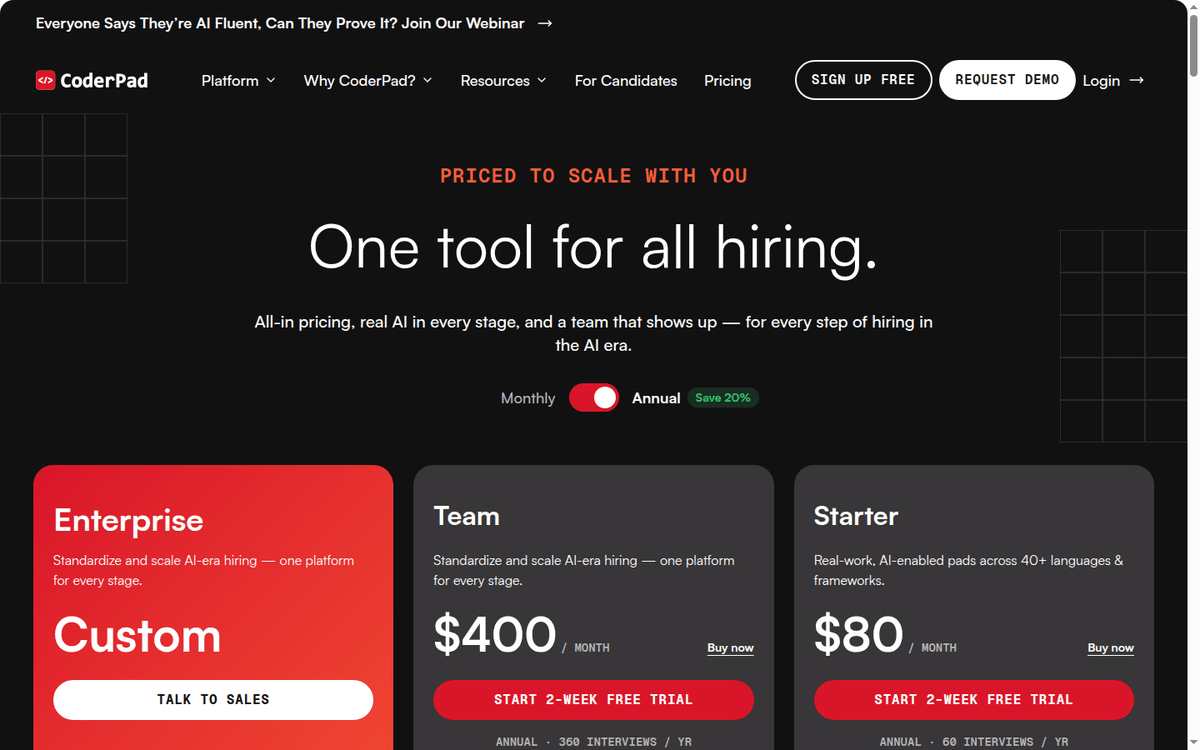
The headline numbers vary by selector. The pricing page offers an “Annual Save 20%” toggle, and the two columns above are the honest read of it.
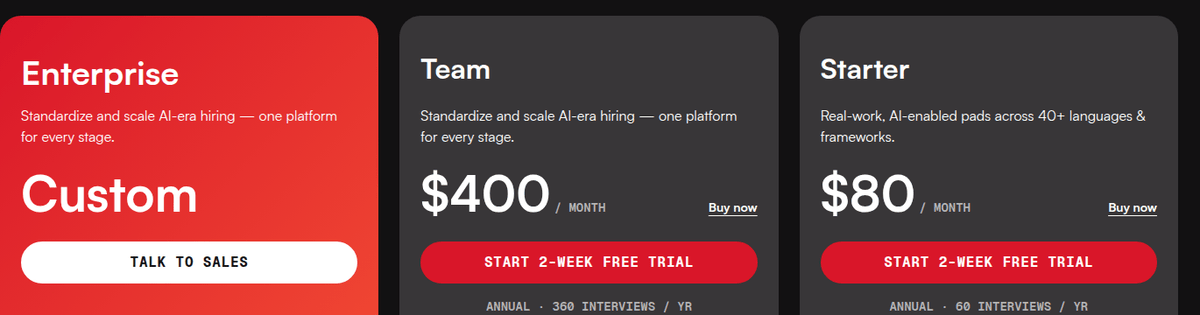
On the annual commitment, Starter is $80/mo and Team is $400/mo — Team billed as a single $4,800 yearly charge. Drop to monthly billing with no annual commitment and the same cards read $120/mo and $500/mo.
The discount is steeper than the badge suggests on Starter: $80 against $120 is a third off, while Team’s $400 against $500 is the advertised 20% (coderpad.io pricing, captured recently).
Interview quotas are bundled into the plan, not metered as separate credits. Starter annual ships 60 interview pads; Team annual ships 360. Overage beyond the bundled quota is billed flat at $30 (or €30) per additional pad, regardless of whether the pad is a live interview, a screen assessment, or a take-home session.
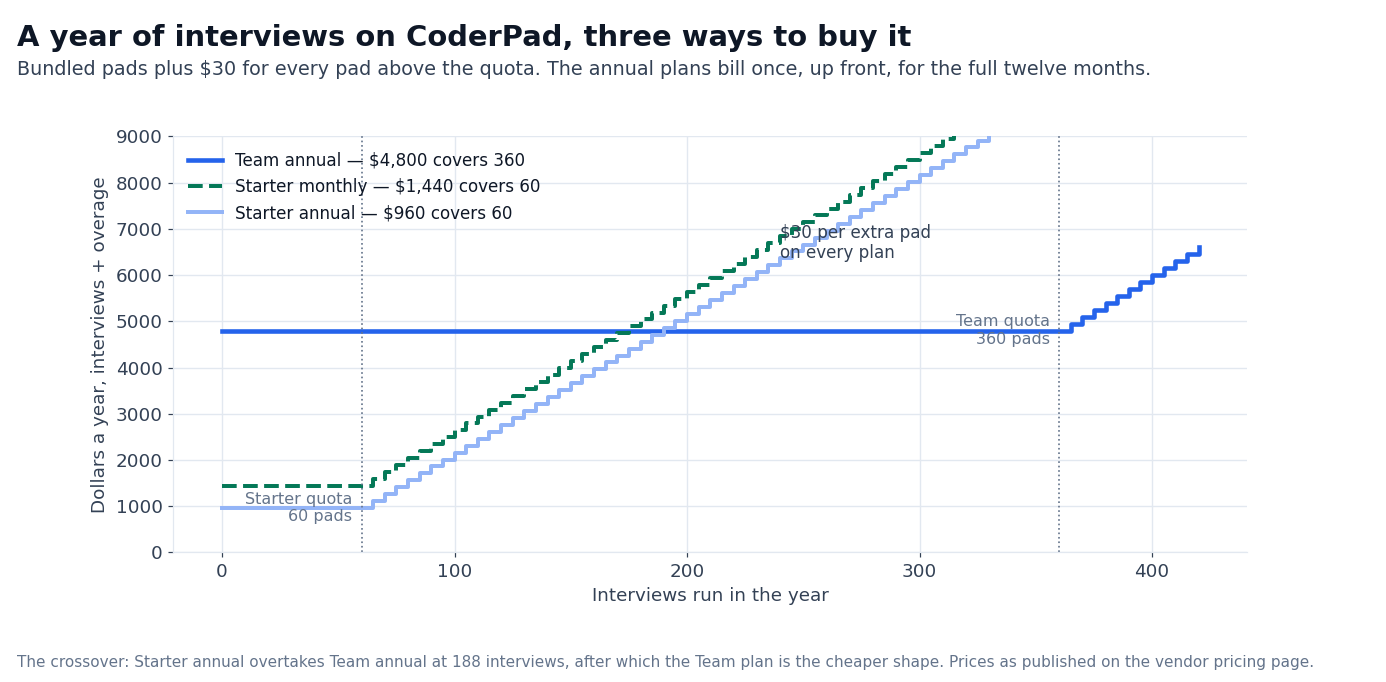
The same flat overage applies on Starter and Team; the difference between tiers is the bundled volume, not the marginal cost.
The free trial is 14 days with no credit card required, and the FAQ is explicit that you will not be charged at the end of it. After the trial you pick a plan; cancel any time from the in-app billing settings, and you keep access until the end of the paid period.
Annual plans bill once, upfront, for the full 12 months — the monthly figure shown on the page is a derived monthly equivalent, not a recurring monthly charge.
How the per-pad economics land
The marginal cost is what matters when you draw the budget line.
| Workload | Plan | Bundled pads | Effective $/pad at full quota | Overage $/pad if you exceed |
|---|---|---|---|---|
| 60 interviews / year | Starter annual | 60 | $16.00 | $30.00 |
| 60 interviews / year | Starter monthly | 60 | $24.00 | $30.00 |
| 360 interviews / year | Team annual | 360 | $13.33 | $30.00 |
| Custom volume | Enterprise | Negotiated | Volume pricing | $30.00 |
A small team running five interviews a month on monthly billing pays $120/month; that is $24 per pad at the bundled five-a-month rate. The same five a month on the annual Starter commitment pays $80/month, or $16 per pad — which is why the annual toggle matters more here than on Team.
A team running 30 interviews a month on Team annual pays $13.33 per pad; the higher tier drops the unit cost noticeably. Above the bundled quota, the marginal cost is $30 per pad on every plan.
If your hiring is bursty — 100 interviews in January, none in February — the annual Team plan is the cheaper shape. That holds even if you never use half the bundled quota, because every pad above 60 or 360 jumps to $30.
The pricing page makes a point of this comparison: “All-in pricing, real AI in every pad.” The vendor’s argument is that competitors charge separately for AI tooling, take-home sessions, screen analytics, or ATS integrations.
The bundle on Team and Enterprise, it says, covers all of those for one sticker price (coderpad.io, captured recently).
What the AI Assist pitch actually changes
AI Assist is the same idea on all three plans: a frontier LLM sits inside the coding pad, the candidate can invoke it like a teammate, and the interviewer sees every prompt and response. The supported model list on the public pricing page is Claude, GPT, Gemini, and Llama.
Agentic runs — Claude Code and Codex — are Enterprise-only. The AI Interview Designer, which generates role-specific scenario questions, is on Team and Enterprise. Benchmark AI and the AI Test Cases that score a candidate’s output against an AI baseline are Enterprise-only.
Two non-obvious details show up in the feature table. AI Assist is on Starter, but custom questions are capped at 10, so the practical ceiling on hand-built AI-generated scenarios is 10 there. Team lifts that to 20, and Enterprise is Unlimited.
The other is localization: Enterprise includes “Question localization (any language),” which means the same role-specific scenario can be tested in a candidate’s native language. For distributed hiring across Europe or APAC, that is a meaningful operational difference.
The follow-up feature deserves a separate mention. On Enterprise, AI follow-up questions fire on the candidate’s own code — the model reads what they wrote, finds a weakness or an edge case, and asks the candidate to address it.
Combined with code playback and session recording, this is the closest a synchronous interview pad gets to an AI-on-the-other-shoulder experience (coderpad.io, captured recently).
Integrations, cheating prevention, and the buyer shape that fits
| Integration | Starter | Team | Enterprise |
|---|---|---|---|
| ATS: Greenhouse, Lever, Ashby, Workday | — | — | Yes |
| SSO / SAML: Okta, Azure AD, Google | — | — | Yes |
| API access for custom workflows | — | — | Yes |
| Code playback & session recording | Yes | Yes | Yes |
| Webcam proctoring + AI behavior analysis | — | — | Yes |
| Real-time cheating alerts | — | — | Yes |
| AI follow-up questions on the candidate’s own code | — | — | Yes |
Cheating prevention scales by tier. Starter and Team both record the session and let you replay the candidate’s keystrokes; only Enterprise layers on webcam proctoring with AI behavior analysis, real-time cheating alerts, and AI follow-ups.
If your interview process today is a take-home test sent over email with no proctoring, moving to Team already tightens the loop on shared sessions. Moving to Enterprise is the step that closes the proctoring gap.
ATS integrations are Enterprise-only. The vendor publishes Greenhouse, Lever, Ashby, and Workday as supported systems, and SSO via Okta, Azure AD, and Google is Enterprise-only too.
The implication for a hiring team on Starter or Team is simple. Candidates still get a clean interview link, but pushing results back into your ATS means manual recruiter copy-paste or an enterprise plan with API access turned on (coderpad.io, captured recently).
How the case-study claims line up
The pricing page anchors on three numbers — 20% faster time to hire, 88+ hours saved per hire, 40% fewer bad hires. Those are vendor-published aggregate figures, not third-party benchmarks. The case-study titles underneath read more concretely:
- McAfee: 22% faster time-to-accept, 35% higher assessment completion (case study, captured recently).
- Alipes Capital: 70% increase in candidate throughput (case study, captured recently).
- SII Group: 600+ monthly assessments across 18 countries (case study, captured recently).
- Gameloft: developer hiring standardized across 10+ countries (case study, captured recently).
- monday.com: 70+ interviewers using CoderPad (case study, captured recently).
We did not run an independent benchmark against any of these claims, and the vendor does not publish the methodology behind the headline aggregate figures. Treat the case-study bullet points as illustrative; do not anchor a budget conversation on the 88-hour figure.
One number on the vendor’s own site does not agree with itself: the about page says “over 3,800 customers,” while the homepage says “Trusted by 4,000+ customers worldwide.” Both are self-reported, and the gap is worth checking before either figure goes into a business case.
What it costs versus the alternatives
The competitive comparison has three shapes: live-coding interview tools — CoderPad, HackerRank, CodeSignal, and Qualified.io, pre-employment assessments with a code option (HackerRank, TestGorilla), and video-led interview suites (HireVue, ModernLoop). CoderPad’s positioning is the mid-trust coding pad with deep AI tooling.
- HackerRank: stronger on skills assessments and structured interview libraries; weaker on the AI-in-the-pad story. Plan starts lower than CoderPad’s Team, but the AI layer is metered as a separate add-on.
- CodeSignal: skills-assessment-led with a CodeSignal Interview live pad. Comparable on the interview surface; cheaper per assessment, but the AI tier is its own product line.
- HireVue: video-led interviewing; the coding surface is secondary. Different category — pick this if you need on-demand video interviews at scale.
- TestGorilla: general pre-employment assessments with a coding option. Lower cost, broader test types, lighter on the live collaborative IDE.
- ModernLoop: orchestrated interview scheduling and scorecards. These platforms sit alongside CoderPad rather than replacing it — they handle the calendar and feedback loop, CoderPad handles the coding surface.
- Qualified.io: live coding interview pad, no async take-home layer. Lower sticker price, narrower scope.
The deciding question is whether you want the AI-Assist-and-take-home bundle in one tool. If yes, CoderPad on Team is the bundled version of what HackerRank plus CodeSignal plus a separate take-home tool would charge separately.
If you want a single lightweight live pad and run everything else on your own stack, Qualified.io or HackerRank Interview is cheaper.
Where CoderPad is the wrong pick
- You only run a handful of interviews a year. Starter monthly is $120 and bundles five pads a month; the $30/pad overage on top of a plan you barely fill is not cheap. If your volume is steady and low, Starter annual is the better shape, and if you run under 60 a year it is the only tier you need.
- You need a free plan you can publish on. There is no free plan. The free trial is 14 days; after that you are on Starter or above.
- You need proctoring at the Starter tier. Webcam proctoring, AI behavior analysis, real-time cheating alerts, and AI follow-up questions are all Enterprise. If your process requires proctoring, plan for Enterprise from day one.
- You want assessment results pushed into your ATS without an integration engineer. ATS push-back is Enterprise-only. Starter and Team ship without API access and without Greenhouse, Lever, Ashby, or Workday integration; recruiters will be hand-copying the result back into your system.
- You are evaluating CoderPad for engineering assessment only and have no AI-on-the-pad vision. The differentiator is AI Assist in the pad. If your team has no appetite for letting candidates invoke Claude or GPT during the interview, you are paying for a feature you will switch off.
- You need an on-prem or self-hosted solution. CoderPad is SaaS-only. On-prem is not in the published pricing surface.
Agentic runs with Claude Code and Codex, AI follow-up questions, and AI interview transcripts are Enterprise-only.
The Team tier bundles AI, take-home, and screen in one price (coderpad.io pricing, captured recently).
What we did not verify
- We did not purchase any plan. The pricing data, feature lists, and language counts are read off the public pricing page.
- The vendor’s headline aggregate metrics — 20% faster time-to-hire, 88 hours saved per hire, 40% fewer bad hires — are vendor-published and we did not independently benchmark them.
- Enterprise pricing bands are not public. The Custom tag on the plan card is the only published detail.
- The customer count is self-reported and inconsistent between the about page (3,800+) and the homepage (4,000+).
- Per-interview time savings on a specific ATS workflow were not measured.
- We did not test AI Assist in a live session. The supported model list — Claude, GPT, Gemini, Llama — is the public claim; actual latency and quality during a recorded session depend on the model configured for the workspace.
FAQ
How is the “AI Assist” feature defined across plans?
AI Assist puts a frontier LLM — Claude, GPT, Gemini, or Llama — into the pad. The interviewer can see every prompt and response and play it back. It is included on Starter, Team, and Enterprise.
How is CoderPad priced versus HackerRank or CodeSignal?
CoderPad’s published rate is $80/mo (Starter) or $400/mo (Team) on annual billing, and $120/mo or $500/mo month to month. HackerRank and CodeSignal sell assessments and the live pad separately; their lowest-tier pricing is cheaper but AI tooling is an add-on.
Is there a free plan?
No. There is a 14-day free trial with no credit card required. After the trial you pick a paid plan or stop using the platform.
What is the live pad’s language coverage?
The page states 99+ languages and frameworks for the Interview surface, 65+ languages and frameworks for Screen. The list is described as expanding in response to customer asks.
What is the overage fee?
$30/€30 per additional pad, flat, on every public tier.
Does annual billing save money?
Yes, though not by the same margin on every tier. Team’s annual price of $400/mo against $500/mo monthly is the advertised 20%. Starter’s annual $80/mo against $120/mo monthly is closer to a third off. Both annual plans bill once, upfront, for the full 12 months.
Can I cancel any time?
Yes. The FAQ is explicit — you can cancel any time from the app, you will not be charged again, and you keep access until the end of the paid period.
Does the plan include ATS integrations?
No on Starter or Team. Greenhouse, Lever, Ashby, and Workday are Enterprise. Same for SSO via Okta, Azure AD, and Google.
Does CoderPad own CodinGame?
Yes. CoderPad’s about page describes the acquisition of CodinGame and the merged mission. The CodinGame brand remains in market for the consumer-side gamified coding puzzles.
Sources
- CoderPad Pricing. coderpad.io/pricing (captured recently).
- CoderPad About. coderpad.io/about (captured recently).
- McAfee case study. coderpad.io/case-study/how-mcafee-cut-time-to-hire-by-over-20 (captured recently).
- Alipes Capital case study. coderpad.io/case-study/how-alipes-capital-increased-candidate-throughput-70-with-coderpad (captured recently).
- SII Group case study. coderpad.io/case-study/how-sii-group-scaled-technical-hiring-across-18-countries-with-coderpad (captured recently).
How we put this together: the tier ladder, the annual and monthly rates, the bundled interview quotas, the $30/€30 per-pad overage, the AI Assist tiers and the integration matrix come from coderpad.io/pricing, quoted as displayed. We did not purchase a plan.
Figures that depend on a real workload, a real target or a real integration are flagged where they appear in the text rather than being estimated.
Disclosure: this article contains affiliate links. If you buy through them we may earn a commission at no extra cost to you. Commission never changes our scoring or the order of a ranking.