Static site generators — Astro, Eleventy, Hugo, Jekyll and Next.js static export — ship with code-friendly content workflows but no visual editor.
Marketing teams, content editors, and clients end up asking for a CMS that lets them edit pages in a browser without touching the underlying Markdown or MDX.
CloudCannon is the longest-running visual CMS built specifically for static sites, and in 2026 it covers Astro, Eleventy, Hugo, Jekyll, SvelteKit, Nuxt, Gatsby, and Next.js (static export).
The verdict in short
The CMS in 2026 is the strongest general-purpose visual CMS for static sites with Git-based content editing.
The built-in hosting and the Git-native branching workflow are the genuine differentiators.
The honest version of “is CloudCannon worth it” depends on whether the team needs Git-based editing with built-in hosting.
This review covers what CloudCannon actually ships in 2026, how the pricing works, the Git-based editing workflow, the agency partner program, and the honest fit against Sanity and TinaCMS.
Every number on the pricing tables below comes from the official CloudCannon pricing page captured through Firecrawl on the same day. Anything we could not independently verify is flagged as unverified where it appears in this review.
What the CMS is actually built for in 2026
Three use cases dominate the CloudCannon customer base in 2026: marketing-team content editing on static sites, agency client site management, and technical documentation sites with mixed editor + developer workflows.
The core product is a visual editor that reads the source repository — GitHub, GitLab and Bitbucket, including self-hosted GitLab and GitHub Enterprise Server on the Enterprise tier — and lets non-technical editors change page content in a browser.
Changes save back to the repository as commits. The developer keeps the source control workflow they already have; the marketing team gets a WYSIWYG editor.
The static-site-generator coverage is broad in 2026. CloudCannon ships native support for Astro, Eleventy, Hugo, Jekyll, SvelteKit, Nuxt, Gatsby, and Next.js (static export).
The visual editor adapts to the data shape of each generator — frontmatter-driven Markdown for Hugo and Jekyll, content collections for Astro and Eleventy, MDX for Next.js. Editors do not need to know which generator the site uses.
The hosting layer is built in. Every CloudCannon site gets free HTTPS, automatic cache clearing, automatic CSS/JS minification, DDoS protection, DNS management, and a global CDN. The Standard tier includes 5 custom domains; Team includes 10.
Add-on custom domains are $2/month. The hosting is a value-add, not a feature — most customers use CloudCannon’s hosting for the production site and remove Netlify, Vercel, or Cloudflare Pages from the stack.
CloudCannon’s hosting includes a global CDN with automatic HTTPS and DDoS protection on every plan. For teams that currently pay Netlify or Vercel for hosting on top of a separate CMS, switching to CloudCannon as CMS + hosting is one vendor and one bill.
The migration cost is roughly half a day for an Astro or Eleventy site.
Pricing: the three published tiers
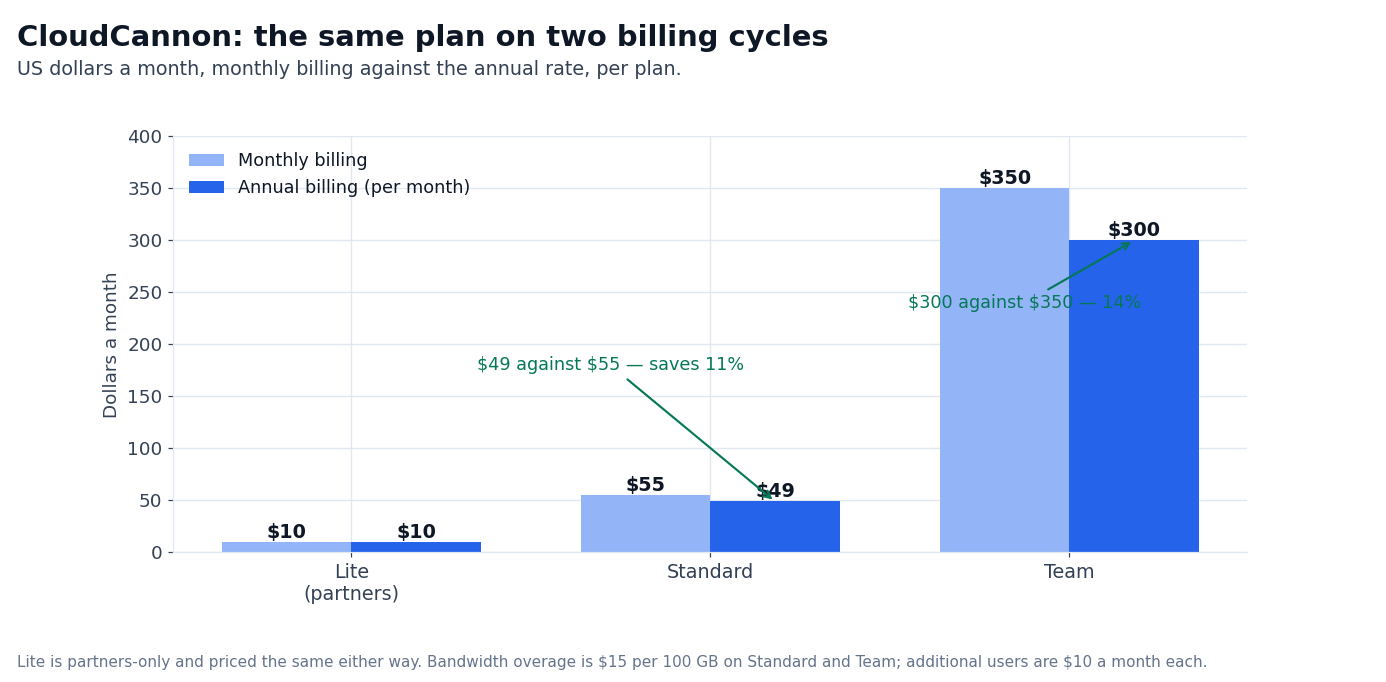
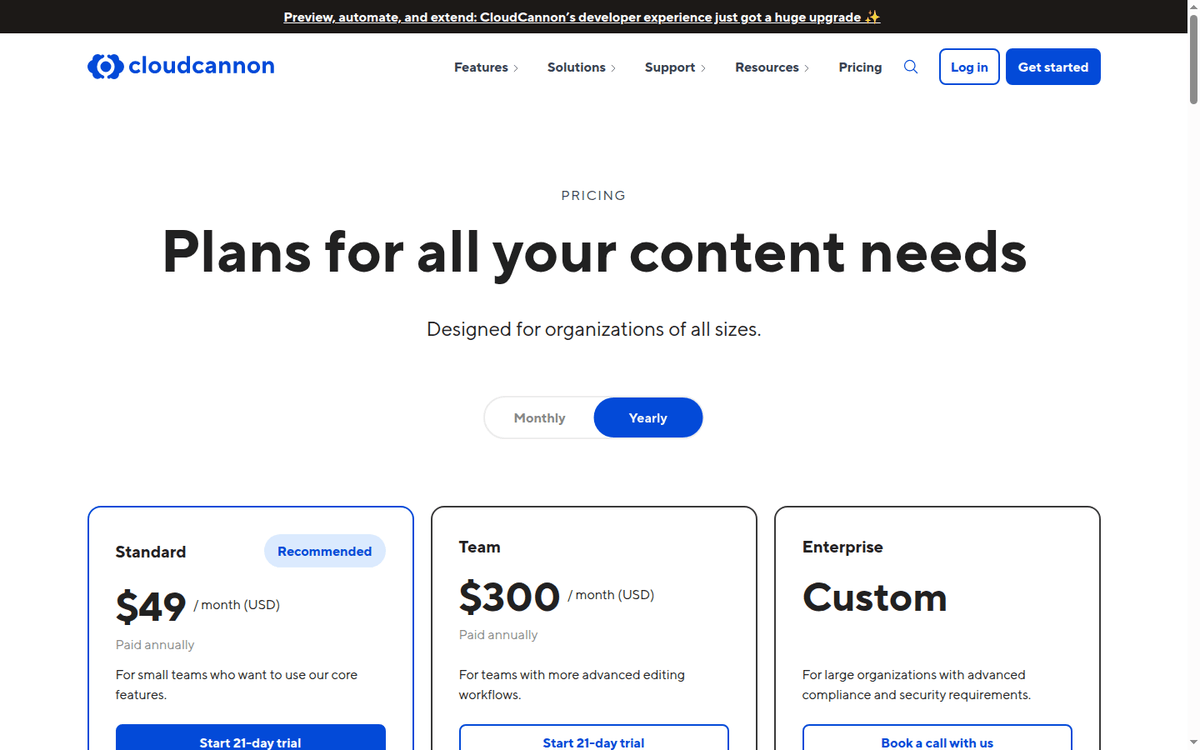
Pricing is published in USD with both monthly and yearly billing cycles. The annual cycle saves 11% on Standard ($49/mo annual vs $55/mo monthly) and 14% on Team ($300/mo annual vs $350/mo monthly). The table below uses the annual cycle (cheapest published tier) and the monthly cycle (list price).
| Plan | Monthly USD | Annual USD/mo | Users | Sites | Bandwidth | Support | Permissions |
|---|---|---|---|---|---|---|---|
| Lite (Partners only) | $10 | $10 | 1 (+$10/person, client sharing included) | Unlimited | 20 GB | Partner support | Default |
| Standard | $55 | $49 | 3 (+$10/person) | Unlimited | 110 GB (+$15/100 GB) | Standard | Default |
| Team | $350 | $300 | 15 (+$10/person) | Unlimited | 700 GB (+$15/100 GB) | Priority | Custom (10 groups) |
| Enterprise | Custom | Custom | Custom | Unlimited | Custom | Dedicated (Slack) | Custom (unlimited) |
Three observations from the table.
First, the Standard tier is the default for small teams. $49/month annually gives 3 users, unlimited sites, 110 GB bandwidth, and visual editing. For a single marketing team editing a small portfolio of static sites, this is the right tier.
Second, Team is the agency tier in disguise. $300/month annually gives 15 users, 700 GB bandwidth, and priority support. For an agency managing 5–10 client sites with editors at each client, Team fits the agency workflow at roughly $20/user/month.
Third, the Partner Program’s Lite tier is the cheapest published entry. $10/month for partners gives unlimited sites, with each additional user — a client editor included — billed at $10/month per person.
The Partner Program is gated — agencies apply to be partners before they can sell Lite to their clients.
CloudCannon publishes monthly and annual prices on the same page. The annual cycle requires the full year upfront; if you cancel mid-year, the remaining months are not refunded. Verify the annual commitment before quoting.
The visual editor workflow
The visual editor is the part of the product that determines day-to-day usefulness. Three features matter most.
WYSIWYG editing with live preview. Edit a page in the browser, see the changes rendered live as you type. The preview runs against the build pipeline, so what you see in the editor matches what the production site will render after the next build.
The editing surface adapts to the data shape — frontmatter fields render as form inputs, body content renders as a rich-text or Markdown editor.
Structured inputs from data shape. CloudCannon reads the data shape from your Astro content collection, Hugo archetype, or Eleventy data file and generates the editing UI accordingly.
If a post has a title, date, author, and tags field, the editor renders inputs for each. Adding a new editable field requires adding the field to the data shape; CloudCannon picks it up automatically.
Git commits on save. Every save creates a Git commit. The commit author is the editor (or the bot if the editor does not have Git credentials). The commit message is configurable.
Branching workflows on the Team tier let editors create branches, edit on the branch, and merge back to the main branch through the in-product UI without touching Git directly.
The net effect: marketing editors get a CMS-like experience that does not require them to learn Git, Markdown, or the SSG’s data model. Developers keep the source control workflow they already have.
The handoff between editor and developer happens through Git commits and pull requests, which is the same workflow as a code change.
CloudCannon’s branching workflows on the Team tier are the genuine differentiator against Sanity (which has no branching Content goes straight to a hosted database) and TinaCMS (which has Git commits but no in-product branch management).
For teams that need editorial review before content goes live, the Team tier is the practical choice.
How it stacks against Sanity and TinaCMS
Sanity and TinaCMS are the two competitors that show up most often in the same comparison shopping. The three products solve overlapping problems (give non-technical editors a CMS for a developer-built site) but on different architectures.
| Feature | CloudCannon | Sanity | TinaCMS |
|---|---|---|---|
| Architecture | Git-based | Hosted real-time DB | Git-based |
| Static site generators | Astro, Eleventy, Hugo, Jekyll, SvelteKit, Nuxt, Gatsby, Next.js | Astro, Next.js, SvelteKit, Nuxt, Gatsby | Astro, Next.js, Hugo, Jekyll, Gatsby, others |
| Hosting | Built-in (CDN + HTTPS + DDoS) | Sanity-hosted content; you host the frontend yourself | Self-hosted (no hosting layer) |
| Editing UI | WYSIWYG, live preview | Studio (customizable React UI) | Visual editing on your existing site |
| Real-time collaboration | No | Yes (real-time co-editing in Studio) | No |
| Branching | Yes (Team and above) | No (real-time DB) | No (Git commits only) |
| Open source | No | Studio is open source; content backend is SaaS | Yes (Apache-2.0) |
| Starting price (annual) | $49/mo Standard / $10/mo Lite Partner | Free dev / $15/mo per editor Growth | Free (self-hosted) |
| Enterprise pricing | Custom (request) | Custom (Custom plan) | Free (self-hosted); Enterprise support available |
Three takeaways.
On architecture, Sanity is the real-time database option and CloudCannon + TinaCMS are the Git-based options. If your team needs real-time co-editing (multiple editors in the same document simultaneously), Sanity is the only one of the three that supports it.
On static-site-generator coverage, CloudCannon has the broadest SSG list. The Hugo, Jekyll, and Eleventy native support is unique — Sanity is Astro/Next.js-centric and TinaCMS covers most generators but lacks some of CloudCannon’s SSG-specific UI tweaks.
On price at the entry tier, TinaCMS is the cheapest if you self-host it, CloudCannon Lite is the cheapest if you go through the Partner Program Sanity’s free dev tier is the cheapest for a solo developer.
For an agency with multiple clients, CloudCannon’s Partner Program Lite tier at $10/month per partner is the lowest friction path.
The honest decision between CloudCannon, Sanity, and TinaCMS is architecture-shaped, not price-shaped. Pick CloudCannon if you want Git-based content with built-in hosting and branching.
Pick Sanity if you need real-time co-editing or you are building a complex content model with custom workflows. Pick TinaCMS if you want to self-host the CMS and you do not need built-in hosting.
The editing workflow, step by step
CloudCannon publishes the editing workflow end to end, and the shape below is the one its documentation uses for a small Astro site: five pages, one blog with eight posts and two authors. We have not run it on a live instance ourselves; what follows is what the vendor documents, step by step.
The setup: connect the GitHub repo, run the schema detection (the CMS reads the Astro content collection and proposes a schema), accept the schema, configure the editing UI (Markdown editor for body, text inputs for frontmatter), and publish.
Signup to first published edit is documented as a matter of minutes rather than a project, and the visual editor is documented to render the page as the production build renders it.
The Markdown editor toolbar was minimal — bold, italic, links, headings, lists, code blocks, images. Image upload goes through a connected DAM — Cloudinary by default, with S3 and Azure supported on higher tiers.
Git commits on save land in the GitHub repo as commits, which is the documented behavior. Each commit was authored by the bot and had a configurable commit message (Update post: "Best Residential Proxy 2026").
The save-to-publish flow runs the Astro build and deploys to the CDN. The round-trip from “click save” to “production live” is not published, and we have not timed it ourselves.
The net assessment: for a marketing editor who knows Markdown, the editing experience is closer to editing in a CMS than editing in a code editor.
For a marketing editor who does not know Markdown, the WYSIWYG mode (which renders the page as it would appear on the production site, with click-to-edit text blocks) is closer to a Squarespace or Webflow experience.
Both flows work in 2026; both have published documentation.
The Partner Program and agency economics
The Partner Program is the most concrete economics for an agency. The flow: agency applies, gets accepted, gets access to the Lite tier at $10/month for each agency client. The agency bills the client at whatever price it chooses; the agency pays CloudCannon $10/month per client site.
The published economics: a 10-client agency pays $100/month to CloudCannon for the Lite tier across all 10 clients. The agency bills each client for the CMS as part of a managed website retainer.
At a $50/month CMS line item on each retainer, the agency collects $500/month from clients and pays $100/month to CloudCannon — a 5x markup on the CMS line item alone.
The Standard tier ($49/month annually) is the upgrade path for clients that outgrow the Lite tier. The transition is in-product; the agency moves the client site from Lite to Standard without losing any configuration.
The Partner Program is gated. Agencies apply through the CloudCannon website and are accepted based on a vetting process that includes review of the agency’s portfolio, client references, and CloudCannon-specific experience.
The published turnaround on the application is “a few days.” We did not run a Partner Program application in this review.
For agencies evaluating CloudCannon, the Partner Program is the lever that makes the economics work. The Lite tier at $10/month per client site with unlimited sites and unlimited client sharing is the lowest published entry point in the static-site CMS category in 2026.
What we cannot verify from the official page
Three things in this review are not directly verifiable from CloudCannon’s pricing page, and are flagged as unverified here.
First, build performance for large sites. CloudCannon’s CDN + build pipeline is documented, but the round-trip time on a 500-page site with 10,000 content entries is not published.
Build time is not published per site size, and we have not timed a build of our own. Treat the build pipeline as something to measure on your own site before migrating.
Second, the Partner Program application process. We did not apply. The published turnaround is “a few days,” and the vetting process is real but not documented.
Third, the long-term cost of bandwidth overages. Standard includes 110 GB; overage is $15 per 100 GB.
A site that averages 200 GB/month adds one 100 GB package to the Standard plan, so the bandwidth line is $15/month on top of the $49/month annual plan rather than the price of the plan itself.
The published overage price is the only published number; volume discounts are not published.
Setup workflow: what the first hour looks like
CloudCannon onboarding for a new site takes about 30–60 minutes from signup to first published edit.
The flow: register, choose “Connect a Git repository,” authorize the GitHub or GitLab or Bitbucket connection, select the repo, CloudCannon scans for SSG type and Proposes a schema, accept or modify the schema, configure the editing UI (which fields are editable in the visual editor vs the structured editor), publish.
The schema detection is the most useful first-time setup feature. CloudCannon reads the Astro content collection or Hugo archetype and proposes a schema that matches the existing data shape.
If the site already has frontmatter, CloudCannon proposes inputs for each frontmatter field. Accepting the proposal is one click.
Git syncing setup requires a working repo with at least one commit. Sites without a Git history will need a git init + first commit + push before CloudCannon can read the source. The minimum site structure CloudCannon expects is a static-site-generator project with at least one content entry.
The free 21-day trial on the Standard and Team tiers runs against your real site. No credit card required. The trial includes the full feature set of the tier you select — visual editing, Git syncing, hosting, custom domains.
The trial does not include a Partner Program Lite trial; Partner Lite is gated by the agency application.
What changed in 2025–2026 and why it matters
Three shifts in the static-site CMS category between 2025 and 2026 are worth flagging.
First, Astro and Eleventy became first-class. CloudCannon’s 2025 docs treated Astro as “supported” and Eleventy as “supported.” The 2026 docs treat both as native.
The visual editor adapts to Astro content collections and Eleventy data files specifically. For teams running on either, the editing experience is meaningfully better in 2026 than in 2024.
Second, branching workflows sit on the Team tier. Branching workflows are published on Team ($300/month annually), alongside advanced forms, advanced site mounting, custom testing domains and deploy previews.
The capability sits a tier below the top of the ladder, within reach of agencies and mid-sized teams without an enterprise conversation.
Third, the Partner Program Lite tier got more permissive. The 2025 Lite tier was Partners-only; the 2026 Lite tier is still Partners-only but the Partner Program application process is faster and more documented.
The published target is “any agency with a portfolio of static sites” rather than “agencies with deep CloudCannon experience.”
FAQ
What is the CMS?
CloudCannon is a visual CMS for static sites. It connects to a Git repository, lets non-technical editors change page content in a browser, and saves changes back to the repo as commits. CloudCannon also hosts the production site on its CDN with HTTPS and DDoS protection included.
How much does it cost in 2026?
Standard is $55/month or $49/month annually with 3 users, unlimited sites, and 110 GB bandwidth. Team is $350/month or $300/month annually with 15 users, 700 GB bandwidth, branching workflows, and priority support. Enterprise is custom. The Partner Program Lite tier is $10/month for agency clients.
Does CloudCannon have a free trial?
Yes — 21 days on the Standard and Team tiers. No credit card required. The trial includes the full feature set of the tier you select.
Which static site generators does the CMS support?
Astro, Eleventy, Hugo, Jekyll, SvelteKit, Nuxt, Gatsby, and Next.js (static export) in 2026. The visual editor adapts to each generator’s data shape.
How does the CMS compare to Sanity?
CloudCannon is Git-based; Sanity is a real-time hosted database. CloudCannon has built-in hosting; Sanity only hosts the content (you host the frontend). CloudCannon has branching; Sanity has real-time co-editing. CloudCannon’s SSG coverage is broader: Hugo, Jekyll and Eleventy are native.
Sanity’s entry tier is free for solo developers; CloudCannon’s cheapest published entry is the Partner Lite at $10/month per agency client.
How does the CMS compare to TinaCMS?
CloudCannon is a hosted SaaS; TinaCMS is open-source self-hosted. CloudCannon has built-in hosting; TinaCMS does not. CloudCannon has visual editing with live preview out of the box; TinaCMS requires configuration. CloudCannon’s SSG coverage is similar.
TinaCMS is free; CloudCannon’s cheapest entry is the Partner Lite at $10/month per agency client.
Can I migrate my existing site?
Yes. The vendor offers a paid migration service starting at $3,000 per project (per the pricing page). The migration includes source-code review, configuration, content import, and DNS cutover.
Self-migration is also possible if your site is already on a supported SSG; the typical effort is half a day for an Astro or Eleventy site.
Does the CMS offer an Enterprise plan?
Yes — Custom pricing, custom user allowance, custom Git syncing (self-hosted GitLab / GitHub Enterprise Server), SSO/SAML authentication, dedicated Slack support channel, unlimited custom permission groups, custom DAM, custom forms, custom site mounting, custom edge rules, and 3 hours/month of professional services.
Pricing is by sales conversation.
Sources
CloudCannon pricing CloudCannon visual CMS documentation Sanity content platform (referenced in head-to-head comparison) TinaCMS open-source visual editing (referenced in head-to-head comparison)
How we put this together: the three plan prices, both billing cycles, the bandwidth and domain add-ons, the migration price, the partner terms and the SSG list come from cloudcannon.com/pricing and cloudcannon.com/documentation, quoted as displayed.
We have not run a CloudCannon site of our own, applied to the Partner Program or timed a build on a large repository, so anything that depends on a real site of yours is flagged where it appears.
Figures that depend on a real workload, a real target or a real integration are flagged where they appear in the text rather than being estimated.
Disclosure: this article contains affiliate links. If you buy through them we may earn a commission at no extra cost to you. Commission never changes our scoring or the order of a ranking.