Two paths for the same open-source CMS: a managed project, or a free Community Edition you run yourself under the MIT license.
— the two paths this review prices
Strapi is the open-source headless CMS that has been quietly running the data layer for everything from indie blogs to enterprise content operations.
The product ships as a self-hosted Community Edition (MIT-licensed, free, run it on your own infrastructure) and as Strapi Cloud (managed hosting).
The newest piece is the MCP server, which lets AI agents manage Strapi content directly.
The short answer
Strapi is the headless CMS for teams that want an open-source data layer for their content-driven web app, mobile app, or multi-channel content operation. The case fits four shapes of buyer:
- You are a developer building a content-driven web app on Next.js, Nuxt, SvelteKit, or another modern front end, and you want a CMS that exposes the content through REST and GraphQL with no rendering layer in between.
- You are a content operations team that wants an editor-friendly backend without the lock-in of a proprietary CMS.
- You are an enterprise that needs the on-premise path for compliance reasons, and you want a CMS that runs on your own infrastructure.
- Or you are building an AI agent that needs to read and write content, and you want the MCP server to make that integration standard rather than custom.
The case does not fit if your workload is a content-heavy marketing site with editors who cannot or will not use a structured CMS.
The editor experience is improving, but the learning curve is real. It also does not fit if you need a built-in front-end rendering layer (Strapi is headless — you bring the front end yourself).
It does not fit if you want a WYSIWYG page builder for non-technical users; the Blocks Editor is competent but is not a Squarespace-style drag-and-drop.
The pricing model splits into two paths. The self-host Community path is free under the MIT license. You run Strapi on your own infrastructure (Docker, Kubernetes, a VPS, or a PaaS like Render or Railway) and you pay only the infrastructure cost.
The Cloud path is managed hosting, billed per project, with three published tiers (Starter, Pro, Business) plus a custom Business+ tier for higher-volume workloads.
The self-host Community path: what you actually get
The Community Edition is the open-source path. It ships under the MIT license, which means you can use it commercially without paying Strapi a cent. You download the source, run it on your own infrastructure, and you own the data and the deployment.
The Community Edition covers the core CMS surface: the content-type builder, the REST and GraphQL APIs, the admin panel, the Blocks Editor, role-based access control, API tokens, audit logs, the draft-and-publish workflow, the internationalization (i18n) plugin and the basic email provider.
The vendor documents the split between the deployment and the managed Cloud where the license boundary actually falls, rather than tier by tier on the pricing page. It also includes the new MCP server, which lets AI agents interact with the content through the Model Context Protocol.
What Community does not include is the Cloud-only features: the managed hosting, the SLA-backed uptime guarantee, the priority support, the multi-environment workflow, and the Cloud-exclusive plugins.
For a solo developer or a small team, these are not blockers. For an enterprise, the SLA and the support are the deciding factors.
The infrastructure requirement is modest. The published deployment guidance lists 2+ CPU cores and 4 GB of memory as the recommended shape, with a 1-core / 2 GB floor for light setups and development. The database is PostgreSQL, MySQL, MariaDB, or SQLite (the SQLite option is great for development and small workloads).
The asset storage can be local (default) or pointed at S3, Cloudflare R2, or any S3-compatible provider.
The honest read on the self-host path is that it is the right choice for developers who want to own their stack and for enterprises with compliance requirements that prevent managed hosting. The trade-off is the operational overhead — you own the backups, the upgrades, the security patches, and the scaling.
For most teams, the upgrade path is to Cloud once the operational overhead becomes a real cost.
Cloud hosting: what each plan includes
The Cloud path is managed hosting on Strapi’s infrastructure. The published pricing is per project per month, billed monthly or yearly (yearly saves up to 17%).
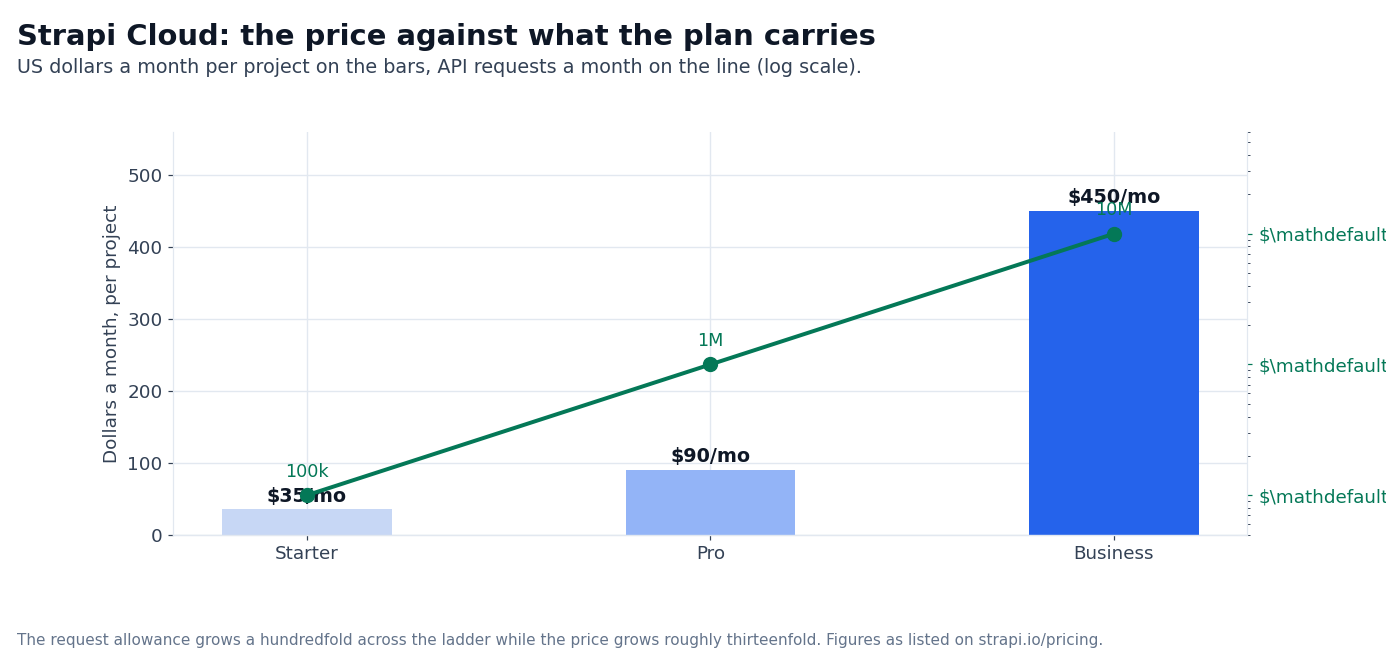
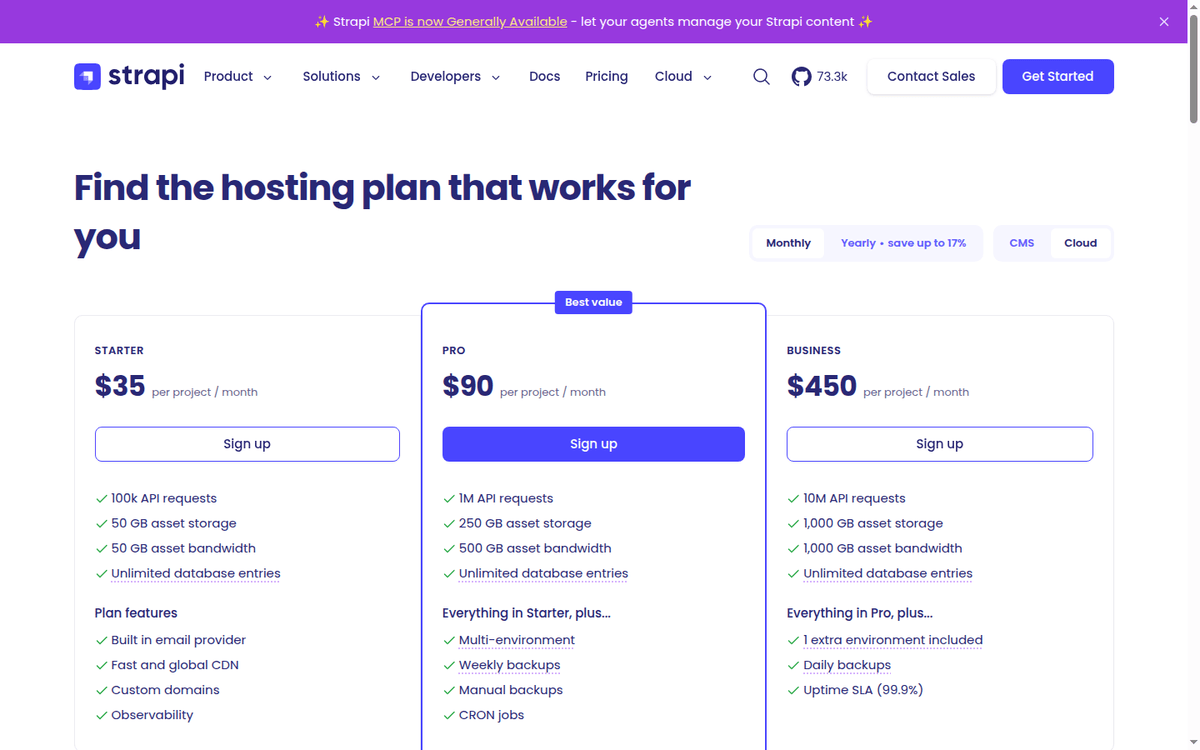
Starter at $35/mo (per project) is the entry point. The published numbers are 100,000 API requests per month, 50 GB asset storage, 50 GB asset bandwidth per month, unlimited database entries, a single environment, weekly backup on the Pro tier (no backup on Starter), and basic customer support.
The runtime is “sleeps when idle” — the project wakes on a request and sleeps after a period of inactivity, which is fine for a low-traffic production workload but not for a high-traffic one.
Pro at $90/mo (per project) is the working tier for most teams.
The published numbers are 1 million API requests per month, 250 GB asset storage, 500 GB asset bandwidth, unlimited database entries, weekly backups with 1-month retention, 30-day observability,
14-day log retention, always-on runtime, multi-environment support (1 environment included, additional at $60/mo per environment, or $600/year), CRON jobs, and basic customer support.
Business at $450/mo (per project) is the tier for high-traffic workloads.
The published numbers are 10 million API requests per month, 1,000 GB asset storage, 1,000 GB asset bandwidth, unlimited database entries, daily backups with 1-month retention,
60-day observability, 30-day log retention, always-on runtime, 2 environments included (additional at $300/mo per environment, or $3,000/year), uptime SLA (99.9%), and priority customer support.
Business+ is the custom tier for higher-volume workloads. Pricing is a sales conversation; the published promise is custom limits, custom SLAs, and a dedicated customer success team.
The trade-off against self-hosting is straightforward. Cloud wins on operational simplicity (Strapi runs the infrastructure), on the multi-environment workflow (staging + production out of the box), and on the priority support.
Self-hosting wins on cost (only infrastructure bill), on data sovereignty (your data is on your own infrastructure), and on the customization ceiling (you can fork the source if you need to).
The MCP server and the AI-agent story
The newest piece on Strapi is the MCP (Model Context Protocol) server, which went GA in 2026. The MCP server lets AI agents (Claude, GPT, custom agents) interact with Strapi content through the standard MCP protocol.
An agent can read content entries, write content entries, create content types, and manage the publishing workflow — all through a standardized interface rather than a custom API integration.
The honest read on the MCP server is that it is a meaningful step forward for any team building AI agents that interact with content. The alternative is a custom REST or GraphQL integration that has to be rebuilt for every agent. The MCP standard is the path to portable integrations across agent frameworks.
The MCP server ships with the Community Edition, where the vendor documents it as free and self-hosted, and it is not sold as a separate add-on on the Cloud path.
The editor experience
The editor experience is where Strapi earns its keep on the content operations side. The admin panel is a React-based UI that the content team logs into.
The content-type builder is a no-code surface for defining content types (collections and single types) with the field types you need (text, rich text, media, relations, JSON, enumeration, etc.).
The Blocks Editor is a WYSIWYG rich text editor that supports drag-and-drop content blocks, embedded media, and dynamic zones.
The content history feature lets editors roll back to a previous version of a content entry. The releases feature lets editors group multiple content changes into a single release and publish them together.
The conditional fields feature lets the schema show different fields based on the value of another field (useful for content types that have multiple variants).
The honest read on the editor experience is that it is competent for the segment but not the deepest in the category. Contentful has a more polished content-modeling surface.
Sanity has the more flexible Studio editor. Directus has a deeper custom-field story. Strapi sits in the middle — competent across the board, no single area is the clear winner.
The comparison angles: Contentful, Sanity, Directus
The honest head-to-head depends on the workload.
Against Contentful. Contentful is the largest pure-play headless CMS and the closest competitor to Strapi Cloud. Contentful wins on enterprise polish (the content-modeling surface is the deepest in the category), on the multi-locale workflow, and on the customer support for enterprise buyers.
Where Strapi takes the lead: the open-source path (Contentful publishes no Community Edition), the MCP server, and the freedom to self-host.
For an enterprise that needs the deepest content-modeling surface, Contentful is the better fit. For a team that wants the open-source path or the MCP-first AI workflow, Strapi is the better fit.
Against Sanity. Sanity is the headless CMS with the most flexible editor experience (Sanity Studio is a customizable React app). Sanity wins on the editor surface (Sanity Studio is the most customizable in the category), on the Portable Text format for rich content, and on the GROQ query language.
Strapi wins on the open-source path, on the MCP server, and on the self-host flexibility. For a content team that wants the most customizable editor experience, Sanity is the better fit. For a team that wants the open-source path, Strapi is the better fit.
Against Directus. Directus is the headless CMS that sits on top of an existing database (it wraps your existing PostgreSQL or MySQL database rather than creating its own schema).
Directus wins on the database-first workflow (you keep your existing schema and Directus wraps it), on the no-code admin surface, and on the open-source path (Directus publishes its core under a source-available license).
Strapi wins on the content-type builder, on the Blocks Editor, and on the Cloud managed-hosting surface.
For a team that has an existing database and wants to wrap it, Directus is the better fit. For a team that wants a fresh content schema and the Cloud path, Strapi is the better fit.
When Strapi is the wrong pick
Three workloads where the platform is not the right shape.
The first is a content-heavy marketing site with non-technical editors. The Blocks Editor is competent, but it is not a Squarespace-style drag-and-drop. For a marketing team that needs a WYSIWYG page builder with no developer in the loop, a WordPress-with-Gutenberg or a Webflow is the right shape.
The second is a workload that needs a built-in front-end rendering layer. Strapi is headless — you bring the front end yourself. If you need an all-in-one CMS with templates and a hosted front end, a Webflow, a WordPress, or a Contentful with the Launch product is the right shape.
The third is a workload that needs a built-in personalization or A/B testing surface. Strapi is a content data layer; personalization is the front end’s responsibility.
If you need the personalization features built into the CMS (Contentful Personalization, Sanity Personalization, etc.), the right shape is one of those platforms rather than Strapi.
Where the numbers stop
Three classes of figures in this review depend on real workload measurement that we could not benchmark without a paid Strapi Cloud account on a real production workload. They are flagged as unverified in this review.
The first is the actual editor experience on your real content types. The Blocks Editor and the content-type builder are competent for the segment; the real editor experience depends on the content modeling choices you make. The second is the API latency on your real query volume.
The 100k / 1M / 10M request tier caps are the published numbers; the latency depends on the query complexity and the database size. The third is the migration cost from your existing CMS.
Strapi exposes the content through REST and GraphQL rather than shipping a published importer catalog, so the cost depends on the schema complexity and the data volume.
FAQ
Is Strapi really free?
Yes. The Community Edition is MIT-licensed and free to use commercially. You can download the source, run it on your own infrastructure, and you pay only the infrastructure bill. The Cloud path (managed hosting) is a separate paid product.
How much does Strapi Cloud cost per month?
Starter is $35/mo per project. Pro is $90/mo per project. Business is $450/mo per project. Business+ is custom-priced for higher-volume workloads. Yearly billing saves up to 17%.
Does Strapi support GraphQL?
Yes. Strapi exposes both REST and GraphQL APIs from the same content types. The GraphQL API is built on the GraphQL plugin, which is enabled by default on new projects. The schema is generated from the content-type builder.
How does Strapi compare to Contentful?
Strapi wins on the open-source path (Contentful has no Community Edition), on the MCP server, and on the self-host flexibility.
Contentful wins on enterprise polish, on the multi-locale workflow, and on the customer support for enterprise buyers. For enterprise content modeling, Contentful is the better fit. For the open-source path, Strapi is the better fit.
Is Strapi good for AI agents?
Yes. The MCP server went GA in 2026 and lets AI agents interact with Strapi content through the standard MCP protocol. It arrives with the Community Edition, and on the Cloud path it is not a separately priced add-on.
Can I migrate from WordPress to Strapi?
Migration means writing a script against Strapi’s REST or GraphQL API: the data layer is a schema you define, so the work is in the mapping rather than in running an importer. The exact cost depends on the schema complexity and the data volume; the migration cost on your own instance is unverified here.
Sources
- Strapi Cloud pricing — Starter, Pro, Business, Business+ tiers, asset and API limits
- Strapi features — content-type builder, REST/GraphQL APIs, Blocks Editor, MCP server
- Strapi documentation — installation guides, plugin reference, MCP server configuration
How we put this together: the Cloud plan prices, the API request allowances, the asset storage and bandwidth figures, the environment add-on rates and the backup cadence come from strapi.io/pricing, quoted as displayed, with the product surface read from strapi.io/features and the deployment guidance from the documentation.
We have not run a production instance on Cloud, benchmarked a query volume or measured the editor experience on a real content type, so anything that depends on your own stack stays flagged as unverified in this review.
Figures that depend on a real workload, a real target or a real integration are flagged where they appear in the text rather than being estimated.
Disclosure: this article contains affiliate links. If you buy through them we may earn a commission at no extra cost to you. Commission never changes our scoring or the order of a ranking.