Backendless sits in an awkward middle. It is a Visual App Builder with a UI canvas, MBaaS primitives — database, auth, push, file storage — and Cloud Code for JavaScript or Java — and it sells that bundle in three different ways.
Cloud Free the hosted entry point, with Cloud Code included
Cloud Scale the hosted production path, with the Marketplace add-ons on top
Pro a self-hosted Docker license with paid support
The cheapest path is the Cloud Free plan: fifty API requests per minute, twenty database tables, and one gigabyte of file storage. The production path is Cloud Scale, plus optional Function Packs from the Backendless Marketplace.
The enterprise path is Backendless Pro — a free-license self-hosted Docker install with paid support subscriptions — and a Managed Backendless subscription that puts Backendless’ own ops team in front of it. We read every pricing page in the funnel to map what each path actually costs.
How the three Backendless paths differ
Backendless splits its product into three lines that share the same SDK and the same UI Builder but bill differently. Picking the right path is the first decision; pricing details come after.
| Path | Hosting | Billing | Who it fits |
|---|---|---|---|
| Cloud | Managed by Backendless | Free or $15+/mo Scale | Solo developers, small teams, prototypes that may outgrow the free tier |
| Pro | Self-hosted (your machine, your data center, your cloud) | Free license; support and upgrades from $7,200/yr | Enterprises that need unlimited API requests, on-prem deployment, or specific data-residency |
| Managed | Your Pro install, monitored by Backendless | Annual subscription on top of Pro (price on request) | Teams that want Pro’s capabilities without hiring DevOps for it |
The Cloud path is what most readers will compare to Firebase or Supabase. The Pro path is what enterprises compare to self-hosted Parse or a custom MBaaS. The Managed path is what teams that want Pro but lack headcount compare to a managed-service contract.
We did not run a real app through any of these paths.
The numbers below come directly from the three pricing pages (backendless.com/pricing/backendless-cloud, backendless.com/pricing/backendless-pro, backendless.com/pricing/managed-backendless).
Cloud — Free and Scale, in detail
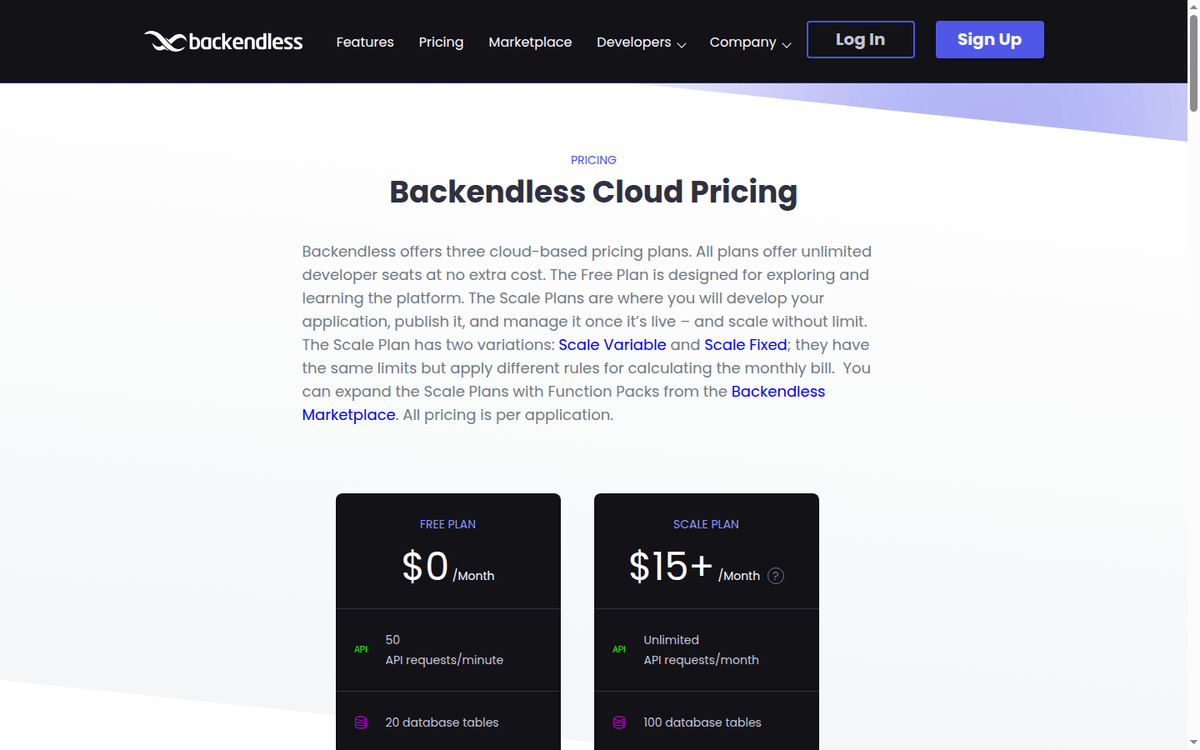
The Cloud pricing page is the only one with a published rate card. Both tiers share the same UI Builder, Cloud Code (JavaScript or Java), and the same SDK surface. The published numbers are below; the unit is “per application” (backendless.com/pricing/backendless-cloud).
| Item | Free | Scale |
|---|---|---|
| Price | $0/mo | $15+/mo (Scale Variable or Scale Fixed) |
| API requests / minute | 50 | Unlimited API requests / month |
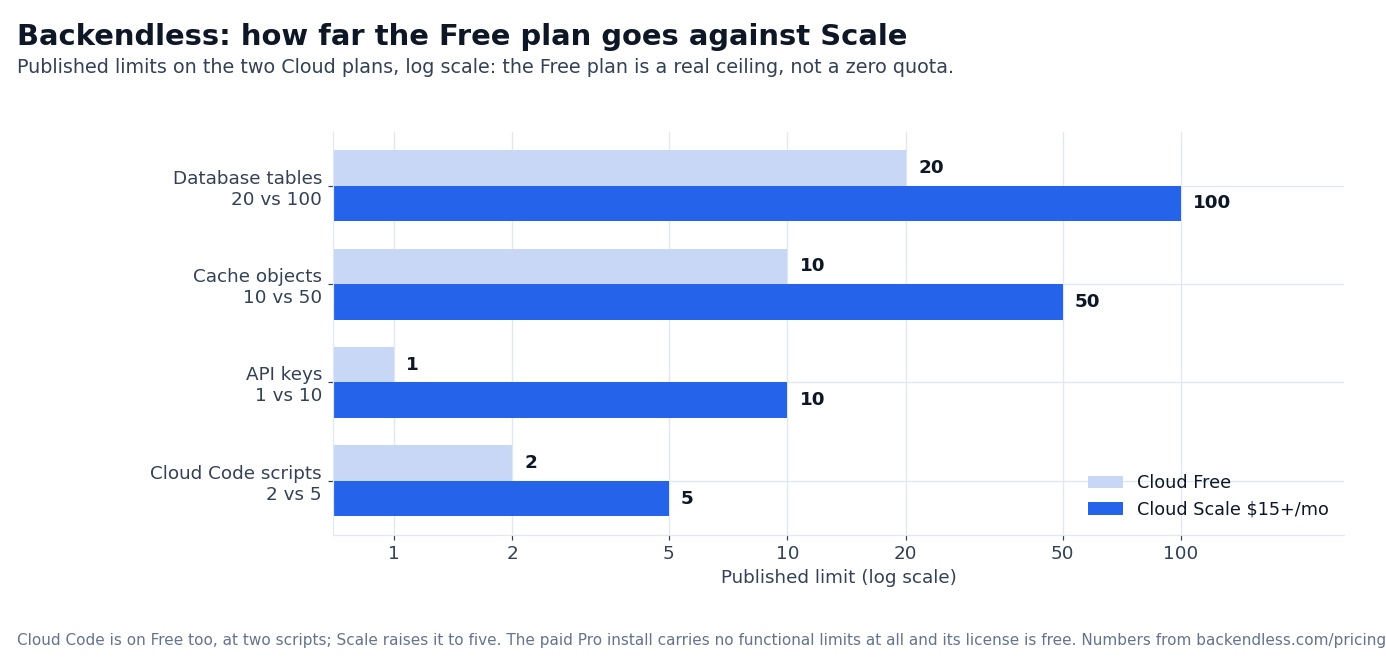
| Database tables | 20 | 100 |
| File storage | 1 GB | 10 GB |
| Cache objects | 10 | 50 |
| Atomic counters | 10 | 100,000 |
| Daily backups | — | yes |
| Custom domains | — | yes (multiple) |
| Custom API keys | 1 | 10 |
| Custom security roles | 2 | 3 |
| Limits can be increased | — | yes (on request) |
| Developer seats | Unlimited | Unlimited |
The published “starts at $15/mo” is the floor. The Scale page splits the math into two variants:
- Scale Variable — bills as the sum of daily charges. Each daily charge is based on the peak API requests per minute during the 24-hour cycle.
- Scale Fixed — bills at a flat rate tied to the highest tier you select. The published tier table is gated behind a “Detailed Comparison” link.
Both variants have identical limits. The difference is whether your bill varies daily with traffic or stays flat on the tier you pick. Neither variant publishes the actual rate per peak-RPM tier; that comparison page is the place to look.
Three things the Cloud pricing page does not document but matter:
- API requests / month is “Unlimited” on Scale. We did not find a published ceiling on monthly API requests.
- Concurrent connections are not published on either tier.
- Function Packs from the Backendless Marketplace are sold separately and stack on top of Scale.
For a solo developer or a small team building a B2C app, Cloud Free is the entry path with no card required. For anything in production that expects more than fifty API requests per minute at peak, Scale at $15+/mo is where the math starts.
Pro — a free license with paid support and upgrades
Backendless Pro is the “Limitless Edition” of the platform. It runs as a Docker Compose install that you put on your developer laptop, on a private server, or in any cloud.
The published positioning is that there are no functional limits — unlimited apps, unlimited API calls, unlimited push notifications, unlimited objects in data tables, and unlimited file storage scaling (backendless.com/pricing/backendless-pro).
The license costs nothing. What the page sells on top of it is support and upgrades:
- Annual support — $7,200/yr.
- Annual unlimited upgrades — $7,200/yr.
- Support and upgrades together — $10,000/yr.
- Clustered deployment — Contact Us for Pricing. The single-server install is the free one.
What the Pro pricing page does publish:
- Run Anywhere — Docker Compose install via the Backendless Pro Manager, available as containers on DockerHub.
- Limitless Backendless — unlimited apps, API calls, push notifications, objects, file storage.
- Built to Scale — each tier scales independently (web tier, app server, data tier).
- Open-Source Client SDKs — the same SDKs as Cloud: iOS, Android, Web, React Native and the rest.
- Marketplace Access — Function Packs from the Backendless Marketplace stack on top.
What is not published:
- What the Clustered option costs — it is quoted on request.
- What the annual support subscription covers beyond the published line.
- Whether a renewal discount is available for existing Pro customers.
Pro is the right path when you need to deploy inside a private network, when you have data-residency requirements that exclude public clouds, or when you have predictable load that would make Cloud Scale’s per-RPM billing more expensive than a self-hosted install with paid support. We did not run a Pro install.
Managed — the 24x7x365 layer over Pro
Managed Backendless is sold as a subscription that wraps a Pro install. Backendless’ own team of server administrators and DevOps engineers monitors the install around the clock and steps in with manual interventions when needed (backendless.com/pricing/managed-backendless).
The pricing page does not publish a fee. The entry path is a sales conversation (“Let’s Talk”) with the support team. What the page does publish about coverage:
- 24x7x365 monitoring with multiple service monitors in real time.
- Manual interventions by the Backendless ops team when something breaks.
- Expert guidance on CPU, memory, disk, and bandwidth — the four levers that drive most hosting costs.
- Cross-platform expertise — AWS, Google Cloud, Azure, DigitalOcean, or your own server infrastructure.
The positioning is “Best Value” versus hiring an in-house DevOps engineer trained in Backendless. The argument is that the Managed subscription gives you top-tier expertise without the recruiting and training overhead.
What is not published:
- The annual or monthly subscription fee.
- The minimum Pro license count you need to buy Managed.
- Whether Managed includes incident-response SLAs.
- Whether Managed covers performance tuning beyond reactive monitoring.
For a team that wants Pro’s flexibility but lacks a Backendless-experienced DevOps engineer, Managed is the published option. The contract scope — and the price — come out of the sales conversation.
Cloud Code, UI Builder, and Marketplace Function Packs
Three product capabilities cut across the Cloud / Pro / Managed paths. They are worth pulling out separately because they affect what you actually build with:
- UI Builder — drag-and-drop interface for screens. Available on Cloud Free with limits and on Cloud Scale with broader capacity. Included with Pro and Managed (no functional limits).
- Cloud Code — JavaScript or Java business logic that runs on Backendless’ infrastructure. Available on every tier: the Free plan publishes a limit of 2 Cloud Code scripts and a 1 MB deployment size, Scale allows 5 scripts and 20 MB.
- Marketplace Function Packs — pre-built add-ons — auth, payments, push and the rest — sold individually in the Backendless Marketplace. Available on Cloud Scale, Pro, and Managed.
For teams that need Cloud Code at scale or want to compose Marketplace packs on top of an in-house install, Pro is the path where the unlimited model stops being a constraint.
We did not price individual Marketplace Function Packs; the Marketplace is the source for current pack-by-pack pricing (backendless.com/marketplace).
Backendless vs Firebase: two published billing models for a managed backend
The default comparison for a managed mobile backend is Firebase, and the difference with Backendless Cloud is mostly the shape of the bill.
Firebase publishes two plans (firebase.google.com/pricing): Spark, which is no-cost and needs no payment method, and Blaze, which is pay-as-you-go billed at Google Cloud rates with the Spark quotas included.
The no-cost quota is per project and per database. Cloud Firestore’s free tier is 1 GiB of stored data with 50,000 document reads a day; writes, deletes, and outbound transfer are metered separately (firebase.google.com/docs/firestore/pricing).
Backendless Cloud Free caps API requests at 50 a minute with 20 tables and 1 GB of storage.
The second difference is where the backend runs. Firebase is managed only — no self-hosted Firebase is published. Backendless sells Pro, a Docker Compose install licensed per developer and run on your own machine or cloud. For a team that needs the database inside its own network, that is the whole decision.
The third is what you are metered on. Firebase bills per operation, so a busy read path drains the free quota quickly. Backendless Free is metered on request rate and table count, which is simpler to model before launch but harder to predict once volume pushes the bill onto Scale.
Bubble and Backendless: the app builder versus the backend
One of these sells the whole app; the other sells a backend with a UI Builder on top. Their published plans measure different resources (bubble.io/pricing).
Bubble’s paid plans start at $59/month for 175,000 workload units a month and top out at $549/month for 500,000, with Growth at $209/month in between and Enterprise on a sales call. Backendless counts API requests a minute, tables, and storage instead.
Every published Bubble plan runs on Bubble’s infrastructure, so traffic growth shows up as overages or a bigger plan. Backendless gives a team the same choice the rest of this review describes: stay on Cloud and pay for the peak request rate, or move to Pro and pay once per developer.
The split decides who owns the front end. Bubble’s editor builds the interface and the logic together. Backendless pairs its backend with the UI Builder but leaves the clients open to any SDK it ships — iOS, Android, web, and React Native.
Backendless vs Xano: hosted Postgres versus a packaged backend
The published Xano pricing runs across four tiers (xano.com/pricing). Free is $0 with an AI-ready Postgres database capped at 100,000 records, unlimited REST APIs on a rate limit of 10 requests per 20 seconds, a no-code MCP and agent builder, and one workspace.
Essential is $85/month: dedicated infrastructure, unlimited records, no API rate limit, three workspaces, five seats, 100 GB of file storage.
Pro is $224/month and adds five workspaces, ten seats, a managed load balancer, and a 99.99% SLA. Self-hosting on AWS, Azure, GCP, or on-prem sits on the Custom tier, sold through sales.
Xano’s Free tier is a working database with an API surface. Backendless Free caps the request rate at 50 a minute, the table count at 20, and Cloud Code at two scripts.
On the paid side, Xano’s Essential at $85/month sits above Backendless Scale’s $15+/month entry, though Scale’s real bill follows the peak-RPM tier you pick, which the Cloud page leaves behind a comparison link.
Both vendors keep the clustered self-hosted price off the page: Xano behind Custom, Backendless Pro behind a quote for the Clustered option.
If the team already thinks in SQL, Xano’s Free tier is the cheaper way to find out whether a hosted Postgres backend fits.
Who Backendless fits
Three profiles fit Backendless cleanly:
- Solo developers and small teams shipping a single B2C app or a prototype. Cloud Free is the entry path with no card required; Cloud Scale at $15+/mo is the production math when traffic picks up.
- Enterprises that need self-hosted MBaaS with no functional limits. Pro is free to license, with paid annual support and upgrades; the clustered deployment is quoted on request.
- Teams that want Pro without running it themselves. Managed Backendless at a sales-led subscription is the published way to put Backendless’ ops team in front of your install.
Three profiles should pass:
- Pure SaaS teams that only need authentication and a database. Supabase or Firebase at their free tiers do this without paying $15+/mo or running a self-hosted install.
- Teams that need a quick landing page. Backendless’ UI Builder is closer to a real app builder than to a no-code landing-page tool. Webflow or Framer are the right starting point for marketing pages.
- Mobile-only teams that want to skip a backend entirely. If you only need push notifications and analytics, Firebase or OneSignal will do the job at lower cost.
Is Backendless worth the price tag? For a developer building a small to mid-size app with custom business logic, Cloud Scale at $15+/mo is a workable entry price.
For enterprises that need on-prem deployment or specific data residency, Pro is the only one of the three that meets the requirement, and the contract scope is a sales conversation. For teams without Backendless DevOps expertise, Managed is the published way to get there; the subscription price is not published.
—
- Backendless Cloud pricing: https://backendless.com/pricing/backendless-cloud/ (captured 2026-09)
- Backendless Pro pricing: https://backendless.com/pricing/backendless-pro/ (captured 2026-09)
- Managed Backendless pricing:
- Backendless home: https://backendless.com/ (captured 2026-09)
- Backendless Marketplace: https://backendless.com/marketplace/ (captured 2026-09)
- Bubble pricing: https://bubble.io/pricing
- Xano pricing: https://www.xano.com/pricing/
- Firebase pricing:
- Firestore pricing: https://firebase.google.com/docs/firestore/pricing
FAQ
How much does Backendless cost?
Cloud Free is $0/mo. Cloud Scale starts at $15+/mo with two billing variants (Variable and Fixed) that share the same limits. Pro is a free license with annual support at $7,200/yr, annual unlimited upgrades at $7,200/yr, or the two together at $10,000/yr; the clustered deployment is quoted on request.
Managed Backendless is a separate sales-led subscription. Currency is USD across Cloud.
Is Backendless Cloud really free?
Yes. The published limits are 50 API requests/minute, 20 database tables, 1 GB file storage and unlimited developer seats, and no credit card is required. Cloud Code runs on Free as well, at a published limit of 2 scripts.
What is the difference between Cloud and Pro?
Cloud is managed by Backendless and billed monthly (Free or Scale $15+/mo). Pro is a self-hosted Docker install with a free license. Pro has no functional limits and can run on your developer machine, your data center, or any cloud you control. Managed wraps Pro with a Backendless ops subscription.
What does Scale actually cost beyond $15?
The Scale pricing page splits the math into Scale Variable (bills by daily peak API requests/min) and Scale Fixed (bills at a flat tier rate). The “Detailed Comparison” link on the pricing page is where Backendless publishes the per-tier rates. We did not capture those numbers in this review.
Is Backendless cheaper than Firebase?
Neither published card is strictly cheaper; it depends on which resource your app burns. Backendless Cloud Free is $0 with 50 API requests a minute, 20 tables, and 1 GB of storage.
Firebase’s Spark plan is no-cost with per-product quotas, such as Firestore’s 1 GiB of stored data and 50,000 document reads a day. Firebase Blaze then bills per operation at Google Cloud rates, while Backendless Scale starts at $15+/month.
Do I need to buy Cloud Code separately?
No. Cloud Code is included on every tier. Free publishes a limit of 2 scripts and a 1 MB deployment size, Scale allows 5 scripts and 20 MB.
Can I migrate from Cloud to Pro later?
Backendless publishes a “Smooth Migration” path on the Managed pricing page, indicating that the platforms are designed to interoperate. We did not run a migration to verify how the SDK surface and UI Builder artifacts transfer.
Does Backendless have a free trial?
No. The Cloud Free plan is the no-cost path and needs no card. Pro and Managed are the paid options; only the clustered deployment is quoted on request.
Is there an API rate limit on Scale?
The published text says “Unlimited API requests / month” on Scale. We did not find a published ceiling for total monthly requests. The Scale Variable billing math is keyed off-peak requests/minute during a 24-hour cycle.
Can Backendless run on-prem?
Yes. Pro is designed to be installed on your developer machine, on-premise servers, or any cloud. Managed is sold as a subscription over a Pro install, with the Backendless ops team monitoring it.
Sources: – Backendless pricing overview: https://backendless.com/pricing/ (captured 2026-09)
https://backendless.com/pricing/managed-backendless/ (captured 2026-09)
https://firebase.google.com/pricing
How we put this together: the Cloud Free and Scale limits, the Pro license and its annual support and upgrade prices, and the Managed subscription come from the four pricing pages on backendless.com, quoted as displayed, with the add-on prices read from backendless.com/marketplace and the comparison figures from bubble.io, xano.com and firebase.google.com.
We have not run a Backendless app, installed Pro or benchmarked the Cloud tiers, so load-dependent numbers stay flagged where they appear.
Figures that depend on a real workload, a real target or a real integration are flagged where they appear in the text rather than being estimated.
Disclosure: this article contains affiliate links. If you buy through them we may earn a commission at no extra cost to you. Commission never changes our scoring or the order of a ranking.